Author: admin

  • Java Program to Insert an Element in a Specified Position in an Array

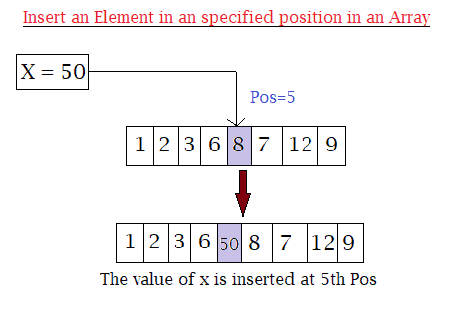
    The following program shows how to insert an element at a specific position in an Array in Java.

    The program takes the following as input:

    • The size of an array.
    • Value of elements of an array.
    • The position where the user wants to insert the new element.
    • The value of the element itself that the user wants to insert.
    Array Insertion in java

    Lastly displays the final result where the new elements have been inserted.


    Program to Insert an Element in an Array at a Specified Position in Java

    import java.util.Scanner;
    public class Insert_Array
    {
      public static void main(String[] args)
      {
        int n, x, pos;
        Scanner s = new Scanner(System.in);
    
        System.out.print("Enter size of an Array: ");
        n = s.nextInt();
    
        int a[] = new int[n + 1];
    
        System.out.println("Enter " + n + " elements in an array:");
        for (int i = 0; i < n; i++)
        {
          a[i] = s.nextInt();
        }
    
        System.out.print("Enter the position where you want to insert new element: ");
        pos = s.nextInt();
    
        System.out.print("Enter the element you want to insert at " + pos + " position: ");
        x = s.nextInt();
    
        //insertion
        for (int i = (n - 1); i >= (pos - 1); i--)
        {
          a[i + 1] = a[i];
        }
        a[pos - 1] = x;
    
        //Displaying after insertion
        System.out.print("Array after insertion: ");
        for (int i = 0; i < n; i++)
        {
          System.out.print(a[i] + " ");
        }
        System.out.print(a[n]);
      }
    }

    Output:

    Enter size of an Array: 5
    Enter 5 elements in an array:
    1
    2
    3
    4
    5
    Enter the position where you want to insert new element: 3
    Enter the element you want to insert at 3 position: 9
    Array after insertion: 1 2 9 3 4 5


  • Java Program to Find the Largest Element in an Array

    In this tutorial, we will write a java program to print the largest element present in an array. If you do not about the array and for loops working process then click the link below, as this program uses them.

    The program below takes the number element and all the values of the elements from the user as input and finds the largest element among them in java.


    Java Program to Find the Largest Element in an Array

     //largest element in an array in java
      
     import java.util.Scanner;
    
     public class LargestElementsArray 
     {
      public static void main(String[] args) 
      {
        int num, largest;
        Scanner s = new Scanner(System.in);
        
        System.out.print("Enter the number of elements for an array:");
        num = s.nextInt();
        
        int a[] = new int[num];
        
        System.out.println("Enter elements of array:");
        for(int i = 0; i < num; i++)
        {
            a[i] = s.nextInt();
        }
        
        largest = a[0];
        
        for(int i = 0; i < num; i++)
        {
          if(largest < a[i])
          {
            largest = a[i];
          }
        }
        
        System.out.println("Largest elements in an array is:"+largest);
      }
     }

    Output:

    Enter number of elements in the array:5
    Enter elements of array:
    4
    67
    89
    32
    4
    Largest elements in an array is:89


  • Java Program to Find the Sum of all the Elements in an Array (user inputs)

    In this programming tutorial, we will learn to write a java program to calculate the sum of all the elements in an array by taking array input from the user.

    The for loop in the program runs starting from 0 (array index starts from 0) to the total length of an array (i.e. till the last index).

    Although it is quite simple, you still need to have an idea of the proper function of following in java:


    Java Program to Find the Sum of all the Elements in an Array

     //sum of an array(user inputs) in java
      
     import java.util.Scanner;
    
     public class SumofElements
     {
        public static void main(String args[])
        {
          Scanner sc = new Scanner(System.in);
            
          int[] array = new int[10];
          int sum = 0;
            
          System.out.println("Enter the elements in an array:");
          for (int i=0; i < 10; i++)
          {
            array[i] = sc.nextInt();
          }
            
          //Sum calculation
          for( int num : array) 
          {
            sum = sum + num;
          }
          System.out.println("Sum of the elements is :"+sum);
        }
     }

    Output:

    Enter the elements in an array:
    3
    4
    2
    6
    8
    12
    4
    5
    7
    9
    0
    Sum of the elements is :60


  • Java Program to Sort Elements in Ascending Order of an Array

    In this tutorial, we will write a program to sort elements of an array in ascending order in java. The number of elements and elements themselves are taken as input from the user.

    The program compares the elements and the swap technique is used to arrange the elements in increasing order.

    Before that you need to have an idea of the following:


    Java Program to Sort Elements in Ascending Order of an Array

    // sort elements of an array in java.
     
    import java.util.Scanner;
    
     public class AscendingOrderArray 
     {
       public static void main(String[] args) 
       {
         int n, temp;
            
         //User inputs 
         Scanner sc = new Scanner(System.in);
            
         System.out.println("Enter the number of elements for an array: ");
         n = sc.nextInt();
            
         int ar[] = new int[n];
            
         System.out.println("Enter elements of an array:");
         for (int i = 0; i < n; i++) 
         {
           ar[i] = sc.nextInt();
         }
         sc.close();
            
         for (int i = 0; i < n; i++) 
         {
           for (int j = i + 1; j < n; j++) 
           { 
             if (ar[i] > ar[j]) 
              {
                temp = ar[i];
                ar[i] = ar[j];
                ar[j] = temp;
              }
           }
          }
            
          System.out.print("Ascending Order of array elements: ");
          for (int i = 0; i < n - 1; i++) 
          {
            System.out.print(ar[i] + ", ");
          }
         System.out.print(ar[n - 1]);
       }
     }

    Output:

    Enter the number of elements for an array:
    5
    Enter elements of an array:
    23
    5
    76
    11
    89
    Ascending Order of array elements: 5, 11, 23, 76, 89


  • Top Interview Question of Java

    This article contains 50+ top java interview questions and answers that help you prepare for your interview. These are frequently asked java questions in an interview from basic to intermediate.

    This article will help to understand the OOP concept, basic overview, exceptions, threads, modifiers, collections, Bytecode, various differences, etc. and help to get ready for any java related interview.


    1. What is Java?

    Java is a popular general-purpose, high-level, modern programming language, and computing platform. It is fast, reliable, secure and dynamic, with the ability to fit the needs of virtually any type of application. It was created by James Gosling from Sun Microsystems (Sun) in 1991. It is Platform Independent, which means the user only needs to write a program once and it can be run on a number of different platforms such as Windows, Mac OS, and the various versions of UNIX.


    2. What are the features of JAVA?

      Object-Oriented
      Platform Independent
      Simple and secure
      Portable
      Robust
      Dynamic
      Multi-threaded
      High Performance
      Compiled and Interpreted
      Distributed.
    Click Here to learn in detail.


    3. What do you understand by JVM?

    JVM stands for Java Virtual Machine, which is an abstract machine that provides a runtime environment to run Java programs. JVM is the specification that must be implemented in the computer system. It converts Java bytecode into machine language, so not only Java but it also enables the computer to run other programs that are compiled to bytecode. There are three notations in JVM:
    Specification, Implementation, and Runtime Instance.


    4. Name the types of memory allocated by JVM?

    Types of memory allocated by JVM are:

    • Method Area:
      In method area, structures like the run-time constant pool, field and method data, variables information, static variables, etc. are stored.
    • Heap:
      It is a shared resource among all the threads and created during run-time. All the Objects, metadata, and arrays are stored in the heap.
    • JVM language Stacks:
      Java language Stacks stores parameters, local variables and return addresses during method calls. It is not a shared resource. One JVM stack is created simultaneously for each thread that is each thread contains its own JVM stack.
    • PC Registers:
      PC(Program Counter) Register contains/stores the address of JVM(Java Virtual Machine) instruction that is being currently executed. Each thread in Java has its own PC register.
    • Native Method Stacks:
      Every thread has its own separate native stack hold the native method information.

    Click here for more detail


    5. What is the Java IDE’s?

    Eclipse and NetBeans are the IDE’s of JAVA.


    6. JDK vs JRE vs JVM.

    JDK

    It stands for Java Development Kit. It is the tool necessary to compile, document, and package Java programs. It contains JRE + development tools and is an implementation of any one of the following Java Platforms released by Oracle:
    1. Standard Edition Java Platform
    2. Enterprise Edition Java Platform
    3. Micro Edition Java Platform

    JRE

    It stands for Java Runtime Environment. JRE refers to a runtime environment in which Java bytecode can be executed and used for developing java applications with a set of libraries. It’s an implementation of the JVM and is physically exists.

    JVM

    JVM stands for Java Virtual Machine, which is an abstract machine that provides a runtime environment to run Java programs. JVM is the specification that must be implemented in the computer system. There are three notations in JVM:
    Specification, Implementation, and Runtime Instance.


    7. What is the JIT compiler?

    Just-In-Time(JIT) compiler: It is used to increase the performance of the compiler by taking the block of similar bytecode that is the repeated method calls. Hence reducing the compilation time and making it more efficient.


    8. What is meant by the Local variable and the Instance variable?

    Local variable: A variable that is declared within the body of the method or constructor is called a local variable. And is destroyed after exiting the method or block.
    Instance variable: These are the non-static variable that is declared within the class but outside the method or constructor. And can be accessed only by creating objects.


    9. What gives Java its ‘write once and run anywhere’ nature?

    The bytecode. Java compiler converts the Java programs into the class file (Byte Code) which is the intermediate language between source code and machine code. This bytecode is not platform-specific and can be executed on any computer.


    10. What are Class and Objects?

    Class: A class is a user-defined blueprint or prototype for creating Objects. It is a logical entity.
    A class in Java contain:
    Methods
    Fields
    Constructors
    Blocks
    Interfaces

    Objects: It can be defined as a real-world entity that has state and behavior. An object is a runtime entity. Eg. bike, Lamp, pen, table, etc.
    An Object is an instance of a class. It is a physical as well as a logical entity.


    11. What are the Oops concepts?


    12. What is the classloader subsystem?

    This subsystem is used for loading class files. It performs three major functions :
    Loading, Linking, and Initialization.
    There are three built-in classloaders in Java:

    • Bootstrap ClassLoader: It loads the rt.jar file which contains all class files of Java Standard Edition like java.lang package classes, java.net package classes, java.util package classes.
    • Extension ClassLoader: It loads the jar files located inside $JAVA_HOME/jre/lib/ext directory.
    • System ClassLoader: It loads the class files from the classpath. Also known as Application classloader.

    13. Does Java Use Pointers?

    No, Java doesn’t use pointers. It has tough security and is not safe. Instead of pointers, java uses reference types as they are safer and more secure. Memory allocation is done automatically so to avoid direct access to memory by the user java doesn’t allow pointers.


    14. What are the various access modifiers for Java classes?

    The access modifiers in Java specify the accessibility or visibility or scope of a field, method, constructor, or class. Following are Java’s four access modifiers with their accessibility:

    • default (Same class, Same package)
    • private (Same class)
    • protected ( Same class, Same package, Subclasses)
    • public ( Same class, Same package, Subclasses, Everyone)

    15. What are the Functions of JVM and JRE?

    JVM (Java Virtual Machine) provides a runtime environment for Java Byte Codes to be executed.
    JRE (Java Runtime Environment) includes sets of files required by JVM during runtime.


    16. How can we restrict inheritance for a class?

    We can restrict inheritance for a class by the following steps:

    1. By using the final keyword.
    2. If we make all methods final, then we cannot override that.
    3. By using private constructors.
    4. By using the Javadoc comment (//)

    17. What Is the Difference Between Overloading and Overriding?

    Method Overloading is one of the features in a class having more than one method with the same name. Method Overriding is a feature that allows the user to declare a method with the same name in a sub-class that is already present in a parent class.


    18. What is the super keyword in java?

    The super keyword in Java is used in the sub-class for calling the inherited parent class method/constructor. Super is used to access superclass variables, methods, constructors.
    Super can be used in two forms :

    1. The first form is for calling a superclass constructor.
    2. The second one is to call superclass variables, methods.

    19. Why java is platform-independent?

    Unlike other programming languages such as C, C++, etc, which require a specific platform to be compiled whereas Java is compiled into byte-code and this byte-code is Platform Independent. This means Java is only required to write-once and can be run on any platform such as Windows, Linux, Mac OS, etc. This byte-code is interpreted by the Java Virtual Machine (JVM).


    20. What is bytecode in java?

    When a javac compiler compiles a class it generates a .class file. This .class file contains a set of instructions called byte code. Byte code is a machine-independent language and contains a set of instructions that are to be executed only by JVM. JVM can understand these byte codes.


    21. Explain the main() method in java?

    The main () method is the starting point of execution for all java applications.

    public static void main(String[] args) {}

    String args[] are an array of string objects we need to pass from command line arguments. Every Java application must have at least one main method.


    22. Difference between ‘>>’ and ‘>>>’ operators in java?

    >> is a right shift operator that shifts all of the bits in value to the right to a specified number of times.
    int a = 12;
    a = a >> 3;

    The above line of code moves 12 three characters right.
    >>> is an unsigned shift operator used to shift right. The places which were vacated by shift are filled with zeroes.


    23. What Is a Package?

    Packages in Java are a way to pack(group) a number of related types such as classes, interfaces, enumerations, and annotations together into a single unit. Packages are used to avoid name conflicts, provide a good structure to the projects with maintainable code that consists of many classes.


    24. What is a singleton class?

    A singleton class in java can have only one instance and hence all its methods and variables belong to just one instance. Singleton class concept is useful for situations when there is a need to limit the number of objects for a class.


    25. What are Loops in Java?

    loop statement allows us to execute a block of code or statement or group of statements as many times according to the user’s need. It is done by evaluating a given condition for true and false. The statement stops looping when the condition is false.


    26. What is an infinite Loop and how it is declared?

    An infinite loop runs without any condition and runs infinitely. An infinite loop (sometimes called an endless loop).
    An infinite loop is declared as follows:

     or (;;)
     {
        // Statements to execute
    
        // Add any loop breaking logic
     }

    27. Java doesn’t support Multiple Inheritance. Why?

    In this type of inheritance, one class(derived class) can inherit from more than one superclass. Java doesn’t support multiple inheritances because the derived class will have to manage the dependency on two base classes. It creates ambiguity.


    28. Define an abstract class.

    An abstract class is a class that is declared with an abstract keyword. An abstract class may or may not have abstract methods. This class cannot create objects, to access this class, it must be inherited. This class can have public, private, protected, or constants and default variables.
    Example:

    abstract class ClassName{ }


    29. What is the finalize method?

    Before destroying an object, the finalize() method is called by Garbage Collector for performing the cleanup process. And once it’s done, Garbage Collector destroys that object. The finalize() method is present in an Object Class as:

    protected void finalize(){}


    30. What is Runtime Exceptions?

    Unchecked Exceptions are also known as run-time exceptions. These exceptions occur during the time of execution of a program that is at run-time. Some of the Unchecked Exceptions occur are ArithmeticException, NullPointerException, ArrayIndexOutOfBoundsException, etc.


    31. What is an Interface?

    An Interface in Java is the same as a class, like any other class, an interface can have methods and variables. But unlike a class, the method in it is an abstract method (only method signature, contain no-body), and also by default, the declared variables in an interface are public, static & final. It is used to achieve abstraction and loose coupling.


    32. What is an applet?

    The Applet in Java is a special type of internet-based program, that runs on the web browser and works at the client side. It is used to make the webpage more dynamic and provide interactive features that cannot be applied by HTML alone. Any applet in Java is a class that extends the java.applet.Applet class. An Applet class does not contain the main() method.


    33. Why Multiple Inheritance is not supported in java?

    In this type of inheritance, one class(derived class) can inherit from more than one superclass. Java doesn’t support multiple inheritances because the derived class will have to manage the dependency on two base classes. In java, we can achieve multiple inheritances only through Interfaces. It is rarely used because it creates an unwanted problem in the hierarchy.


    34. What is the difference between StringBuffer and String?

    A string is an Immutable class that is their values are unchangeable once it is created. Whereas StringBuffer is a mutable class that is their values or content can be changed later. Every time we alter the value or content the String objects create a new string rather than changing the existing one. Due to this, the StringBuffer is preferred rather than String.


    35. Distinguish between StringBuffer and StringBuilder in Java programming.

    StringBuffer

    • StringBuffer is a thread-safe.
    • These methods are synchronized.
    • The performance is very slow.

    StringBuilder

    • StringBuilder is fast as it is not thread-safe.
    • These methods are non-synchronized.
    • The performance is very fast.

    36. What are the default value of float and double data-type in Java?

    For float its 0.0f and for double it’s 0.0d


    37. What is an Exception?

    An exception in Java is an event that arises during the execution of a program i.e. during run-time. The occurrence of an exception in a program disrupts the normal flow of instructions. This causes the termination of the program or application and therefore needs to be handled by calling an exception handler, which deals with the exception.


    38. When a super keyword is used?

    The super keyword in Java is used in the sub-class for calling the inherited parent class method/constructor. It can be also used to refer to a hidden field.


    39. What is the benefit of using Encapsulation?

    Benefits of Encapsulation:

    • Data- hiding in Java.
    • The class field can be made read-only or write-only.
    • It provides the class the total control over the data.

    40. Why Packages are used?

    Packages are used to avoid name conflicts, provide a good structure to the projects with maintainable code that consists of many classes.


    41. State the main purpose of using MultiThreading.

    The main purpose of MultiThreading is to achieve the simultaneous execution of more than two tasks so to maximize the use of CPU time.


    42. What are the ways in which Thread can be created?

    There are two ways to create a thread:
      By extending Thread class.
      By implementing the Runnable interface.


    43. name a class extended by applet?

    An applet extends java.applet.Applet class.


    44. What is Garbage collection in Java?

    Garbage collection in java is a way in which the unreachable objects are destroyed to free up space in memory. JVM creates a heap area which is called runtime data area, where all the objects are stored. And the space in that area is limited so it is needed to manage this area efficiently by removing the objects that are no longer required or are unused. And therefore, this process of removing the unused objects present in the heap area is known as Garbage collection.


    45. Define final keyword in java.

    In java, the final keyword is used in many contexts to identify the entity that can only be assigned once and is used as a non-access modifier. These can be:

    final variable:
    The variable declared as final cannot have its value changed once it is assigned. It remains the same that is constant.
    final int maxSpeed = 90; //final variable  

    final method:
    The declared final method cannot be overridden by the inheriting class.
    final void speed() { block of code }

    final class:
    If a class is declared as final, it cannot be extended by other subclasses. Although, it can extend to other classes.
    final class Speed { code }


    More will be added soon. it will be updated from time to time, so stay connected to simple2code.

  • Main Features of Java

    The following are the features of Java:

    • Object-Oriented
    • Platform Independent
    • Simple and secure
    • Portable
    • Robust
    • Dynamic
    • Multi-threaded
    • High Performance
    • Compiled and Interpreted
    • Distributed.

    1. Object-Oriented:

    Java is an object-oriented programming language. OOP divides the program into a number of objects and makes it simpler. This Object has some data and behavior which is used inflow of data from one function to another. Users can easily extend java as it is based on Object Model. Therefore understanding OOP is an important step to learn Java Programming. Basic concepts of OOPs are:

    • Object
    • Class
    • Inheritance
    • Polymorphism
    • Abstraction
    • Encapsulation

    2. Platform Independent:

    Unlike other programming languages such as C, C++, etc, which require a specific platform to be compiled whereas Java is compiled into byte-code and this byte-code is Platform Independent. This means Java is only required to write-once and can be run on any platform such as Windows, Linux, Mac OS, etc. This byte-code is interpreted by the Java Virtual Machine (JVM).

    3. Simple and secure:

    Java is very easy to learn, clean, and easy to understand. Java language is a simple programming language because of its C++ syntax. Java is also best known for the security that it provides and enables us to develop virus-free systems. it is secured because java programs run inside the virtual machine sandbox.

    4. Portable:

    As mentioned above, the byte-code is Platform Independent and can be carried to any other platform for execution of Java program that makes Java code portable.

    5. Robust:

    Robust means strong. Java is strong and reliable because of its ability for early checking for errors, mainly on compilation error and run-time checking.

    6. Dynamic:

    Since Java is designed to adapt to a transformed environment, it makes java dynamic. it is considered to be more dynamic than C or C++. Java supports the dynamic loading of classes and compilation and garbage collection.

    7. Multi-threaded:

    This feature in Java allows Java to perform more than one task at once by defining multiple threads for maximum utilization of CPU. The advantage of the use of Multi-threaded is that it does not require to occupy space in memory for each thread instead it shares the common memory space.

    8. High Performance:

    Java-enabled High performance by introducing JIT- Just In Time compiler, that is the compiler only compiles the code or method that is called, making compilation process faster and consume less-time.

    9. Compiled and Interpreted:

    Java has both Compiled and Interpreted feature where the compilation feature allows to create byte code after compilation. And after, the byte codes are converted into Machine Language with the help of an Interpreter. Hence both features are required for the execution of Java Code.

    10. Distributed: 

    Java is distributed because it allows users/developers to create distributed applications that are designed to run on computer networks. RMI(Remote Method Invocation) and EJB (Enterprise Java Beans) are used for creating distributed applications. In other words, this feature allows the user to access the files from any machine that is connected to each other on the internet.


  • Shell Sort in Java

    In this tutorial, we will learn how to implement Shell Sort in java. First, we will start by understanding the Shell Sort algorithm.

    Shell Sort Algorithm

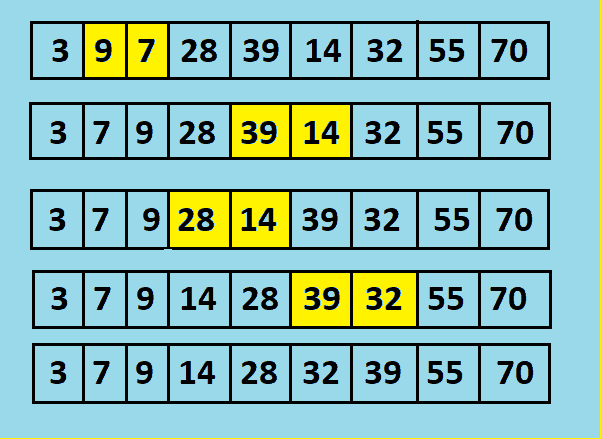
    Shell sort is an in-place comparison-based sorting algorithm and variation of Insertion sort. It is a better version of Insertion sort in comparison-based. It can compare the elements far apart whereas Insertion compares adjacent elements.

    In shell sort, we make the array h-sorted for a large value of h. We keep reducing the value of h until it becomes 1. An array is said to be h-sorted if all sublists of every h’th element are sorted.

    Shell sort

    Time Complexity of Shell Sort:

    • Best case:  0(nlogn)
    • Average case:  0(n(logn)^2)
    • Worst case:  0(n(logn)^2)

    Before we begin, you need to have an idea of the following:


    Implementation of Shell sort in java

    import java.util.Arrays;
    
    public class ShellSortJava
    {
      public static void main(String[] args)
      {
        int[] arr = { 23, 12, 89, 145, 10, 8, 333, 1, 70, 67 };
    
        System.out.println("Array Before Sorting : ");
        System.out.println(Arrays.toString(arr));
    
        System.out.println("Array After Shell Sorting : ");
        arr = shellsort(arr);
        System.out.println(Arrays.toString(arr));
      }
    
      private static int[] shellsort(int[] array)
      {
        int h = 1;
        while (h <= array.length / 3)
        {
          h = 3 *h + 1;	//h<=length/3
        }
    
        while (h > 0)
        {
          // similar to insertion
          for (int i = 0; i < array.length; i++)
          {
            int temp = array[i];
            int j;
    
            for (j = i; j > h - 1 && array[j - h] >= temp; j = j - h)
            {
              array[j] = array[j - h];
            }
    
            array[j] = temp;
          }
    
          h = (h - 1) / 3;
        }
    
        return array;
      }
    }

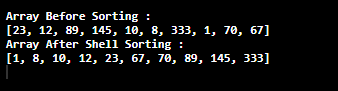
    The output of shell Sort Algorithm in java:


  • Sorting Algorithms in Java

    In this post, we will learn about the Sorting algorithms in java. There are various sorting algorithm in java that you can implement. we have cover the major algorithms that are mostly used and asked.

    Sorting Algorithms

    Sorting algorithms can be defined as a process of arranging the array elements in a way that they are either in ascending order or descending order. The most-used orders are numerical order and lexicographical order.

    For example:
    Consider the array: int Arr[10] = { 10, 4, 5, 2, 20, 35, 34, 17, 9, 14)
    Now this array if sorted in descending order will look like as given below:
    int Arr[10] = { 2, 4, 5, 9, 10, 14, 17, 20, 34, 35}


    Sorting in Java

    There are various sorting algorithms in java which of some important are listed and are explained one by one. These various sorting techniques in java are also frequently asked in java interview questions.

    The list of types of sorting in java includes the following:

    These are indexes of top sorting algorithms in java with examples, click on the solution to understand each of the algorithms.

    1. Bubble Sort

    Bubble sorting is the simplest sorting algorithm that works by comparing two adjacent elements in an array and swapping them if found in the wrong order.
    Explanation with Example.

    2. Selection Sort

    The selection sort is a simple sorting algorithm which is an in-place comparison-based algorithm. It has two parts where the left end has a sorted part and the right end has an unsorted part.
    Explanation with Example.

    3. Heap Sort

    Heap is a tree in heap sorting that possesses some specific properties whose value should be greater than or equal to that of the children node.
    Explanation with Example.

    4. Insertion Sort

    Insertion sort is a simple sorting algorithm that sorts the elements in an array by comparing the values at index with all its prior elements. This process takes more time so it is only used for small data set.
    Explanation with Example

    5. Quick Sort

    Quick sort algorithm is a way of rearranging the elements in an array in ascending or descending order. Quicksort is another Divide and Conquer algorithm.
    Explanation with Example.

    6. Merge Sort

    Merge Sort is another sorting algorithm that follows a Divide and Conquer algorithm approach to sort the elements in an array in ascending or descending order.
    Explanation with Example.

    7. Shell Sort

    Shell sort is an in-place comparison-based sorting algorithm and variation of Insertion sort. It is a better version of Insertion sort in comparison-based. It can compare the elements far apart whereas Insertion compares adjacent elements.
    Explanation with Example

    8. Counting Sort

    Counting Sort Algorithm is an integer-based algorithm, non-comparison, and linear sorting algorithm. The counting sort algorithm sorts the elements in an array in a specific range. It is based on keys between the specific range.
    Explanation with Example.


    If want to learn more about Java Programming and improve your theoretical Knowledge, click on the link below.


  • Bubble Sort in Java

    In this tutorial, we will learn how to implement Bubble Sort in java. First, we will start by understanding the Bubble Sort algorithm.

    Bubble Sort Algorithm

    Bubble sorting is the simplest sorting algorithm that works by comparing two adjacent elements in an array and swapping them if found in the wrong order.

    Bubble sort compares the first element with the next one and if found in the wrong order then that compared element in an array are swapped. This algorithm traverse through the entire element in an array.

    Time Complexity of Bubble Sort:

    • Best case:  O(n)
    • Average case:  O(n^2)
    • Worst case:  O(n^2)

    Bubble Sort in Java program:

    We will see the two examples on Bubble sorting in java, one defining the elements in the program and another by taking user input.

    Before we begin, you need to have an idea on following:


    1. Defining the elements in a program.

    public class BubbleSortExample
    {
      static void bubbleSort(int[] arr)
      {
        int n = arr.length;
        int temp = 0;
        for (int i = 0; i < n; i++)
        {
          for (int j = 1; j < (n - i); j++)
          {
            if (arr[j - 1] > arr[j])
            {
              //swap elements  
              temp = arr[j - 1];
              arr[j - 1] = arr[j];
              arr[j] = temp;
            }
          }
        }
      }
    
      public static void main(String[] args)
      {
        //Defining array elements
        int arr[] = { 4, 76, 34, 2, 132, 16, 1 };
    
        System.out.println("Order of elements before Bubble Sort");
        for (int i = 0; i < arr.length; i++)
        {
          System.out.print(arr[i] + " ");
        }
    
        System.out.println();
    
       //sorting array 
        bubbleSort(arr);
    
        System.out.println("Order of elements after Bubble Sort");
        for (int i = 0; i < arr.length; i++)
        {
          System.out.print(arr[i] + " ");
        }
      }
    }

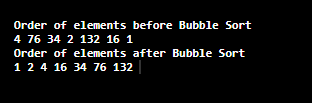
    The Output of Bubble Sort in Java.


    2. By User-Input.

    import java.util.Scanner;
    
    public class BubbleSortExample
    {
      static void bubbleSort(int[] arr)
      {
        int n = arr.length;
        int temp = 0;
        for (int i = 0; i < n; i++)
        {
          for (int j = 1; j < (n - i); j++)
          {
            if (arr[j - 1] > arr[j])
            {
              //swap elements  
              temp = arr[j - 1];
              arr[j - 1] = arr[j];
              arr[j] = temp;
            }
          }
        }
      }
    
      public static void main(String[] args)
      {
        int n, c;
        Scanner in = new Scanner(System.in);
    
        System.out.println("Enter the no. of elements to be sorted");
        n = in .nextInt();
    
        int arr[] = new int[n];
        System.out.println("Enter " + n + " integers");
        for (c = 0; c < n; c++)
          arr[c] = in .nextInt();
    
        System.out.println("Order of elements before Bubble Sort");
        for (int i = 0; i < arr.length; i++)
        {
          System.out.print(arr[i] + " ");
        }
    
        System.out.println();
    
       //sorting array 
        bubbleSort(arr);
    
        System.out.println("Order of elements after Bubble Sort");
        for (int i = 0; i < arr.length; i++)
        {
          System.out.print(arr[i] + " ");
        }
      }
    }

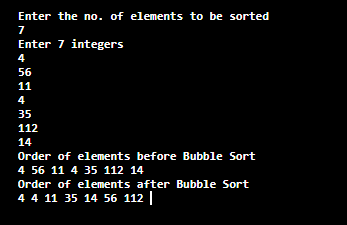
    The Output of the Bubble sorting algorithm in java.


  • Merge Sort in Java

    In this tutorial, we will learn how to implement Merge Sort in java. First, we will start by understanding the Merge Sort algorithm.

    Merge Sort Algorithm

    Merge Sort is another sorting algorithm that follows a Divide and Conquer algorithm approach to sort the elements in an array in ascending or descending order.

    It divides the array into two halves and sorts them separately. Again the two halves are divided into separate two halves and the process keeps on going until the elements are totally separated. After that, the elements are combined together in the same steps as they were separated but while combining the elements are sorted in each steps.

    When the combining step is completed we will get a fully sorted array.

    Before we begin, you need to have an idea on following:

    Time Complexity of Merge Sort:

    • Best case:  0(n log n)
    • Average case:  0(n log n)
    • Worst case:  0(n log n)

    Implementation of Merge sort in java

    import java.util.Arrays;
    
    public class Main
    {
      public static void main(String[] args)
      {
        int[] inputArr = { 45, 87, 11, 5, 80, 9, 02, 560, 33, 99, 1 };
        System.out.println("Array before sorting: ");
        System.out.println(Arrays.toString(inputArr));
    
        mergesort(inputArr);
    
        System.out.println("Array after merge sorting: ");
        System.out.println(Arrays.toString(inputArr));
      }
    
      public static void mergesort(int[] inputArr)
      {
        mergesort(inputArr, 0, inputArr.length - 1);
      }
    
      private static void mergesort(int[] inputArr, int start, int end)
      {
        int mid = (start + end) / 2;
        if (start < end)
        {
          mergesort(inputArr, start, mid);
          mergesort(inputArr, mid + 1, end);
        }
    
        int i = 0, first = start, last = mid + 1;
        int[] tmp = new int[end - start + 1];
        while (first <= mid && last <= end)
        {
          tmp[i++] = inputArr[first] < inputArr[last] ? inputArr[first++] : inputArr[last++];
        }
        while (first <= mid)
        {
          tmp[i++] = inputArr[first++];
        }
        while (last <= end)
        {
          tmp[i++] = inputArr[last++];
        }
        i = 0;
        while (start <= end)
        {
          inputArr[start++] = tmp[i++];
        }
      }
    }

    The output of Merge Sort Algorithm in java: