Author: admin

  • Java Program to Check Positive or Negative Numbers

    In this tutorial, we will write a program to check whether the number is positive or negative in java. The program takes the user input for the number to be checked and performs the calculation.

    Before, we begin you need to have the idea of the proper working of if-else..if statement. Click the link below.:


    Java Program to Check for Positive and Negative Numbers

     //check for positive or negative of a number in java
    
     import java.util.Scanner;
    
     public class PositiveNegativeNumber
     {
        public static void main(String[] args) 
        {
          int num;
          Scanner s = new Scanner(System.in);
          System.out.print("Enter the number: ");
            
          num = s.nextInt();
          if(num > 0)
          {
            System.out.println(num+" is a positive number");
          }
          else if(num < 0)
          {
            System.out.println(num+" is a negative number");
          }
          else
          {
            System.out.println(num+" is neither positive nor negative");
          }
        }
     }

    Output:

    Enter the number: -5
    -5 is a negative number


  • Java Program to Find the Sum of the Digits of a Number

    In this example, we will calculate the sum of the Digits of a Number in java taking the value from the user. Before we begin, you should have knowledge on the following topic in Java:

    Explanation: This is an easy program if you have the working technique of the operator. Suppose the entered number is 123, we will create a program in a loop that will add these three digits such as 1 + 2 + 3. And display the result.


    Java Program to Find a Factorial of a Number Using for loop

     //calculate the sum of the digits of a number in java
    
     import java.util.Scanner;
    
     public class SumOfDigits 
     {
        public static void main(String args[])
        {
           int num, temp, sum = 0;
            
           Scanner s = new Scanner(System.in);
            
           System.out.print("Enter the number: ");
           num = s.nextInt();
            
           while(num > 0)
           {
              temp = num % 10;
              sum = sum + temp;
              num = num / 10;
           }
            
           System.out.println("Sum of the entered Digits:"+sum);
        }
     }

    Output:

    Enter the number: 4567
    Sum of the entered Digits:22


  • Java Program to Find a Factorial of a Number using Recursion

    In this example, we will calculate the factorial of a number taking the value from the user.
    You can also learn to find the Factorial of a Number in Java Using for loop.

    Recursion refers to the function calling itself inside its function in a program.

    Before we begin, you should have the knowledge of the following:

    Factorial of n number: Factorial of n number is the product of all the positive descending integers and is denoted by n!.
    Example:

    factorial of n (n!) = n * (n-1) * (n-2) * (n-3)….1
    factorial of 5 (n!) = 5 * 4 * 3 * 2 * 1
    NOTE: Factorial of 0 (0!) = 1


    Factorial Program using Recursion in java.

     //find the factorial of a number using recursion in java
    
     import java.util.Scanner;
    
     public class FactorialRecursion
     {
       public static void main(String args[])
       {
    
         Scanner scanner = new Scanner(System.in);
         System.out.print("Enter the number: ");
    
         int num = scanner.nextInt();
    
         //Called the user defined function fact
         int factorial = fact(num);
    
         System.out.println("Factorial of entered number is: " + factorial);
       }
    
       //function
       static int fact(int n)
       {
         int output;
         if (n == 1)
         {
           return 1;
         }
         output = fact(n - 1) *n; //recursion
         return output;
       }
     }

    Output:

    Enter the number: 4
    Factorial of entered number is: 24


  • Java Program to Find a Factorial of a Number

    In this example, we will calculate the factorial of a number taking the value from the user. You may also learn to find Factorial of a Number in Java Using recursion.

    Before we begin, you should have the knowledge of the following:

    Factorial of n number: Factorial of n number is the product of all the positive descending integers and is denoted by n!.

    Example:

    factorial of n (n!) = n * (n-1) * (n-2) * (n-3)….1
    factorial of 5 (n!) = 5 * 4 * 3 * 2 * 1
    NOTE: Factorial of 0 (0!) = 1


    Java Program to Find a Factorial of a Number Using for loop.

     //find the factorial of a number in java
    
     import java.util.Scanner;
    
     public class FactorialOfANumber
     {
      public static void main(String args[])
      {
        int fact=1;
        Scanner scanner = new Scanner(System.in);
    
        System.out.print("Enter the number: ");
        int num = scanner.nextInt();
    
        for(int i=1;i<=num;i++)
        {
         fact = fact * i;
        }
        System.out.println("Factorial of entered number is: "+fact);
      }
    
     }

    Output:

    Enter the number: 5
    Factorial of entered number is: 120


  • Java Program to Find the Sum of Natural Numbers

    It is the Basic Java Program to find the sum of N natural numbers. The program below uses the While loop, if you want to learn about the while loop click below.

    Example: If you want to find the sum of 5 natural numbers, the process will be executed in this manner:
    1 + 2 + 3 + 4 + 5
    The result will be: 15


    Java Program to Find the Sum of Natural Numbers using While Loop

    //Sum of Natural numbers in java
      
    public class SumNaturalNumbers 
    {
      public static void main(String[] args) 
       {
    
       int n = 100, count = 1, sum = 0;
    
       while(count <= n)
       {
           sum = sum + count;
           count++;
       }
    
       System.out.println("Sum: "+sum);
       }
    }

    Output:

    Sum: 5050

    In the above program, n is already defined in the program but if you wish to take the input of n from the user, just use the scanner class.


  • Java Interview Programs

    This article includes a big list of java programs for interviews. This includes your coding skills different java interview questions and helps you to understand each of the questions clearly and be a better developer.

    The idea behind this post is to create a list of all the frequently asked java programming interview questions and make you prepare for it. We start with simple number programs, logical, strings, the use of loop,s and many more.

    Click on the solution to dive into the source code and explanation from the list mentioned below.
    Let us begin


    1. Armstrong number in java:

    A number is said to be an Armstrong Number if even after the sum of its digits, where each digit is raised to the power of the number of digits is equal to the original number. For example 153, 371, 407, 9474, etc.
    (Solution with example and explanation)


    2. Reverse a String in java:

    There are various ways in the java program to reverse a String. Reversing a string means displaying the string from backward. Example: reverse will be displayed as esrever.
    (Solution with example and explanation)


    3. How to create a Pyramid of Numbers in java?

    Patterns are one of the easiest ways to improve the coding skills and one of the logical programs asked in an interview. The frequent use of loops can increase your skills and printing them in order.
    (Solution with example and explanation)


    4. Java Program to Swap Two Numbers without using the Third Variable.

    It is easy to swap two numbers using the third variable, we assigned one to a temporary(temp) variable and swap with to others. But the main interview question asked in swapping is without using the third variable.
    (Solution with example and explanation)


    5. A Prime Number

    A number is said to be a prime number if it is divisible by itself and 1. Example 3, 5, 7, 11, 13, 17, 19, etc. Also, learn to list the prime number between given numbers
    (Solution with example and explanation)


    6. Palindrome Number/String

    A number is said to be a Palindrome number if it remains the same when its digits are reversed or are the same as forward. It is also applied to the word, phrase or other sequences of symbols.
    For example: 14141, 777, 272 are palindrome numbers as they remain the same even if reversed
    (Solution with example and explanation)


    7. Fibonacci Series:

    Fibonacci series is the series of numbers where the next number is achieved by the addition of the previous two numbers. The initial addition of two numbers is 0 and 1. For example: 0,1,1,2,3,5,8,13….etc. Using for loop and recursion.
    (Solution with example and explanation)


    8. String Anagram

    Two strings are said to be in an anagram if they contain the same set of characters but in a different order.
    For example: “Keep – peek”, “School Master – The Classroom”, “Debit Card – Bad Credit” etc.
    (Solution with example and explanation)


    9. How to remove duplicates from ArrayList in java

    ArrayList is a collection type used mostly in java. It is the list interface from Java’s collection framework that allows duplicates in its list. It provides insertion order, flexibility in program and duplicates in a list. Using HashSet and LinkedHashSet.
    (Solution with example and explanation)


    10. How to find the duplicate characters in a string in java

    We write a program to find duplicate characters in a string in java. For example, consider a string “nut cutter“, duplicate characters in it are : u: 2, t : 3.
    (Solution with example and explanation)


    11. Java Program to remove all white spaces from a string

    In this post, we will learn how to remove white spaces from a string in java. We will learn the two ways to remove white spaces in java. First by using in-built methods called replaceAll() and second without the use of in-built methods (for-loop).
    (Solution with example and explanation)


    12. The Square Root of a number in java

    This post shows how to find a square root of a number in java. We will learn two methods to find the square root one by an in-built math method called Math.sqrt() and the other by using a do-while loop.
    (Solution with example and explanation)


    13. Java Program to Count the Number of Words present in a String using HashMap.

    Take the string from user input using Scanner class and store it in a string “str“. We declare the HashMap(which is a part of java’s collection that stores data in (Key, value) pairs). The Key in this program is String and the Value in an Integer.
    (Solution with example and explanation)


    14. Java Program to find the second-largest number in an array.

    we take the user input for How many elements does a user wants in an array and what are the elements with the help of the Scanner class. Example with output.
    (Solution with example and explanation)


    15. Printing different Patterns in Java

    Patterns are one of the easiest ways to improve the coding skills for java.
    This post contains printing star patterns, alphabetic patterns, and numeric patterns.
    (solution with example and explanation)


    16. Java Program to find the GCD of two numbers.

    GCD(Greatest Common Divisor) or we can say HCF(Highest Common Factor) of two numbers is the largest number(integer). Example using for loop and if statement.
    (Solution with example and explanation).


    17. How to reverse sentences in String Java?

    Reversing a string in java is easy. Here we reverse the sentence of words from back to front rather than reversing each word.
    Example: Let us consider a string “I am a code” and the output will be “code a am I“.
    (Solution with example and explanation)


    18. Java program to check whether the given number Is Binary or not

    binary number is a number expressed in the base-2 numeral system that is the number that contains 2 symbols to represent all the numbers. The symbols are 0 and 1.
    For example: 101011, 110011110, 10001111 are binary numbers.
    (Solution with example and explanation)


    19. Generate Random numbers in Java.

    We can define Random as something that happens without any conscious decision. Similarly, a random number is a number that is chosen unpredictably or randomly from the set of numbers. Learn two ways two generate random numbers in java.
    (Solution with example and explanation)


    20. How to remove all vowels from a string in java?

    This post shows, How to remove all vowels from a string in java? with the help of replaceAll() method.
    (Solution with example and explanation)

    More Question will be added to on upcoming months.

  • Java Program to Generate Random Numbers

    Generating Random numbers in java is quite easy as it provides various classes to do that. It comes in handy when needed to apply to any kind of application development that might require random number generation. Let start by knowing random numbers.

    What is Randon Number?

    We can define Random as something that happens without any conscious decision. Similarly, a random number is a number that is chosen unpredictably or randomly from the set of numbers.

    Random Number can be generated using two ways.

    • java.util.Random class
    • Math.random() method

    We will also learn to generate between the range, at last.


    Java Program to generate Random Number

    1. Using java.util.Random class:

    java.util.Random class allows us to generate random numbers of type integers, doubles, floats, longs, and booleans. In the example below, we will see to generate numbers of type Integers and booleans. Then you can apply to other data-types.

    Program:

    import java.util.Scanner;
    import java.util.Random;
    
    public class JavaRandomNumber
    {
      public static void main(String[] args)
      {
        Scanner sc = new Scanner(System.in);
    
        //user Input
        System.out.println("How many random Numbers do you want?");
        int num = sc.nextInt();
    
        Random random = new Random();
    
        //Interger Random Numbers
        System.out.println(num + " Random Integers are:");
        for (int i = 0; i < num; i++)
        {
          System.out.println(+random.nextInt());
        }
    
        System.out.println("\n");
    
        //Booleans Random Numbers
        System.out.println(num + " Random Booleans are:");
        for (int i = 0; i < num; i++)
        {
          System.out.println(random.nextBoolean());
        }
      }
    }

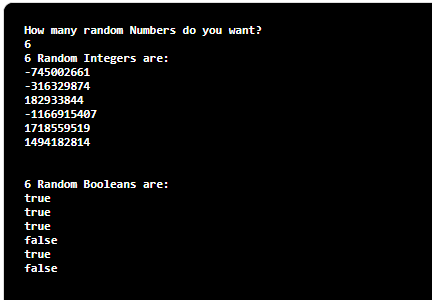
    The output of generating random numbers using java.util.Random class:


    2. Using Math.random() method:

    Math.random() method allows you to create only a random number of type doubles as shown below.

    Program:

    import java.util.Scanner;
    
    public class JavaRandomNumber
    {
      public static void main(String[] args)
      {
        Scanner sc = new Scanner(System.in);
        
        //user Input
        System.out.println("How many random Numbers do you want?");
        int num = sc.nextInt();
        
        //Doubles Random Numbers
        System.out.println(num+" Random Doubles are:");
        for(int i = 0; i < num; i++)
        {
            System.out.println(+Math.random());
        }
      }
    }

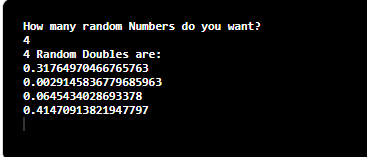
    The output of generating random numbers using Math.random() method:


    Java Program to generate Random Number within the range

    import java.util.Scanner;
    import java.util.Random; 
    
    public class JavaRandomNumber
    {
      public static void main(String[] args)
      {
        Scanner sc = new Scanner(System.in);
        
        //user Inputs
        System.out.println("How many random Numbers do you want?");
        int num = sc.nextInt();
        
        System.out.println("What is the last range of number starting from 0 to _?");
        int lastNum = sc.nextInt();
        
        Random random = new Random();
        
        //Doubles Random Numbers
        System.out.println("\n"+num+" Random integers within 0 to "+lastNum+ " are : ");
        for (int i = 0; i < 5; i++)
        {
            System.out.println(+random.nextInt(lastNum));
        }
      }
    }

    The output to generate random numbers between the range in java:

    How many random Numbers do you want?
    4
    What is the last range of number starting from 0 to _?
    30

    4 Random integers within 0 to 30 are :
    1
    15
    9
    28
    4

    This random generation of numbers within range can be applied to Math.random() method, we only need to replace the code inside the for loop to System.out.println((int)(Math.random() * lastNum));.


  • Java Program – How to Reverse Sentences in String

    Reverse a sentence word by word in java:

    Reversing a string in java is easy. Here we reverse the sentence of words from back to front rather than reversing each word.

    Example: Let us consider a string “I am a code” and the output will be “code a am I“.

    Explanation:
    First, we take a String from user input with the help of a Scanner class. Then we again with help of split() function we split the input string into separate words that is String[] wordsRev = str.split("\s");.

    Take an empty string to store the reverse sentence. Then the iteration of for loop starts for i equal to the length of the words present in a string. Then the split words are store in the result String from backward inside the for loop.

    For loop will continue until i is less than or equal to zero. Integer i will decrease by 1 at every iteration. Since we take the length from backward we decrease the value of i.
    At last, print the result String(resultString).


    Java Program to Reverse a Sentence Word by Word

    import java.util.Scanner;
     
    public class ReverseTheString 
    {
        public static void main(String[] args) 
        {
            Scanner sc = new Scanner(System.in);
            String str;
            
            System.out.println("Enter the String :");
            str = sc.nextLine();
             
            //String outputString = reverseTheSentence(str);
             
            String[] wordsRev = str.split("\\s");
             
            String resultString = "";
             
            for (int i = wordsRev.length-1; i >= 0; i--)
            {
                resultString = resultString + wordsRev[i] + " ";
            }
             
            System.out.println("Output String : "+resultString);
             
            sc.close();
        }
    }

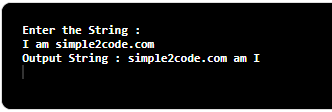
    The output of reversing the words in a sentence n java:


  • Java Program to Find GCD of Two Numbers

    In this tutorial, we will write a java program to calculate the GCD of two numbers.

    GCD of two numbers in Java:

    GCD(Greatest Common Divisor) or we can say HCF(Highest Common Factor) of two numbers is the largest number(integer) that divides both the number. Or in other words, two numbers that are divisible by the same largest number leaving no remainder.

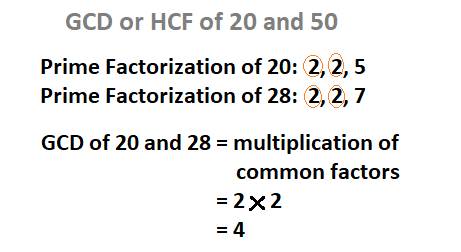
    For example: GCD of 20 and 28 is 4 as shown in the image below.

    GCD of two numbers

    Java program two calculate GCD of two numbers using for loop and if statement

    In this example, we take the user input for the two numbers whose GCD needs to be found and store it in num1 and num2. Then iterate through for loop for i less than equal num1 and i less than equal to num2

    Inside for loop, we set if statement to check for the divisibility 0f both num1 and num2 by i. If true then we set the value of current i to gcd. This iteration runs until it finds the largest number that divides both num1 and num2.


    Program: GCD of Two Number in Java.

     //calculate the gcd of two number
     
     import java.util.Scanner;
    
     public class GCDJava
     {
       public static void main(String[] args) 
       {
         int num1 , num2, gcd = 1;
         Scanner sc = new Scanner(System.in);
    
         System.out.println("Enter the first number:");
         num1 = sc.nextInt();
            
         
         System.out.println("Enter the second number:");
         num2 = sc.nextInt();
            
            
         for(int i = 1; i <= num1 && i <= num2; ++i)
         {
           // Checks if i is factor of both integers
           if(num1 % i==0 && num2 % i==0)
              gcd = i;
         }
        System.out.printf("G.C.D of %d and %d is %d", num1, num2, gcd);
       }
     }

    The Output of GCD of two numbers in java

    Enter the first number:
    81
    Enter the second number:
    153
    G.C.D of 81 and 153 is 99


  • Java Program to Print Pyramid Pattern of Stars

    Java Program to Print Pyramid Pattern of Stars

    This article will show you how to print a simple pyramid pattern of stars in java.

    Patterns are one of the easiest ways to improve the coding skills for java. The frequent use of loops can increase your skills and printing pattern order.

    We will see two programs:

    1. To print a full pyramid by declaring the number of rows in a program.
    2. To print a full pyramid by taking user input for the number of rows.

    1. Java program to print the full pyramid pattern.

     //Pattern full pyramid
     
     public class Main
     { 
      public static void main(String[] args)  
      {  
        int rows = 6;  
        
       for (int i = 0; i < rows + 1; i++) 
       { 
        for (int j = rows; j > i; j--) 
        {  
           System.out.print(" ");  
        }  
         for (int k = 0; k < (2 * i - 1); k++) 
         {  
           System.out.print("*");  
         }  
          System.out.println();  
       }  
      }  
     }

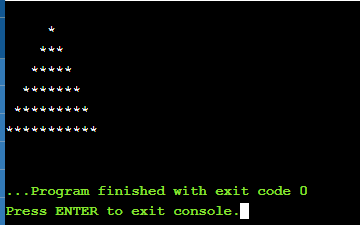
    After the execution of the program, you will get the following result:


    2. Java program to print the full pyramid pattern (user input)

     import java.util.Scanner;
     
     public class Main
     { 
      public static void main(String[] args)  
      {  
         Scanner sc = new Scanner(System.in);
     
        System.out.print("Enter the number of rows: ");
        int rows = sc.nextInt(); 
        
        for (int i = 0; i < rows + 1; i++) 
        { 
         for (int j = rows; j > i; j--) 
         {  
           System.out.print(" ");  
         }  
          for (int k = 0; k < (2 * i - 1); k++) 
          {  
            System.out.print("*");  
          }  
         System.out.println();  
       }  
      }  
     }

    After the execution of the program, you will get the following result: