Author: admin

  • C# Program for Pass by Value

    This article shows the use of pass by value in C#. You may go through the following theory on pass by value in C#, click the link below.

    The program has a variable num value which is passed to the method square() as an argument. This calculates and displays the results in it.


    C# Program to implement Pass by Value

    Source code: C# program to implement call by value

    using System;
    
    class passByValue
    {
      static void square(int a)
      {
        a = a * a;
        Console.WriteLine("Value Within the Cube method : {0}", a);
      }
    
      static void Main()
      {
        int num = 10;
        Console.WriteLine("Value of num before the Method is called : {0}", num);
    
        // passing the value of num 
        square(num);
    
        Console.WriteLine("Value of num after the Method is called : {0}", num);
        Console.ReadKey();
      }
    }

    Output:


  • C# Program to check whether a Number is Even or Odd

    This article of C# Program checks if a given integer is Odd or Even, we have used the Ternary Operator (?:) and also seen the use of try and catch block.

    Explanation:
    The user enters the number that needs to be check for odd or even numbers. Here the entered number is checked with i % 2 == 0, that is if after the divisibility of an entered number by 2, the remainder is zero then it is an Even number but if the remainder is not zero then the entered number is an Odd number.


    C# Program to check whether the entered Number is Even or Odd.

    Source Code: C# odd or even program

    using System;
    
    public class EvenOdd
    {
      public bool isEven(int i)
      {
        return (i % 2 == 0);
      }
    }
    
    public class Program
    {
      public static void Main(string[] arg)
      {
        Console.WriteLine("Enter a number to check even or odd:");
        var i = Console.ReadLine().ToString();
        
        try
        {
          var n = int.Parse(i);
          EvenOdd obj = new EvenOdd();
          Console.WriteLine(obj.isEven(n) ? "Number is Even" : "Number is Odd");
        }
    
        catch (System.Exception ex)
        {
          Console.WriteLine("Invalid String Format!!");
        }
      }
    }

    Output:

    C sharp odd and even number

  • C# Program to Swap Two Numbers

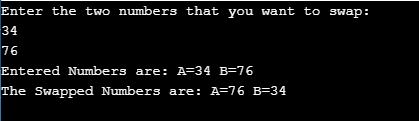
    In this tutorial, we will write a program to swap two numbers in C#. We will use a temporary variable to swap the numbers along with a user-defined function.

    Question:
    Write a C# program to Swap two Numbers using third variable.

    Explanation:
    The user input values are passed as an argument in SwapValue function where they are swapped using a third variable temp and the swapped output is displayed as shown in the program below.


    C# Program to Swap two Numbers using the Third variable

    Source Code:

    using System;
    
    public class Swap
    {
      public static void SwapValue(int a, int b)
      {
        Console.WriteLine("Entered Numbers are: A=" + a.ToString() + " B=" + b.ToString());
    
       //temporary variable
        var temp = a;
        a = b;
        b = temp;
    
        //Display
        Console.WriteLine("The Swapped Numbers are: A=" + a.ToString() + " B=" + b.ToString());
    
      }
    
      public static void Main(string[] arg)
      {
        Console.WriteLine("Enter the two numbers that you want to swap: ");
        var input = "";
    
        input = Console.ReadLine();
        var x = int.Parse(input);
    
        input = Console.ReadLine();
        var y = int.Parse(input);
    
        SwapValue(x, y);
    
      }
    }

    Output:


  • C# Program to find the Sum of Digits of a Number

    In this tutorial, we will write a C# program to get a number and display the sum of the digits. We will see the use of a do-while loop and get the user inputs with source code.

    Explanation: The program takes a number from the user as input and passes that number to a function where the calculation is done. The do-while loop is used to iterate the number digit by digit and finally add the number and display the result at the end.


    C# Program to find the Sum of Digits of a Number using function

    source code: Program to calculate the sum of the digits in C#.

    using System;
    
    public class SumOfDigits
    {
      public static void CalculateSum(int x)
      {
        var sum = 0;
        var rem = 0;
    
        do {
          rem = x % 10;
          x = x / 10;
          sum = sum + rem;
    
        } while (x != 0);
    
        Console.WriteLine("The sum is: " + sum);
      }
    
      public static void Main(string[] s)
      {
        Console.WriteLine("Enter a number to find the sum of the digits:");
        var input = Console.ReadLine();
    
        var num = int.Parse(input);
    
        CalculateSum(num);
      }
    }

    Output:


  • C# Program to display the Date in various Formats

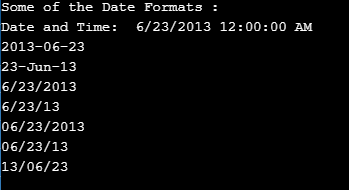
    In this tutorial, we will write a C# program to display date formats, you see the list of various ways in which you can display dates in C#.

    A new date object is created for DateTime class in C#. DateTime class is already defined class present in C# language. We do not have to create such a class ourselves. Then simple it displays the date in various formats.


    C# Program to display various Date Formats

    Source code:

    using System;
    
    class Program
    {
      static void Main()
      {
        DateTime date = new DateTime(2013, 6, 23);
        Console.WriteLine("Some of the Date Formats : ");
    
        Console.WriteLine("Date and Time:  {0}", date);
        Console.WriteLine(date.ToString("yyyy-MM-dd"));
        Console.WriteLine(date.ToString("dd-MMM-yy"));
        Console.WriteLine(date.ToString("M/d/yyyy"));
        Console.WriteLine(date.ToString("M/d/yy"));
        Console.WriteLine(date.ToString("MM/dd/yyyy"));
        Console.WriteLine(date.ToString("MM/dd/yy"));
        Console.WriteLine(date.ToString("yy/MM/dd"));
      }
    }

    Output:


  • Example Program for Access Modifiers in C#

    This tutorial demonstrates the use of Access Specifiers in C# shows the accessing of different specifiers present in C# with source code. You may go through the theory of access modifiers in C#.

    Question:
    Write a C# program to Illustrate the Use of Access Specifiers


    Example Program for Access Modifiers in C#

    Source Code:

    using System;
    
    class Program
    {
      static void Main(string[] args)
      {
        two B = new two();
        B.show();
      }
    }
    
    class one
    {
      private int x;
      protected int y;
      internal int z;
      public int a;
      protected internal int b;
    }
    
    class two: one
    {
      public void show()
      {
        Console.WriteLine("Values are : ");
        y = 20;
        z = 30;
        a = 40;
        b = 50;
    
        Console.WriteLine(y);
        Console.WriteLine(z);
        Console.WriteLine(a);
        Console.WriteLine(b);
    
      }
    }

    Output:


  • C# Program for Left Shift Operator Operation

    This article shows the use of the left Shift operator in a program in C#. You need to have the knowledge of the following before you go ahead.

    The Left Shift Operator in C# allows the creators to shift the bits to their left for the adjustments. The position it needs to shift is determined by the additive expression.

    Question:
    Write a C# program to Illustrate the Left Shift Operator Operation


    C# Program for Left Shift Operator Operation

    Source code.

    using System;
    
    class LeftShiftOperation
    {
      public static void Main()
      {
        int a = 1024 * 1024 * 1024;
        uint p = 1024 * 1024 * 1024;
        int b = -42;
    
        Console.WriteLine("Example of Left Shift Operation:");
    
        Console.WriteLine("{0},{1},{2}", a, a *2, a << 1);
        Console.WriteLine("{0},{1},{2}", p, p *2, p << 1);
        Console.WriteLine("{0},{1},{2}", a, a *4, a << 2);
        Console.WriteLine("{0},{1},{2}", p, p *4, p << 2);
        Console.WriteLine("{0},{1},{2}", b, b *1024 * 1024 *64, a << 26);
      }
    }

    Output:


  • C# Program using Polymorphism

    In this tutorial, you will write Polymorphism programs in C#. The program demonstrates for three different data types.

    Question:
    Write a C# Program to illustrate the use of Polymorphism.

    Solution:
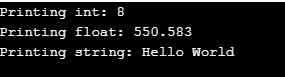
    In the following program, we create an object for Polymorphism Class, and under this Class, we create three functions of the same name print but varying in argument data types. Now we call the print function by passing the three different values(different data types). We see that despite having the same function name(print), we can still print for three different data types as shown in the program.


    C# Program using Polymorphism

    Source code: C# polymorphism program

    using System;
    
    class Polymorphism
    {
      void print(int i)
      {
        Console.WriteLine("Printing int: {0}", i);
      }
    
      void print(double f)
      {
        Console.WriteLine("Printing float: {0}", f);
      }
    
      void print(string str)
      {
        Console.WriteLine("Printing string: {0}", str);
      }
    
      static void Main(string[] args)
      {
        Polymorphism p = new Polymorphism();
    
       	//Call print to print integer
        p.print(5);
    
       	//Call print to print float
        p.print(500.263);
    
       	//Call print to print string
        p.print("Hello World");
      }
    }

    Output:


  • C# program for Multilevel Inheritance

    Let us see the source code for C# multilevel inheritance program. You may go through the theory first by clicking the link below.

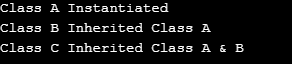
    Explanation: In the following program, Class B inherits A Class C inherits B through which Class C can inherit the property of class A. So, only by creating a single object that is only for Class C, you can access the properties of Class A and B.


    C# Program for Multilevel Inheritance

    using System;
    
    class A
    {
      public A()
      {
        Console.WriteLine("Class A Instantiated");
      }
    }
    
    class B: A
    {
      public B()
      {
        Console.WriteLine("Class B Inherited Class A");
      }
    }
    
    class C: B
    {
      public C()
      {
        Console.WriteLine("Class C Inherited Class A &B");
      }
    }
    
    class Program
    {
      static void Main(string[] s)
      {
        C c = new C();
      }
    }

    Output:


  • C# program for Single Inheritance

    Let us see the source code for the Single Inheritance program in C#. You may go through the theory of inheritance first.

    Explanation: Inheritance in OOP means to derive some property of another Class. The following program Class B inherits Class A. Now, by only creating an object for Class B, you can access the properties of Class A.


    C# Program to Illustrate Single Inheritance

    Program:

    using System;
    
    class A
    {
      public A()
      {
        Console.WriteLine("Class A Instantiated");
      }
    }
    
    class B: A
    {
      public B()
      {
        Console.WriteLine("Class B Inherited Class A");
      }
    }
    
    class Program
    {
      static void Main(string[] s)
      {
        new B();
      }
    }

    Output:

    Class A Instantiated
    Class B Inherited Class A