Author: admin

  • C# File I/O

    Files are used to store the data permanently in the storage device with a specific name and path. And when we open the file in order to read or write, it becomes a stream.

    File Handling refers to the various operation that can be performed on a file such as reading from a file, writing to a file, appending file, etc. The two most common operations are reading from a file and writing to a file. And when we open a file to do so then the file becomes a stream.

    The System.IO namespace class contains the input and output streams handling classes that are used for performing the various operation.

    The members that are included in System.IO namespace classes are:

    I/OClass Description
    BinaryReaderReads primitive data from a binary stream.
    BinaryWriterWrites primitive data in binary format.
    BufferedStreamTemporary storage for a stream of bytes.
    DirectoryHelps in manipulating a directory structure.
    DirectoryInfoUsed for performing operations on directories.
    DriveInfoProvides information for the drives.
    FileHelps in manipulating files.
    FileInfoUsed for performing operations on files.
    FileStreamUsed to read from and write to any location in a file.
    MemoryStreamUsed for random access to streamed data stored in memory.
    PathPerforms operations on path information.
    StreamReaderUsed for reading characters from a byte stream.
    StreamWriterIs used for writing characters to a stream.
    StringReaderIs used for reading from a string buffer.
    StringWriterIs used for writing into a string buffer.

    C# FileStream

    As already discussed above, FileStream class provides a stream for the various file operations. Reading and writing data into a file becomes easy with FileStream.

    However, a FileStream object is required in order to create a new file or open an existing one. To create a FileStream object we use a new keyword in the following way.

    FileStream <object_name> = new FileStream( <file_name>, <FileMode Enumerator>,
       <FileAccess Enumerator>, <FileShare Enumerator>);
    
    //Example
    FileStream file = new FileStream("example.txt", FileMode.Open, FileAccess.Read,
       FileShare.Read);

    Let us see what each of the above Enumerator means:

    FileMode:

    This emulator defines the various ways through which we can open a file and its member are:

    ParametersDescription
    AppendIt creates a new file or opens a file(if exists any) and puts the cursor at the end of the file.
    CreateIt is used to create a new file.
    CreateNewThis member specifies the OS that it should create a new file.
    Open It is used to open an existing file.
    OpenOrCreateIt is used to open an existing file, if not then create a new one.
    TruncateIt opens an existing file and truncates its size to zero bytes.

    FileAccess:

    This enumerator has three members:

    • Read: Only to read.
    • ReadWrite: Both read and write
    • Write: Only write.

    FileShare:

    FileShare refers to sharing of files and its members are:

    ParametersDescription
    InheritableIt allows a filehandle to pass an inheritance to the child processes
    NoneSharing of the current file is declined by this member.
    ReadIt opens a file only for reading.
    ReadWriteIt opens a file for both reading and writing
    Write It opens a file only for writing.

    Let us g through an example to see it in action.

    Example: C# program for FileStream

    The following program writes multiple bytes into the file

    using System;
    using System.IO;
    
    namespace FileProgram
    {
      class Program
      {
        static void Main(string[] args)
        {
          FileStream f = new FileStream("sample.txt", FileMode.OpenOrCreate, FileAccess.ReadWrite);
    
          for (int i = 97; i <= 122; i++)
          {
            f.WriteByte((byte) i);
          }
    
          f.Close();
        }
      }
    }

    Output: Once the program is executed, a new file will be created if it doesn’t already exist. And inside that file, the following text will be present.

    abcdefghijklmnopqrstuvwxyz

  • C# throw keyword

    We have already discussed the exception handling in C# and how to handle the exception if one exists. The exception discussed are raised by the CLR automatically, now we will see how we can manually raise an exception.

    In C#, we use the keyword ‘throw’ in order to throw an exception programmatically. We can raise any type of exception derived from the Exception class with the help of the throw keyword.

    The syntax for throw keyword.

    throw e;

    In this syntax e is an exception that is derived from the Exception class.

    Example: C# program for throw keyword

    using System;
    
    namespace ExceptionEg
    {
      class Employee
      {
        static void Main(string[] args)
        {
          try
          {
            empDetails();
          }
    
          catch (Exception e)
          {
            Console.WriteLine(e.Message);
          }
        }
    
        // static method
        private static void empDetails()
        {
          string emp_name = null;
    
          if (string.IsNullOrEmpty(emp_name))
          {
            throw new NullReferenceException("Employee name is Empty");
          }
          else
          {
            Console.WriteLine("Employee Name: " + emp_name);
          }
        }
      }
    }

    Output:

    Employee name is Empty

    As you can see new keyword is used to create an object of the exception. Also, a try-catch block is used to handle the exception.

    Since the name string is kept empty, the program threw an exception indicating that the name cannot be empty. This is how the throw keyword works in C#.


    Re-throwing an Exception

    With the use of the catch block and throw keyword, we can re-throw an exception inside the catch block. We pass it to the caller and let them handle it in a way they want.

    Example: C# program for re-throwing an exception

    using System;
    
    namespace ExceptionEg
    {
      class Employee
      {
        static void Main(string[] args)
        {
          try
          {
            empDetails();
          }
          catch (Exception e)
          {
            Console.WriteLine(e.Message);
          }
        }
    
       	// static method
        private static void empDetails()
        {
          string emp_name = null;
    
          try
          {
            if (emp_name.Length > 0)
            {
              Console.WriteLine("Employee Name: {0}", emp_name);
            }
          }
          catch (Exception e)
          {
            throw;
          }
        }
      }
    }

    Output:

    Object reference not set to an instance of an object

    As you can see, we throw an exception without any parameters because if we throw an exception with a parameter such as throw e then we will not be able to preserve the stack trace of the original exception.

    This is how we Re-throw an exception using throw and catch. Also, if you can go through Exception Handling to learn more on how to handle exceptions.


  • C# Exception Handling

    An exception is an event that occurs during the execution of the program i.e. during runtime. This event is unexpected, not known by the program, and disrupts the normal flow of the code. So to handle such errors, we create an exception handler code which will be executed when it finds an exception in a program.

    Exception handling is a mechanism to maintain the normal flow of a program by handling runtime errors. The main advantage of exception handling is to ensure that even when an exception occurs, the program’s flow doesn’t break.


    C# Exception Classes

    The exception classes in C# are mainly directly or indirectly derived from the System.Exception class. Let us go through some of the predefined exception classes derived from the Sytem.SystemException.

    ExceptionDescription
    System.DivideByZeroExceptionIt handles the error generated by dividing a number by zero.
    System.IndexOutOfRangeExceptionIt handles the error when the array index is out of range.
    System.NullReferenceExceptionIt handles the error generated by referencing the null object.
    System.ArrayTypeMismatchExceptionIt handles the error of array mismatched type.
    System.InvalidCastExceptionIt handles the error generated during typecasting.
    System.IO.IOExceptionIt handles the Input-Output errors.
    System.OutOfMemoryExceptionIt handles the insufficient free memory error.
    System.FieldAccessExceptionIt handles the error generated by invalid private or protected field access.
    System.StackOverflowExceptionIt handles the error generated during stack overflow.

    C# Exception Handling Keywords

    C# provides four different keywords to handle the exception.

    • try: The try block identifies the block of code for which the exception will be activated. It is followed by a catch block.
    • catch: The catch indicates the cathching of an exception where you want to catch the error accuring in the program. It is placed right after the try block.
    • finally: Finally block is used to execute the code followed by the try-catch block. finally block is always executed whether an exception is handled or not.
    • throw: throw keyword is used to throw an exception when a problem shows up in a program.

    C# try/catch and finally block

    As discussed above, the try block contains the code that might throw an exception, catch handles an exception if there exists any, and finally block is used for any cleanup work that needs to be done. finally is always executed whether there exists an exception or not.

    The syntax for a try, catch, and finally keyword.

    try
    {
       // exception causing block
    }
    catch(Type x)
    {
       // handling block
    }
    finally
    {
       //clean up block
    }

    Let us go through an example in C#.

    using System;
    
    namespace ExceptionEg
    {
      public class Program
      {
        public static void Main(string[] args)
        {
          int x = 15;
          int y = 0;
          int result;
          try
          {
            result = x / y;
          }
    
          catch (Exception e)
          {
            Console.WriteLine(e);
          }
    
          finally
          {
            Console.WriteLine("Finally block is executed");
          }
        }
      }
    }

    Output:

    System.DivideByZeroException: Attempted to divide by zero.
    at....
    Finally block is executed


    C# User-Defined Exceptions

    C# allows us to create our own exception in order to make it more meaningful. User-defined exception classes are derived from the Exception class.

    using System;
    
    class TestTemperature
    {
      static void Main(string[] args)
      {
        Age age = new Age();
        try
        {
          age.validateAge(18);
        }
    
        catch (InvalidAgeException e)
        {
          Console.WriteLine("InvalidAgeException: {0}", e.Message);
        }
      }
    }
    
    public class InvalidAgeException: Exception
    {
      public InvalidAgeException(string message): base(message) {}
    }
    
    public class Age
    {
      public void validateAge(int age)
      {
        if (age < 21)
        {
          throw (new InvalidAgeException("Age must be greater than 21"));
        }
        else
        {
          Console.WriteLine("Age: " + age);
        }
      }
    }

    Output:

    InvalidAgeException: Age must be greater than 21

    Go through throw keyword in C# topic next.


  • C# Strings

    In C#, String is the series of characters or array of characters that represents a text. It is of a reference type (Object) in c#. Various operations are performed on a string such as concatenation, comparison, getting substring, search, trim, replacement, etc.

    • It is a reference type.
    • It’s immutable that is its state cannot be changed.
    • It can contain nulls.
    • It overloads the operator(==).

    Comparing string and String

    string and String are the same in C#, the keyword string is an alias of System.String. Both are equivalent and we can use any convention because the string class inherits the properties and methods of the System.String class.

    Declaring string using string and System.String class.

    string str1 = "Simple2code"; // uses string keyword
     
    String str2 = "Simple2code"; // uses System.String clas

    A variable of the string type can be declared and assign string literal as given below.

    string ch = "S";
    string str1 = "Simple2code";
    string str2 = "This is simple2code.com";

    String example in C#

    using System;
    
    namespace StringProgram
    {
      class Program
      {
        static void Main(string[] args)
        {
          //using array of character
          char[] ch = { 's', 'i', 'm', 'p', 'l', 'e' };
          string str = new string(ch);
          Console.WriteLine(str);
    
          // using "System.String" class
          System.String name = "Simple";
          Console.WriteLine("Name: " + name);
    
          // using an alias of System.String class
          String roll = "43";
          Console.WriteLine("Roll: " + roll);
    
          // using string
          string score = "80";
          Console.WriteLine("Marks: " + score);
        }
      }
    }

    Output:

    simple
    Name: Simple

    Roll: 43
    Marks: 80


    C# String Properties

    Charsreturns a char object at a specified position in the current string object.
    Lengthreturns the length of a specified string

    C# String methods

    We can perform an operation on strings in order to manipulate them according to the need. An to do that there are few methods present in C#. The following table shows the most commonly used methods in string.

    MethodsDescription
    Compare(String, String)It is used to compare two strings and returns integer value as an output.
    Concat(String, String)It is used to concatenate the two specified strings.
    Contains(String)It is used to check whether a specified character/string exists or not in the string value.
    Copy(String)It creates a new instance of String with the same value as a specified String.
    EndsWith(String)It is used to check whether the specified character is the last character of the string or not.
    Equals(String, String)It is used to compare two strings. It returns a Boolean value as output.
    GetHashCode()It is used to get the HashValue of the specified string.
    IndexOf()It is used to get the index position of the first occurrence of the specified character.
    ToLower()It is used to transform the specified string into the lower case.
    ToUpper()It is used to transform the specified string into the upper case.
    ToString()It returns the instance of a String.
    Insert()It is used to insert the string/character in the string at the specified position.
    Remove()It is used to delete all the characters from beginning to specified index positions.
    Replace()It is used to replace the character.
    Split()It is used to split the string at the specified value.
    StartsWith()It is used to check whether the specified character is the starting character of the string or not.
    Substring()It is used to find the substring from a specified string.
    ToCharArray()It is used to convert a string into a char array.
    Trim()It is used to remove the extra whitespaces from the beginning and end of the specified string.

    Let us go through some of the examples of the above methods mentioned in C#.

    Comparing String in C#

    using System;
    
    namespace StringProgram
    {
      class CompString
      {
        static void Main(string[] args)
        {
          string str1 = "This is a website";
          string str2 = "This is simple2code.com";
    
          if (String.Compare(str1, str2) == 0)
            Console.WriteLine("Strings are equal.");
          else
            Console.WriteLine("Strings are not equal.");
    
        }
      }
    }

    //Output
    Strings are not equal.


    Concatinate Stringin C#

    using System;
    
    namespace StringProgram
    {
      class ConcatString
      {
        static void Main(string[] args)
        {
          string str1 = "This is ";
          string str2 = "simple2code.com";
    
          Console.WriteLine(String.Concat(str1, str2));
    
        }
      }
    }

    //Output
    This is simple2code.com


    String Contains method in C#

    using System;
    
    namespace StringProgram
    {
      class ContainString
      {
        static void Main(string[] args)
        {
          string str1 = "This is simple2code.com";
          string str2 = "simple2code.com";
    
          if (str1.Contains(str2))
            Console.WriteLine("FOUND!");
    
         	//or You can directly search the letters
          if (str1.Contains("is"))
            Console.WriteLine("FOUND!");
    
        }
      }
    }

    //Output
    FOUND!
    FOUND!


    Substring method in C#

    using System;
    
    namespace StringProgram
    {
      class SubString
      {
        static void Main(string[] args)
        {
          string str1 = "This is simple2code.com";
          string subStr = str1.Substring(8);
    
          Console.WriteLine(subStr);
    
        }
      }
    }

    //Output
    simple2code.com


    Special Characters

    As we have seen till now the string must be within the quotes. Now there might be cases where the string may need a single quote or double quote to form sentences. Example, John’s book, It’s alright, etc.

    Now to use quotes within the string quotes, we need to use backslash escape character. With the help of this, we can turn the special character into a string character.

    Escape characterResult
    \'
    \"
    \\\

    Let us go through an example to demonstrate the escape character.

    using System;
    
    namespace StringProgram
    {
      class SpecialChar
      {
        static void Main(string[] args)
        {
          string str1 = "This is \"simple2code.com\".";
          string str2 = "It\'s allright.";
    
          Console.WriteLine(str1);
          Console.WriteLine(str2);
    
        }
      }
    }

    //Output:
    This is "simple2code.com".
    It's allright.

    As you can see in the output, the result is with the quotes where we inserted in the program. This way you can apply special characters in a string.


  • C# Inheritance and its Types

    Inheritance is an important pillar for the foundation of Object-Oriented Programming (OOP). It is a process in C# through which one class can acquire the fields and methods of another class.

    Inheritance allows us to inherit or acquire the features of the parent class to the child class so that we can be reuse, extend or modify the attributes and behaviour of another class.

    Importance of Inheritance:

    • For Code Reusability.
    • For Method Overriding (to achieve runtime polymorphism).

    Important terms related to inheritance.

    • Super Class: The class whose properties and functionalities are inherited by the Subclass is known as superclass(a parent class or a base class).
    • Sub Class: The class that inherits the property and behavior of the other class(Superclass) is known as subclass( a derived class, extended class, or child class). The subclass can have its own fields and methods along with the fields and methods of the superclass.

    Syntax to use inheritance in C#

    class derived-className : base-className 
    {  
       //fields  
       //methods
    }  

    Types of Inheritance in C#

    Below are the various types of inheritance supported in C#.

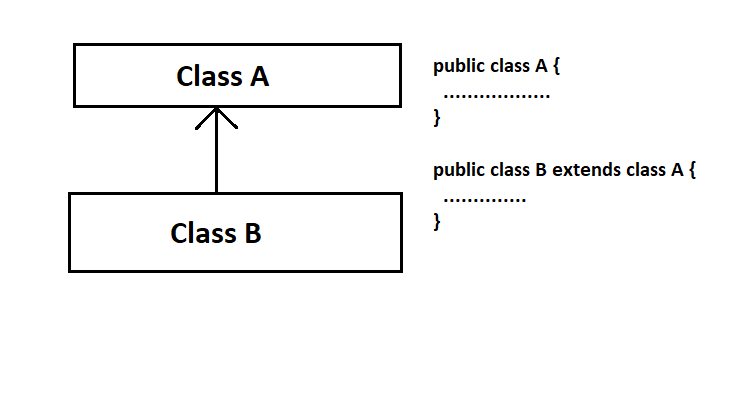
    1. Single Inheritance

    It refers to an inheritance where a child inherits a single-parent class. In the diagram below, class B inherits class A.

    single Inheritance

    Syntax:

    class sub_class_name : base_class_name
    {
      //body of subclass
    };

    Example: C# example for single inheritance.

    using System;
    
    namespace InheritanceEg
    {
      public class ParentClass
      {
        public void printParent()
        {
          Console.WriteLine("This is Parent Class");
        }
      }
    
      public class ChildClass: ParentClass
      {
        public void printChild()
        {
          Console.WriteLine("This is Child Class");
        }
      }
    
      public class Program
      {
        public static void Main(string[] args)
        {
          ChildClass obj = new ChildClass();
          obj.printParent();
          obj.printChild();
        }
      }
    }

    //Output:
    This is Parent Class
    This is Child Class


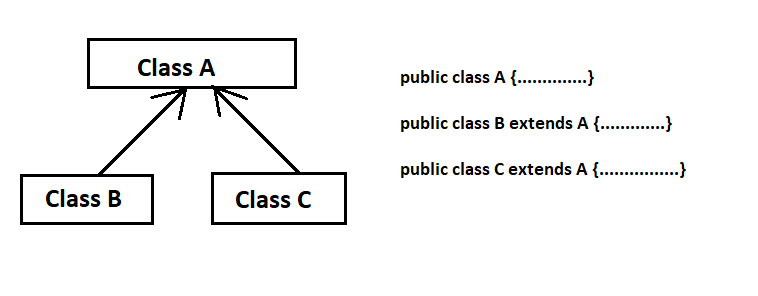
    2. Hierarchical Inheritance

    The process of deriving more than one class from a base class is called hierarchical inheritance. In other words, we create more than one derived class from a single base class as shown in the diagram below.

    hierarchical Inheritance

    Syntax:

    class One  
    {  
        // Class One members  
    }    
    class Two : One   
    {  
        // Class Two members.  
    }  
    class Three : One  
    {  
        // Class Three members  
    }     

    Example: C# example for hierarchical Inheritance.

    using System;
    
    namespace InheritanceEg
    {
      public class ParentClass
      {
        public void printParent()
        {
          Console.WriteLine("This is Parent Class");
        }
      }
    
      public class Son: ParentClass	 //Inheriting ParentClass
      {
        public void printSon()
        {
          Console.WriteLine("This is Son's Class");
        }
      }
    
      public class Daughter: ParentClass   //Inheriting ParentClass
      {
        public void printDaughter()
        {
          Console.WriteLine("This is Daughter's Class");
        }
      }
    
      //Main Class
      public class Program
      {
        public static void Main(string[] args)
        {
          Son s = new Son();
          Daughter d = new Daughter();
    
          s.printSon();
          s.printParent();
    
          d.printDaughter();
          d.printParent();
    
        }
      }
    }

    //Output
    This is Son's Class
    This is Parent Class
    This is Daughter's Class
    This is Parent Class


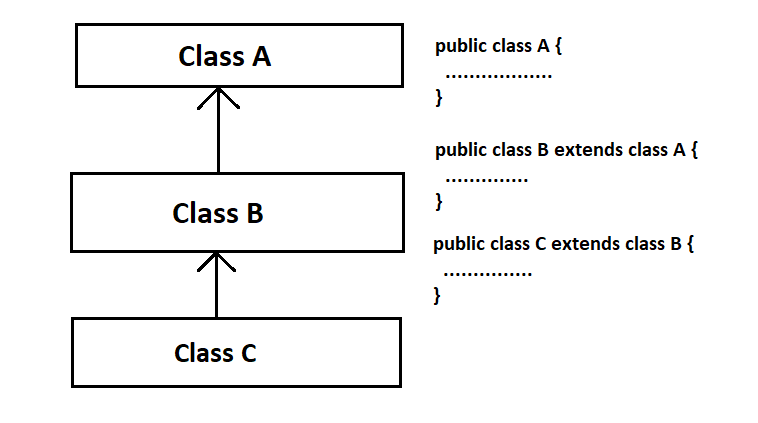
    3. Multilevel Inheritance

    In this type inheritance derived class is created from another derived class. In multilevel inheritance, one class inherits from another class which is further inherited by another class. The last derived class possesses all the members of the above base classes.

    Multilevel Inheritance

    Example: C# example for multilevel inheritance.

    using System;
    
    namespace InheritanceEg
    {
      public class Animal
      {
        public void sleep()
        {
          Console.WriteLine("Animal sleeps");
        }
      }
    
      public class Dog: Animal	//Inheriting Animal
      {
        public void sound()
        {
          Console.WriteLine("Dog barks");
        }
      }
    
      public class Puppy: Dog	//Inheriting Dog
      {
        public void weep()
        {
          Console.WriteLine("Puppy weeps");
        }
      }
    
      public class Program
      {
        public static void Main(string[] args)
        {
          Puppy p = new Puppy();
    
          p.sleep();
          p.sound();
          p.weep();
    
        }
      }
    }

    //Output
    Animal sleeps
    Dog barks
    Puppy weeps


    4. Multiple Inheritance (through Interface)

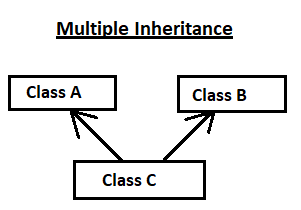
    Multiple inheritance is the process where the single class inherits the properties from two or more classes.

    In the diagram below, class C inherits from both Class A and Class B.

    multiple Inheritance

    Although, C# does not support multiple inheritance. So we need to use interfaces in C# to use the multiple inheritance. We need to declare the parent class with the interface keyword and the child class with the class keyword.

    Example: C# example for multiple inheritance.

    using System;
    
    namespace InheritanceEg
    {
      interface Dog
      {
        void dogFunc();
      }
    
      interface Cat
      {
        void catFunc();
      }
    
      public class Animal: Dog, Cat	//Inheriting Dog and Cat interface
      {
        public void dogFunc()
        {
          Console.WriteLine("I am a Dog");
        }
    
        public void catFunc()
        {
          Console.WriteLine("I am A Cat");
        }
    
        public void animalFunc()
        {
          Console.WriteLine("All are Animals");
        }
      }
    
      public class Program
      {
        public static void Main(string[] args)
        {
          Animal obj = new Animal();
    
          obj.animalFunc();
          obj.dogFunc();
          obj.catFunc();
    
        }
      }
    }

    All are Animals
    I am a Dog
    I am A Cat


  • C# Operator Overloading

    We have learned that the method can be overloaded in C#, in the same way, we can also overload the operator. We can perform the various operations with the same operator in C#.

    Operator overloading means performing different operations with the same operator. We can overload most of the built-in operators that are provided by C#. We can also change the user-defined type as well such as structures or classes.

    The keyword ‘operator‘ is used to overload an operator. Compile-time polymorphism is achieved through operator overloading.

    Syntax:

    access_specifier  class_name  operator operator_symbol (argument_list)
    {
        // Code to be executed
    }

    The following table shows which operators present in C# can be overloaded and which are not.

    OperatorsDescription
    +, -, !, ~, ++, – –unary operators take one operand and can be overloaded.
    +, -, *, /, %Binary operators take two operands and can be overloaded.
    ==, !=, =Comparison operators can be overloaded.
    &&, ||Conditional logical operators cannot be overloaded directly
    +=, -+, *=, /=, %=, =Assignment operators cannot be overloaded.

    Also, =, ., ?:, ->, new, is, sizeof, typeof cannot be overloaded.


    Overloading Unary Operators

    The return type of unary operator overloading can be of any type except the void. The unary operator includes +, ~, ! and dot (.), these must have any return type but void but the return type must be the type of ‘Type’ for ++ and – operators and must be a bool type for true and false operators.

    Also, remember that the true and false operators can be overloaded only as pairs. The compilation error occurs if a class declares one of these operators without declaring the other.

    The syntax for overloading unary operator:

    public static classname operator operator_symbol (t)
    {
       // Code to execute
    }

    Let us go through an example in the C# program for overloading unary operators.

    using System;
    class Example
    {
      private int x;
      private int y;
      public Example() {}
    
      public Example(int i, int j)
      {
        x = i;
        y = j;
      }
    
      public void print()
      {
        Console.WriteLine("X = {0}  Y = {1}", x, y);
      }
    
      public static Example operator-(Example eg)
      {
        eg.x = -eg.x;
        eg.y = -eg.y;
        return eg;
      }
    }
    
    class MainFunc
    {
      public static void Main()
      {
        Example obj1 = new Example(10, 20);
        obj1.print();
    
        Example obj2 = new Example();
        obj2 = -obj1;
    
        obj2.print();
      }
    }

    Output:

    X = 10 Y = 20
    X = -10 Y = -20


    Overloading Binary Operator

    Binary operators are overloaded in pairs such as when an arithmetic operator is overloaded then the corresponding assignment operators also get overloaded automatically. For example, if we overload the + operator then += also gets overloaded automatically.

    The syntax for overloading binary operator:
    we overload binary operator in the same manner as a unary operator, the only difference is the number of parameters here is two.

    public static classname operator operator_symbol (t1, t2)
    {
      // Code to be executed
    }
    using System;
    
    namespace BinaryOverloading
    {
      class Example
      {
        private int num1;
        private int num2;
    
        //constructor with no argument
        public Example() {}
    
        public Example(int i, int j)
        {
          num1 = i;
          num2 = j;
        }
    
        public void print()
        {
          Console.WriteLine("num1 = {0}  num2 = {1}", num1, num2);
        }
    
        public static Example operator+(Example eg1, Example eg2)
        {
          Example temp = new Example();
          temp.num1 = eg1.num1 + eg2.num1;
          temp.num2 = eg1.num2 + eg2.num2;
          return temp;
        }
      }
    
      class MainBinary
      {
        public static void Main()
        {
          Example obj1 = new Example(10, 20);
          obj1.print();
    
          Example obj2 = new Example(20, 30);
          obj2.print();
    
          Example obj3 = new Example();
          obj3 = obj1 + obj2;
    
          obj3.print();   //final result  
        }
      }
    }

    Output:

    num1 = 20 num2 = 30
    num1 = 10 num2 = 20
    num1 = 30 num2 = 50


  • C# Method Overriding

    Method overriding is done through inheritance, it allows us to define a method at a derived class with the same name present in a base class with the same signature and same return type then the method in a base class is said to be overridden.

    In method overriding, the base class method uses virtual keyword while the derived class method uses override keyword.

    Method overriding is one of the ways through which C# achieves Run Time Polymorphism (Dynamic Polymorphism). The decision made to call the required function is done at the run time. Hence, it is a Runtime polymorphism.

    Example: C# program for method overriding.

    using System;  
    
    namespace Program 
    {
     public class Animal
     {  
        public virtual void sleep()
        {  
            Console.WriteLine("Animals Sleeps");  
        }  
     }  
     public class Dog: Animal  //inheriting Animal class
     {  
        public override void sleep()  
        {  
            Console.WriteLine("Dog Sleeps");  
        }  
          
     }  
    
     public class OverrideMain
     {  
        public static void Main()  
        {  
            Animal obj = new Dog();  
            obj.sleep();  
            
            obj = new Animal();
            obj.sleep(); 
        }  
     }  
    }

    Output:

    Dog Sleeps
    Animals Sleeps


  • C# Method Overloading

    A method is said to be overloaded if two or more methods having the same name but different parameters. The difference could be in a number of parameters or types of parameters so that compiler can tell the difference.

    The advantage of method overloading is that you don’t have to use different names for the function which does the same task. Method overloading is a way to achieve Compile Time Polymorphism in C#

    Method overloading in C# can be achieved in two ways:

    1. By changing number of arguments
    2. By changing data type of the arguments

    1. C# Method overloading: By changing the data type of Arguments

    In this method, the data type is changed although the number of arguments passed remains the same. Also, while calling this method make sure to give the proper parameters accordingly.

    Example of C# program for method overloading.

    using System;
    
    namespace Program
    {
      class OverloadMethod
      {
        public void display(String name, int roll)
        {
          Console.WriteLine("Name: {0}  Roll: {1}", name, roll);
        }
    
        public void display(float num1, float num2)
        {
          Console.WriteLine("Value of counter: {0}", num1 + num2);
        }
      }
    
    public class OverloadMain
    {
        static void Main(string[] args)
        {
          OverloadMethod obj = new OverloadMethod();
    
          // Call functions
          obj.display("John Mac", 18);
          obj.display(90.2f, 6.5f);
        }
      }
    }

    Output:

    Name: John Mac Roll: 18
    Value of counter: 96.7


    2. C# Method Overloading: By changing no. of arguments

    Another way is by changing the number of arguments that is the number of parameters passed when called. We can also keep the argument empty and it will recognize the method with an empty parameter list.

    Example of C# program for method overloading.

    using System;
    
    namespace Program
    {
      class MethodOverload
      {
        public void display(String name, int roll)
        {
          Console.WriteLine("Name: {0}  Roll: {1}", name, roll);
        }
    
        public void display(int counter)
        {
          Console.WriteLine("Value of counter: {0}", counter + 1);
        }
      }
    
    public class OverloadMain 
    {
        static void Main(string[] args)
        {
          MethodOverload obj = new MethodOverload();
    
          // Call functions
          obj.display("John Mac", 18);
          obj.display(99);
        }
      }
    }

    Output:

    Name: John Mac Roll: 18
    Value of counter: 100


  • C# Polymorphism

    Polymorphism means having many forms. The word “poly” means many and “morphs” means form. Polymorphism is one of the core principles of object-oriented programming which means it is the way of performing some task in many ways.

    With polymorphism, a class can have multiple implementations with the same name.

    There are two types of polymorphism in C#:

    1. Compile-time Polymorphism or Static (or early) Polymorphism.
    2. Runtime Polymorphism or Dynamic (or late) Polymorphism.

    C# Compile Time Polymorphism

    In this type of program, the flow of control is decided at compile time itself. It is achieved by function overloading and operator overloading. It is also known as static or early binding.

    Let us go through function overloading and we will cover operator overloading in the next tutorial.

    Function Overloading

    A function is said to be overloaded if two or more functions having the same name but different parameters. The difference could be in a number of parameters or types of parameters so that compiler can tell the difference.

    Also, while calling this function make sure to give the proper parameters according to the required called function. Learn more on method overloading in C#.

    Example of C# program for function overloading.

    using System;
    
    namespace Program
    {
      class PolyExample
      {
        void display(String name, int roll)
        {
          Console.WriteLine("Name: {0}  Roll: {1}", name, roll);
        }
    
        void display(int counter)
        {
          Console.WriteLine("Value of counter: {0}", counter + 1);
        }
    
        //Main function
        static void Main(string[] args)
        {
          PolyExample obj = new PolyExample();
    
          // Call functions
          obj.display("John Mac", 18);
          obj.display(99);
        }
      }
    }

    Output:

    Name: John Mac Roll: 18
    Value of counter: 100


    C# Run Time Polymorphism

    In run time polymorphism, the program is called at the time of execution that is at rum time. It is also known as the late binding or dynamic binding.

    This type of polymorphism is achieved by Method Overriding.

    Method Overriding

    Method overriding is done through inheritance, it allows us to define a function at a derived class that is already present in a base class. And that base is said to be overridden. There is a use of the virtual keyword and override keyword as shown in the program below.

    And the decision made to call the required function is done at the run time. Hence, the Runtime polymorphism.

    Example: C# program for method overriding.

    using System;  
    
    namespace Program {
     public class Animal
     {  
        public virtual void sleep()
        {  
            Console.WriteLine("Animals Sleeps");  
        }  
     }  
     public class Dog: Animal  //inheriting Animal class
     {  
        public override void sleep()  
        {  
            Console.WriteLine("Dog Sleeps");  
        }  
          
     }  
    
     public class PolymorphismMain
     {  
        public static void Main()  
        {  
            Animal obj = new Dog();  
            obj.sleep();  
            
            obj = new Animal();
            obj.sleep(); 
        }  
     }  
    }

    Output:

    Dog Sleeps
    Animals Sleeps


  • C# Properties

    C# properties are the class members that provide a flexible way for the class to expose its private field. It provides a way to read, write, and perform some computation to the private fields of the class.

    These properties have special methods called accessors that are used to set, get, and compute on private fields of the class. The two accessors used are the get accessor and set accessor.

    • get accessor: It specifies read-only property and returns a property value. We use it to get the private filed value as a public.
    • set accessor: It specifies write-only property and returns a property value. We use it to assign a new value to the private filed.

    The properties can be read-only, write-only, or read-write property. The read-only implements get an accessor but no set accessor. The write-only implements set accessor but no get accessor whereas read-write implements both set and get accessors.

    We use it in the following way in a program:

    private String name;
    private int age;
    
    // Name as a String type
    public string Name
    {
      get
      {
        return name;
      }
      set
      {
        name = value;
      }
    }
    
    // Age as an int type
    public int Age
    {
      get
      {
        return age;
      }
      set
      {
        age = value;
      }
    }

    Let us go through a program to understand its use.


    Example 1: C# program for Properties

    We will write a program for a read-write property using a set and get accessors.

    using System;
    
    public class Student
    {
      // private variables
      private String name;
      private int roll;
    
      // using setter and getter for name
      public String stdName
      {
        get
        {
          return name;
        }
    
        set
        {
          name = value;
        }
      }
    
      // using setter and getter for roll
      public int stdRoll
      {
        get
        {
          return roll;
        }
    
        set
        {
          roll = value;
        }
      }
    }
    
    class StudentInfo
    {
      static public void Main()
      {
        // creating object
        Student obj = new Student();
    
        //setting the values
        obj.stdName = "John Mac";
        obj.stdRoll = 15;
    
        // Getting the values
        Console.WriteLine("Student Name: " + obj.stdName);
        Console.WriteLine("Studen Roll: " + obj.stdRoll);
      }
    }

    Output:

    Student Name: John Mac
    Studen Roll: 15


    Example 2: C# program for read-only Properties

    using System;
    
    public class Student
    {
      // private variables
      private String name;
      private int roll;
    
      public Student(String n, int r)
      {
        name = n;
        roll = r;
      }
    
      // using get
      public String stdName
      {
        get
        {
          return name;
        }
      }
    
      // using get
      public int stdRoll
      {
        get
        {
          return roll;
        }
      }
    }
    
    class StudentInfo
    {
      static public void Main()
      {
        // creating object
        Student obj = new Student("Jacob Hill", 17);
    
        // Getting the values
        Console.WriteLine("Student Name: " + obj.stdName);
        Console.WriteLine("Studen Roll: " + obj.stdRoll);
      }
    }

    Output:

    Student Name: Jacob Hill
    Studen Roll: 17