Tag: java array program

  • Java Program for the Subtraction of Two Matrices

    This tutorial shows how to subtract two matrices in Java. As this program is based on Array and uses of for loop so you may go through the following first.

    Matrices mean having two-dimension that is there are columns and rows in the following java example.

    The Program takes the input for both the column and row elements from the user using the scanner class and a third two-dimensional array is created to store the subtraction result of two matrices. And lastly displays the final result.


    Java Program to Subtract Two Matrices

      //subtraction of matrices in java
    
      import java.util.Scanner;
    
      public class SubtractionMatrix
      {
        public static void main(String args[])
        {
          int row, col, i, j;
          Scanner sc = new Scanner(System.in);
    
          System.out.println("Enter the number of rows");
          row = sc.nextInt();
    
          System.out.println("Enter the number  columns");
          col = sc.nextInt();
    
          int mat1[][] = new int[row][col];
          int mat2[][] = new int[row][col];
          int result[][] = new int[row][col];
    
          //First matrix Input
          System.out.println("Enter the elements of matrix1");
          for (i = 0; i < row; i++)
          {
    
            for (j = 0; j < col; j++)
              mat1[i][j] = sc.nextInt();
          }
    
          //Second matrix Input
          System.out.println("Enter the elements of  matrix2");
          for (i = 0; i < row; i++)
          {
    
            for (j = 0; j < col; j++)
              mat2[i][j] = sc.nextInt();
          }
    
          //Subtraction
          for (i = 0; i < row; i++)
            for (j = 0; j < col; j++)
              result[i][j] = mat1[i][j] - mat2[i][j];
    
          System.out.println("Result of subtraction:-");
    
          for (i = 0; i < row; i++)
          {
            for (j = 0; j < col; j++)
              System.out.print(result[i][j] + "\t");
    
            System.out.println();
          }
        }
      }

    Output:

     Enter the number of rows
     3
     Enter the number  columns
     2
     Enter the elements of matrix1
     4
     6
     8
     1
     2
     6
     Enter the elements of  matrix2
     0
     0
     0
     0
     0
     0
     Result of subtraction:-
     4	 6	
     8	 1	
     2	 6
  • Java Program for the Addition of Two Matrices

    In this tutorial, we will learn how to write a program to add two matrices in Java. As this program is based on Array and uses of for loop so you may go through the following first.

    Matrices mean having two-dimension that is there are columns and rows in the following java example.

    The Program takes the input for both the column and row elements from the user using the scanner class and a third two-dimensional array is created to store the sum result of two matrices. And lastly displays the final result.


    Java Program to Add Two Matrices

      //Addition of a matrix
    
     import java.util.Scanner;
    
     public class AdditionOfMatrix
     {
        public static void main(String args[])
        {
          int row, col, i, j;
          Scanner sc= new Scanner(System.in);
        
          System.out.println("Enter the number of rows");
          row = sc.nextInt();
            
          System.out.println("Enter the number  columns");
          col  = sc.nextInt();
        
          int mat1[][] = new int[row][col];
          int mat2[][] = new int[row][col];
          int result[][] = new int[row][col];
        
        //First matrix Input
          System.out.println("Enter the elements of matrix1");
          for (  i= 0 ; i < row ; i++ )
          {   
            for ( j= 0 ; j < col ;j++ )
            mat1[i][j] = sc.nextInt();
          }
            
         //Second matrix Input
          System.out.println("Enter the elements of  matrix2");
          for (  i= 0 ; i < row ; i++ )
           {
             for ( j= 0 ; j < col ;j++ )
             mat2[i][j] = sc.nextInt();
        
           }
        
        //Addition
          for (  i= 0 ; i < row ; i++ )
             for ( j= 0 ; j < col ;j++ )
                 result[i][j] =  mat1[i][j] + mat2[i][j]  ;   
        
          System.out.println("Result of Addition:-");
        
          for (  i= 0 ; i < row ; i++ )
          {  
            for ( j= 0 ; j < col ;j++ )
               System.out.print(result[i][j]+"\t");
            
            System.out.println();
         }
        
        }
     }

    Output:

     Enter the number of rows
     3
     Enter the number  columns
     2
     Enter the elements of matrix1
     1
     1
     1
     1
     1
     1
     Enter the elements of  matrix2
     1
     1
     1
     1
     1
     1
     Result of Addition:-
     2	 2	
     2 	 2	
     2 	 2

  • Java Program to Insert an Element in a Specified Position in an Array

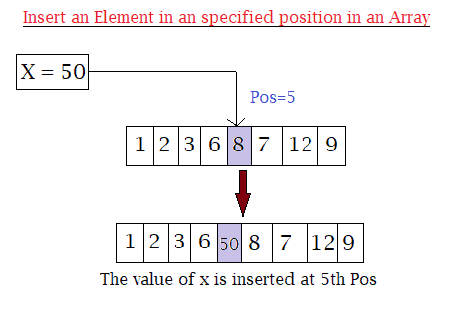
    The following program shows how to insert an element at a specific position in an Array in Java.

    The program takes the following as input:

    • The size of an array.
    • Value of elements of an array.
    • The position where the user wants to insert the new element.
    • The value of the element itself that the user wants to insert.
    Array Insertion in java

    Lastly displays the final result where the new elements have been inserted.


    Program to Insert an Element in an Array at a Specified Position in Java

    import java.util.Scanner;
    public class Insert_Array
    {
      public static void main(String[] args)
      {
        int n, x, pos;
        Scanner s = new Scanner(System.in);
    
        System.out.print("Enter size of an Array: ");
        n = s.nextInt();
    
        int a[] = new int[n + 1];
    
        System.out.println("Enter " + n + " elements in an array:");
        for (int i = 0; i < n; i++)
        {
          a[i] = s.nextInt();
        }
    
        System.out.print("Enter the position where you want to insert new element: ");
        pos = s.nextInt();
    
        System.out.print("Enter the element you want to insert at " + pos + " position: ");
        x = s.nextInt();
    
        //insertion
        for (int i = (n - 1); i >= (pos - 1); i--)
        {
          a[i + 1] = a[i];
        }
        a[pos - 1] = x;
    
        //Displaying after insertion
        System.out.print("Array after insertion: ");
        for (int i = 0; i < n; i++)
        {
          System.out.print(a[i] + " ");
        }
        System.out.print(a[n]);
      }
    }

    Output:

    Enter size of an Array: 5
    Enter 5 elements in an array:
    1
    2
    3
    4
    5
    Enter the position where you want to insert new element: 3
    Enter the element you want to insert at 3 position: 9
    Array after insertion: 1 2 9 3 4 5


  • Java Program to Find the Largest Element in an Array

    In this tutorial, we will write a java program to print the largest element present in an array. If you do not about the array and for loops working process then click the link below, as this program uses them.

    The program below takes the number element and all the values of the elements from the user as input and finds the largest element among them in java.


    Java Program to Find the Largest Element in an Array

     //largest element in an array in java
      
     import java.util.Scanner;
    
     public class LargestElementsArray 
     {
      public static void main(String[] args) 
      {
        int num, largest;
        Scanner s = new Scanner(System.in);
        
        System.out.print("Enter the number of elements for an array:");
        num = s.nextInt();
        
        int a[] = new int[num];
        
        System.out.println("Enter elements of array:");
        for(int i = 0; i < num; i++)
        {
            a[i] = s.nextInt();
        }
        
        largest = a[0];
        
        for(int i = 0; i < num; i++)
        {
          if(largest < a[i])
          {
            largest = a[i];
          }
        }
        
        System.out.println("Largest elements in an array is:"+largest);
      }
     }

    Output:

    Enter number of elements in the array:5
    Enter elements of array:
    4
    67
    89
    32
    4
    Largest elements in an array is:89


  • Java Program to Find the Sum of all the Elements in an Array (user inputs)

    In this programming tutorial, we will learn to write a java program to calculate the sum of all the elements in an array by taking array input from the user.

    The for loop in the program runs starting from 0 (array index starts from 0) to the total length of an array (i.e. till the last index).

    Although it is quite simple, you still need to have an idea of the proper function of following in java:


    Java Program to Find the Sum of all the Elements in an Array

     //sum of an array(user inputs) in java
      
     import java.util.Scanner;
    
     public class SumofElements
     {
        public static void main(String args[])
        {
          Scanner sc = new Scanner(System.in);
            
          int[] array = new int[10];
          int sum = 0;
            
          System.out.println("Enter the elements in an array:");
          for (int i=0; i < 10; i++)
          {
            array[i] = sc.nextInt();
          }
            
          //Sum calculation
          for( int num : array) 
          {
            sum = sum + num;
          }
          System.out.println("Sum of the elements is :"+sum);
        }
     }

    Output:

    Enter the elements in an array:
    3
    4
    2
    6
    8
    12
    4
    5
    7
    9
    0
    Sum of the elements is :60


  • Java Program to Sort Elements in Ascending Order of an Array

    In this tutorial, we will write a program to sort elements of an array in ascending order in java. The number of elements and elements themselves are taken as input from the user.

    The program compares the elements and the swap technique is used to arrange the elements in increasing order.

    Before that you need to have an idea of the following:


    Java Program to Sort Elements in Ascending Order of an Array

    // sort elements of an array in java.
     
    import java.util.Scanner;
    
     public class AscendingOrderArray 
     {
       public static void main(String[] args) 
       {
         int n, temp;
            
         //User inputs 
         Scanner sc = new Scanner(System.in);
            
         System.out.println("Enter the number of elements for an array: ");
         n = sc.nextInt();
            
         int ar[] = new int[n];
            
         System.out.println("Enter elements of an array:");
         for (int i = 0; i < n; i++) 
         {
           ar[i] = sc.nextInt();
         }
         sc.close();
            
         for (int i = 0; i < n; i++) 
         {
           for (int j = i + 1; j < n; j++) 
           { 
             if (ar[i] > ar[j]) 
              {
                temp = ar[i];
                ar[i] = ar[j];
                ar[j] = temp;
              }
           }
          }
            
          System.out.print("Ascending Order of array elements: ");
          for (int i = 0; i < n - 1; i++) 
          {
            System.out.print(ar[i] + ", ");
          }
         System.out.print(ar[n - 1]);
       }
     }

    Output:

    Enter the number of elements for an array:
    5
    Enter elements of an array:
    23
    5
    76
    11
    89
    Ascending Order of array elements: 5, 11, 23, 76, 89


  • Java Program to Find the Second Largest Number in an Array

    This is a tutorial on how to write a java program to display the second largest element in an array.

    Find the second-largest element in an array:

    In the below program, we take the user input for How many elements does a user wants in an array and what are the elements with the help of the Scanner class. And then declare an integer variable named “Highest” and “secondHighest” which are set to zero.

    Now using for loop and if-else if statement, we check for the highest and the second-highest. That is when the 0th index is greater than the largest, we assigned highest to secondHighest and the element at the 0th index to highest. But if the 0th index is larger than the secondHighest then we assigned the 0th index element to secondHighest.

    The for loop iteration will keep repeating until the length of an array (that is the number of elements). After the end of for loop, we display the result for the highest and second-highest by printing it.


    Java Program for the second-highest element in java with output:

    import java.util.Scanner;
    
    public class SecondHighestelements 
    {
      public static void main(String[] args) 
      {
        int num;
        int Highest = 0;
        int secondHighest = 0;
    
        Scanner elem = new Scanner(System.in);
        Scanner sc = new Scanner(System.in);
        
        //Number of elements for an Array
        System.out.println("Enter the number of elements you want:");
        num = elem.nextInt();
        
        int[] arr = new int[num];
         
        //User Input for elements 
        System.out.println("Enter the elements in an array:");
      
        for (int i=0; i < num; i++)
        {
          arr[i] = sc.nextInt();
        }
        
         for (int i = 0; i < arr.length; i++) 
          {
            if (arr[i] > Highest) 
            {
                secondHighest = Highest;
                Highest = arr[i];
            } 
            else if (arr[i] > secondHighest) 
            {
                secondHighest = arr[i];
            }
          }
        
          //Display Result
          System.out.println("\nSecond largest number in an entered Array: " + secondHighest);
          System.out.println("Largest Number in an entered Array: " + Highest);
        }
    }

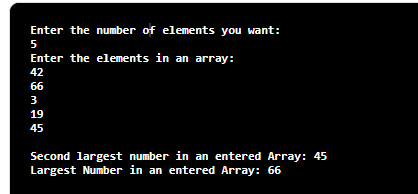
    The Output of the second largest element in an array in java:

    java

  • Java Program to Remove Duplicates from ArrayList

    In this tutorial, we will learn to write a Java program to remove duplicates from an ArrayList, we will learn to remove duplicate elements by various approaches.

    ArrayList is a collection type used mostly in java. It is the list interface from Java’s collection framework that allows duplicates in its list. It provides insertion order, flexibility in the program, and duplicates in a list.

    We will see two ways to remove duplicates in java ArrayList

    • Using HashSet
    • Using LinkedHashSet

    1. Remove duplicate elements using HashSet in ArrayList in java

    HashSet is one of the methods to remove elements from ArrayList. It does not follow insertion order which is the disadvantage of using it because once the duplicates elements are removed, the elements will not be in an insertion order inside ArrayList.

    Program:

    import java.util.ArrayList;
    import java.util.HashSet;
     
    public class HashSetDuplicates
    {
        public static void main(String[] args)
        {
            //ArrayList
            ArrayList<String> ListwithDuplicates = new ArrayList<String>();
        /*
         Duplicate elements in the following ArrayList
         Rick, Dayrl, Glenn
        */
            ListwithDuplicates.add("Rick");
            ListwithDuplicates.add("Glenn");
            ListwithDuplicates.add("Dayrl");
            ListwithDuplicates.add("Carol");
            ListwithDuplicates.add("Rick");
            ListwithDuplicates.add("Dayrl");
            ListwithDuplicates.add("Maggie");
            ListwithDuplicates.add("Glenn");
     
            //Constructing HashSet
            HashSet<String> set = new HashSet<String>(ListwithDuplicates);
     
            //List with no duplicate elementsusing set
            ArrayList<String> listWithNoDuplicates = new ArrayList<String>(set);
     
            //Display list With No Duplicate Elements in ArrayList
            System.out.println("After removal of Duplicates ");
            System.out.println(listWithNoDuplicates);
        }
    }

    The output of removing duplicate elements using HashSet:

    After removal of Duplicates
    [Rick, Dayrl, Glenn, Carol, Maggie]


    2. Remove duplicate elements using LinkedHashSet in ArrayList in java

    LinkedHashSet is also one of the other methods to remove elements from ArrayList. The advantage of using LinkedHashSet is that it does not allow duplicates and also maintains insertion order. It is the useful property of LinkedHashSet that is used in removing Duplicates elements from ArrayList.

    Program:

    import java.util.ArrayList;
    import java.util.LinkedHashSet;
     
    public class LinkedHashSetDuplicates
    {
        public static void main(String[] args)
        {
            //ArrayList
            ArrayList<String> ListwithDuplicates = new ArrayList<String>();
        /*
         Duplicate elements in the following ArrayList
         Rick, Dayrl, Glenn
        */
            ListwithDuplicates.add("Rick");
            ListwithDuplicates.add("Glenn");
            ListwithDuplicates.add("Dayrl");
            ListwithDuplicates.add("Carol");
            ListwithDuplicates.add("Rick");
            ListwithDuplicates.add("Dayrl");
            ListwithDuplicates.add("Maggie");
            ListwithDuplicates.add("Glenn");
     
            //Constructing HashSet
            LinkedHashSet<String> set = new LinkedHashSet<String>(ListwithDuplicates);
     
            //List with no duplicate elementsusing set
            ArrayList<String> listWithNoDuplicates = new ArrayList<String>(set);
     
            //Display list With No Duplicate Elements in ArrayList
            System.out.println("After removal of Duplicates ");
            System.out.println(listWithNoDuplicates);
        }
    }

    Output:

    After removal of Duplicates
    [Rick, Glenn, Dayrl, Carol, Maggie]