Blog

  • C – Pointer Arithmetic

    In this tutorial, we will learn about the various operation that can be performed on Pointers. But before that if you do not know about the Pointer click the link below.


    As the operation can be performed on numeric value and pointer is an address which is an numeric value so we can perform some operation on Pointers. There are specifically four arithmetic operators that can be performed on the Pointers and those are:

    • Increment ++
    • Decrement - -
    • Addition +
    • Substraction -
    • Comparision ==

    Let us assume that a pointer (ptr) is pointing to some integer variable whose address is 2000. Now let us perform increment operation on that pointer ptr.

    ptr++

    Now where the ptr points to? Well the ptr address value which was initially 2000 increases to 2004 because of the integer. The integer occupies 4 bytes of storage and so ptr increases by 4. The increment depends on the data-types that you are pointing through your pointer. If your pointer points to character type then the address which was initially at 2000 will increases to 2001 (as the size of the character is 1 byte).


    Increment of Pointer in C

    As from the above explanation, we conclude that the increment of the pointer by 1 means the pointer value will increase by the size of the data-types that the pointer is pointing.

    It is mostly used during the traversing of an array through which the program can reach every element present in an array.

    Example for incrementing pointer variable in C.

    #include<stdio.h>  
    
    int main()
    {  
        int num = 10;        
        int *ptr;//integer pointer 
        
        //storing the address of num variable
        ptr = &num;        
        
        printf("Address initially at ptr: %p\n", ptr);        
        
        //pointer increment
        ptr = ptr + 1;        
        printf("After increment the value of ptr: %p", ptr);
        
        return 0;  
    }    

    Output: Check the last two digit which is increased by 4 byte (int).

    Address initially at ptr: 0x7ffc86bcc234
    After increment the value of ptr: 0x7ffc86bcc238

    Example of Traversing an array by incrementing pointer variable in C.

    #include<stdio.h>  
    
    int main ()  
    {  
        //declaration of variables
        int arr[4] = {10, 20, 30, 40};  
        int i, *ptr;
        
        ptr = arr;  
        
        printf("Printing all the Element in arr.\n");
        for(i = 0; i < 4; i++)  
        {  
            printf("arr[%d] = %d\n", i, *ptr );
            ptr++;
        }
        return 0;
    }  

    Output: Following result is produced after compilation and execution.

    Printing all the Element in arr.
    arr[0] = 10
    arr[1] = 20
    arr[2] = 30
    arr[3] = 40

    Decrement of Pointer in C

    Decrement is as same as the increment. We can decrement the value of the pointer depending on its data types the pointer is pointing.

    Example for decrementing pointer variable in C.

    #include<stdio.h>  
    
    int main()
    {  
        int num = 10;        
        int *ptr;//integer pointer 
        
        //storing the address of num variable
        ptr = &num;        
        
        printf("Address initially at ptr: %p\n", ptr);        
        
        //pointer decrement
        ptr = ptr - 1;        
        printf("After decrement the value of ptr: %p", ptr);
        
        return 0;  
    }  

    Output: Check the last two digit which is decreased by 4 byte (int).

    Address initially at ptr: 0x7ffd246dc634
    After decrement the value of ptr: 0x7ffd246dc630

    Addition and Subtraction of Pointers in C

    We can add or subtract the value of the pointer variable. If you add 2 that means the value of the pointer increases 2 times depending on the size of data types that the pointer pointing to such as,

    present_address + (number  ×  size_of_the_data_type)

    Subtraction is also processed in the same manner instead of increases 2 times, pointer will be decreased by 2 times the size of the data type.

    Example for addition and subtraction of pointer variable in C.

    #include<stdio.h>  
    
    int main()
    {  
        int num = 10;        
        int *ptr;//integer pointer 
        
        //storing the address of num variable
        ptr = &num;        
        
        printf("Address initially at ptr: %p\n", ptr);        
        
        //3 pointer variable added
        ptr = ptr + 3;        
        printf("After Addition the value of ptr: %p\n", ptr);
        
        //3 pointer variable subtracted
        ptr = ptr - 3;        
        printf("After Subtracting the value of ptr: %p", ptr);
        
        return 0;  
    } 

    Output: Check the last two digit change.

    Address initially at ptr: 0x7ffc41a0bb42
    After Addition the value of ptr: 0x7ffc41a0bb54
    After Subtracting the value of ptr: 0x7ffc41a0bb42

    Pointers Comparision

    Pointers can be compared using  ==, <, and > operators in C if they are pointing to the same array.

    Example of comparing the pointers in C

    #include <stdio.h>
    
    int main()
    {
      int *ptr1, *ptr2;
      int a = 10, b = 20;
    
      ptr1 = &a;
      ptr2 = &b;
    
      if (*ptr1 > *ptr2) //comparing values 
      {
        printf("ptr1 is greater.");
      }
      else
      {
        printf("ptr2 is greater.");
      }
    
      return (0);
    }

    Output: *ptr points to the actual value stored in the address that the pointer points to.

    ptr2 is greater.

    Operation that can’t be operated on Pointer:

    The following operators are not allowed on the pointer address value as it gives the false address value. You can say that they are illegal operations on Pointers.

    1. pointer_address + pointer_address
    2. pointer_address * pointer_address
    3. pointer_address % pointer_address
    4. pointer_address / pointer_address
    5. pointer_address & pointer_address
    6. pointer_address ^ pointer_address
    7. pointer_address | pointer_address
    8. ~pointer_address

  • C – Pointers

    In programming, there are various tasks that can be achieved easily with the use of pointers such as dynamic memory allocation that needs pointers to perform. It is important to learn pointers for the programmer because it minimizes the execution time and saves memory space. Before we jump into the Pointers let us understand a little bit about the Memory Addresses.

    Memory Address:

    As we already know at this point that every variables declared in a program are stored in computer storage possessing some memory address. And these addresses can be accessed by using the ampersand (&) operator. If you have the variable name var then &var is used to access the address of that variable in a program.

    Consider the following program in C:

    #include <stdio.h>
    
    int main()
    {
      int var = 10;
    
      //Displaying the address of Variable var
      printf("Address of var: %p", &var);  
      return 0;
    }

    Output:

    Address of var: 0x7ffeeca6915c
    
    //You might get the different address

    What is Pointer?

    In C programming language pointer is a variable that stores or points to the address of another variable. This variable can be of type int, char, array, function, or any other pointer. It does not stores the value but only the address of the pointed variable.

    Syntax of Pointer:

    Pointer variables are declared in the following way using asterisk * symbol ( asterisk * = same asterisk used for multiplication).

    data_type *pointer_name;

    You can declare the pointer with different C data-types too, some are:

    int    *intp; //pointer to an integer
    float  *fltp; //pointer to a float
    char   *chp   //pointer to a character

    Initialization of Pointers:

    After declaring the pointer, we need to initialize the pointers. To get the actual address we use the ampersand (&) operator and it is used before the variable name that pointer needed to be the point.

    pointer = &variable_name;

    Short example to use in a program:

    int *ptr;
    
    int x =10;
    x = 10;
    ptr= &x;
    • Reference operator (&): It returns the variable’s address.
    • Dereference operator (*): It gets the value that has been stored in a memory address.

    Size of Pointers in C.

    The size of pointer is same for all the variable irrespective of their data types. However it depends on your machine architecture. For example, for a 32 bit computer the pointer size can be 4 bytes for a 64 bit computer the pointer size can be 8 bytes.

    See the example and you can check it on your computer by running the following program.

    #include <stdio.h>
    
    int main()
    {
        int *ptrI; //integer Pointer
        float *ptrF; //float Pointer
        char *PtrC; //character Pointer
    
        //Size of the pointer respectively
        printf("The size of int pointer is: %d\n",sizeof(ptrI));
        printf("The size of float pointer is: %d\n",sizeof(ptrF));
        printf("The size of char pointer is: %d\n",sizeof(PtrC));
        
        return 0;
    }

    Output:

    The size of int pointer is: 8
    The size of float pointer is: 8
    The size of char pointer is: 8

    Example: Use of pointer in C Program.

    #include <stdio.h>
    
    int main () {
    
       int  num = 10; 
       int  *ptr; //Declaring Pointer
    
       ptr = &num; //initializing pointer
    
       //Address stored in a ptr (address of num)
       printf("Address of num variable: %p\n", ptr);
    
       // Displying actual value present in that address
       printf("Value of ptr: %d\n", *ptr );
    
       return 0;
    }

    Output:

    Address of num variable: 0x7ffebfe68824
    Value of ptr: 10

    As you can see, in the example above we printed two things:

    1. We printed ptr that had already stored the address of num (pointed by this line: ptr = &num;) and so the program displayed the address on num variable.
    2. We printed *ptr that displayed the actual value of the variable(num) that the address stored in ptr points to.

    Now in a simple way, we can say that asterisk * returns the value of the referenced variable and ampersand (&) operator returns the address of a variable.


    NULL Pointers

    When a pointer is assigned with a null value at the time declaration then it is called a NULL pointer. We use this value when we do not assign any address to the pointer. The null pointer always contains a constant value of 0.

    Let us see an C example for NULL pointer:

    #include <stdio.h>
    
    int main()
    {
      int *ptr = NULL; //null pointer
      printf(“The value inside ptr: %x”, ptr);
    	
      return 0;
    }

    Output:

    The value inside ptr: 0

    Advantages and Disadvantages of pointers

    Pointers allow memory allocation that is Dynamic memory allocation as well as deallocation.
    They are useful for complex data structures such as in a linked list, graph, tree, etc.

    They are complex to understand, fault value may cause memory corruption pointers are comparatively slower than the variable.


  • C – Recursion

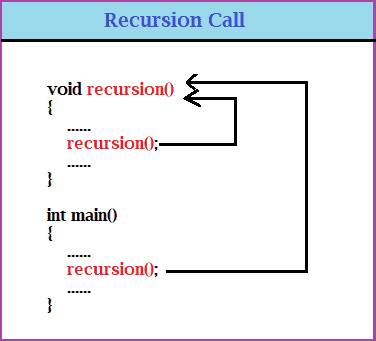
    Recursion refers to the process when a function calls itself inside that function directly or indirectly or in a cycle. And such functions are called recursive functions. However, the crucial part is the termination condition that is given to the recursive function because it might go into an infinite loop.

    If the termination is not processed properly then that will lead to stack overflow (recursion invokes stack memory) which will lead to a system crash. It could be a little hard to understand the recursive code but the code becomes shorter than the iterative code.

    void recursion()
    {
        ......
        recursion(); //calling itself
        ......
    }
    
    int main()
    {
        ......
        recursion();
        ......
    }
    Recursion

    Recursion is very useful in performing mathematical calculations such as during the calculation of factorial of a number, Fibonacci series problem, etc. Although any problem that can be performed by recursion can also be done iteratively.

    But sometimes it is best-suited to use recursion such as the tower of Hanoi, Factorial and Fibonacci calculation, etc.


    What is base condition?

    In recursion, the larger problem is solved in terms of smaller problems, and the larger value is solved by converting into a smaller value still the base condition is reached by the function. It is the condition when the computing is complete and needs to get out of the function.

    int factorial_Number(int n)
     {
    
       if (n == 1) //base condition
         return 1;
       else
         return (n* factorial_Number(n - 1));
     }

    What do you mean by direct and indirect recursion?

    When the function call itself (same function), it is called a direct call. When some function is called inside another function then it is said to be an indirect call. Relate to the example given below:

    // Direct recursion
    void direct_Func()
    {
        .... .. .
    
        direct_Fun();
    
        ... .. .
    }
    
    // Indirect recursion
    void indirect_Func1()
    {
        .... .. .
        indirect_Func2();
    
        .... .. .
    }
    void indirect_Func2()
    {
        .... .. .
        indirect_Func1();
    
        .... .. .
    }

    Factorial Program in C using Recursion

    factorial of n (n!) = n * (n-1) * (n-2) * (n-3)….1
    factorial of 5 (n!) = 5 * 4 * 3 * 2 * 1
    NOTE: Factorial of 0 (0!) = 1

     /*Find Factorial of a Number using Recursion*/
     
     #include <stdio.h>
    
     int factorial_Number(int);
    
     int main()
     {
       int num, result;
    
       //taking  user input
       printf("Enter the Number to Find the Factorial of: ");
       scanf("%d", &num);
    
       //Calling the user defined function
       result = factorial_Number(num);
    
       //Displaying factorial of input number
       printf("Factorial of %d is: %d", num, result);
       return 0;
     }
    
     //Function
     int factorial_Number(int n)
     {
       //condition to exit
       if (n == 1)
         return 1;
       else
         return (n* factorial_Number(n - 1)); //recurion: calling function itself
     }

    Output:

    Enter the Number to Find the Factorial of: 5
    Factorial of 5 is: 120


  • C Program to Find Quadrant of a given Co-Ordinate

    Questions:
    Write a C program to accept a coordinate point in an XY coordinate system and determine in which quadrant the coordinate point lies.

    A Cartesian coordinate system specifies each point uniquely in a plane by a pair of numerical coordinates.
    There are 4 quadrants in a cartesian coordinate system.

    • 1st Quadrant, both (x,y) co-ordinates are (+,+).
    • 2nd Quadrant, both (x,y) co-ordinates are (-,+).
    • 3rd Quadrant, both (x,y) co-ordinates are (-,-).
    • 4th Quadrant, both (x,y) co-ordinates are (+,-).

    If x, y values are 0,0 then it lies in a center that is the origin. And the following program displays them accordingly depending on the coordinates.


    Program to Find the Quadrant in which the given co ordinates lies in C.

    Source Code:

    #include <stdio.h>
    
    int main()
    {
      int x, y;
      printf("Enter the Coordinates(x,y): ");
      scanf("%d %d", &x, &y);
    
      //check for the condition.
      if (x > 0 && y > 0)
      {
        printf("The coordinate (%d,%d) lies in the First quadrant(+,+)\n", x, y);
      }
      else if (x > 0 && y < 0)
      {
        printf("The coordinate (%d,%d) lies in the Second quadrant(+,-)\n", x, y);
      }
      else if (x < 0 && y < 0)
      {
        printf("The coordinate (%d,%d) lies in the Third quadrant(-,-)\n", x, y);
      }
      else if (x < 0 && y > 0)
      {
        printf("The coordinate (%d,%d) lies in the Fourth quadrant(-,+)\n", x, y);
      }
    
      return 0;
    }

    Output:

    Enter the Coordinates(x,y): -3 4
    The coordinate (-3,4) lies in the Fourth quadrant(-,+)


  • C Program to Find Factorial of a Number using Recursion

    In this example, we will calculate the factorial of a number taking the value from the user in C using recursion.

    Recursion refers to the function calling itself directly or in a cycle.

    Before we begin, you should have the knowledge of following in C Programming:

    Factorial of n number: Factorial of n number is the product of all the positive descending integers and is denoted by n!.
    Example:

    factorial of n (n!) = n * (n-1) * (n-2) * (n-3)….1
    factorial of 5 (n!) = 5 * 4 * 3 * 2 * 1
    NOTE: Factorial of 0 (0!) = 1


    Factorial Program in C using Recursion

     /*Find Factorial of a Number using Recursion */
     
     #include <stdio.h>
    
     int factorial_Number(int);
    
     int main()
     {
       int num, result;
    
       //user input
       printf("Enter the Number to Find the Factorial of: ");
       scanf("%d", &num);
    
       //Calling function
       result = factorial_Number(num);
    
       //Display
       printf("Factorial of %d is: %d", num, result);
       return 0;
     }
    
     
     int factorial_Number(int n)
     {
       //Factorial of 0 is 1 
       if (n == 0)
         return (1);
       else
         return (n* factorial_Number(n - 1)); //recurion: calling function itself
     }

    Output:

    Enter the Number to Find the Factorial of: 5
    Factorial of 5 is: 120


  • Factorial Program in C using Function

    In this example, we will calculate the factorial of a number taking the value from the user in C.

    Before we begin, you should have the knowledge of the following in C Programming:

    Factorial of n number: Factorial of n number is the product of all the positive descending integers and is denoted by n!.
    Example:

    factorial of n (n!) = n * (n-1) * (n-2) * (n-3)….1
    factorial of 5 (n!) = 5 * 4 * 3 * 2 * 1
    NOTE: Factorial of 0 (0!) = 1

    In this tutorial, we will see various ways to find the factorial of a number in C.


    1. Factorial Program in C using Function with return.

    #include <stdio.h>
    
    int factorial(int);
    int main()
    {
      int num, fact = 1, result;
    
      //user input
      printf("Enter the number to find factorial: ");
      scanf("%d", &num);
    
      result = factorial(num);  //function call
    
     //display
      printf("Factorial of %d is: %d\n", num, result);
    
      getch();
      return 0;
    }
    
    //function to find factorial
    int factorial(int num)
    {
      int i, fact = 1;
    
     	//factorial calculation
      for (i = 1; i <= num; i++)
        fact = fact * i;
    
      return (fact);
    }

    Output:

    Enter the number to find factorial: 5
    Factorial of 5 is: 120


    2. C program to find factorial of a number using Ternary operator with recusrion

    The following program uses the recursion technique along with the Ternary operator. Also, the program does not declare the function prototype at first like the previous because the function is defined before the main() function.

    #include <stdio.h>
    
    int factorial(int n)
    {
      // using ternary operator with recursion
      return (n == 1 || n == 0) ? 1 : n* factorial(n - 1);
    }
    
    int main()
    {
      int num, result;
    
      //taking Inputs
      printf("Enter the number to find factorial: ");
      scanf("%d", &num);
    
      //function call and display the result
      result = factorial(num);
      printf("Factorial of %d is: %d\n", num, result);
      getch();
      return 0;
    }

    Output:

    Enter the number to find factorial: 5
    Factorial of 5 is: 120


  • C Program for Simultaneous Equations

    In this tutorial, the program finds out the solutions to the simultaneous equations in two variables. The Linear equations are present in the following form:

    • ax+by=c
    • px+qy=r

    The co-efficient (a, b, c, p, q, r) are taken as an input from the user for the two equations.


    C Program to solve Simultaneous Linear Equations in two variables

    Source Code:

    #include <stdio.h>
    
    int main()
    {
      double a, b, c, p, q, r, x, y;
    
      //Taking inputs of co-efficient for both equations
      printf("Enter the coefficents of the first equation of the form ax+by=c\n");
      scanf("%lf %lf %lf", &a, &b, &c);
    
      printf("Enter the coefficents of the second equation of the form px+qy=r\n");
      scanf("%lf %lf %lf", &p, &q, &r);
    
      if (((a*q - p *b) != 0) && ((b*p - q*a) != 0))
      {
        //In this case we have a unique solution and display x and y
        printf("The solution to the equations is unique\n");
        x = (c*q - r*b) / (a*q - p*b);
        y = (c*p - r*a) / (b*p - q*a);
    
        //Displaying the value
        printf("The value of x=%lf\n", x);
        printf("The value of y=%lf\n", y);
      }
      else
      if (((a*q - p*b) == 0) && ((b*p - q*a) == 0) && ((c*q - r*b) == 0) && ((c*p - r*a) == 0))
      {
        printf("Infinitely many solutions are possible\n");
        printf("The value of x can be varied and y can be calculated according to x's value using relation\n");
        printf("y=%lf+(%lf)x", (c/b), (-1*a/b));
      }
      else
        //No possible solution.
        if (((a*q - p*b) == 0) && ((b*p - q*a) == 0) && ((c*q - r*b) != 0) && ((c*p - r *a) != 0))
          printf("No Possible solution\n");
      getch();
    }

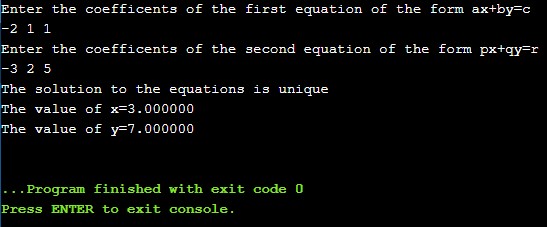
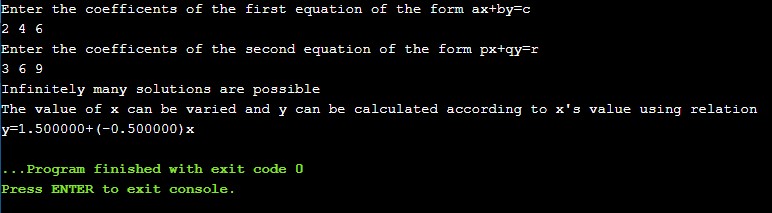
    Let us see two outputs with two different inputs of two equation:

    Output1:

    Simultaneous Equations in C

    Output2:


  • C Program to Find Roots of a Quadratic Equation

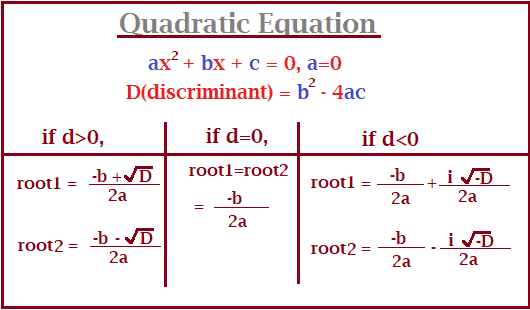
    Quadratic equations are the polynomial equation having a degree 2. For a quadratic equation ax2+ bx + c = 0, (a≠0) and the discriminant (D = b2-4ac) decides the nature of roots. There are three possibilities of discriminant and those are:

    1. when d>0, the roots are real and distinct
    2. when d=0, the roots are real and equal
    3. when d<0, the roots are real and imaginary
    quardraic equation program

    In order to understand the program, you need to have the knowledge of the following in C Programming:


    Find the Roots of a Quardratic Equation in C

    The program uses sqrt() library function in order to calculate the square root of a number. To use sqrt(), math.h header file is used.

    #include <math.h>
    #include <stdio.h>
    
    int main()
    {
      double a, b, c, d, root1, root2, real, img;
      
      printf("Enter the values for a, b and c:\n");
      scanf("%lf %lf %lf", &a, &b, &c);
    
      //determinant
      d = b *b - 4 *a * c;
    
      // real and different roots
      if (d > 0)
      {
        root1 = (-b + sqrt(d)) / (2 *a);
        root2 = (-b - sqrt(d)) / (2 *a);
        printf("root1 = %.2lf and root2 = %.2lf", root1, root2);
      }
    
      //for real and equal roots
      else if (d == 0)
      {
        root1 = root2 = -b / (2 *a);
        printf("root1 = root2 = %.2lf;", root1);
      }
    
      // d < 0 both roots are real and imaginary
      else
      {
        real = -b / (2 *a);
        img = sqrt(-d) / (2 *a);
        printf("root1 = %.2lf+%.2lfi and root2 = %.2f-%.2fi", real, img, real, img);
      }
    
      return 0;
    }

    Output:

    quadratic equation

  • Java – Increment and Decrement Operator

    The ++ and the – – are Java’s increment and decrement operators. ++ is used to increase the value by 1 and – – is used to decrease the value by 1. There are two kinds of Increment and Decrement Operators.

    They are:

    • Post-Increment or Post-Decrement:
      First, the value is used for operation and then incremented or decremented. Represented like a++ or a–.
    • Pre-Increment Pre-Decrement:
      Here First the value is incremented or decremented then used for the operation. Represented like ++a or – –a.

    Example on Increment and Decrement Operator in java

    //This program demonstrates the ++ and -- operators.
    
    public class IncrementDecrement
    {
       public static void main(String[] args)
       {
          int number = 10;
    
          //Original Value
          System.out.println("Original value: " + number);
    
          //Incrementing the number.
          number++;
    
          //Value after incrementing
          System.out.println("After Incrementing: " + number);
    
          // Decrement number.
          number--;
    
          // Display the value in number.
          System.out.println("Again, after decrementing " + number);
       }
    }

    Output: After execution following result will be displayed.

    Original value: 10
    After Incrementing: 11
    Again, after decrementing 10

    Limitations of Increment and Decrement Operators:

    Increment and decrement operators can only be applied to variables but not on constant values. If we apply on canstants then we will get a compile-time error.

    int x = 10;       
    int y = ++10; // this will through compile-time error.

    Example of Pre increment and Post increment in java:

    a = 4;
    i = ++a + ++a + a++;
    i = 5 + 6 + 6;
    (a = 7)

    The above shows the use of a++ and ++a and at the end, if you print the value of a, you will get 7 as the value of a.

    Pre-increment: (++a)

    The major point to remember is that ++a increments the value and immediately returns it.

    Post-increment: (a++)

    a++ also increments the value but returns an unchanged value of the variable. It does not return the value immediately but if it is executed on the next statement then a new value is used.

    Example of Pre decrement and Post decrement in java:

    a = 4;
    i = --a + --a + a--;
    i = 3 + 2 + 2;
    (a = 1)

    Pre-decrement: (a)

    The major point to remember is that ––a decrements the value and immediately returns it.

    Post-decrement: (a)

    a–– also decrements the value but returns an unchanged value of the variable. It does not return the value immediately but if it is executed on the next statement then a new value is used.


  • Implementation of Stack Using Array in C Program

    Stack Program in C:
    This article covers stack implementation using an array in c programming. Here, we will see how to insert in the stack, remove and display the elements in the stack.

    The basic operation of stack are:

    • PUSH(): This function is used to insert an element on top of the stack.
    • POP(): This function is used to remove the element from the top of the stack.
    • DISPLAY(): This function is used to display all the elements present in the stack.

    Some of the terms related to stack:

    • OVERFLOW: It is a state in STACK when the Stack is FULL.
    • UNDERFLOW: It is a state in STACK when the Stack is EMPTY.

    Lets us understand through C Program for stack using Array.


    C Program to Implement Stack using Array with Output

    #include <stdio.h>
    
    int stack[50], stackSize, topElmt;
    
    void push(void);
    void pop(void);
    void display(void);
    
    int main()
    {
      int choices;
      topElmt = -1;
      printf("Enter the size for STACK:");
      scanf("%d", &stackSize);
    
      printf("--------------------------------");
      printf("\n STACK OPERATIONS USING ARRAY");
      printf("\n--------------------------------");
    
      printf("\nPress 1 to PUSH");
      printf("\nPress 2 to POP");
      printf("\nPress 3 to DISPLAY");
      printf("\nPress 4 to EXIT");
    
      do {
        printf("\nEnter Your Choice:");
        scanf("%d", &choices);
    
        switch (choices)
        {
          case 1:
            {
             	//calling PUSH() Function
              push();
              break;
            }
    
          case 2:
            {
             	//calling POP() Function
              pop();
              break;
            }
    
          case 3:
            {
             	//calling DISPLAY() Function
              display();
              break;
            }
    
          case 4:
            {
              printf("\n---------END----------");
              break;
            }
    
          default:
            {
              printf("\nWrong Choice.");
            }
        }
      }
    
      while (choices != 4);
      return 0;
    }
    
    //PUSH Function
    void push()
    {
      int x;
    
     	//Checkfor if STACK is FULL or NOT
      if (topElmt >= stackSize - 1)
      {
        printf("\nSTACK is OVERFLOW");
    
      }
      else
      {
        printf("Enter an Integer that you want to insert: ");
        scanf("%d", &x);
        topElmt++;
        stack[topElmt] = x;
      }
    }
    
    //POP Function
    void pop()
    {
     	//Check if STACK is EMPTY or NOT
      if (topElmt <= -1)
      {
        printf("\nSTACK is UNDERFLOW");
      }
      else
      {
       	//displaying removed element from top oa a STACK
        printf("\nThe popped(removed) elements is %d", stack[topElmt]);
        topElmt--;
      }
    }
    
    //DISPLAY Function
    void display()
    {
      int i;
      if (topElmt >= 0)
      {
        printf("The Elements present in a STACK are: ");
    
        for (i = topElmt; i >= 0; i--)
        {
          printf("\n%d", stack[i]);
        }
    
        printf("\nEnter Your Choice");
      }
      else
      {
        printf("\n The STACK is empty");
      }
    }

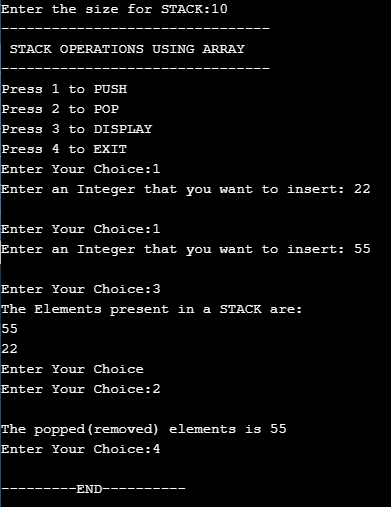
    The output of implementing stack using array in C program.