This article shows the result of how to display all the magic numbers between 1 to nth number in C programming.
What is Magic Number?
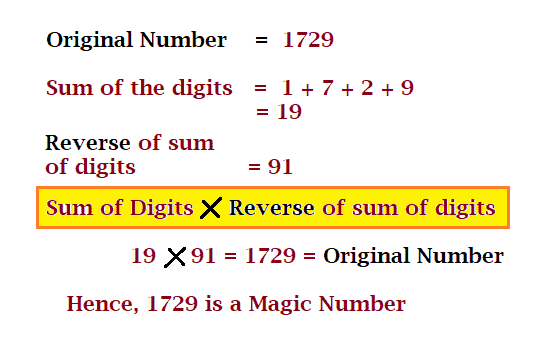
A number is said to be a MagicNumber if the sum of the digits of that number, when multiplied by the reverse number of the sum of its digits, is equal to the original number.
Example: 1729 is a magic number.
magic number
C Program to print all Magic Numbers till N.
#include <stdio.h>
#include <stdlib.h>

int main()
{
  int num, temp, i;

  printf("Enter the last number you want to check between 1 to:");
  scanf("%d", &num);

  //loop to check all the number
  for (i = 1; i <= num; i++)
  {
    int revnum = 0;
    int sumOfDigits = 0;
    temp = i;

    //calculate sum of the digits
    while (temp > 0)
    {
      sumOfDigits += temp % 10;
      temp = temp / 10;
    }

    //reversing the digits
    temp = sumOfDigits;
    while (temp > 0)
    {
      revnum = revnum *10 + temp % 10;
      temp = temp / 10;
    }

    //displaying the result
    if (revnum *sumOfDigits == i)
      printf(" %d", i);

  }

  return 0;
}
This article is to check for neon numbers in C programming. We will two different examples in C for the Neon number.
Check if the entered number is Neon number or not in C.
Display all the Neon Number within a given range in C.
Neon Numbers
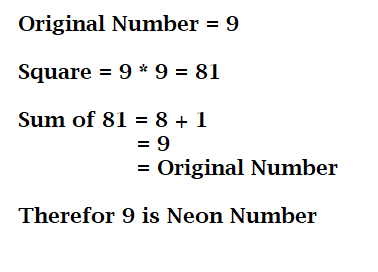
A number is said to be a neon number if the sum of the digits of a square of the number is equal t the original number.
Example: 9 is a Neon number (see explanation in the diagram).
Neon Number in C
C Program to Check the Number is a Neon Number or Not
The following program takes the user input for a number that the user wants to check for. Then square the number sum the digits using while loop but you can also sum the digits using for the loop, using the following code: for(i = square; i > 0; i = i/10) { sum = sum + i % 10; } instead of a while loop. And lastly, print the result accordingly to print the neon number.
Source Code:
#include <stdio.h>

int main()
{
  int num, square, i, sum = 0;

  printf("Enter the number you want to check for Neon No.: ");
  scanf("%d", &num);

  //Calculating the square of the No.
  square = num * num;

  i = square;

  //Adding the digits of square
  while (i > 0)
  {
    sum += i % 10;
    i = i / 10;
  }

  //Check for original Number and display
  if (sum == num)
    printf("The entered number %d is a neon number.", num);
  else
    printf("The entered number %d is NOT a neon number.", num);

  return 0;
}
The output of neon number in c programming.
C Program to print all the Neon Number within a Range
#include <stdio.h>

int isNeon(int num)
{
   int sum = 0;
   int square = num * num;

   while (square != 0)
   {
      sum += square % 10;
      square /= 10;
   }

   return (sum == num);
}

int main()
{
   int lrRange = 0, upRange = 0, i;

   //user inputs for max and min value
   printf("Enter lower range: ");
   scanf("%d", &lrRange);
   printf("Enter the upper range: ");
   scanf("%d", &upRange);

   // check number
   printf("\nAll the Neon numbers between %d to %d are: ", lrRange, upRange);

   for (i = lrRange; i <= upRange; i++)
   {
     	//calling function by passing i
      if (isNeon(i))
         printf("%d ", i);
   }

   return 0;
}
Output:
Enter lower range: 0
Enter the upper range: 10000

All the Neon numbers between 0 to 10000 are:
0 1 9
In this tutorial, you will learn how to display all the Prime Numbers from 1 to entered Range in C.
Prime Number:
A Prime Number is a number that is only divisible by 1 and itself. Example: 2, 3, 5, 7, 11, 13, 17, etc. These numbers are only divisible by 1 and the number itself.
The program takes the input from the user. It takes the upper range value and depending on this it will display all the Prime numbers between 1 to upper-value range.
C program to Display all the Prime Numbersup to a Given Number.
Source code:
#include <stdio.h>

void main()
{
  int num, i, j, temp;

 //User Input
  printf("Enter the Number upto which you want to print: ");
  scanf("%d", &num);

 //Printing all the Prime number
  printf("Prime Numbers upto %d are: \n", num);
  for (i = 1; i <= num; i++)
  {
    temp = 0;
    for (j = 1; j <= num; j++)
    {
      if (i % j == 0)
        temp++;
    }

    if (temp == 2)
      printf("%d ", i);//printing
  }

  getch();
}
The output of Prime Number in C programming.
You may go through the following prime program in C.
In this tutorial, you will learn how to display all the Prime Numbers within a Range in C.
Prime Number:
A Prime Number is a number that is only divisible by 1 and itself. Example: 2, 3, 5, 7, 11, 13, 17, etc. These numbers are only divisible by 1 and the number itself.
The program takes the input from the user. It takes the lower range value and upper range value and depending on this it will display all the Prime numbers between those lower and upper-value ranges.
C Program to Display all the Prime Numbers in a Given Range.
#include <stdio.h>

int main()
{
  int i, j, temp, minRange, maxRange, n;

  printf("Enter the LowerRange(initial) Value: ");
  scanf("%d", &minRange);

  printf("Enter the UpperRange(End) Value: ");
  scanf("%d", &maxRange);

  printf("Listing all the Prime Number between %d and %d:\n", minRange, maxRange);
  for (i = minRange + 1; i < maxRange; i++)
  {
    temp = 1;
    for (j = 2; j < i / 2; j++)
      if (i % j == 0)
      {
        temp = 0;
        break;
      }

    if (temp)
      printf("%d ", i);
  }
}
The output of Printing Prime Number in C.
You may go through the following prime program in C.
In this tutorial, you will learn about the Bubble Sort and how to implement bubble sort in C Program.
Question: Write a c program to implement bubble sort.
Sorting is a technique for organizing the elements in an increasing or decreasing order.
Bubble Sort Algorithm:
Bubble Sort is a comparison-based algorithm in which the adjacent elements are compared and swapped to maintain the order or found in the wrong order.
Bubblesort compares the first element with the next one and if found in the wrong order then that compared element in an array are swapped. This algorithm traverse through the entire element in an array.
Time Complexity of Bubble Sort:
Best case:O(n)
Average case:O(n^2)
Worst case:O(n^2)
Bubble Sort in C Program:
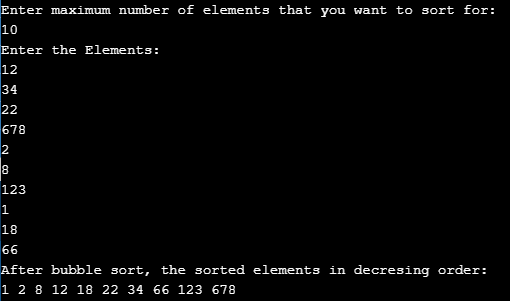
Source Code: We will see for descending order. We take the user input for the elements.
//Bubble sorting c

#include <stdio.h>

int main()
{
  int arr[50], numElemt, i, j, swap;

  printf("Enter maximum number of elements that you want to sort for:\n");
  scanf("%d", &numElemt);

  printf("Enter the Elements:\n");

 //elements input
  for (i = 0; i < numElemt; i++)
  {
    scanf("%d", &arr[i]);
  }

 //calculation for sorting for decreasing order
  for (i = 0; i < numElemt - 1; i++)
  {
    for (j = 0; j < numElemt - i - 1; j++)
    {
      if (arr[j] > arr[j + 1])
      {
        swap = arr[j];
        arr[j] = arr[j + 1];
        arr[j + 1] = swap;
      }
    }
  }

  printf("After bubble sort, the sorted elements in decresing order:\n");

//Displaying sorted elements
  for (i = 0; i < numElemt; i++)
    printf("%d ", arr[i]);

  return 0;
}
In this tutorial, you will learn about the Merge Sort and how to implement in C Program.
Merge Sort Algorithm:
Merge Sort is a sorting algorithm that follows a Divide and Conquer algorithm approach to sort the elements in an array in ascending or descending order.
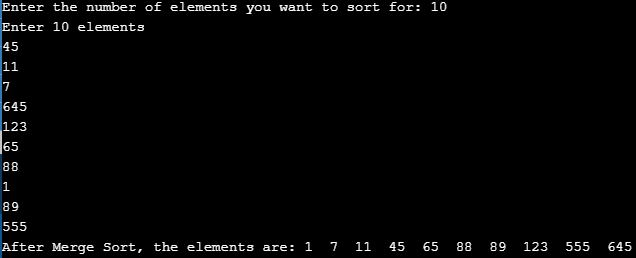
It divides the array into two halves and sorts them separately. Again the two halves are divided into separate two halves and the process keeps on going until the elements are totally separated. After that, the elements are combined together in the same steps as they were separated but while combining the elements are sorted in each steps.
When the combining step is completed we will get a fully sorted array.
Time Complexity of Merge Sort:
Best case:0(n log n)
Average case:0(n log n)
Worst case:0(n log n)
C Program for Merge Sort
//merge sort c program

#include <stdio.h>
#include <stdlib.h>

void MergeSorted(int[], int);
void Merg(int[], int[], int, int, int);
void MSort(int[], int[], int, int);

int main()
{
  int i, numElemt, arr[50];

  //User Input
  printf("Enter the number of elements you want to sort for: ");
  scanf("%d", &numElemt);

  printf("Enter %d elements\n", numElemt);
  for (i = 0; i < numElemt; i++)
  {
    scanf("%d", &arr[i]);
  }

  MergeSorted(arr, numElemt);

  printf("After Merge Sort, the elements are: ");
  for (i = 0; i < numElemt; i++)
  {
    printf("%d  ", arr[i]);
  }

  printf("\n");
}

void Merge(int arr[], int temp[], int lpos, int rpos, int rend)
{
  int i, lend, numElemt, temppos;
  lend = rpos - 1;
  temppos = lpos;
  numElemt = rend - lpos + 1;

  while (lpos <= lend && rpos <= rend)
  {
    if (arr[lpos] <= arr[rpos])
      temp[temppos++] = arr[lpos++];
    else
      temp[temppos++] = arr[rpos++];
  }

  while (lpos <= lend)
    temp[temppos++] = arr[lpos++];
  while (rpos <= rend)
    temp[temppos++] = arr[rpos++];

  for (i = 0; i < numElemt; i++, rend--)
    arr[rend] = temp[rend];
}

void MSort(int arr[], int temp[], int left, int right)
{
  int mid;
  if (left < right)
  {
    mid = (left + right) / 2;
    MSort(arr, temp, left, mid);
    MSort(arr, temp, mid + 1, right);
    Merge(arr, temp, left, mid + 1, right);
  }
}

void MergeSorted(int arr[], int numElemt)
{
  int *temparray;
  temparray = malloc(sizeof(int) *numElemt);
  MSort(arr, temparray, 0, numElemt - 1);
  free(temparray);
}
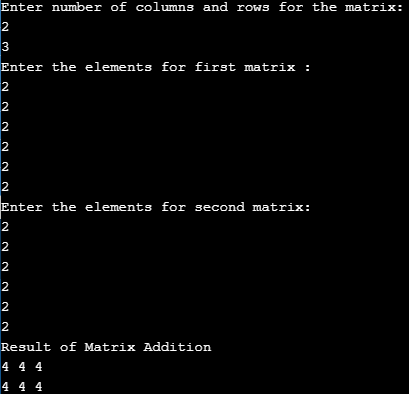
C Program to Add Two Matrices: During the Addition of Matrix in c programming, the number of rows and number of columns for both the matrices must be the same.
Before we start, if you want to learn about the Arrays as this program uses array, click the link below.
Firstly, declare array and integer to store the matrices. The program takes the user input for both rows and columns and then takes the elements for both matrices. Then by adding both the matrices (c[i][j] = a[i][j]+b[i][j];), program display the result which is stored in c[][] (printf("%d ",c[i][j]);)
Source Code:
#include <stdio.h>

int main()
{
  int A[50][50], B[50][50], C[50][50];
  int i, j, m, n;

 //User Inputs
  printf("Enter number of columns and rows for the matrix:\n");
  scanf("%d%d", &m, &n);

  printf("Enter the elements for first matrix :\n");
  for (i = 0; i < m; ++i)
    for (j = 0; j < n; ++j)
      scanf("%d", &A[i][j]);

  printf("Enter the elements for second matrix:\n");
  for (i = 0; i < m; ++i)
    for (j = 0; j < n; ++j)
      scanf("%d", &B[i][j]);

 //Addition operation and displaying
  printf("Result of Matrix Addition\n");
  for (i = 0; i < m; ++i)
  {
    for (j = 0; j < n; ++j)
    {
      C[i][j] = A[i][j] + B[i][j];
      printf("%d ", C[i][j]);	//displaying
    }

    printf(" \n");
  }

  return 0;
}
Question: Write a C Program to find the area and circumference of a circle.
The program simply calculates the area and circumference of a circle using its formula. Although the value PI is already defined with preprocessor directives. It takes that value if PI is used anywhere in the program.
You can check out the following if you do not know about the operators as this program uses operators.
C Program to Calculate the Area and Circumference of a Circle
Source Code:
//Find the area and circumference of a circle

#include <stdio.h>
#include <conio.h>

//Defining the pi value
#define PI 3.142857

void main()
{
  int r;
  float area, circum;

  printf("Enter the radius of a circle: ");
  scanf("%d", &r);

 //calculate the area
  area = PI * r * r;
  printf("Area of a circle: %f ", area);

 //calculate the circumference
  circum = 2 *PI * r;
  printf("\n Circumference of a circle: %f ", circum);

  getch();
}
The output of calculating the area and circumference of a circle in C.
Enter the radius of a circle: 5
Area of a circle: 78.571426
Circumference of a circle: 31.428570
This post focuses on the Binary search tree (BST) and the implementation of a Binary Search Tree program for Insertion, Deletion, and Traversal in C.
What is a Binary Search Tree (BST)?
It is one of the most used data structures where the nodes are placed together in a tree-like structure. Tree-like structure refers to the structure where there is a parent node and each parent is linked with its child nodes. But in BST a parent node cannot have more than two child nodes. The top node being the root node in the structure.
NOTE: The child nodes on the left of its parent node are equal to its parent node. The child nodes in the right of its parent node are greater than its parent node.
C Program for Binary Search Tree (BST)
#include < stdio.h >
#include <malloc.h >

  struct node
  {
    int info;
    struct node * lchild;
    struct node * rchild;
  }*root;

void find(int item, struct node **par, struct node **loc)
{
  struct node *ptr, *ptrsave;

  if (root == NULL)
  {
    *loc = NULL;
    *par = NULL;
    return;
  }

  if (item == root->info)
  {
    *loc = root;
    *par = NULL;
    return;
  }

  if (item < root->info)
    ptr = root->lchild;
  else
    ptr = root->rchild;
  ptrsave = root;

  while (ptr != NULL)
  {
    if (item == ptr->info)
    {*loc = ptr;
      *par = ptrsave;
      return;
    }

    ptrsave = ptr;
    if (item < ptr->info)
      ptr = ptr->lchild;
    else
      ptr = ptr->rchild;
  }

  *loc = NULL;
  *par = ptrsave;
}

void insert(int item)
{
  struct node *tmp, *parent, *location;
  find(item, &parent, &location);
  if (location != NULL)
  {
    printf("Item already present");
    return;
  }

  tmp = (struct node *) malloc(sizeof(struct node));
  tmp->info = item;
  tmp->lchild = NULL;
  tmp->rchild = NULL;

  if (parent == NULL)
    root = tmp;
  else
  if (item < parent->info)
    parent->lchild = tmp;
  else
    parent->rchild = tmp;
}

void case_a(struct node *par, struct node *loc)
{
  if (par == NULL)
    root = NULL;
  else
  if (loc == par->lchild)
    par->lchild = NULL;
  else
    par->rchild = NULL;
}

void case_b(struct node *par, struct node *loc)
{
  struct node * child;

  //intializing child
  if (loc->lchild != NULL)
    child = loc->lchild;
  else
    child = loc->rchild;

  if (par == NULL)
    root = child;
  else
  if (loc == par->lchild)
    par->lchild = child;
  else
    par->rchild = child;
}

void case_c(struct node *par, struct node *loc)
{
  struct node *ptr, *ptrsave, *suc, *parsuc;

  ptrsave = loc;
  ptr = loc->rchild;
  while (ptr->lchild != NULL)
  {
    ptrsave = ptr;
    ptr = ptr->lchild;
  }

  suc = ptr;
  parsuc = ptrsave;

  if (suc->lchild == NULL && suc->rchild == NULL)
    case_a(parsuc, suc);
  else
    case_b(parsuc, suc);

  if (par == NULL)
    root = suc;
  else
  if (loc == par->lchild)
    par->lchild = suc;
  else
    par->rchild = suc;

  suc->lchild = loc->lchild;
  suc->rchild = loc->rchild;
}

int del(int item)
{
  struct node *parent, *location;
  if (root == NULL)
  {
    printf("Tree empty");
    return 0;
  }

  find(item, &parent, &location);
  if (location == NULL)
  {
    printf("Item not present in tree");
    return 0;
  }

  if (location->lchild == NULL && location->rchild == NULL)
    case_a(parent, location);
  if (location->lchild != NULL && location->rchild == NULL)
    case_b(parent, location);
  if (location->lchild == NULL && location->rchild != NULL)
    case_b(parent, location);
  if (location->lchild != NULL && location->rchild != NULL)
    case_c(parent, location);
  free(location);
}

int preorder(struct node *ptr)
{
  if (root == NULL)
  {
    printf("Tree is empty");
    return 0;
  }

  if (ptr != NULL)
  {
    printf("%d  ", ptr->info);
    preorder(ptr->lchild);
    preorder(ptr->rchild);
  }
}

void inorder(struct node *ptr)
{
  if (root == NULL)
  {
    printf("Tree is empty");
    return;
  }

  if (ptr != NULL)
  {
    inorder(ptr->lchild);
    printf("%d  ", ptr->info);
    inorder(ptr->rchild);
  }
}

void postorder(struct node *ptr)
{
  if (root == NULL)
  {
    printf("Tree is empty");
    return;
  }

  if (ptr != NULL)
  {
    postorder(ptr->lchild);
    postorder(ptr->rchild);
    printf("%d  ", ptr->info);
  }
}

void display(struct node *ptr, int level)
{
  int i;
  if (ptr != NULL)
  {
    display(ptr->rchild, level + 1);
    printf("\n");
    for (i = 0; i < level; i++)
      printf("    ");
    printf("%d", ptr->info);
    display(ptr->lchild, level + 1);
  }
}

main()
{
  int choice, num;
  root = NULL;
  while (1)
  {
    printf("\n");
    printf("1.Insert\n");
    printf("2.Delete\n");
    printf("3.Inorder Traversal\n");
    printf("4.Preorder Traversal\n");
    printf("5.Postorder Traversal\n");
    printf("6.Display\n");
    printf("7.Quit\n");
    printf("Enter your choice : ");
    scanf("%d", &choice);

    switch (choice)
    {
      case 1:
        printf("Enter the number to be inserted : ");
        scanf("%d", &num);
        insert(num);
        break;
      case 2:
        printf("Enter the number to be deleted : ");
        scanf("%d", &num);
        del(num);
        break;
      case 3:
        inorder(root);
        break;
      case 4:
        preorder(root);
        break;
      case 5:
        postorder(root);
        break;
      case 6:
        display(root, 1);
        break;
      case 7:
        break;
      default:
        printf("Wrong choice\n");
    }
  }
}
Output of Binary Search Tree Program in C: After execution following will be displayed in Screen.
1.Insert
2.Delete
3.Inorder Traversal
4.Preorder Traversal
5.Postorder Traversal
6.Display
7.Quit
Enter your choice : 1
Enter the number to be inserted : 250

1.Insert
2.Delete
3.Inorder Traversal
4.Preorder Traversal
5.Postorder Traversal
6.Display
7.Quit
Enter your choice : 1
Enter the number to be inserted : 350

1.Insert
2.Delete
3.Inorder Traversal
4.Preorder Traversal
5.Postorder Traversal
6.Display
7.Quit
Enter your choice : 4
Enter the number to be inserted : 250
250  350
1.Insert
2.Delete
3.Inorder Traversal
4.Preorder Traversal
5.Postorder Traversal
6.Display
7.Quit
Enter your choice : 6

        350
   250
1.Insert
2.Delete
3.Inorder Traversal
4.Preorder Traversal
5.Postorder Traversal
6.Display
7.Quit
Enter your choice :