Virtual functions are created in order to override the functions with the same name just like in the given below program.
C# Program for Multilevel Inheritance with Virtual Function
using System;

class A
{
  public virtual void Function()
  {
    Console.WriteLine("Class A.Funtion()");
  }
}

class B: A
{
  override public void Function()
  {
    base.Function();
    Console.WriteLine("Class B:A.Function()");
  }

  public virtual void _Function()
  {
    Console.WriteLine("Class B._Function()");
  }
}

class C: B
{
  new public void _Function()
  {
    base._Function();
  }
}

class Program
{
  static void Main(String[] s)
  {
    C c = new C();
    c.Function();
  }
}
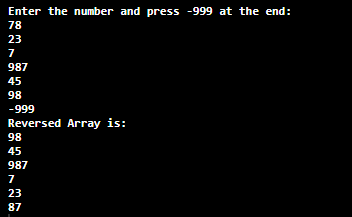
In this tutorial, we will write a C# program to reverse an array, we have used while loop and for loop to reverse an array in C#.
Question: Write a C# Program to Reverse an array without using function.
C# Program to Reverse an Array
using System;
using System.Collections;
using System.Collections.Generic;
using System.Linq;

class ArrayReversing
{
  static void Main(string[] s)
  {
    const int EXIT_VALUE = -999;
    List<int> numbers = new List<int> ();

    Console.WriteLine("Enter the number and press -999 at the end:");

    while (true)
    {
      var input = Console.ReadLine();
      int i = int.Parse(input);
      if (i == EXIT_VALUE) break;
      numbers.Add(i);

    }

    int[] array = numbers.ToArray();
    Console.WriteLine("Reversed Array is:");
    for (int i = array.Length - 1; i > -1; i--)
    {
      Console.WriteLine(array[i].ToString());
    }
  }
}
Sorting is a technique for organizing the elements in an increasing or decreasing order. Similarly, the Selection sort algorithm is one of the techniques to achieve the ordering of elements in an array in an increasing or decreasing order in a program.
Selection Sort Algorithm
The selection sort is a simple sorting algorithm which is an in-place comparison-based algorithm. It has two parts where the left end has a sorted part and the right end has an unsorted part.
In the beginning, the left end is empty and the right end has all the elements then the smallest element from the right end is brought to the left end and swapped with the leftmost element. This process continues until the element from the right end is brought to the left by swapping.
Although, it may cause a problem with the large inputs.
C# Program for Selection Sort
There is an unsorted list of arrays given in a program. With the help of selection sort, we sort those array lists in ascending order.
Source Code:
//selection sort
using System;

public class Sort
{
  static void Main(string[] arg)
  {
    int temp, smallest;

    int[] array = new int[10]
    { 45, 67, 2, 998, 1, 33, 27, 7, 90, 11 };

    Console.WriteLine("Selection sort in C#");

    Console.Write("Unsorted Array are: ");
    for (int i = 0; i < array.Length; i++)
      Console.Write(array[i] + " ");

    for (int i = 0; i < array.Length - 1; i++)
    {
      smallest = i;
      for (int j = i + 1; j < array.Length; j++)
      {
        if (array[j] < array[smallest])
          smallest = j;
      }

      temp = array[smallest];
      array[smallest] = array[i];
      array[i] = temp;
    }

    Console.WriteLine();

    Console.Write("After Selection sort: ");
    for (int i = 0; i < array.Length; i++)
      Console.Write(array[i] + " ");

  }
}
In this tutorial, we will write a java program to calculate the sum of all the elements present in an array. Although it is quite simple, you still need to have an idea of the proper function of following in java:
The for loop in the program runs starting from 0 (array index starts from 0) to the total length of an array (i.e. till the last index). An inbuilt function is used to find the length of an array (array.length).
Java Program to Find the Sum of all the Elements in an Array
  //find the sum of an array in java

 public class SumOfAnArray
 {
    public static void main(String[] args)
    {
      int sum = 0;
      //Initializing array
      int [] arr = new int [] {5, 4, 6, 1, 9};

      //sum of array
      for (int i = 0; i < arr.length; i++)
      {
        sum = sum + arr[i];
      }

      System.out.println("Sum of all the elements of an array: " + sum);
    }
 }
Comparison operators are used to comparing two values and return boolean results. These operators are used to check for relations like equality, greater than, less than between two values.
They are used with a loop statement and also with if-else statements.
Following are the Relational operators in Java:
Operator
Name
Example
==
Equal to.
A == B
!=
Not equal.
A != B
>
Greater than.
A > B
<
Less than.
A < B
>=
Greater than or equal to.
A >= B
<=
Less than or equal to.
A <= B
Java Program for Relational Operator
  public class Relational
  {

    public static void main(String args[])
    {
    int x = 10;
    int y = 20;

    System.out.println("Is x == y = " + (x == y) );
    System.out.println("Is x != y = " + (x != y) );
    System.out.println("Is x > y = " + (x > y) );
    System.out.println("Is x < y = " + (x < y) );
    System.out.println("Is y >= a = " + (y >= x) );
    System.out.println("Is y <= a = " + (y <= x) );

    //Demonstration to use it with if-else
    if(x==y){
        System.out.println("X is equal to y");
    }
    else{
        System.out.println("X is not equal to y" );
    }

   }
  }
Output:
  Is x == y = false
  Is x != y = true
  Is x > y = false
  Is x < y = true
  Is y >= a = true
  Is y <= a = false
  X is not equal to y
Ternary Operator is also known as the Conditional operator. It is used to evaluate Boolean expressions. We can say that it is a short version of the if-else statement. But here instead of operating on two operands, it operates on three operands, and therefore the name ternary.
Syntax: of Ternary Operator:
variable num1 = (expression) ? value if true : value if false
Java Program for Ternary Operator :
  public class Ternary
  {
    public static void main(String args[])
    {
    int number1, number2;
    number1 = 30;

    number2 = (number1 == 15) ? 200: 400;
    System.out.println( "For false, value of number2 is: "+number2);

    /* number1 is not equal to 15 the second value after colon that is false value is assigned to the variable number2 */

    number2 = (number1 == 30) ? 200: 400;
    System.out.println( "For true, value of number2 is: "+number2);

    /* number1 is equal to 30 so the first value that is the true value is assigned to the variable number2 */
    }
  }
Output:
For false, value of number2 is: 400
For true, value of number2 is: 200
Assignment operator is used to assigning a value to any variable. This operator assigns the value of the right–hand side of an operator to the left–handside. Various assignment operator in Java: These are the short version formed by combining the two operators.
For example Instead of writing, we can write a+= 5.
Assignment operator: ‘=’ This operator assigns the value on the right to the variable on the left. a = 20; B = 30; Ch = 'cha';
Add AND assignment operator: ‘+=’ This operator first adds the current value of the variable on the left to the value on the right and then assigns the result to the variable on the left. c+=7; a+=b;
Subtract AND assignment operator: ‘-=’ This operator first subtracts the current value of the variable on the left from the value on the right and then assigns the result to the variable on the left. c-=7; a-=b;
Multiply AND assignment operator: ‘*=’ This operator first multiplies the current value of the variable on the left to the value on the right and then assigns the result to the variable on the left. c*=7; a*=b;
Divide AND assignment operator: ‘/=’ This operator first divides the current value of the variable on the left by the value on the right and then assigns the result to the variable on the left. c/=7; a/=b;
Modulus AND assignment operator: ‘%=’ It takes modulus using two operands and assigns the result to the left operand. C %= A is equivalent to C = C % A ;
Right shift AND assignment operator: ‘>>=’ This operator is used for Right shift Operation. C >>= 2 ;
Left shift AND assignment operator: ‘<<=’ This operator is used for Left shift Operation. C <<= 2 ;
Bitwise AND assignment operator: ‘&=’ This operator is used for Bitwise AND Operations. C &= 2;
Bitwise exclusive OR and assignment operator: ‘^= This operator is used for Bitwise exclusive OR Operations. C ^= 2;
Bitwise inclusive OR and assignment operator: ‘|= This operator is used for Bitwise inclusive OR. C |= 2;
Example of Assignment Operator:
  public class AssignmentOperator
  {
    public static void main(String args[])
    {
    int number1 = 100;
    int number2 = 10;

    number2 += number1;
    number2 -= number1;
    number2 *= number1;
    number2 /= number1;
    number2 %= number1;


    System.out.println(" Result of +=: "+number2);
    System.out.println(" Result of -=: "+number2);
    System.out.println(" Result of *=: "+number2);
    System.out.println(" Result of /=: "+number2);
    System.out.println(" Result of %=: "+number2);
    }
  }
Output:
 Result of +=: 110
 Result of -=: 90
 Result of *=: 1000
 Result of /=: 10
 Result of %=: 0
Bitwise operator works on bits and performs a bit-by-bit operation. There are six Bitwise Operators and can be applied to the integer types, long, int, short, char, and byte.
List of Bitwise Operator in Java:
Bitwise AND: ‘&’ Binary AND Operator copies a bit to the result if it exists in both operands.
Bitwise OR: ‘|’ Binary OR Operator copies a bit if it exists in either operand.
Bitwise XOR: ‘^’ Binary XOR Operator copies the bit if it is set in one operand but not both.
Binary Left Shift: ‘<<’ TThe left operands value is moved left by the number of bits specified by the right operand.
Binary Right Shift: ‘>>’ The left operand’s value is moved right by the number of bits specified by the right operand.
Bitwise complement: ‘~’ Binary Ones Complement Operator is unary and has the effect of ‘flipping’ bits.
zero-fill right shift: ‘>>>’ The left operands value is moved right by the number of bits specified by the right operand and shifted values are filled up with zeros.
Java Program for Bitwise Operator :
public class Bitwise
  {
    public static void main(String args[]) {

    int number1 = 11;  /* 15 = 00001011 */
    int number2 = 22;  /* 10 = 00010110 */
    int output = 0;

    output = number1 & number2;
    System.out.println("Result for number1 & number2: "+output);

    output = number1 | number2;
    System.out.println("Result for number1 | number2: "+output);

    output = number1 ^ number2;
    System.out.println("Result for number1 ^ number2: "+output);

    output = ~number1;
    System.out.println("Result for ~number1: "+output);

    output = number1 << 2;
    System.out.println("Result for number1 << 2: "+output);
    output = number1 >> 2;
    System.out.println("Result for number1 >> 2: "+output);
   }
  }
Output:
 Result for number1 & number2: 2
 Result for number1 | number2: 31
 Result for number1 ^ number2: 29
 Result for ~number1: -12
 Result for number1 << 2: 44
 Result for number1 >> 2: 2