Author: admin

  • C String – strlwr() function

    strlwr() function in C String converts all the characters present in a given string to Lowercase.

    The strlwr() function is defined in the header file string.h.

    It takes a single argument that is the name of the string and is written as follows.

    strlwr(string_name);

    C Program for strlwr() function

    #include <stdio.h>
    #include <string.h>
    
    int main() 
    {
      char str[20] = "SIMple2CODe.CoM";
      
      printf("Original String: %s", str);  
      printf("Lowercasing all the Characters: %s", strlwr(str));  
     
      return 0;
    }

    Output:

    Don’t be alarmed if it does not run on your compiler. It is just that some functions like strlwr(), which are only available in ANSI C (Turbo C/C++) and are not available in the standard C-GCC compiler.


  • C String – strrev() function

    Reversing a string in C can be done by strrev() function in a single line. This function simply reverses the given string in a program.

    The strrev() function is defined in the header file string.h.

    It takes a single argument that is the name of the string and is written as follows.

    strrev(string_name);

    C Program for strrev() function

    #include <stdio.h>
    #include <string.h>
    
    int main() 
    {
      char str[] = "simple2code";
      
      printf("Original String: %s", str);  
      printf("Reversed str String: %s", strrev(str));  
     
      return 0;
    }

    Output:

    Original String: simple2code
    Reversed str String: edoc2elpmis

    Don’t be alarmed if it does not run on your compiler. It is just that some function like strrev(), which are only available in ANSI C (Turbo C/C++) and are not available in the standard C-GCC compiler.


  • C String – strcmp() function

    strcmp() function is used to compare two string to each other and returns an integer value.

    The strcmp() function is defined in the header file string.h.

    It takes two arguments, the name of the first string and the second string. These two strings are compared with each other and the returned integer value depends on following condition.

    • returns 0: if both the string are equal.
    • returns negative integer: if string1 < string2
    • returns positive integer: if string1 > string2

    And is written as follows:

    strcmp(first_string, second_string);

    C Program for strcmp() function

    #include <stdio.h>
    #include <string.h>
    
    int main() 
    {
      char str1[] = "simple2code";
      char str2[] = "simple2code.com";
      char str3[] = "simple2code";
      int return_result;
    
      //comaprision between str1 and str2
      //with if..else statement
      if(strcmp(str1, str2) == 0)    
          printf("Strings (str1,str2) are equal.");    
      else    
          printf("Strings (str1,str2) are not equal.");
          
       //comaprision between str1 and str2
      //by displaying integer value
      return_result = strcmp(str1, str3);
      printf("\nRetuned Integer value fron str2 and str3 cmp: %d", return_result);
    
    
      return 0;
    }

    Output:

    Strings (str1,str2) are not equal.
    Retuned Integer value fron str2 and str3 cmp: 0

    The program shows the comparison in two different ways, one with help of if..else statement in C and another recognized by the integer value returned by strcmp() function.


    C String – strncmp function

    It is the same as the above strcmp() function but here the difference is that it takes the third argument for n number of characters to be compared from both the strings.

    It is written as follows:

    strncmp(first_string, second_string, n);

    C Program for strncmp() function

    #include <stdio.h>
    #include <string.h>
    
    int main() 
    {
      char str1[] = "simple2codeWebsite";
      char str2[] = "simple2code.com";
    
      //comparing only 11 characters from both the strings
      if(strncmp (str1, str2, 11) == 0)    
          printf("Strings (str1,str2) are equal.");    
      else    
          printf("Strings (str1,str2) are not equal.");
    
    
      return 0;
    }

    Output:

    Strings (str1,str2) are equal.

    As you can see, the third argument passed is 11 that means the strncmp() functions take 11 characters from both the strings and compare them to each other and check if they are equal or not.

    In this case, the result is equal even though both the strings (simple2codeWebsite, simple2code.com) are different but their first 11 characters are equal. Hence the result is equal.


  • C String – strcat() function

    strcat() function is used to combine two string together to form a single string in a program.

    It concatenates two strings and the final result is returned to the first string. The strcat() function is defined in the header file string.h.

    It takes two arguments, the name of the first string and the second string. These two strings are joined together and the first string stores the final result. And is written as follows:

    strcat(first_string, second_string);

    C Program for strcat() function

    #include <stdio.h>
    #include <string.h>
    
    int main()
    {
        char str1[20] = "This is ";
        char str2[20] = "Simple2Code website.";
        
        strcat(str1, str2);
    
        //str1 stores the concate result
        printf("After concatenation: %s", str1);
    
        return 0;
    }

    Output:

    After concatenation: This is Simple2Code website.


    C String – strncat function

    It is the same as the above strcat() function but here the difference is that it takes the third argument for n number of characters to be concatenated from the second string to the first string in a program. Like strcat, the result will be stored in the first string.

    It is written as follows:

    strncat(first_string, second_string, n);

    C Program for strncat() function

    #include <stdio.h>
    #include <string.h>
    
    int main()
    {
        char str1[20] = "This is ";
        char str2[20] = "Simple2Code website";
        
        //4 character are chose from str2
        strncat(str1, str2, 4);
    
        //Display only This is Simp
        printf("After concatination: %s", str1);
    
        return 0;
    }

    Output:

    After concatenation: This is Simp


  • C String – strcpy() function

    strcpy() function in C is used to copy the contents from one string (source) to another string (destination).

    The strcpy() function is defined in the header file string.h. It takes two arguments, destination and source. The source is from where the string is taken and the destination is to where the string is copied and written as follows:

    strcpy(destination, source);

    C Program for strcpy() function

    #include <stdio.h>
    #include <string.h>
    
    int main()
    {
        char str1[20] = "Simple2Code";
        char str2[20];
    
        printf("String on str2: %s.", strcpy(str2, str1));
    
        return 0;
    }

    Output:

    String on str2: Simple2Code.


  • C String – strlen() function

    strlen() function in C is used to calculate the length of the given string. It counts the number of characters present in a String excluding the null character ‘\0‘.

    The strlen() function is defined in the header file string.h. It takes one argument that is the string name and written as follows:

    strlen(string_name);


    C Program for strlen() function

    #include <stdio.h>
    #include <string.h>
    
    int main()
    {
        char str[20] = "Simple2Code";
    
        printf("Length of a String str: %zu", strlen(str));
    
        return 0;
    }

    Output:

    Length of a String str: 11


  • C – String Functions

    Often, we need t to manipulate the String according to the need of the program. However, we can do that manually in a program but that is complex to comprehend and the program becomes very large.

    So to make it easy, C provides us with some library functions. And these functions are defined under string.h header file in C.

    There are various in-built String functions in C through which we can manipulate the String in a program. These functions are provided by the Standard C library.

    Learn more on following topics before String function.

    The following are the important string functions that mostly used in String manipulation in C:

    FunctionWork of Function
    strlen()returns length of the string
    strcpy()copies the contents of string to another
    strcat()concatenates(joins) two strings
    strcmp()compares two strings
    strlwr()returns string in lowercase
    strupr()returns string in uppercase
    strrev()returns reverse a string.

    There are more functions such as:


  • C gets() and puts() functions in String

    In this tutorial, you will learn about the two functions that are used in String, gets() and puts() function in C. Learn more on String.


    How o read and write a line of text in C

    gets() and puts() function are used for reading and writing a line of text or String in C. These both functions are included in a header file stdio.h.

    gets() function in C

    This gets() when used in a program allowed the user to enter the characters or line of text until the user encountered the new line or you can say until the user presses the enter key. It also allows the space-separated line of text or String.

    It is used in the program in the following manner:

    C Program for gets() function.

    #include<stdio.h>  
    
    int main ()  
    {  
        char str[40];  
        printf("Enter the text: ");  
        gets(str); 
        
        printf("You have entered: %s", str); 
        return 0;
    } 

    Output:

    Enter the text: This is simple2code.com.
    You have entered: This is simple2code.com.

    Although, gets() function is risky to use, the program might throw a warning when you used gets() because it does not check the array bound and keep on taking character until the new line is entered. This can be avoided by the use of fgets() function which only reads the character to the limit stated in the program.

    C Program for fgets() function.

    fgets() function takes three argument:

    • Name of the String,
    • The size that is the number of character to read,
    • stdin which is the standard input to take input from the keyboard.
    #include <stdio.h>
    
    int main() 
    {
        char str[20];
        printf("Enter the text: ");
        fgets(str, 20, stdin);
        
        //display
        printf("You have entered: %s",str);
        return 0;
        
    }

    Output:

    Enter the text: This is simple2code.
    You have entered: This is simple2code.

    puts() function in C

    puts() function works in a manner similar to printf() function. It is used to print or display the string in C and moves the cursor to the first position.

    C Program for puts() function.

    #include<stdio.h>    
    
    int main()
    {    
        char name[30];    
        printf("Enter the text: ");    
        gets(name); //reads  
        
        
        printf("You have entered: ");    
        puts(name); //displays  
        return 0;    
    }

    Output:

    Enter the text: This is simple2code.
    You have entered: This is simple2code.

    C Program for fputs() function.

    fputs() takes two argument:

    • Name of the String itself,
    • stdout which is the standard output to display on the screen.
    #include <stdio.h>
    
    int main()
    {
      char str[30];
      printf("Enter the Website: ");
      gets(str); //reads
      
      printf("You have entered: ");
      fputs(str, stdout); //prints
      return 0;
        
    }

    Output:

    Enter the Website: This is simple2code.
    You have entered: This is simple2code.

  • Strings in C

    This tutorial contains about the String in C programming. You will learn about the declaration, initialization of String, and the use of string with examples.

    What is String?

    A string is defined as a series of characters or an array of characters(terminated by a null character ‘\0’). Each character present in the array occupies one byte of memory. The manipulation of text(words or sentences) in a c program is done by String.

    The termination character that is the ‘\0’ character is essential to add in the string as it is the only way to specify where the particular string ends.

    Declaring and Initializing a String in C

    You can declare the string in two ways:

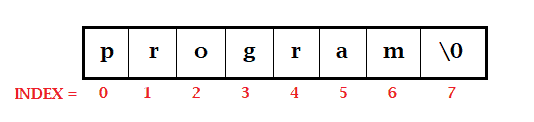
    1. By character array: Here we declare the character array with a single character as one element within the single quote. Since the last element of the array needs to be a null character so the size of the array is one more than the number of characters used. Hence always take one size more than you actually need in an array for the null character.

    char str[8] = {'p','r','o','g','r','a','m','\0'};
    char str[] = {'p','r','o','g','r','a','m','\0'};

    Memory presentation of the above character array in C/C++:

    string

    2. By String Literal: In this case, we can simply write the complete string(words or sentence) at once that is by the string literal. Here, you don’t have to add a null character at the end, the compiler will append ‘\0’ at the end of the string.

    char str[]="program";
    char str[15]="simple2code";

    In both cases, you can either give the array size or you can just leave it blank and it will take the size according to the number of characters you will initialize it with.

    For character %s format specifier is used in a program.


    Let us see a simple example:

    String program:

    #include <stdio.h>
    
    int main () 
    {
    
       //By character array
       char arr[13] = {'S','i','m','p','l','e','T','o','C','o','d','e','\0'};
       printf("This Website: %s\n", arr);
       
       //By String Literal
       char str[] = "Simple2code Tutorial";
       printf("This Website Tutorial: %s\n", str);
       
       return 0;
    }

    Output:

    This Website: SimpleToCode
    This Website Tutorial: Simple2code Tutorial


    How to Read String from the User.

    Taking input from the user is done by a built-in library function scanf(). Scanf() keeps on taking the input from the user until it encounters whitespace (space, newline, tab, etc.).

    NOTE that we do not use the & operator(use for address) in scanf() function, since it is an array of characters and the name (str) itself indicates the base address of the array (string).

    String C Program:

    #include <stdio.h>
    
    int main()
    {
        char str[20];
        
        //taking input
        printf("Enter Stream: ");
        scanf("%s", str);
        
        //displaying the input 
        printf("Stream is: %s", str);
        return 0;
    }

    Output:

    Enter Stream: Computer Science
    Stream is: Computer

    In the above program, only the Computer is displayed when we try to print the string that is because of the white space in between. Now this could be overcome by changing a line of code that is you need to write scanf("%[^\n]s", str) instead of scanf("%s", str). It will allow you to store the string until a newline(\n) is encountered.

    Let see it in a program.

    #include <stdio.h>
    
    int main()
    {
        char str[20];
        
        //taking input
        printf("Enter Stream: ");
        scanf("%[^\n]s", str);//replaced code
        
        //displaying the input 
        printf("Stream is: %s", str);
        return 0;
    }

    Output:

    Enter Stream: Computer Science.
    Stream is: Computer Science.


    Passing String to a Function

    Passing a string to a function is done in the same way as passing an array to a function.

    Example: C program to pass a string to a function

    #include <stdio.h>
    
    void displayFunc(char str[])
    {
        printf("Stream is: %s", str);
    }
    
    int main()
    {
        char str[20];
        
        //taking input
        printf("Enter Stream: ");
        scanf("%[^\n]s", str);
        
        //calling function
        displayFunc(str);
        return 0;
    }

    Output:

    Enter Stream: Computer Science.
    Stream is: Computer Science.


    String with Pointers

    We have already seen the use of pointers with arrays. In the same way, we can use a pointer with a string in C to point the String. We can manipulate the elements of a string with the pointer.

    Example 1: String and Pointer

    #include<stdio.h>  
    
    int main ()  
    {  
        char str[11] = "Simple2Code"; 
        
        //ptr pointer points to str String
        char *ptr = str;    
        printf("String present in str: %s",ptr);//str string is printed  
        
        return 0;
    }  

    Output:

    String present in str: Simple2Code


    Example 2: String and Pointer

    #include <stdio.h>
    
    int main(void) 
    {
      char str[] = "Simple Code";
    
      printf("Oth position: %c\n", *str);   // S
      printf("3th position: %c\n", *(str+3));  // p
    
      char *strPtr;
    
      strPtr = str;
      printf("Oth position: %c\n", *strPtr);    // S
      printf("7th position: %c", *(strPtr+7));  // C
    }

    Output:

    Oth position: S
    3th position: p
    Oth position: S
    7th position: C

    As you can see we can manipulate the element with the help of the pointer too. We can increment or decrement the pointer in order to get to the required positioned element.
  • C – Pointer to Pointer (with Example)

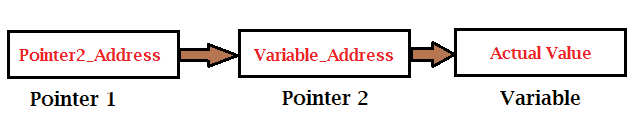
    As we know by now that a pointer stores the address of the pointed variable. But it is not the only use, pointer also stores the address of another pointer forming a chain like structure.

    When we defined the pointer to a pointer, it means the first pointer contains the address of the second pointer and the second pointer contains the address of an actual variable.

    Pointer to Pointer

    We can declare the pointer to pointer variable by simply adding an additional asterisk * before the pointer name. example:

    int **pointer_name;

    C Program for Pointer to Pointer

    #include <stdio.h>
    
    int main() 
    {
    
        int x = 50;
        
        //pointer declaration
        int *ptr1;
        int **ptr2;
    
        //assigning address to pointer
        ptr1 = &x;
        ptr2 = &ptr1;
    
        //Printing the address of each variable
        printf("Address of x: %u\n", &x);
        printf("Address of p1: %u\n", &ptr1);
        printf("Address of p2: %u\n\n", &ptr2);
    
        //Printing the value that pointer and variable stores
        printf("Value stored by x: %u\n", x);
        printf("Value stored by ptr2: %d\n", *ptr2);
        printf("\nValue that **p2 pointing to: %d\n", **ptr2);
        
        return 0;
    
    }

    Output:

    Address of x: 556073700
    Address of p1: 556073704
    Address of p2: 556073712
    
    Value stored by x: 50
    Value stored by ptr2: 556073700
    
    Value that **p2 pointing to: 50