Author: admin

  • Java Program to print ASCII value of a Character

    In this tutorial, you will learn how to find the ASCII value of a character in Java. Before that, you need to have the knowledge of the following in Java Programming.

    ASCII stands for American Standard Code for Information Interchange. It is a 7-bit character set that contains 128 (0 to 127) characters. It represents the numerical value of a character.

    Example: ASCII value for character A is 65, B is 66 but a is 97, b is 98, and so on.

    There are two ways to find the ASCII value of a character, we will learn both of them.

    1. Variable Assignment
    2. Using Type-Casting

    1. Variable Assignment

    Java internally converts the character values to ASCII values, we do not require any type of method to do so.

    public class AsciiValue    
    {  
        public static void main(String[] args)   
        {  
            // character whose ASCII value to be found  
            char ch1 = 'A';  
            char ch2 = 'a';  
            
            //assigning character to int  
            int ascii1 = ch1;  
            int ascii2 = ch2;  
            
            System.out.println("The ASCII value of " + ch1 + " is: " + ascii1);  
            System.out.println("The ASCII value of " + ch2 + " is: " + ascii2);  
        }  
    }  

    Output:

    The ASCII value of A is: 65
    The ASCII value of a is: 97


    2. Using Type-Casting

    Type-casting refers to the casting of one data-type variable to another data type.

    public class AsciiValue    
    {  
        public static void main(String[] args)   
        {  
            // character whose ASCII value to be found  
            char ch1 = 'A';  
            char ch2 = 'a';  
            
            //casting to int  
            int ascii1 = (int) ch1;  
            int ascii2 = (int) ch2;  
            
            System.out.println("The ASCII value of " + ch1 + " is: " + ascii1);  
            System.out.println("The ASCII value of " + ch2 + " is: " + ascii2);  
        }  
    }  

    Output:

    The ASCII value of A is: 65
    The ASCII value of a is: 97


    We can also take the user input for character by using the Scanner class and print the ASCII value accordingly as shown in the program below.

    import java.util.Scanner;
    
    public class AsciiValue    
    {  
        public static void main(String[] args)   
        {  
            Scanner sc = new Scanner(System.in);
            
            // User Input 
            System.out.print("Enter a character: ");  
            char ch = sc.next().charAt(0); 
            
            //assigning to int  
            int ascii1 = ch;  
            
            System.out.println("The ASCII value of " + ch + " is: " + ascii1);  
        }  
    }  

    Output:

    Enter a character: b
    The ASCII value of b is: 98


  • C Program to Count the Number of Digits in an Integer

    In this tutorial, you will learn how to count the number of Digits in an integer in C programming. You will learn various approaches possible to Count the Number of Digits. But before that, you need to have knowledge of the following topics in C programming.

    Explanation:
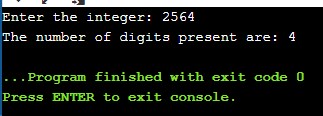
    The following programs simply take the user input and display how many digits are present in that integer.

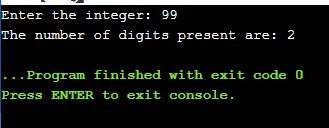
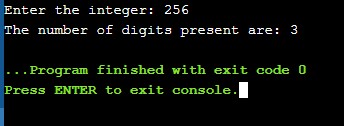
    Example: Consider an Integer “256“, The number of digits present here is 3. Therefore the program displays 3 as a result of the program.

    1. C Program to Count the Number of Digits using while loop

    The same method is applied if you want to do it with the for a loop. Instead of while loop, use for loop in the calculation part, the rest remains the same

    #include <stdio.h>
    
    int main()
    {
      // variable declaration
      int num;
      int count = 0;
    
      //user Input
      printf("Enter the integer: ");
      scanf("%d", &num);
    
      //calculation
      while (num != 0)
      {
        num = num / 10;
        count++;
      }
    
      printf("The number of digits present are: %d", count);
      return 0;
    }

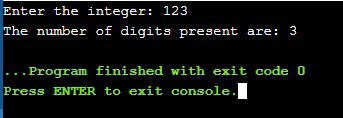
    Output:


    2. C Program to Count the Number of Digits using math library function

    Here, we will not use any loops to calculate the result. We will use one of the inbuilt functions provided by the math library in C language and in a single line. The logarithmic function will be helpful in such a program.

    log10(num)+1, where log10() is the predefined function in math.h header file.

    #include <stdio.h>
    #include <math.h>
    
    int main()
    {
      // variable declaration
      int num;
      int count = 0;
    
      //user Input
      printf("Enter the integer: ");
      scanf("%d", &num);
    
      //calculation
      count = (num == 0) ? 1 : log10(num) + 1;
    
      printf("The number of digits present are: %d", count);
      return 0;
    }

    Output:


    3. C Program to Count the Number of Digits using function

    A separate function is created in the program and the integer value is passed as an argument in the program as shown below.

    #include <stdio.h>
    
    int calculate(int n); //function prototype
    
    int main()
    {
      // variable declaration
      int num;
      int result = 0;
    
      printf("Enter the integer: ");
      scanf("%d", &num);
    
      result = calculate(num);
      printf("The number of digits present are: %d", result);
    
      return 0;
    }
    
    int calculate(int n)
    {
      int count = 0;
      while (n != 0)
      {
        n = n / 10;
        count++;
      }
    
      return count;
    }

    Output:


    4. C Program to Count the Number of Digits using recursion

    Here static is used to count. As the recursion function calls itself again and again until the condition is full-filled, so static variable count is declared so that its value doesn’t initialize again and again after the first call.

    #include <stdio.h>
    
    int calculate(int n); //function prototype
    
    int main()
    {
      // variable declaration 
      int num;
      int result = 0;
    
      printf("Enter the integer: ");
      scanf("%d", &num);
    
      result = calculate(num);
      printf("The number of digits present are: %d", result);
    
      return 0;
    }
    
    int calculate(int n)
    {
      static int count = 0;
    
      if (n > 0)
      {
        count = count + 1;
        return calculate(n / 10);
      }
      else
      {
        return count;
      }
    }

    Output:


  • Command Line Argument in C

    The arguments passed from the command line are called command-line arguments. Command-line arguments are passed to the main() method.

    It allows you to pass the values in a program when they are executed. This is useful when the developer wants to control the program from the outside.

    Since the values passed to the main() function, there are changes that need to be made in main() function. See the syntax below.

    int main(int argc, char *argv[])

    Let us see each of the argument passed:

    • argv – It is the total number of arguments in the command line including the program name. It counts the file name as the first argument.
    • argv[] – It contains all the arguments, the first one being the file name itself.

    Example: C Program for Command Line Argument

    #include <stdio.h>  
    
    void main(int argc, char *argv[] )  
    {  
      
       printf("Program name itself is: %s\n", argv[0]);  
       
       if(argc < 2)
       {  
          printf("No argument passed through command line.\n");  
       }  
       else
       {  
          printf("First argument is: %s\n", argv[1]);  
       }  
    }

    Note that argv[0] holds the name of the program itself and argv[1] points to the first command-line argument and argv[n] gives the last argument.

    Output:

    Run the above program in windows by passing an argument.

    cprogram.exe simple2code

    It will print the following result:

    Program name itself is: cprogram
    First argument is: simple2code

    Now if you pass multiple arguments (like: cprogram.exe simple2code is website), it will still display the same result as above.

    But is you pass the argument in double quote, the program will treat that as one single value.

    cprogram.exe “simple2code is a Website”

    It will display the following result:

    Program name itself is: cprogram
    First argument is: simple2code is a Website

    If no argument is supplied, argc will be 1.


  • C – Union

    Like Structure in C, Union is also a user-defined data type that is used to store the collection of different data types which are grouped together.

    Union and structure both are the same, except allocating memory for their members. Structure allocates storage space for each member separately whereas, Union allocates one common storage space for all its members providing an efficient way of using the same memory location for multi-purpose.

    Defining Union

    The keyword union is used to define union. The syntax of union is stated below.

     union tag_name
     {
        data_type var_name1;
        data_type var_name2;
        data_type var_name3;
    
        ...
     };

    Applying above syntax we can write the union for student in following way in C.

    union student
    {
       int st_id;
       char st_name[10];
       char st_address[50];
    };

    Creating a Union variable

    Union variable is created to allocate the memory then we can perform some task, defining union does not allocate memory. Union variable will always have the size of its largest member

    Union variable can be created in two different ways:

    1. Union variable can be created inside the main() function as shown blow.

    union student
    {
       int st_id;
       char st_name[10];
       char st_address[50];
    };
    
    int main()
    {
      union student
     s1, s2, *s3;
      return 0;
    }

    2. Union variable can be created after defining the union as shown below.

    union student
    {
       int st_id;
       char st_name[10];
       char st_address[50];
    } s1, s2, *s3;

    In both s1 and s2 are union variables and s3 is a union pointer variable.


    How to access the members of union?

    Accessing the (.) dot operator is used to access the union members and -> operator is used to access the pointer variables.

    Consider the above mention example of union. We can access its members in the following ways:

    • s1.st_id;
    • s2._st_name;
    • (*s3).st_address or s3->st_address

    Example of Union in C programming

    We will see two examples, first one will give a garbage value as only one at a time the memory is allocated to one member.

    1. Union Program in C: shows garbage value

    #include <stdio.h>  
    #include <string.h>
    
    union student
    {
       int id;
       char name[25];
    }s1; //declaring union var s1 
    
    int main( )  
    {  
       //storing values
       s1.id = 101;  
       strcpy(s1.name, "Sherlock Holmes"); 
       
       //Printing 
       printf( "Student id : %d\n", s1.id); //output: garbage value 
       printf( "Student name : %s\n", s1.name);
       
       return 0;  
    }  

    Output:

    Student id : 1919248467
    Student name : Sherlock Holmes

    1. Union Program in C: proper result

    #include <stdio.h>  
    #include <string.h>
    
    union student
    {
       int id;
       char name[25];
    }s1; //declaring union var s1 
    
    int main( )  
    {  
       //storing and printint one at a time
       s1.id = 101; 
       printf( "Student id : %d\n", s1.id); //output: garbage value
       
       strcpy(s1.name, "Sherlock Holmes"); 
       printf( "Student name : %s\n", s1.name);
       
       return 0;  
    }  

    Output:

    Student id : 101
    Student name : Sherlock Holmes

    Note that in the above example one member is being used at a time that’s why all the members are printed properly else the student id value might get corrupted like the one in first example.
    Using one variable at a time is the main purpose of using ‘union’.


  • C – Structure and Function

    Just like any other variables that are passed in a function, structure can also be pas structs to functions. But before that you must go through the following topics in C.


    Passing structures to functions

    While passing a structure we may pass the members of the structure or we can pass the structure variable itself. See the example below.

    #include <stdio.h>
    
    struct student 
    {
       char name[50];
       int roll;
    };
    
    // function prototype
    void display_function(struct student stud);
    
    int main() 
    {
       struct student s1;
    
       printf("Enter Student's name: ");
       scanf("%[^\n]%*c", s1.name);//reads until \n is entered
    
       printf("Enter the Student's Roll: ");
       scanf("%d", &s1.roll);
    
       display_function(s1); //struct variable is passed
    
       return 0;
    }
    
    void display_function(struct student stud) 
    {
       printf("\n-------------DISPLAY---------\n");
       printf("Name of the Student: %s", stud.name);
       printf("\nRoll Number of the Student: %d", stud.roll);
    }

    Output:

    Enter Student's name: Sherlock Holmes
    Enter the Student's Roll: 101
    
    -------------DISPLAY---------
    Name of the Student: Sherlock Holmes
    Roll Number of the Student: 101

    The variable of the structure (s1) itself is passed into the display_function function as an argument.


    How to return a struct from a function

    Go through the following example to see how a structure is returned from the function.

    #include <stdio.h>
    
    struct student
    {
        char name[25];
        int roll;
    };
    
    // struct type function prototype
    struct student stud_detail();
    
    int main()
    {
        struct student s;
    
        s1 = stud_detail();
    
        printf("\n---------DISPLAY--------\n");
        printf("Name of the Student: %s", s1.name);
        printf("\nRoll of the Student: %d", s1.roll);
        
        return 0;
    }
    
    struct student stud_detail() 
    {
      struct student s;
    
      printf("Enter Student's name: ");
      scanf ("%[^\n]%*c", s.name);
    
      printf("Enter Roll Number: ");
      scanf("%d", &s.roll);
      
      return s;// returning struct variable
    }	

    Output:

    Enter Student's name: Sherlock Holmes
    Enter Roll Number: 101
    
    ---------DISPLAY--------
    Name of the Student: Sherlock Holmes
    Roll of the Student: 101

    As you can see in the example, a separate structure variable (s) is declared inside the function (stud_detail()), and after entering all the information of the student, s is returned and displayed in the main function.


  • C Nested Structure

    Nested Structure in C is nothing but the structure within a structure. We can declare a structure inside a structure and have its own member function. With the help of nested structure, complex data types are created.

    The struct declare inside another struct has its own struct variable to access the data members of its own. Following is the Syntax of nested structure.

    structure S_name1
    {
        data_type member1;
        data_type member2;
        data_type member3;
        ...
    
        structure S_name2
        {
            data_type member_1;
            data_type member_2;
            data_type member_3;
            ...
            
        }, var1
    
    } var2;

    Structure can be nested in two different ways:

    1. By Embedding structure

    Embedding method means to declare structure inside a structure. It is written in following way in C.

    struct Dept
    {     
       int D_id;  
       char D_name[30];  
       
       struct Emp
        {  
          int emp_name[30];  
          int emp_id;  
          int emp_add;   
        }e1;  //Emp Variable
    
    }d1;//Dept variable

    2. By separating structure

    This is the second method where the structures are declared separately but the dependent structure is declared inside the main structure as one of its members. And it is written in the following way in C.

    //Dependent structure
    struct Emp  
    {     
       int emp_name[30];  
       int emp_id;  
       int emp_add;  
    
    };
    
    //main Structure
    struct Dept
    {  
       int D_id;  
       char D_name[30]; 
       struct Emp e1;//Emp variable  
    }d1; 

    Accessing Nested structure in C

    Accessing the members is done by (.) dot operator (already discussed). But in a nested structure, members of the nested structure (inner structure) is accessed through the outer structure followed by the (.) dot operator.

    Consider the above Dept and Emp structure, if we want to access the Emp members, we need to access through Dept and is done in following way.

    d1.e1.emp_name;
    d1.e1.emp_id;
    d1.e1.emp_add;

    Note: You can extended the nesting of structure to any level.


    C Program for Nested Structure

    #include <stdio.h>
     
    struct college
    {
        int col_id;
        char col_name[40];
    };
     
    struct student 
    {
        int Stud_id;
        float score;
    
        struct college c1; //college variable
    }s1;
     
    int main() 
    {
        printf("College Detail\n");
        
        printf("Enter College name: ");
        scanf("%[^\n]s", s1.c1.col_name);
        printf("Enter college ID: ");
        scanf("%d", &s1.c1.col_id);
    
        printf("\nStudent Detail\n");
    
        printf("Enter Student ID: ");
        scanf("%d", &s1.Stud_id);
        printf("Enter Score: ");
        scanf("%d", &s1.score);
        
        
        printf("----------DISPLAY-----------\n");
    
        printf("College ID: %d\n", s1.c1.col_id);
        printf("College Name: %s\n", s1.c1.col_name);
        printf("\nStudent Id: %d\n", s1.Stud_id);
        printf("Student Score: %d\n", s1.score);
    
        return 0;
    }

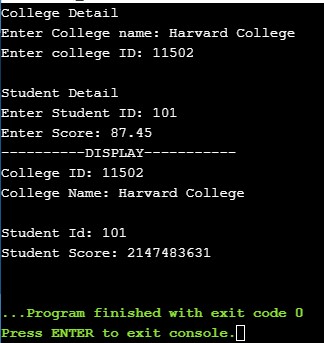
    Output:

    Nested structure in C

  • C – Structures and Pointers

    In this tutorial, you will learn how to use pointers in structure and how to access the members of structure using pointer. But before, if you do not know about structure and pointers click the link below.


    Use of pointer in Structure in C

    We use pointers in structure to define a pointer variable of the struct. Just like we define the pointer with any other variable, a pointer is also defined with struct in the same way.

    struct struct_name
    {
        data_type member1;
        data_type member2;
        ...
        ...
    };
    
    int main()
    {
        //defining the structure pointer variable
        struct struct_name *struct_pointer;
    }

    Now struct_pointer points to the structure. And we can store the address of the structure variables in that pointer.


    Accessing Structure members using pointer.

    As discussed earlier in Structure, there are two ways to access the members of the structure. One is dot operator(.) (already discussed), another is -> operator.

    #include <stdio.h>
    
    struct student
    {
       char name[25];
       int roll_no;
    };
    
    int main()
    {
        struct student *studentPtr, s1;
        studentPtr = &s1;   
    
        printf("Enter the Name: ");
        scanf("%[^\n]s", &studentPtr->name);
    
        printf("Enter the Roll Number: ");
        scanf("%d", &studentPtr->roll_no);
    
        //Displaying
        printf("\nName of the student: %s\n", studentPtr->name);
        printf("Roll of the Student: %d", studentPtr->roll_no);
    
        return 0;
    }

    Output:

    Enter the Name: James Shatt
    Enter the Roll Number: 101
    
    Name of the student: James Shatt
    Roll of the Student: 101

  • Structure in C with Example

    In C programming, the structure is user-defined data types that allow us to store the combination of different data types together. All the different data type variables are represented by a single name.

    As we have studied earlier that Array can hold only a similar type of variable in contiguous memory locations. Similarly, a structure can hold several data of various kinds in a contiguous memory location.

    Why to use Structure?

    Suppose, let say I want to store different attributes of different data types. For example, i want to store the information about the student which contain name(string), roll_no(int), address(string), Score(float), etc. All these are of different types. So to store these various kinds of attributes you need to create all these again and again for each student. And that would be very time-consuming and a headache to create the same variables again and again.

    That is when structure comes into action. With the help of structure now I can create the members for the structure (members refers to the name, roll_no, address, etc.). And create the variables for each student. Go through the example below, you will understand.

    Structures are variables that have several parts, each part of the object can have different types. Each part of the structure is called a member of the structure.


    Syntax:

    The keyword used to define the structure is struct.

    struct structure_name 
    {  
        data_type member1;  
        data_type member2;
        data_type member3; 
        ... 
        ...  
    };  

    Consider basic data of student: name, roll_no, address, score.
    student structure is defined in the following way:

    struct student
    {
    
      char name[30];
      int roll_no;
      char address[5O];
      float score;
     };

    Declaring Structure variable

    A structure variable is required to access the members of the structure. There are two ways to declare structure variable in C,

    1st way:

    Let say there are the following members of structure student.

    struct student
    {
      char name[30];
      int roll_no;
      char address[5O];
      float score;
     };

    And now to create a structure variable for the above student structure, the following line needs to be written inside the main function.

    struct student s1, s2;

    s1 and s2 are used to access the member of the student. These are like the objects for the student just like an object in C++.

    2nd Way:

    Another method is to declare the objects right after defining the structure as shown below.

    struct student
    {
      char name[30];
      int roll_no;
      char address[5O];
      float score;
     } s1,s2;   //struct varibale created

    Which one to use 1st way or 2nd way?

    1. Use the 1st way, if the number of variables is not fixed because creating the variable in the main() function gives you more flexibility.
    2. Use the 2nd way, if the number of variables that you need to use is fixed.

    Scope:
    A structure type declaration can be local or global, depending upon where the declaration is made.


    Access members of a structure

    There are two ways to access the members of the structure.

    1. – (Member or Dot operator)
    2. -> – (Structure pointer operator), discussed in the next.

    1. – (Member or Dot operator)

    Let say that I want to access the member name of s1 by (.) Dot operator. This can be done in the following way:

    s1.name;

    C Structure program

    1. Example to store information for more than one student in a structure.

    #include<stdio.h>
    #include <string.h>
    
    struct student      
    {  
      char name[30];
      int roll_no;
      char address[40];
      float score;     
    }s1, s2;  //declaring structure variable   
    
    int main()    
    {    
       //storing student 1 Info   
       strcpy(s1.name, "Sherlock Holmes");
       s1.roll_no = 101; 
       strcpy(s1.address, "221B Baker Street");
       s1.score = 91.10; 
       
       //storing student 2 Info   
       strcpy(s2.name, "James Moriarity");
       s2.roll_no = 102; 
       strcpy(s2.address, "13 Street, Ireland");
       s2.score = 89.05;
          
       //printing student 1 Info   
       printf( "Student 1 Name: %s\n", s1.name);    
       printf( "Student 1 Roll No: %d\n", s1.roll_no);
       printf( "Student 1 Address: %s\n", s1.address);
       printf( "Student 1 Score: %.2f\n", s1.score);
       
       //printing student 2 Info   
       printf( "\nStudent 2 Name: %s\n", s2.name);    
       printf( "Student 2 Roll No: %d\n", s2.roll_no);
       printf( "Student 2 Address: %s\n", s2.address);
       printf( "Student 2 Score: %.2f\n", s2.score);
    
      return 0;  
    }     

    Output:

    Student 1 Name: Sherlock Holmes
    Student 1 Roll No: 101
    Student 1 Address: 221B Baker Street
    Student 1 Score: 91.10

    Student 2 Name: James Moriarity
    Student 2 Roll No: 102
    Student 2 Address: 13 Street, Ireland
    Student 2 Score: 89.05


    2. Example to store information by taking user input and adding two numbers in structure in c.


    #include<stdio.h>
    
    struct student      
    {  
      char name[30];
      float maths;
      float science;
      float chemistry;
      float total;
    }s1, s2;  //declaring structure variable   
    
    int main()    
    {    
       //Taking student 1 and 2 Name  
       printf("Enter Student 1 Name:\n");
       gets(s1.name);
       printf("Enter Student 2 Name:\n");
       gets(s2.name);
       
       //taking s1 and s2 marks
       printf("\nEnter Student 1 marks on Maths, Science and Chemistry respectively:\n");
       scanf("%f %f %f", &s1.maths, &s1.science, &s1.chemistry);
       printf("Enter Student 2 marks on Maths, Science and Chemistry score respectively:\n");
       scanf("%f %f %f", &s2.maths, &s2.science, &s2.chemistry);
       
       //Adding s1 and s2 marks
       s1.total = s1.maths + s1.science + s1.chemistry;
       s2.total = s2.maths + s2.science + s2.chemistry;
          
       //comparing the total
       if(s1.total > s2.total)
         printf("\n%s scored the highest: %.2f", s1.name, s1.total);
       else if(s1.total < s2.total)
         printf("%s scored the highest: %.2f", s2.name, s2.total);
       else
          printf("%s and %s scored equal: %.2f", s1.name, s2.name, s1.total);
      
      return 0;  
    }    

    Output:

    Enter Student 1 Name:
    Sherlock Holmes
    Enter Student 2 Name:
    Jim Moriarty

    Enter Student 1 marks on Maths, Science and Chemistry respectively:
    80.05 70 88.15
    Enter Student 2 marks on Maths, Science and Chemistry respectively:
    79.15 72.35 82

    Sherlock Holmes scored the highest: 238.20


    C – Use of typedef keyword in Structure

    typedef in Structure is used to simplify the code to improve readability and confusion. In other words, it simplifies the syntax of structure

    structure without the use of typedef,

    struct student
    {
      char name[30];
      int roll_no;
      char address[5O];
      float score;
     };  
    
    int main() {
        struct student
     s1, s2;
    }

    Now let us see the structure syntax with the use of typedef,

    typedef struct student  
    {  
      char name[30];
      int roll_no;
      char address[5O];
      float score; 
    }stud;  
    
    int main()  
    {  
      stud s1; 
      ...
      ...
    } 

    As you can see, now stud is declared as the variables of struct student and with the help of stud variable, we can create the variables of type struct student.

    Example of structure using typedef keyword:

    #include <stdio.h> 
    
    typedef struct student  
    {  
        char stud_name[20];  
        int roll_no;  
    }stud;  
    
    int main()  
    {  
        stud s1;  
        
        //user inputs
        printf("Enter the name of the student: ");  
        scanf("%[^\n]s",&s1.stud_name);  
        
        printf("Enter the roll no student: ");  
        scanf("%d",&s1.roll_no);  
        
        //display the detail
        printf("\nName of the student: %s\n", s1.stud_name);  
        printf("Roll Number of the Student: %d", s1.roll_no);  
        
        return 0;  
    }  

    Output:

    Enter the name of the student: James Sebastian
    Enter the roll no student: 18
    Name of the student: James Sebastian
    Roll Number of the Student: 18

  • C String – strchr() function

    strchr() function in C is used to search the stated character in a string.

    It searches the string for the character and stops when the first time the character is found. And if the string needs to be printed, only the character starting from the searched character to the end is printed.

    The strchr() function is defined in the header file string.h.

    It takes two arguments, first the string name and another is the character you need to search in the string and is written as follows.

    strchr(string_name, search_Char);

    C Program for strchr() function

    #include <stdio.h>
    #include <string.h>
    
    int main() 
    {
      char str[] = "The Website is simple2code.com";
      
      printf("Searched Character is s, So:\n%s", strchr(str, 's'));  
     
      return 0;
    }

    Output:

    Searched Character is s, So:
    site is simple2code.com

    First-time s is found in ‘website’, so the character after s that is “site is simple2code.com” is printed.


    C String – strrchr() function

    strrchr() function is also the same as the strchr() function only difference is that it starts the search in reverse order and stops when the searched character is found.

    C Program for strrchr() function

    #include <stdio.h>
    #include <string.h>
    
    int main() 
    {
      char str[] = "The Website is simple2code.com";
      
      printf("Searched Character is s, So:\n%s", strrchr(str, 's'));  
     
      return 0;
    }

    Output:

    Searched Character is s, So:
    simple2code.com

    Searching from the reverse order the program finds the first ssimple2code.com’, so the character after s that is “simple2code.com” is printed.


  • C String – strupr() function

    strupr() function in C String converts all the characters present in a given string to Uppercase.

    The strupr() function is defined in the header file string.h.

    It takes a single argument that is the name of the string and is written as follows.

    strupr(string_name);

    C Program for strupr() function

    #include <stdio.h>
    #include <string.h>
    
    int main() 
    {
      char str[20] = "SimplE2code.Com";
      
      printf("Original String: %s", str);  
      printf("Uppercase Characters: %s", strupr(str));  
     
      return 0;
    }

    Output:

    Original String: SimplE2code.Com
    Uppercase Characters: SIMPLE2CODE.COM

    Don’t be alarmed if it does not run on your compiler. It is just that some functions like strupr(), which are only available in ANSI C (Turbo C/C++) and are not available in the standard C-GCC compiler.