C++ is a powerful general-purpose, case-sensitive, free-form programming language that supports object-oriented, procedural, and generic programming. It is a mid–level language as it comprises both low and high-level language features.
C++ programming language developed by Bjarne Stroustrup starting in 1979 at Bell Labs in Murray Hill, New Jersey. It was developed as an enhancement to the C language and originally named C with Classes but later it was renamed C++ in 1983.
C++ runs on a variety of platforms, such as Windows, Mac OS, and also in the various versions of the UNIX system. C++ can be used in various platforms for development purposes such as for the development of operating systems, browsers, games, etc.
Object-Oriented Programming
C++ supports object-oriented programming(OOPs) and hence stands on four major components and those are.
Inheritance
Polymorphism
Encapsulation
Abstraction
Standard Libraries of C++
C++ is consists of three major parts:
The first one is the core library which gives the building blocks of the programming, such as variables, data types, and literals, etc.
Second is the Standard library that gives a set of functions manipulating strings, files, etc.
The third one is The Standard Template Library (STL) that includes the set of methods manipulating data structure, etc.
What are the Features of C++ programming Language?
C++ is an Object-Oriented Programming Language, which is its main feature. It can create and destroy objects while programming. As it is an enhancement to C, hence it possesses all the features offered by C along with its new important feature (Object-Oriented Programming, operator overloading, error handling, etc).
What are the Features of C++ programming Language?
Object-Oriented Programming (OOP)
Simple
Platform or Machine Dependent/Portable
High-Level Language
Multi-paradigm programming language
Case Sensitive
Compiler based
Speed
Rich in Library
Memory Management
Pointer and Recursion
1. Object-Oriented Programming (OOP)
C++ is an Object-Oriented Programming Language and it is its main feature. It provides a modular structure for programs that means OOP divides the program into a number of objects and makes it simpler and easier for maintainance which is not provided in Procedure-oriented programming language such as C. Therefore understanding OOP is an important step to learn Java Programming.
C++ follows four main concepts of OOP those are abstraction, data encapsulation, data hiding, and polymorphism.
2. Simple
It is a simple programming language in the sense of a structured approach that is the program can be broken down into parts and can be resolved modularly. This helps the programmer to recognize and understand the problem easily.
3. Platform or Machine Independent/Portable
Platform Dependent language refers to those languages that are executed only on that operating system where it is developed but cannot be executed on any other Operating system. And C++ is of those languages.
Although portability refers to using the same piece of code on various environment with little or no change.
4. High-Level Language
C++ is a high Level language, making it easier to understand as it is closely associated with the human-comprehensible language that is English.
It also supports the feature of low-level language that is used to develop system applications such as kernel, driver, etc. That is why it is also known as mid-level language as C++ has the ability to do both low-level & high-level programming.
5. Multi-paradigm programming language
C++ is a language that supports object-oriented, procedural and generic programming. It supports at least 7 different styles of programming. This makes it very versatile.
6. Case Sensitive
Similar to C, C++ also treats the lowercase and uppercase characters in a different manner. For example, the keyword “cout’ (for printing) changes if we write it as ‘Cout’ or “COUT”. But this problem does not occur in other languages such as HTML and MySQL.
7. Compiler-based
C++ is a compiler-based programming language, unlike Java or Python which are interpreter-based. This feature makes C++ comparatively faster than Java or Python language.
8. Speed
It is a compile-based, hence the compilation and execution time of C++ language is fast.
9. Rich in Library
C++ offers a library full of various in-built function that makes the development with C++ much easier and faster. These functions are present in the various header files and header files are included at the beginning of the program depending on which function the programmer needed to use.
Some of the header files used in C++:
<iostream>
Contains C++ standard input and output functions
<cmath>
Contains math library functions
<ctime>
Contains function for manipulating the time and date
<fstream>
Contains function for functions that perform input from files on disk and output to files on disk
10. Memory Management
C++ has this feature that allows us to allocate the memory of a variable in run-time. This is known as Dynamic Memory Allocation. There is a function called free() that allows us to free the allocated memory.
11. Pointer and Recursion
Unlike Java, C++ supports pointers for direct interaction with the memory. Pointer is used for memory, structures, functions, array etc. It provides various solution for the memory related problems in a program.
It provides code reusability for every function that is the recursion.
In this tutorial of Emirp Number in Java, we will write a program to check for the Emirp number in Java. Let us start by understanding, what is Emirp number.
Emirp Number
A number is said to be an Emirp number if it is a prime number and when reversed, the result formed is also a Prime Number. Emirp is backward for Prime, which indicates that a number, when formed backward, is also a prime number. Hence also known as twisted prime numbers.
Example: 13, 79, 199, 107 etc.
Explanation: Consider a Prime Number, 13 The reverse of 13: 31, which is also a prime number. Therefore, 13 is an Emirp Number.
Java Program to check for Emirp Number Using Function.
import java.io.*;
import java.util.*;

public class EmirpNumber
{
   //function to check for prime, returns boolean
   public static boolean isPrime(int n)
   {
      if (n <= 1)
         return false;

      for (int i = 2; i < n; i++)
      {
         if (n % i == 0)
            return false;
      }

      return true;
   }

   //function to check for emirp number, returns boolean
   public static boolean isEmirp(int n)
   {
      //calls isPrime function and checks for prime
      if (isPrime(n) == false)
         return false;

      int rev = 0;
      while (n != 0)
      {
         int digit = n % 10;
         rev = rev *10 + digit;

         n = n / 10;
      }

      //after reverse again checks for prime
      return isPrime(rev);
   }

   //main function
   public static void main(String args[])
   {
      Scanner sc = new Scanner(System.in);

      System.out.print("Enter a number: ");
      int n = sc.nextInt();

      //Display accordingly
      if (isEmirp(n) == true)
         System.out.println(n + " is an Emirp number.");
      else
         System.out.println(n + " is not an Emirp number.");
   }
}
Output:
//First Run
Enter a number: 13
13 is an Emirp number.

//Second Run
Enter a number: 107
107 is an Emirp number.

//Third Run
Enter a number: 23
23 is not an Emirp number.
In this tutorial, we will write an Autobiographical Number Program in Java and also learn what is Autobiographical Number.
Autobiographical Number
An autobiographical number is a number such that the first digit of it counts how many zeroes are there in it, the second digit counts how many ones are there, and so on. Basically, it counts the frequency of digits from 0 to 9 in order which they occur in a number.
Example: 1210 has 1 zero, 2 ones, 1 two, and 0 threes. Some other examples include 2020, 21200, 3211000, 42101000, etc.
Explanation: Consider a number, 21200.
First, the sum of the digits: 2+1+2+0+0 = 5 Second, count the number of digits: 5 Since the sum of the digits is equal to the number of digits present in a number. Therefore, 21200 is an autobiographical number.
Java Program to check if the given number is Autobiographical Number or not
import java.util.*;

public class AutobiographicalNumber
{
   public static void main(String args[])
   {
      int num, n;
      String str;
      boolean flag;
      Scanner sc = new Scanner(System.in);

      System.out.print("Enter the number: ");
      num = sc.nextInt();

      num = Math.abs(num);
      n = num;

      str = String.valueOf(num);

      int digitarray[] = new int[str.length()];
      for (int i = digitarray.length - 1; i >= 0; i--)
      {
         digitarray[i] = n % 10;
         n = n / 10;
      }

      flag = true;

      for (int i = 0; i < digitarray.length; i++)
      {
         int count = 0;
         for (int j = 0; j < digitarray.length; j++)
         {
            if (i == digitarray[j])
               count++;
         }

         if (count != digitarray[i])
         {
            flag = false;
            break;
         }
      }

      if (flag)
         System.out.println(num + " is an Autobiographical number.");
      else
         System.out.println(num + " is not an Autobiographical number.");
   }
}
Output:
//First Run
Enter the number: 1210
1210 is an Autobiographical number.

\\Second Run
Enter the number: 1410
1410 is not an Autobiographical number.
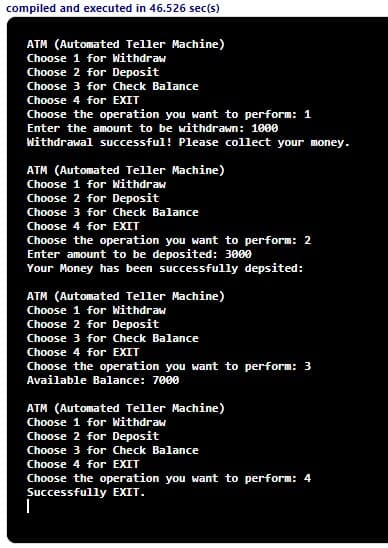
In this tutorial, we will write an ATM program in Java. The program will represent the ATM transaction executed.
Operation available in the ATM Transaction are:
Withdraw
Deposit
Check Balance
Exit
The user will choose one of the above operations:
Withdraw is to withdraw the amount from an ATM. The user is asked to enter the amount and after the withdrawal process is complete, we need to remove that amount from the total balance.
Deposit is to add an amount to the total balance, here also the user enters the amount to be added to the total balance.
Check Balance means simply display the total balance available in the user’s account.
Exit is to return the user to the main page from the current transaction mode. For that, we will use exit(0).
ATM program Java
The following program uses the switch statement in java to create a case for each transaction or option.
import java.util.Scanner;

public class ATMProgram
{
  public static void main(String args[])
  {
    int balance = 5000, withdraw, deposit;
    Scanner sc = new Scanner(System.in);

    while (true)
    {
      System.out.println("ATM (Automated Teller Machine)");
      System.out.println("Choose 1 for Withdraw");
      System.out.println("Choose 2 for Deposit");
      System.out.println("Choose 3 for Check Balance");
      System.out.println("Choose 4 for EXIT");
      System.out.print("Choose the operation you want to perform: ");

      //user choice input
      int choice = sc.nextInt();
      switch (choice)
      {
        case 1:
          System.out.print("Enter the amount to be withdrawn: ");
          withdraw = sc.nextInt();

          //balance need to be with the withdrawn amount
          if (balance >= withdraw)  //for successful transaction
          {
            balance = balance - withdraw;
            System.out.println("Withdrawal successful! Please collect your money.");
          }
          else	//not enough balance
          {
            System.out.println("Insufficient Balance");
          }

          System.out.println("");
          break;

        case 2:
          System.out.print("Enter amount to be deposited: ");
          deposit = sc.nextInt();

          //adding to the total balance
          balance = balance + deposit;
          System.out.println("Your Money has been successfully depsited:");
          System.out.println("");
          break;

        case 3:
          //balance check
          System.out.println("Available Balance: " + balance);
          System.out.println("");
          break;

        case 4:
          //for exit
          System.out.println("Successfully EXIT.");
          System.exit(0);
      }
    }
  }
}
In this tutorial, we will write java programs to check for Spy Numbers. We will look at two different java programs son Spy Number
Java Program to Check If a Number is Spy number or not.
Java Program to print all the Spy Number within a given Range.
What is Spy Number?
A number is said to be a spy number if the sum of all its digits is equal to the product of all its digits. Example:
Number: 123 Sum of its digits: 1+2+3 = 6 Product of its digits: 1*2*3 = 6 Sum and Product are equal, hence, 123 is a Spy number.
Similarly, you may check for other numbers such as 22, 132, 1124, etc.
Spy Number in Java Program
1. Java Program to Check If a Number is Spy number or not
import java.util.Scanner;

public class SpyNumber
{
   public static void main(String args[])
   {
      int num, product = 1, sum = 0, lastdigit;
      Scanner sc = new Scanner(System.in);

      //read from user
      System.out.print("Enter the number: ");
      num = sc.nextInt();

      int number = num;

      //calculation for sum and product
      while (num > 0)
      {
         lastdigit = num % 10;

        	//calculating sum
         sum = sum + lastdigit;
        	//calculating product
         product = product * lastdigit;

         num = num / 10;
      }

      //compares the sum and product and print the result
      if (sum == product)
         System.out.println(number + " is a spy number.");
      else
         System.out.println(number + " not a spy number.");
   }
}
Output:
//First Run
Enter the number: 1124
1124 is a spy number.

//Second Run
Enter the number: 166
166 not a spy number.
2.Java Program to print all the Spy Number within a given Range.
We will create a separate Boolean function (isSpyNumber()) that will return true if the sum of the digits and the product of the digits are equal else will return false and print them accordingly.
The program takes the input for the lower range and upper range value and will pass those numbers between this range to the function as an argument.
import java.util.Scanner;

public class SpyNumber
{
   private static boolean isSpyNumber(int number)
   {
      int lastdigit = 0;
      int sum = 0, product = 1;

      //calculation
      while (number != 0)
      {
         lastdigit = number % 10;

        	//calculating sum
         sum = sum + lastdigit;
        	//calculating product
         product = product * lastdigit;

         number = number / 10;
      }

      //comapre and return true value if found equal
      if (sum == product)
         return true;

      return false;
   }

   public static void main(String args[])
   {
      int lwRange, upRange;
      Scanner sc = new Scanner(System.in);

      //read from user
      System.out.print("Enter the Lower Range: ");
      lwRange = sc.nextInt();
      System.out.print("Enter the Upper Range: ");
      upRange = sc.nextInt();

      System.out.println("The Spy numbers between " + lwRange + " and " + upRange + " are: ");
      for (int i = lwRange; i <= upRange; i++)
      {
         //calling function at each iteration, that is for each number within the range
         if (isSpyNumber(i))
            System.out.print(i + " ");
      }
   }
}
Output:
Enter the Lower Range: 1
Enter the Upper Range: 1000
The Spy numbers between 1 and 1000 are:
1 2 3 4 5 6 7 8 9 22 123 132 213 231 312 321
In this tutorial, we will write a C program to Check if a Given String is a Palindrome using string function. Before that, you may go through the C topic below.
A number is said to be a Palindrome number if it remains the same when its digits are reversed or are the same as forward. It is also applied to the word, phrase or other sequences of symbols.
For example: If we take the example of ‘mam‘ or ‘madam‘, these are also palindrome words as we will get the same result even if we write it backward.
C Program to Check if a Given String is a Palindrome
The program uses one of the string functions that is strlen() function that returns the length of the string. And the header string.h is included to use this function.
#include <stdio.h>
#include <string.h>

int main()
{
   char str[30], flag = 0;
   int i, length;

   printf("Enter the string:");
   gets(str);

   //strlen() function is used
   length = strlen(str);

   for (i = 0; i < length / 2; i++)
   {
      if (str[i] != str[length - 1 - i])
      {
         flag = 1;
         break;
      }
   }

   if (flag == 0)
      printf("%s :- is a palindrome.", str);
   else
      printf("%s :- is not a palindrome.", str);

   return 0;
}
Output:
//First Run
Enter the String:
madam
madam :- is a palindrome.

//Second Run
Enter the String:
step on no pets
step on no pets :- is a palindrome.

//Thirsd Run
Enter the String:
how are you
how are you :- is not a palindrome.
In this tutorial, we will write a C program to read a string and check for palindrome without using string related function. Before that, you may go through the C topic below.
A number is said to be a Palindrome number if it remains the same when its digits are reversed or are the same as forward. It is also applied to the word, phrase or other sequences of symbols.
For example: 14141, 777, 272 are palindrome numbers as they remain the same even if reversed. If we take the example of ‘mam‘ or ‘madam‘, these are also palindrome words as we will get the same result even if we write it backward.
C Program to check a given string is palindrome without using the Built-in Function
#include <stdio.h>

int main()
{
   char string[50], length = 0;
   int flag = 1, i;

   printf("Enter the String:\n");
   gets(string);

   //\0 represent for string is ended
   for (i = 0; string[i] != '\0'; i++)
   {
      length++;
   }

   for (i = 0; i < length / 2; i++)
   {
      if (string[i] != string[length - 1 - i])
      {
         flag = 0;
         break;
      }
   }

   if (flag == 1)
      printf("%s :- is a palindrome.", string);
   else
      printf("%s :- is not a palindrome.", string);

   return 0;
}
Output:
//First Run
Enter the String:
madam
madam :- is a palindrome.

//Second Run
Enter the String:
step on no pets
step on no pets :- is a palindrome.

//Thirsd Run
Enter the String:
how are you
how are you :- is not a palindrome.
In this section, we will write a C Program to Multiply Two Matrices using multi-dimensional array. You may go through the c topics below, before starting.
Matrix multiplication in C: We can add, subtract, multiply or divide two matrices in C. The program takes inputs for the numbers of rows and columns and elements themselves. And then we perform the multiplication operation using for loop in C.
The matrix multiplication is done by multiplying the first matrix one-row element with the second matrix all column elements.
NOTE: Condition for multiplication of matrix:- the number of columns of the first matrix should be equal to the number of rows of the second matrix.
C Program for Matrix Multiplication
We will take the rows and columns values once from the user for both the matrices.
#include <stdio.h>

int main()
{
   int a[10][10], b[10][10], mul[10][10], r, c, i, j, k;

   printf("Enter the number of ROWS: ");
   scanf("%d", &r);
   printf("Enter the number of COLUMNS: ");
   scanf("%d", &c);

   printf("\nEnter the element for the FIRST matrix: \n");
   for (i = 0; i < r; i++)
   {
      for (j = 0; j < c; j++)
      {
         printf("a[%d][%d] = ", i, j);
         scanf("%d", &a[i][j]);
      }
   }

   printf("\nEnter the element for the SECOND matrix: \n");
   for (i = 0; i < r; i++)
   {
      for (j = 0; j < c; j++)
      {
         printf("b[%d][%d] = ", i, j);
         scanf("%d", &b[i][j]);
      }
   }

   printf("\nMatrix Multiplication: \n");
   for (i = 0; i < r; i++)
   {
      for (j = 0; j < c; j++)
      {
         mul[i][j] = 0;
         for (k = 0; k < c; k++)
         {
            mul[i][j] += a[i][k] *b[k][j];
         }
      }
   }

   //print the result
   for (i = 0; i < r; i++)
   {
      for (j = 0; j < c; j++)
      {
         printf("%d\t", mul[i][j]);
      }

      printf("\n");
   }

   return 0;
}
Output:
Enter the number of ROWS: 2 Enter the number of COLUMNS: 2
Enter the element for the FIRST matrix: a[0][0] = 2 a[0][1] = 2 a[1][0] = 2 a[1][1] = 2
Enter the element for the SECOND matrix: b[0][0] = 3 b[0][1] = 3 b[1][0] = 3 b[1][1] = 3
In this tutorial, we will write a Program to access an element in 2D Array in C. Before that, you should have knowledge of the following C programming topics.
2D Array is of 2 Dimensional, one determines the number of rows and another is for columns. Example: arr[0][1] refers element belonging to the zeroth row and first column in a 2D array.
For accessing an elemnt, we need two Subscript variables (i, j).
i = number of rows.
j = number of columns.
C Program to access the 2D Array element
#include <stdio.h>

int main()
{
   int i, j, arr[3][3];

   printf("Enter the element for each row and column:\n");
   for (i = 0; i < 3; i++)
   {
      for (j = 0; j < 3; j++)
      {
         printf("arr[%d][%d] = ", i, j);
         scanf("%d", &arr[i][j]);
      }
   }

   //Display array
   printf("\nElement present in an Array:\n");

   for (i = 0; i < 3; i++)
   {
      for (j = 0; j < 3; j++)
      {
         printf("%d\t", arr[i][j]);
      }

      printf("\n");
   }

   return (0);
}
Output:
Enter the element for each row and column:
arr[0][0] = 1
arr[0][1] = 2
arr[0][2] = 3
arr[1][0] = 4
arr[1][1] = 5
arr[1][2] = 6
arr[2][0] = 7
arr[2][1] = 8
arr[2][2] = 9

Element present in an Array:
1	2	3
4	5	6
7	8	9