Author: admin

  • C Program for Strong Number

    In this tutorial, we will learn about the strong number and write a C Program to find Strong Number.

    Strong Number

    Strong numbers are those numbers whose sum of the factorial of the individual digits is equal to the number itself.

    Example: 145 is a strong number.

    Explanation: 145
    1! + 4! + 5!
    = 1 + 24 + 120
    = 145, number itself.
    Hence it is a Strong number.

    Let us understand the Strong number in C program.


    C program to check whether a number is Strong number or not

    #include<stdio.h>
     
    int main()
    {
     int num, rem, temp;
     int  i, sum = 0, fact;
     
     printf("Enter the number to be checked: ");
     scanf("%d", &num);
     
     temp = num;
     
     while(temp)
     {
         i = 1, fact = 1;
         rem = temp%10;
     
         //calculation of factorial
         while(i <= rem)
         {
            fact = fact * i;
            i++;
         }
     
         sum += fact;
         temp /= 10;
     
    }
     
     // displaying according to condition
     if(sum == num)
         printf("%d is a strong number.", num);
     else
         printf("%d is not a strong number.", num);
     
     return 0;
     
    }

    Output:

    Enter the number to be checked: 145
    145 is a strong number.


    Let us go through another example where we display all the strong numbers within an entered range.

    C Program to print strong numbers in a given range

    // program to find strong numbers within a given range in C
    
    #include <stdio.h>
    
    int main()
    {
       int lrRange, upRange, rem, temp;
       int i, sum = 0, fact;
    
       printf("Enter the lower range: ");
       scanf("%d", &lrRange);
    
       printf("Enter the upper range: ");
       scanf("%d", &upRange);
    
       printf("Strong number between entered range are: ");
       for (i = lrRange; i <= upRange; i++)
       {
          temp = i;
          while (temp)
          {
             fact = 1;
             rem = temp % 10;
    
             //calculation of factorial
             int count = 1;
             while (count <= rem)
             {
                fact = fact * count;
                count++;
             }
    
             sum += fact;
             temp /= 10;
    
          }
    
          //Display
          if (sum == i)
             printf("%d ", i);
    
          sum = 0;
       }
    
       return 0;
    
    }

    Output:

    Enter the lower range: 1
    Enter the upper range: 300
    Strong number between entered range are: 1 2 145

  • C Program for Pascal Triangle

    In this tutorial, you will learn how to write a program to print Pascal’s Triangle in C. Before that you should be familiar with the following topic in C programming.

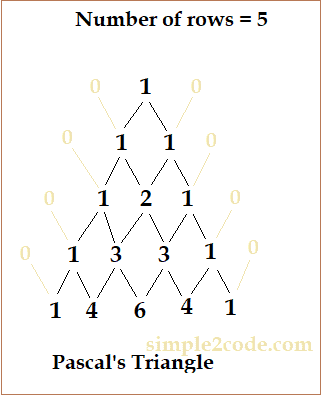
    Pascal’s triangle is one of the important examples that is taught to the student. The number outside Pascal’s triangle is zero (0), which is not visible. It is a pattern where the triangle starts from 1 at the top and below is the addition of the upper level as you can see in the figure below. The addition continues until the required level is reached.

    pascal's triangle

    Pascal Triangle Program in C

    /c program to print pascal's triangle
    
    #include <stdio.h>
    
    int main()
    {
       int rows, coef = 1, s, i, j;
    
       printf("Enter the number of rows: ");
       scanf("%d", &rows);
    
       for (i = 0; i < rows; i++)
       {
          for (s = 1; s <= rows - i; s++)
              printf("  ");
    
          for (j = 0; j <= i; j++)
          {
             if (j == 0 || i == 0)
                coef = 1;
             else
                coef = coef *(i - j + 1) / j;
             printf("%3d", coef);
          }
    
          printf("\n");
       }
    
       return 0;
    }

    Output:

               1
             1   1
           1   2   1
         1   3   3    1
       1  4    6   4   1
     1  5   10   10  5   1

  • C Program to find Cosine value

    In this tutorial, we will write a C Program to find Cosine series. Let us first by understanding what is cosine series.

    Cosine Series:

    It is a series used to find the value of cos(x), where x is the angle in degree which is converted to Radian.

    Formula:

    cosine formula

    For Cos(x) series:

    Cos(x) = 1 – (x*2 / 2!) + (x*4 / 4!) – (x*6 / 6!)……

    Let us understand through a C program to calculate the value of cos(x).

    Example

    Input-:
    x = 4, n = 3
    Output-:
    0.997563

    Input-:
    x = 8, n = 2
    Output-:
    0.990266


    C Program to find Cosine series

    #include <stdio.h>
    
    const double PI = 3.142;
    
    int main()
    {
       float x;
       int n;
       float result = 1;
       float s = 1, fact = 1, p = 1;
    
       printf("Enter x value: ");
       scanf("%f", &x);
    
       printf("Enter n value: ");
       scanf("%d", &n);
    
       //Converting degrees to radians
       x = x *(PI / 180.0);
    
       for (int i = 1; i < n; i++)
       {
          s = s *-1;
          fact = fact *(2 *i - 1) *(2 *i);
          p = p *x * x;
          result = result + s *p / fact;
       }
    
       printf("Result: %lf\n", result);
       return 0;
    }

    Output:

    Enter x value: 10
    Enter n value: 3
    Result: 0.984804


  • C++ Overloading (Operator and Function)

    C++ allows us to overload methods, constructor and indexed properties. The function or operator define with the same name but with different types of parameters s called overloading. C++ has two types of overloading and they are:

    • Function overloading
    • Operator overloading

    C++ Function overloading

    Function overloading is a feature of object-oriented programming where multiple functions having the same name differs by their parameters, then these functions are said to be overloaded. When we call those functions, we need to make sure to enter the proper number of arguments along with the proper data type.

    Example: Below are the sample of functions with same name but different arguments.

    // same name different arguments
    int func() { }
    int func(int n) { }
    float func(double d) { }
    int func(int n, double d) { }

    Error example: Now see the example below, the functions defined below have the same name, same number type, and the same number of arguments. In such cases, the compiler will through an error.

    // Compiler throws error
    int func(float num1) { }
    double func(float num2){ }

    The advantage of function overloading is that we do not need to write different names for the functions that perform the same task, increasing the readability of the program. Polymorphism is achieved by function overloading.

    Let us go through an example in C++ for function overloading.

    C++ program for function overloading with different types and different number of parameters

    // C++ program for function overloading
    
    #include <iostream>
    using namespace std;
    
    class OverloadProgram
    {
       public:
       int total(int num1, int num2)
       {
          return num1 + num2;
       }
    
       int total(int num1, int num2, float num3)
       {
          return num1 + num2 + num3;
       }
    };
    
    int main()
    {
       OverloadProgram obj;
    
       //calling first display function
       cout << "Result 1: " << obj.total(50, 40) << endl;
    
       //calling second display function
       cout << "Result 2: " << obj.total(7, 15, 5) << endl;
    
       return 0;
    }

    Output:

    Result 1: 90
    Result 2: 27

    C++ Operator Overloading

    Operator overloading means performing different operations with the same operator. We can overload most of the built-in operators that are available in C++. We can also change the user-defined type as well such as objects and structures.

    The keyword ‘operator‘ is used to overload an operator. Compile-time polymorphism is achieved through operator overloading. It has a return type and parameter list.

    Example: Consider an operator ‘+‘, it is used to add the two numbers but it is also used with string to concatenate two strings. So the ‘+‘ operator when placed between number operands, addition operation is done but when placed between string operands, it concatenates them.

    Syntax: syntax for operator overloading in C++.

    class class_name
    {
        ... .. ...
        public
           return_type operator symbol (arguments_list) {
               //code
           } 
    };

    In the above syntax,

    • return_type is the type that is returned by the function
    • symbol refers to the operator that is to be overloaded such as +, <, -, >, etc.

    However there are few operator that cannot be overloaded and they are:

    • sizeof operator
    • Scope operator (::)
    • ternary operator(?:)
    • member pointer selector(*)

    Let us go through an example in C++ for operator overloading.

    C++ Program for operator overloading

    // Overload ++ program
    
    #include <iostream>
    using namespace std;
    
    class TestOperator
    {
       private:
          int number;
    
       public:
    
         // Constructor
         TestOperator(): number(9) {}
    
         // ++ overloaded
         void operator++()
         {
           ++number; // pre increment by 1
         }
    
         void display()
         {
           cout << "The Count: " << number << endl;
         }
    };
    
    int main()
    {
       TestOperator op;
    
       // Calling the void operator++ ()function
       ++op;
    
       //calling display function
       op.display();
       return 0;
    }

    Output:

    The Count: 10

    Another example for operator overloading in C++.

    // C++ program for operator overloading
    #include <iostream>
    using namespace std;
    
    class Message
    {
      string str;
      public_colon
      Message(string i)
      {
        str = i;
      }
    
      void operator+(Message);
      void display();
    };
    
    void Message::operator+(Message a)
    {
      string msg = str + a.str;
      cout << "The result: " << msg;
    
    }
    
    int main()
    {
      Message m1("Hi, Welcome ");
      Message m2("Home");
    
      m1 + m2;
    
      return 0;
    }

    Output:

    //Output:
    The result: Hi, Welcome Home

    The advantage of operator overloading is that we can perform different operations on the same operand.


  • LRU Page Replacement Algorithm in C

    In this tutorial, we will look at C program for LRU Page Replacement Algorithm.

    Least Recently Used (LRU) Page Replacement algorithm

    It is an algorithm whose concept is based on the pages used in an instruction. The pages that are vigorously utilized in past instruction are probably going to be utilized intensely in the next instruction and the pages with used less are likely to be used less in the future. When a new page refereed is not present in the memory, a page fault occurs.

    Whenever a page fault occurs, the page that is least used is removed from the memory frames.

    Let us see an implementation of lru page replacement in c.

    C program to implement LRU page replacement algorithm

    //C program for LRU replacement algorithm implementation
    
    #include <stdio.h>
    
    //user-defined function
    int findLRU(int time[], int n)
    {
       int i, minimum = time[0], pos = 0;
    
       for (i = 1; i < n; ++i)
       {
          if (time[i] < minimum)
          {
             minimum = time[i];
             pos = i;
          }
       }
    
       return pos;
    }
    
    //main function
    int main()
    {
       int no_of_frames, no_of_pages, frames[10], pages[30], counter = 0, time[10], flag1, flag2, i, j, pos, faults = 0;
       printf("Enter number of frames: ");
       scanf("%d", &no_of_frames);
    
       printf("Enter number of pages: ");
       scanf("%d", &no_of_pages);
    
       printf("Enter reference string: ");
    
       for (i = 0; i < no_of_pages; ++i)
       {
          scanf("%d", &pages[i]);
       }
    
       for (i = 0; i < no_of_frames; ++i)
       {
          frames[i] = -1;
       }
    
       for (i = 0; i < no_of_pages; ++i)
       {
          flag1 = flag2 = 0;
    
          for (j = 0; j < no_of_frames; ++j)
          {
             if (frames[j] == pages[i])
             {
                counter++;
                time[j] = counter;
                flag1 = flag2 = 1;
                break;
             }
          }
    
          if (flag1 == 0)
          {
             for (j = 0; j < no_of_frames; ++j)
             {
                if (frames[j] == -1)
                {
                   counter++;
                   faults++;
                   frames[j] = pages[i];
                   time[j] = counter;
                   flag2 = 1;
                   break;
                }
             }
          }
    
          if (flag2 == 0)
          {
             pos = findLRU(time, no_of_frames);
             counter++;
             faults++;
             frames[pos] = pages[i];
             time[pos] = counter;
          }
    
          printf("\n");
    
          for (j = 0; j < no_of_frames; ++j)
          {
             printf("%d\t", frames[j]);
          }
       }
    
       printf("\nTotal Page Faults = %d", faults);
    
       return 0;
    }

    Output:

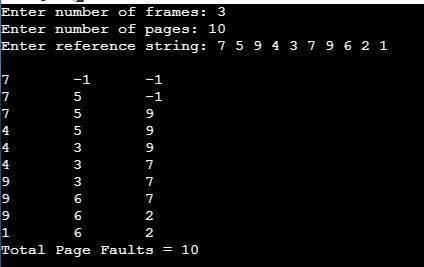
    lru replacement algorithm

  • C Program to Compare two Strings using strcmp()

    In this tutorial, we will Compare Strings Using strcmp() function in C. But if you want to learn more about String you may go through the following topic in C.

    strcmp() function is used to compare two string to each other and returns an integer value.

    The syntax for strcmp() in c:

    strcmp(first_string, second_string);

    • returns 0: if both the string are equal.
    • returns negative integer: if string1 < string2
    • returns positive integer: if string1 > string2

    The header file string.h defines the strcmp() function.

    Let us understand through an example of strcmp function in C programming.


    String comparison using strcmp() function in C

    //C Program to Compare Two Strings using strcmp()
    
    #include <stdio.h>
    #include <string.h>
    
    int main()
    {
        char str1[20], str2[20];
        int result;
        
        printf("Enter a first string: ");
        gets(str1);
        printf("Enter a second string: ");
        gets(str2);
        
        //use of strcmp
        result = strcmp(str1, str2);
        
        
        //displaying the result
        if (result == 0)
            printf("Strings are same");
        else
            printf("Strings are not same");
        return 0;
    }

    Output:

    Enter a first string: This is simple2code
    Enter a second string: This is simple2code
    Strings are same

    str1 and str2 takes the input for the two strings from the user and the result variable stores the value after comparison of two strings. And the final result is displayed accordingly.


  • C++ Polymorphism

    Polymorphism means having many forms. The word “poly” means many and “morphs” means forms, which means it is the way of performing some task in many ways. That means a single function or an operator functioning in many ways. It is one of the major concepts of Object-oriented programming.

    Take a real-life example: A woman can be a mother or daughter and a teacher in a class, that is she posses a different behaviour at different times or situations. Similarly, a class in a program has a method and the subclass have the same method but with a different task to perform related to the first method. This is called polymorphism.

    In C++, we have two types of polymorphism and they are:

    • Compile-time Polymorphism or Static (or early) Polymorphism.
    • Runtime Polymorphism or Dynamic (or late) Polymorphism.

    1. Compile time Polymorphism

    In this type of program, the flow of control is decided at compile time itself. It is achieved by function overloading and operator overloading. It is also known as static or early binding.

    Function Overloading:

    The multiple functions having the same name but with different parameters, then these functions are said to be overloaded. When we call those functions, we need to make sure to enter the proper number of arguments along with the proper data type.

    Example: C++ example of function overloading.

    // C++ program for function overloading
    
    #include <iostream>
    using namespace std;
    
    class OverloadProgram
    {
       public:
       int total(int num1, int num2)
       {
          return num1 + num2;
       }
    
       int total(int num1, int num2, float num3)
       {
          return num1 + num2 + num3;
       }
    };
    
    int main()
    {
       OverloadProgram obj;
    
       //calling first display function
       cout << "Result 1: " << obj.total(50, 40) << endl;
    
       //calling second display function
       cout << "Result 2: " << obj.total(7, 15, 5) << endl;
    
       return 0;
    }

    Output:

    Result 1: 90
    Result 2: 27

    Operator Overloading:

    To achieve Compile time Polymorphism, operator overloading is also used. Operator overloading means performing different operations with the same operator. The keyword ‘operator‘ is used to overload an operator.

    Example: Consider an operator ‘+‘, it is used to add the two numbers but it is also used with string to concatenate two strings. So the ‘+‘ operator when placed between number operands, addition operation is done but when placed between string operands, it concatenates them.

    Let us understand through an example: C++ program for operator overloading.

    // C++ program for operator overloading
    
    #include <iostream>
    using namespace std;
    
    class Message
    {
      string str;
      public:
        Message(string i)
        {
          str = i;
        }
    
      void operator+(Message);
      void display();
    };
    
    void Message::operator+(Message a)
    {
      string msg = str + a.str;
      cout << "The result: " << msg;
    
    }
    
    int main()
    {
      Message m1("Hi, Welcome ");
      Message m2("Home");
    
      m1 + m2;
    
      return 0;
    }

    Output:

    //Output:
    The result: Hi, Welcome Home

    2. Run time Polymorphism

    In run time polymorphism, the program is called at the time of execution that is at rum time. It is also known as the late binding or dynamic binding.

    This type of polymorphism is achieved by Method Overriding. We use virtual functions and pointers to achieve this.

    Function Overriding:

    Function overriding allows us to define a function at a derived class that is already present in a base class. And that base is said to be overridden.

    And the decision made to call the required function is done at the run time. Hence, the Runtime polymorphism.

    Example: C++ example of function overriding.

    // C++ program for function overriding
    
    #include <iostream>
    using namespace std;
    
    class Animal
    {
       public:
       void display()
       {
          cout << "I am Animal" << endl;
       }
    };
    
    class Dog: public Animal
    {
       public:
       void display()
       {
          cout << "I am a Dog" << endl;
       }
    };
    
    int main(void)
    {
       Animal anim = Animal();
       anim.display();	//parent class object 
    
       Dog dg = Dog();
       dg.display();	// derived class object
    
       return 0;
    }

    Output:

    I am Animal
    I am a Dog

    Differences between Compile time and Run time Polymorphism

    Compile-time polymorphismRun time polymorphism
    In this type of program, the flow of control is decided at compile time itself.The program is called at the time of execution that is at rum time
    It is achieved by function overloading and operator overloadingIt is achieved by function overriding and virtual function.
    Also called static or early binding.Also called late binding or dynamic binding.
    Here, the methods have the same name but with a different number of parameters or the type of parameters.Here, the methods have the same name, the same number of parameters, or the type of parameters.
    As it happens at compile-time, therefore provides a fast execution.As it happens at run-time, therefore provides a slow execution.

  • C++ Copy Constructor

    A copy constructor in C++ is used to create a copy of an already existed object. It is also used to Initialize one object from another of the same type.

    There are two types of copy constructor:

    • Default Copy constructor
    • User-Defined constructor

    Default Copy constructor:

    The default copy constructor is defined by the compiler when the user do not define a copy constructor.

    Syntax for Default Copy constructor:

    ClassName (const class_name &old_object_name)
    {
      ......
    }

    let us go through the program in C++.

    C++ Program of the copy constructor

    // C++ program for copy constructor
    
    #include <iostream>
    using namespace std;
    
    // class
    class  Rectangle {
    
      public:
           float length;
           float breadth;
           Rectangle(float l, float b)   // constructor
           { 
             length = l;
             breadth = b;
           }
           
           Rectangle(const Rectangle &obj) // copy constructor
           {
            length = obj.length;
            breadth = obj.breadth;
           }
           
           void displayArea()
           {
             float area = length * breadth;
             
             //display
             cout << "Area: " << area << endl;
           }
    };
    
    int main() 
    {
        Rectangle rect1(6, 4); //parameterized constructor
        Rectangle rect2(rect1); //copy constructor
        
        
        rect2.displayArea(); //calling through the copy constructor
        
        return 0;
    }

    Output:

    Area: 24

    Shallow Copy Constructor

    A shallow copy is a process where the copy of an object is created by copying all the member’s data exactly as it is. Default copy constructor produces the shallow copy constructor.

    Both the objects that are the original and copy point at the same memory. Since, both the object points to the same memory location, changes made by one will be reflected on other. Now since we only need to make a replica of the original object, shallow does not fully fill this purpose.

    Let us understand through an example in C++.

    // C++ program for the shallow constructor
    
    #include <iostream>
    using namespace std;
      
    
    class Rectangle 
    {
      private:
        int length;
        int *breadth;
      
      public:
        Rectangle() 
        {
            breadth = new int;
        }
    
        // Function for dimension set
        void setDimensions(int l, int b)
        {
           length = l;
           *breadth = b;
        }
      
        //display method
        void display()
        {
           cout << "Length: " << length << endl;
           cout << "Breadth: " << *breadth << endl;
        }
    };
      
    int main()
    {
        // Object of Rectangle
        Rectangle rect1;
        rect1.setDimensions(10, 5); //set data
      
        //copying rect1 at the time of initialization
        Rectangle rect2 = rect1;
        rect2.display();
      
        return 0;
    }

    Output:

    Length: 10
    Breadth: 5
    Shallow Copy constructor

    Since the pointer breadth of both the objects (original and copied) points to the same memory location, freeing one of the memory will free the other one too. So this is solved by the Deep Constructor.


    Deep Copy Constructor

    A deep copy constructor is used to overcome the problem caused by the Shallow constructor. In the deep constructor, it is like having a copy of a project but both the original and copied project are kept in separate files, that is the changes made in one of the files will not affect the other.

    A deep copy will allocate separate memory space for copied file. A user-defined copy constructor is used for the Deep copy constructor and assign dynamic memory as well if required.

    Let us understand through an example in C++.

    // C++ program for the Deep constructor
    
    #include <iostream>
    using namespace std;
      
    
    class Rectangle 
    {
      private:
        int length;
        int *breadth;
      
      public:
        Rectangle() 
        {
            breadth = new int;
        }
        
        Rectangle (Rectangle &rec)
        {
            length = rec.length;
            breadth = new int;
            *breadth = *(rec.breadth);
        }
        
        // Function for dimension set
        void setDimensions(int l, int b)
        {
           length = l;
           *breadth = b;
        }
      
        //display method
        void display()
        {
           cout << "Length: " << length << endl;
           cout << "Breadth: " << *breadth << endl;
        }
        
        //destructor
        ~Rectangle()
        {
           delete breadth;
        }
    };
      
    int main()
    {
        // Object of Rectangle
        Rectangle rect1;
        rect1.setDimensions(10, 5); //set data
      
        //copying rect1 at the time of initialization
        Rectangle rect2 = rect1;
        rect2.display();
      
        return 0;
    }

    Output:

    Length: 10
    Breadth: 5
    Deep copy constructor

    As you can see in the program above, we use destructor to destroy the dynamically allocated memory.


  • C++ Destructor

    As the name indicates, a C++ destructor destroys the object of a class as soon as the scope of an object ends. It is opposite to a constructor. When an object goes out of the scope, the compiler automatically calls the destructor function.

    Also, the destructor has the exact same name as the class, the difference is, it is prefixed with a tilde sign (~). And the destructor cannot have parameters nor modifiers.

    The syntax for C++ destructor:

    class Square
    {
        public:
         // destructor
         ~Square() 
         {
           // statement
         }   
    };

    let us see an example of a destructor in C++.


    C++ example for the Constructor and Destructor call

    // C++ program for destructor and constructor
    
    #include <iostream>
    using namespace std;
    
    // class
    class  Square 
    {
       public:
        // constructor
        Square() {
            cout << "Constructor Invoked." << endl;
        }
        //Destructor
        ~Square() {
            cout << "Destructor Invoked." << endl;
        }
    };
    
    int main() {
    
        // creating an objects of Square class
        Square sq1;
        Square sq2;
    
        return 0;
    }

    Output:

    Constructor Invoked.
    Constructor Invoked.
    Destructor Invoked.
    Destructor Invoked.


  • C++ Constructor

    In C++, a constructor is a special type of method that is called automatically when an instance of the class (object) is created. The compiler calls the constructor and is used to initialize the data members of a newly created object.

    The constructor has the same name as its class. Also, it doe not have any return type not even void.

    Let us first look at the syntax of constructor in c++

    class A
    {
      public:
         int x;
    
         // constructor
         A()
         {
           // object initialization
         }
    };

    Types of Constructor in C++

    1. Default constructor
    2. Parameterized constructor

    C++ Default constructor

    The constructor with no arguments is called a default constructor.

    Let us look into the example of the C++ default Constructor.

    // C++ program for default constructor
    
    #include <iostream>
    using namespace std;
    
    // class
    class Square
    {
       private:
          float side;
    
       public:
         // constructor
         Square()
         {
           side = 12.4;
    
           cout << "Side: " << side << endl;
         }
    };
    
    int main()
    {
       // creating an objects of Square class
       Square sq1;
    
       return 0;
    }

    Output:

    Side: 12.4

    Note: Default Constructor is used if the user does not define a constructor then the compiler creates a default constructor and initializes the member variables to its default values.


    C++ Parameterized Constructor

    A Constructor having a specific number of parameters is called Parameterized Constructor. Passing parameters is useful when you want to assign an initial value to an object at the time of its creation.

    Let us look into the example of the C++ Parameterized Constructor.

    // C++ program for Parameterized constructor
    
    #include <iostream>
    using namespace std;
    
    // class
    class Rectangle
    {
       public:
           float length;
           float breadth;
           Rectangle(float l, float b)	// constructor
           {
              length = l;
              breadth = b;
           }
           void CalArea()
           {
              float area = length * breadth;
        
             	//display
              cout << "Area: " << area << endl;
           }
    };
    
    int main()
    {
       // creating an objects of Rectangle class
       Rectangle rect1(6, 4);
       Rectangle rect2(3.5, 2.8);
    
       rect1.CalArea();
       rect2.CalArea();
    
       return 0;
    }

    Output:

    Area: 24
    Area: 9.8