Author: admin

  • Fizz Buzz Program in C

    In this tutorial, we will learn about Fizz Buzz Implementation in C programming. Let us start by understanding what Fizz Buzz is and its implementation in a program.

    Fizz Buzz Program

    A Fizz Buzz program prints the number from the range of 1 to n, where n is the input number taken from the user.

    • The program prints “FizzBuzz” if it is a multiple of 3 and 5.
    • The program prints “Fizz” if it is a multiple of only 3 but not 5.
    • The program prints “Buzz” is it is a multiple pf only 5 but not 3.
    • Lastly, it prints the number itself, if it is none of the above.

    Example:

    Input (n): 10
    Output: 1 2 Fizz 4 Buzz Fizz 7 8 Fizz Buzz

    Now let us go through an example in the C program to implement FizzBuzz.


    Fizz Buzz Program in C

    //FizzBuzz program in C
    #include <stdio.h>
    
    int main()
    {
       int i, n;
    
       printf("Enter the number: ");
       scanf("%d", &n);
    
       for (i = 1; i <= n; i++)
       {
          // For FizzBuzz (3 *5 =15)
          if (i % 15 == 0)
             printf("FizzBuzz\t");
    
          // For Fizz (3)
          else if ((i % 3) == 0)
             printf("Fizz\t");
    
          // For Buzz (5)
          else if ((i % 5) == 0)
             printf("Buzz\t");
    
          else	//if none of the above print n
             printf("%d\t", i);
       }
    
       return 0;
    }

    Output:

    Enter the number: 20
    1 2 Fizz 4 Buzz Fizz 7 8 Fizz Buzz 11 Fizz 13 14 FizzBuzz 16 17 Fizz 19 Buzz

  • C Program to Find Length of a String Using strlen() Function

    In this section, we will write a C program to find the length of a string using strlen() function. But before, you may go through the following topic in C programming.

    The program will take the user input for the string. To find the length of a string, we use the built-in string function called strlen(). This function is present in the string.h header file.


    C Program to Find Length of a String Using strlen() Function

    // C program to find length of the string using strlen() function
    #include <stdio.h>
    
    int main()
    {
       char str[30];
       int length;
    
       printf("Enter a string: ");
       scanf("%s", str);
    
       length = strlen(str);
    
       printf("Length of %s is %d", str, length);
       return 0;
    }

    Output:

    Enter a string: simple2code
    Length of simple2code is 11

    You can also check the following:


  • C Program to Find the Length of a String without using Function strlen()

    In this section, we will write a C program to find the length of a string without using strlen() function. But before, you may go through the following topic in C programming.

    The program will take the user input for the string and iterate the string. It will count the number of characters present in the string.


    C Program to Find the Length of a String without using Function strlen()

    // C program to find length of the string without using strlen() function
    #include <stdio.h>
    
    int main()
    {
       char str[30];
       int i;
    
       printf("Enter a string: ");
       scanf("%s", str);
    
       for (i = 0; str[i] != '\0'; ++i);
    
       printf("The length of %s is %d", str, i);
       return 0;
    }

    Output:

    Enter a string: simple2code
    The length of simple2code is 11

    You can also check the following:


  • C Program to Find Second Largest Number in an Array

    The following C program finds the second largest element present in an array. The program iterates through an array and compares each element in an array.

    For example:

    Input: arr[] = {5, 85, 19, 6, 99, 45}
    Output: The second largest element is 85.


    C Program to Find Second Largest Number in an Array

    //C Program to find Second largest Number in an Array
    
    #include <stdio.h>
    #include <limits.h>
    
    int main()
    {
       int arr[30], i, size, largest, second;
    
       printf("Enter the size of an array: \n");
       scanf("%d", &size);
    
       printf("Enter %d elements of an Array:\n", size);
    
       for (i = 0; i < size; i++)
       {
          scanf("%d", &arr[i]);
       }
    
       // largest and second largest initialized with minimum possible value
       largest = second = INT_MIN;
    
       //iterate through the array
       for (i = 0; i < size; i++)
       {
          //if arr element is greater than largest then
          //swap the value with largest and second largest with second.
          if (arr[i] > largest)
          {
             second = largest;
             largest = arr[i];
          }
          else if (arr[i] > second && arr[i] < largest)
          {
             second = arr[i];
          }
       }
    
       printf("Largest element: %d", largest);
       printf("\nSecond Largest element: %d", second);
    
       return 0;
    }

    Output:

    Enter the size of an array:
    5
    Enter 5 elements of an Array:
    12
    56
    8
    19
    88
    Largest element: 88
    Second Largest element: 56

    Go through more C programming with various topics:


  • C Program to Check Whether a Given Number is Prime or Not

    In this C programming example, we will learn about the Prime Number program in C. We specifically write a program to check the entered number is prime or not.

    Prime Number:

    A Prime Number is a number that is only divisible by 1 and itself. Example: 2, 3, 5, 7, 11, 13, 17, etc. These numbers are only divisible by 1 and the number itself.

    Note:
    0 and 1 is not a prime number and 2 is the only even and smallest prime number.

    You must know the following topics in C first:


    C Program to Check Whether a Given Number is Prime or Not

    #include <stdio.h>
    
    int main()
    {
      int num, i, flag = 0;
    
      //user input
      printf("Enter the number: ");
      scanf("%d", &num);
    
      for (i = 2; i <= num / 2; ++i)
      {
        // checking for non-prime
        if (num % i == 0)
        {
          flag = 1;
          break;
        }
      }
    
      //checkinh for the entered number is 1 or not
      //because 1 cannot be a prime number
      if (num == 1)
      {
        printf("1 is not a prime number.");
      }
      else
      {
        if (flag == 0)
          printf("%d is a prime number.", num);
        else
          printf("%d is not a prime number.", num);
      }
    
      return 0;
    }

    Output:

    //Run 1
    Enter the number: 13
    13 is a prime number.

    //Run2
    Enter the number: 1
    1 is not a prime number.

    You may go through the following C program on the prime number.


  • .Net Framework

    .Net is a software development platform developed by Microsoft. It was meant to create applications, which would run on a windows platform. The first beta version was released in 2000.

    Although C# is a computer language that can be studied on its own, it has a special relationship to its runtime environment, the .NET Framework.

    The .NET Framework defines an environment that supports the development and execution of highly distributed, component-based applications. It enables differing computer languages to work together and provides for security, program portability, and a common programming model for the Windows platform.

    The .Net Framework supports more than 60 programming languages such as C#, F#, VB.NET, J#, VC++, JScript.NET, APL, COBOL, Perl, Oberon, etc.

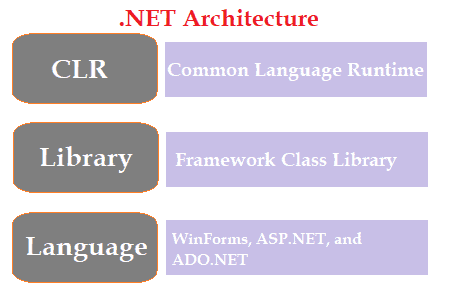
    The following are the .NET Framework important entities.

    • Common Language Runtime (CLR)
    • Framework Class Library (FCL)
    • Core Languages (WinForms, ASP.NET, and ADO.NET)
    .net framework

    Common Language Runtime (CLR)

    The Common Language Runtime (CLR) is the execution engine of the .NET Framework that loads and manages the execution of your program.

    All .NET programs execute under the supervision of the CLR, guaranteeing certain properties and behaviors in the areas of memory management, provide security, Platform independent, garbage collection, and exception handling. It acts as an interface between the framework and the operating system.


    Framework Class Library (FCL)

    This library gives your program access to the runtime environment. It includes some set of standard class libraries that contains several properties and methods used for the framework purposes.

    The Base Class Library (BCL) is the core of FCL and provides basic functionalities.


    Core Languages

    Following are the types of applications built in the .Net framework:

    WinForms: It stands for windows form and is used to create form-based applications. It runs on the client end and notepad is an example of WinForms.

    ASP.Net: It is a web framework, developed by Microsoft and is used to develop web-based applications. This framework is made to run on any web browser such as Internet Explorer, Chrome, etc. It was released in the year 2002.

    ADO.Net: This module of the .Net framework was developed to form a connection between application and data sources (Databases). Examples of such modules are Oracle or Microsoft SQL Server. There are several classes present in ADO.Net that are used for the connection of database, insertion, deletion of data, etc.


  • C# DirectoryInfo Class

    In C#, DirectoryInfo Class is a part of System.IO namespace and it provides properties and methods to perform various operations on directory and subdirectory such as to create, delete and move directory. It cannot be inherited.

    C# DirectoryInfo Properties

    The following tables list the properties provided by DirectoryInfo class.

    PropertyDescription
    CreationTimeIt is used to get or set the creation time of the current file or directory.
    ExistsThis property provides a value indicating whether the directory exists or not.
    ExtensionIt is used to get the extension part of the file.
    NameIt is used to get the name of this DirectoryInfo instance.
    FullNameThis property provides the full path of a directory.
    LastAccessTimeIt is used to gets or sets the time the current file or directory was last accessed.
    ParentIt is useful to get the parent directory of a specified subdirectory.

    C# DirectoryInfo Methods

    MethodDescription
    Create()It creates a directory.
    Delete()It deletes the specified directory.
    EnumerateDirectories()It returns an enumerable collection of directory information in the current directory.
    GetDirectories()Returns the subdirectories of the current directory.
    GetFiles()Returns the file list from the current directory.
    MoveTo()It moves a specified directory and its contents to a new path.
    ToString()It returns the original path that was passed by the user.

    Example: C# program for DirectoryInfo Class

    The program is used to create a directory in C#.

    using System;
    using System.IO;
    
    namespace FileExample
    {
      class Program
      {
        static void Main(string[] args)
        {
    
          string fLoc = "Sample";
          DirectoryInfo dir = new DirectoryInfo(fLoc);
    
          // checking for its existence
          if (dir.Exists)
          {
            Console.WriteLine("The Directory already exists.");
          }
          else
          {
           	// creating directory
            dir.Create();
            Console.WriteLine("Directory Created Successfully!");
          }
        }
      }
    }

    Output:

    Directory Created Successfully!

    A directory named “Sample” will be created on a path that you will specify in a program. The program also checks if the directory specified already exists in that path or not.


    Example: C# program for DirectoryInfo Class tp delete a directory

    using System;
    using System.IO;
    
    namespace FileExample
    {
      class Program
      {
        static void Main(string[] args)
        {
          string fLoc = "sample.text";
          DirectoryInfo dir = new DirectoryInfo(fLoc);
    
          try
          {
            dir.Delete();
            Console.WriteLine("Directory Deleted Successfully!");
          }
    
          catch (Exception ex)
          {
            Console.WriteLine("Something is wrong: " + ex.ToString());
          }
        }
      }
    }

    Output:

    Directory Deleted Successfully!


  • C# FileInfo Class

    In C#, FileInfo class provides properties and instance methods that are used to deal with the various operations in a file such as creating, copying, deleting, moving, etc.

    It is derived from FileSystemInfo class and is a part of System.IO namespace.

    C# FileInfo Properties

    The following are some of the most used properties in FileInfo class.

    PropertyDescription
    DirectoryIt returns an instance of the parent directory of a file.
    DirectoryNameIt retrieves the directory full path as a string.
    ExistsIt returns a value that indicates whether the file exists or not.
    IsReadOnlyIt is used to get or set a value that determines whether the current file is read-only or not.
    LengthThis property gets the size of the current file in bytes.
    NameIt is used to get the name of the file.
    ExtensionThis will return an extension part of the file.
    CreationTimeIt is used to get or set the creation time of the current file or directory.
    LastAccessTimeIt is used to get or set the last access time of the current file or directory.
    LastWriteTimeIt is used to get or set the time when the current file or directory was last written to.

    C# FileInfo Methods

    The table below lists the methods used in FileInfo class.

    MethodDescription
    Create()This method is used to create a file.
    CopyTo(String)This method copies an existing file to a new file, but it won’t allow overwriting an existing file.
    CopyTo(String, Boolean)This method will copy an existing file to a new file, allowing overwriting an existing file.
    CreateText()It creates a StreamWriter that writes a new text file.
    AppendText()It creates a StreamWriter that appends text to the file.
    Encrypt()This method is useful to encrypt a file so that only the account used to encrypt the file can decrypt it.
    Decrypt()This method is useful to decrypt a file that is encrypted by the current account using the encrypt method.
    Delete()It deletes the file permanently.
    Open()This method opens a file in the specified mode.
    OpenRead()This method creates a read-only file stream.
    OpenWrite()This method creates a write-only file stream.
    OpenText()This method creates a stream reader that reads from an existing text file.
    Replace()This method is used to replace the contents of the specified file with the file described by the current fileinfo object.
    ToString()It returns the path as a string.

    Now, let us go through an example in C# for FileInfo.


    Example: C# FileInfo program for creating a file

    using System;
    using System.IO;
    
    namespace FileProgram
    {
      class Program
      {
        static void Main(string[] args)
        {
          string fLoc = "sample.text";
    
          // Check file if exists
          if (File.Exists(fLoc))
          {
            File.Delete(fLoc);
          }
    
          FileInfo f = new FileInfo(fLoc);
          f.Create();
    
          Console.WriteLine("File is created Successfuly");
        }
      }
    }

    Output: After execution, you will see the following result.

    File is created Successfuly

    Also, since we created a new file, a file name “sample.text” will be created in the same path where you have saved your code file. Although, if you want to change the directory of the newly created file then you can give the full pathname instead of just the file name.


    Example: C# FileInfo program to Write and Read from a file

    using System;
    using System.IO;
    
    namespace FileProgram
    {
      class Program
      {
        static void Main(string[] args)
        {
          string fLoc = "sample.text";
    
          // Check file if exists
          if (File.Exists(fLoc))
          {
            File.Delete(fLoc);    //if file exists then delete that file
          }
    
          FileInfo f = new FileInfo(fLoc);
    
          // Writing to the file
          StreamWriter sw = f.CreateText();
          sw.WriteLine("Hi! Welcome to Simple2code.com.");
          sw.Close();
    
          // Reading from a file
          StreamReader sr = f.OpenText();
          string text = "";
          while ((text = sr.ReadLine()) != null)
          {
            Console.WriteLine(text);
          }
        }
      }
    }

    Output: After execution, you will see the following result.

    Hi! Welcome to Simple2code.com.

    A file will be created and the above text is written on it. The program first writes the string on a text file and then reads from it.


  • C# BinaryReader and BinaryWriter

    BinaryReader and BinaryWriter are the classes that are used to read and write into a binary file. These are just like C# StreamReader and StreamWriter except here we read and write to a binary file.

    C# BinaryReader class

    This class in C# is used to read binary information from a file. This class is present in System.IO namespace.

    The BinaryReader contains the following commonly used methods.

    MethodsDescription
    Close()This method closes the BinaryReader object and the resources associated with it.
    Read()It reads the character from the stream and increments the position of the stream.
    ReadBoolean()It is used to read the boolean value and increases the stream by one byte.
    ReadString()It is used to read a string from the current stream. The string is prefixed with the length, encoded as an integer seven bits at a time.

    C# BinaryWriter Class

    The BinaryWriter class is used to write binary information into a stream. This class is present in System.IO namespace.

    The BinaryWriter contains the following commonly used methods.

    MethodsDescription
    Close()This method closes the BinaryReader object and the resources associated with it.
    Write(type value)It is used to write on the current stream. we place the type and value according to the need.
    Write(bool value) ,
    Write(byte value) ,
    Write(char ch),
    Write(double value) ,
    Write(int value) ,
    Write(string value)
    Flush()It is used to clear all buffers on the current writer and causes any buffered data to be written to the underlying device.
    Seek(int offset, SeekOrigin origin)It is used to set a position on a current stream in a file.

    Example: C# program for BinaryReader and BinaryWriter classes

    using System;
    using System.IO;
    
    namespace FileProgram
    {
      class Program
      {
        static void Main(string[] args)
        {
          //BinaryWriter
          BinaryWriter bw = new BinaryWriter(new FileStream("sample.dat", FileMode.Create));
    
          bw.Write("This is Simple2code.com.");
          bw.Write(23.123);
          bw.Write(true);
          bw.Write(45);
    
          bw.Close();
    
          //BinaryReader
          BinaryReader br = new BinaryReader(new FileStream("sample.dat", FileMode.Open));
    
          Console.WriteLine("String : " + br.ReadString());
          Console.WriteLine("Double : " + br.ReadDouble());
          Console.WriteLine("Boolean : " + br.ReadBoolean());
          Console.WriteLine("Integer : " + br.ReadInt32());
    
          br.Close();
    
        }
      }
    }

    Output: After the execution of the above program a new file sample.dat file will be created and the information written on it will be displayed on the screen.

    String : This is Simple2code.com.
    Double : 23.123
    Boolean : True
    Integer : 45


  • C# StreamReader and StreamWriter

    StreamReader and StreamWriterare classes are inherited from the base class Stream, these classes are used to read and write from a file.

    You may go through the File I/O.

    C# StreamReader Class

    The StreamReader class inherits from TExtReader class. It is used for reading data from a file. The most used method in this class are:

    • Close(): It closes the Streamreader object or any resources assosciateed with it.
    • Peek(): It returns the next available character but does not consume it.
    • Read(): It reads the next characer in input stream and increases the charcter position by one.
    • ReadLine(): It reads the line from input stream and returns the data in the form of string.
    • Seek(): This method is used to read or write the data at a specific location from a file.

    Example: C# program for StreamReader

    Let us create a file called sample.text for this example and the following string is present there:

    This is a Website.
    This is Simple2code.com. Visit again.

    using System;
    using System.IO;
    
    namespace FileProgram
    {
      class Program
      {
        static void Main(string[] args)
        {
          StreamReader sr = new StreamReader("sample.txt");
          string str = sr.ReadLine();
    
          while (str != null)
          {
            Console.WriteLine(str);
            str = sr.ReadLine();
          }
    
          sr.Close();
        }
      }
    }

    Output: The string present in a sample.text will be displayed on the screen.

    This is a Website.
    This is Simple2code.com. Visit again.


    C# StreamWriter Class

    StreamWriter class inherits TextWriter class. it is used to write a series of characters to a stream in a particular format. The most used method in this class are:

    • Close(): This methosd closes the current StreamWriter object and all the resources assosciated with it.
    • Flush(): It clears all the data from the buffer and write it in the stream associate with it.
    • Write(): It is used to write data to a stream.
    • WriteLine(): It writes the the data to a stream and adds the newline character at the end of the data.

    Example: C# program for StreamWriter

    The following program creates a new file and writes data into that file. The data is provided in the program.

    using System;
    using System.IO;
    
    namespace FileProgram
    {
      public class Program
      {
        public static void Main(string[] args)
        {
          FileStream file = new FileStream("sample.txt", FileMode.Create);
          StreamWriter sw = new StreamWriter(file);
    
          sw.WriteLine("This is Simple2code.com. Visit again.");
          sw.Close();
          file.Close();
    
          Console.WriteLine("The file is created.");
        }
      }
    }

    Output:

    The file is created.

    After execution, open the newly created file “sample.text”, you will find the following data.

    This is Simple2code.com. Visit again.