Author: admin

  • C++ Program to Add Two Matrices

    In this tutorial, we will write a C++ program to add two matrices using multi-dimensional arrays. To understand the coding, you should have knowledge of the following topics in C++ programming:

    The program takes the user input for the number of rows and columns then the elements for both the matrices.

    Lastly, add both the matrices and store them in a separate array and display the result. Let us go through the program.


    C++ Program to Add Two Matrices

    During addition or subtraction of matrix, it is important that both of the matrices have the same dimensions such as 2×3 matrix can be added to 2×3 matrix.

    #include <iostream>
    using namespace std;
    
    int main()
    {
      int arr1[50][50], arr2[50][50], sum[50][50];
      int row, col, i, j;
    
      cout << "Enter the no. of rows: ";
      cin >> row;
      cout << "Enter the no. of columns: ";
      cin >> col;
    
      // 1st matrix user input
      cout << endl << "Enter 1st Matrix elements: " << endl;
      for (i = 0; i < row; ++i)
        for (j = 0; j < col; ++j)
          cin >> arr1[i][j];
    
      // 2nd matrix user input
      cout << endl << "Enter 2nd Matrix elements: " << endl;
      for (i = 0; i < row; ++i)
        for (j = 0; j < col; ++j)
          cin >> arr2[i][j];
    
      // matrix adition
      for (i = 0; i < row; ++i)
        for (j = 0; j < col; ++j)
          sum[i][j] = arr1[i][j] + arr2[i][j];
    
      // Displaying the result
      cout << endl << "Result of sum of the matrices: " << endl;
      for (i = 0; i < row; ++i)
        for (j = 0; j < col; ++j)
        {
          cout << sum[i][j] << "  ";
          if (j == col - 1)
            cout << endl;
        }
    
      return 0;
    }

    Output:

    Enter the no. of rows: 2
    Enter the no. of columns: 3

    Enter 1st Matrix elements:
    2
    2
    2
    2
    2
    2

    Enter 2nd Matrix elements:
    3
    3
    3
    3
    3
    3

    Result of sum of the matrices:
    5 5 5
    5 5 5


  • Flowchart – Advantages and Disadvantages

    In this section, we will study the advantages of flowchart and also the disadvantages of flowchart. Let us start by understanding what is flowchart.

    A flowchart is a graphical representation of a programming language code so to relate the relations among functions. To simply the problem before coding, the programmer draws a building block with some specific geometric figures and relates the relationship.


    Fowchart Advantages

    • The flowchart helps the programmer to understand the logic of the program in a suitable way.
    • With the help of flowchart, problem can be analyzed in a very effective way.
    • Complex programs can be easily visualized with the help of the flowchart
    • Flowchart is a convenient and very efficient method of communication.
    • The flowchart is useful in troubleshooting and in debugging process.
    • It is a key for correct programming and initial building.

    Flowchart Disadvantages

    • Although the flowchart may give you better advantage, however it sometimes results in waste of time and slows the develpoment process.
    • Sometimes for a large program, the flowchart representation becomes too messy, clumsy and hard to understand for the programmer. It results in a waste of time and effort programmers put into.
    • If the programmer modify in a logic, this might lead to complete redraw of the flowchart. Hence, cost you a whole lot of time.

    You may look at this example to understand more:


  • Basic Applications Of Computer

    This article focuses on the basic applications of computers, listing their uses in different fields. We will go through the details of how they are useful in their respective fields.

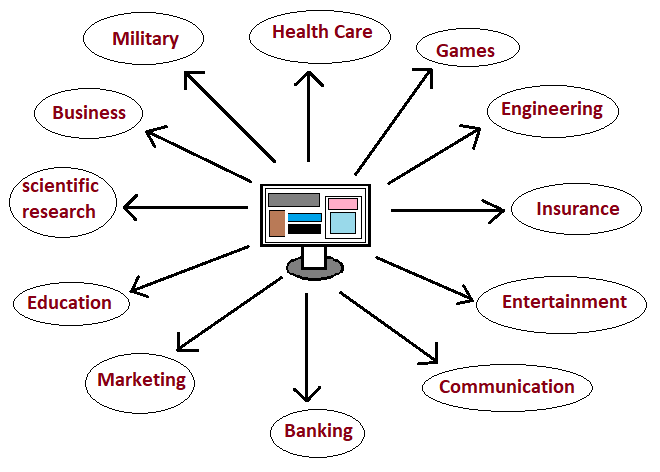
    A computer is an electronic device through which we can perform various tasks. The following are some of the applications of computers:

    • Business application
    • Scientific Research
    • Education Purposes
    • Marketing
    • Banking
    • Communication
    • Entertainment purposes
    • Insurance
    • Engineering Design
    • Games
    • Health Care
    • Military Purposes

    Business Application:

    Nowadays, the application of computers in the business field is highly increasing because of their high speed of calculation of large amounts of data, accuracy, reliability, and versatility.

    All business organizations run their business through via the internet with the help of computers without any delay. business organizations use a computer for their Sales analysis, Budgeting, Managing huge databases and stocks, financial management, etc.


    Scientific Research:

    The computers that are used in scientific research has a great ability to analyze the huge amount of data at a speed which is not possible for the human to anticipate. These computers are so precise that they could determine the exact behavior of certain chemical compounds in a different environment.

    They are used in robotics research to control the robots for better use of it.


    Education Purposes:

    The of the benefit of having a computer is that you can educate yourself through various videos, articles, pdf, images, etc. Computers have dominant applications in the education field where you can enhance yourself in your particular fields through online learning or offline learning. It has a tool for the education system called Computer-Based Education(CBE).

    Nowadays, the scale of computer students are increasing rapidly, all school provide computer education class all over the world and has its massive use.


    Marketing:

    Uses of computers in marketing fields are mostly for the following:

    Advertising: With the use of computers, advertising professionals are able to enhance their skills in arts and graphics writing skills, print and disseminate product ads with the aim to sell more products.

    Home Shopping: With the help of computers home shopping/ delivery services have become more efficient and easy. People can view the product information that is provided through graphical catalogs manage via computers, access to the order of the products.


    Banking:

    Today almost all banking around the world totally depends on computers. Banks have the vast and continuous use of computers. For example, ATM Machine allows us not only to withdraw cash but to deposit cash get information on accounts services, check balance, transfer of money, etc.

    Banking provides the facilities to manage accounts online, banks use computers to interconnect with their respective branches and other branches, and many more.


    Communication:

    The application of computers on communication is a huge benefit for both individuals and also to any organization. Through communication, we can send our ideas, convey our thoughts, speech, etc. For example, through email, we are able to contact our friends in any part of the world rather than with pen and paper. We can contact through message or voice or through video.

    Some applications that are used in this category: E-mail, Usenet, Chatting, FTP, Video-conferencing, and Telnet.


    Entertainment purposes:

    All most all people use computers for entertainment purposes in the following field:

    • watching movies
    • listening to songs
    • photos
    • watching animations etc.

    Professional video editors use the computer to edit their videos to make them more attractive in the field of entertainment.


    Insurance:

    To keep the records in their database up-to-date, all the Insurance companies use computers. Also, the finance houses and stockbroking firms widely use the computer for their purposes. The insurance companies show the information of the clients to maintain their accounts such as the starting date of the policies, next due installment of a policy, maturity date, interests due, etc.


    Engineering Design:

    Engineers use a computer for their design the layout of their machine, architecture in their respective fields. CAD(Computer-Aided Design) provides the creation and modification of images at a very high speed. Some of the engineering fields that widely use computers are:
    Structural Engineering, Industrial Engineering, and Architectural Engineering.


    For Games purposes:

    Nowadays the gaming field is increasing rapidly that uses computers.
    From online games to offline games, kids, as well as adults, are seen as active. Big Gaming Companies organize gaming competitions that are possible only with computers. Some varieties of games include action games, racing games, puzzles, combat, and many more.

    Some examples of games that are highly played on computers are:
    Counter-Strike, PubG, Minecraft, Grand Theft Auto, Halo, etc.


    Health Care/ Hospitals:

    Computers have become an important part of hospitals, medical labs, and dispensaries. Hospitals use computers to keep the records of the patients and are stored in their database for future use, also to keep track of the medicines. Computerized machines are used in hospitals for CT scans, diagnosing, ECG, X-ray, ultrasound, etc.

    Some important healthcare field where computers are necessary are:
    Surgery, Diagnostic System, Patient Monitoring System, Pharmaceutical field.


    For Military purposes:

    The defense system of all countries uses computers to enhance their equipment for their defense systems. The designing of the weapon system, missiles, base to base communication system, keeping track/records of criminals, satellite communication are possible only through computers.
  • C++ Program to Make a Simple Calculator Using Switch Case Statement

    In this C++ program tutorial, we will write a code on how to make a simple calculator using switch statement in C++ or in other words create a simple calculator to add, subtract, multiply and divide using switch and break statement.

    In order to understand the program you need to know about the following topics in C++:


    C++ Program to Make a Simple Calculator Using Switch Case Statement

    # include <iostream>
    using namespace std;
    
    int main() 
    {
        char op;
        float num1, num2;
    
        cout << "Choose the operator to perform: +, -, *, / : ";
        cin >> op;
    
        cout << "\nEnter the First Number: ";
        cin >> num1;
        cout << "Enter the Second Number: ";
        cin >> num2;
    
        switch(op) 
        {
            case '+':
                cout << num1 << " + " << num2 << " = " << num1 + num2;
                break;
    
            case '-':
                cout << num1 << " - " << num2 << " = " << num1 - num2;
                break;
    
            case '*':
                cout << num1 << " * " << num2 << " = " << num1 * num2;
                break;
    
            case '/':
                cout << num1 << " / " << num2 << " = " << num1 / num2;
                break;
    
            default:
                // If chose other than the given options
                cout << "Error! Operation not supported";
                break;
        }
    
        return 0;
    }

    Output:

    Choose the operator to perform: +, -, *, / : +
    Enter the First Number: 20
    Enter the Second Number: 30
    20 + 30 = 50

    Choose the operator to perform: +, -, *, / : *
    Enter the First Number: 5
    Enter the Second Number: 12
    5 * 12 = 60

    Choose the operator to perform: +, -, *, / : &
    Enter the First Number: 12
    Enter the Second Number: 52
    Error! Operation not supported


  • C++ Program to Calculate Average Percentage Marks

    In this tutorial, you will learn to write a code on how to calculate the average percentage marks in C++. You may go through the following topics in C++:

    We will do calculate the total marks, average, and then the percentage of the subjects entered by the user. The program also takes the user input for the marks obtained in the subjects.

    How to find the average and Percentage of marks?

    Total Marks = Sum of the marks of all subjects
    Average Marks = Total Marks/No. of subjects
    Percentage = ((marks obtained)/(total marks) *100)


    C++ Program to find Total, Average and Percentage Marks

    #include <iostream>
    using namespace std;
    
    int main()
    {
      int sub, i;
      float marks, total = 0.0 f, avg, perc;
    
      cout << "Enter the number of subjects: ";
      cin >> sub;
    
      cout << "Enter marks on each subject:\n";
      for (i = 0; i < sub; i++)
      {
        cin >> marks;
        total += marks;
      }
    
      // Average Calculation
      avg = total / sub;
    
      // Each marks is out of 100
      perc = (total / (sub *100)) *100;
    
      cout << "Total Marks Obtained: " << total;
      cout << "\nAverage Marks: " << avg;
      cout << "\nPercentage: " << perc;
    
      return 0;
    }

    Output:

    Enter the number of subjects: 5
    Enter marks on each subject:
    84
    67
    62
    80
    76
    Total Marks Obtained: 369
    Average Marks: 73.8
    Percentage: 73.8

    Here, the total marks are taken as 100 on each subject, you may take the total marks from the users too.


  • C++ Program to Calculate Product and Sum of all Elements in an Array

    In this tutorial, we will write a C++ program to find the sum and product of all elements of an array. You may go through the following topics in C++ used in the program below.

    Explanation: The program takes input for the size of an array and the elements of an array. Then the array is iterated using for loop and the sum and the product of an element are calculated. Lastly, the result is displayed.

    However, the program solves two separate questions at a time:

    • C++ program to calculate the sum of all elements in an array
    • C++ program to calculate the product of all elements in an array

    C++ Program to Calculate Product and Sum of all Elements in an Array

    Source code:

    #include<iostream>
    using namespace std;
    
    int main ()
    {
        int arr[10], size, i, sum = 0, product = 1;
        
        //user input
        cout << "Enter the size of an array: ";
        cin >> size;
        
        cout << "Enter " << size << " elements in an array: " << endl;
        for (i = 0; i < size; i++)
            cin >> arr[i];
        
        //calculation
        for (i = 0; i < size; i++)
        {
            sum += arr[i];
            product *= arr[i];
        }
        
        //Display
        cout << "\nSum of array elements: " << sum;
        cout << "\nProduct of array elements: " << product;
        return 0;
    }

    Output:

    Enter the size of an array: 5
    Enter 5 elements in an array:
    2
    3
    4
    5
    6
    Sum of array elements: 20
    Product of array elements: 720


  • C Program to Swap Two Numbers

    In this tutorial, we will learn how to swap two numbers in C program. Before that, if you may go through the following topics in C that are used in this program.


    C Program to Swap Two Numbers using temporary variable

    The program takes two number inputs from the user that needed to be swapped. And using a third variable, we swap the value. The third variable used is named temp in the program.

    #include<stdio.h>
    
    int main()
    {
        int a, b, temp;
        
        printf("Enter a: ");
        scanf("%d", &a);
        
        printf("Enter b: ");
        scanf("%d", &b);
        
        temp = a;
        a = b;
        b = temp;
        
        printf("The swapped values a: %d and b: %d", a, b);
        
        return 0;
    }

    Output:

    Enter a: 10
    Enter b: 20
    The swapped values a: 20 and b: 10

    You may want to check the following swapping program in C.


  • C Program to Swap Two Numbers without using Third Variable

    In this tutorial, we will write a C program to swap two numbers without using a temporary variable. There are two ways to swap variables.

    1. Using + and
    2. Using * and /

    Let us go through each of them with a C program. You may check out the following program.


    C Program to Swap Two Numbers without using Third Variable

    1. Using + and –

    #include<stdio.h>
    
    int main()
    {
        int a, b;
        printf("Enter a: ");
        scanf("%d", &a);
        
        printf("Enter b: ");
        scanf("%d", &b);
        
        
        a = a + b;  //a = 10 + 20 = 30
        b = a - b;  //b = 30 - 20 = 10
        a = a - b;  //a = 30 - 10 = 20
        
        printf("The swapped values a: %d and b: %d", a, b);
        
        return 0;
    }
    

    Output:

    Enter a: 10
    Enter b: 20
    The swapped values a: 20 and b: 10


    2. Using * and /

    #include<stdio.h>
    
    int main()
    {
        int a, b;
        printf("Enter a: ");
        scanf("%d", &a);
        
        printf("Enter b: ");
        scanf("%d", &b);
        
        a = a * b; //a = 10 * 20 = 200
        b = a / b; //b = 200 / 20 = 10
        a = a / b; //a = 200 / 10 = 20
        
        printf("The swapped values a: %d and b: %d", a, b);
        
        return 0;
    }
    

    Output:

    Enter a: 10
    Enter b: 20
    The swapped values a: 20 and b: 10

    Note that the swapping using / and * will not work if one of the swapping values is zero (0).


  • C Program to Convert Fahrenheit to Celsius

    In this tutorial, we will write a C Program to convert Fahrenheit into Celsius. Let us start by understanding the formula for the conversion of Fahrenheit into Celsius.

    Fahrenheit and Celsius, both are the unit for measuring the temperature. Fahrenheit is represented by oF and Celsius by oC.

    Formula to convert Fahrenheit into Celsius

    celsius = (fahrenheit – 32)*5/9


    C ProgrC Program to Convert Temperature from Fahrenheit to Celsius

    #include<stdio.h>
     
    void main()
    {
        float c,f;
     
        //user input
        printf("Enter the Fahrenheit value: ");
        scanf("%f",&f);
     
        //conversion
        c = (f - 32) * 5 / 9;
        
        //Display the result
        printf("Celsius: %.3f", c); 
    }

    Output:

    Enter the Fahrenheit value: 64
    Celsius: 17.778


  • Infix to Postfix Conversion in C Program using Stack

    Stack is very useful for storing data in the manner of the stack. It s useful when comes to the conversion of arithmetic expressions in high-level programming languages into machine-readable form. There are some complicated arithmetic expressions such as (A+B)*C(D/(E+D)). This form can be converted into polish notation using stack.

    Infix and Postfix Expression

    Infix expression contains the operator at the middle of the operands such as A+B. Whereas Postfix expression the operator goes to the end of the expression such as AB+.

    Let us go through an example in the C program.


    Infix to Postfix Conversion in C Program using Stack

    #include<stdio.h>
    #include<ctype.h>
    
    char stack[100];
    int top = -1;
    
    void push(char x)
    {
        stack[++top] = x;
    }
    
    char pop()
    {
        if(top == -1)
            return -1;
        else
            return stack[top--];
    }
    
    int priority(char x)
    {
        if(x == '(')
            return 0;
        if(x == '+' || x == '-')
            return 1;
        if(x == '*' || x == '/')
            return 2;
        return 0;
    }
    
    int main()
    {
        char exp[100];
        char *e, x;
        printf("Enter Infix expression : ");
        scanf("%s",exp);
        
        e = exp;
        
        while(*e != '\0')
        {
            if(isalnum(*e))
                printf("%c ",*e);
            else if(*e == '(')
                push(*e);
            else if(*e == ')')
            {
                while((x = pop()) != '(')
                    printf("%c ", x);
            }
            else
            {
                while(priority(stack[top]) >= priority(*e))
                    printf("%c ",pop());
                push(*e);
            }
            e++;
        }
        
        while(top != -1)
        {
            printf("%c ",pop());
        }return 0;
    }

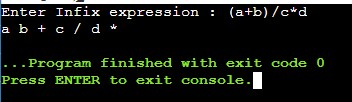
    Output: Run 1

    infix to postfix output

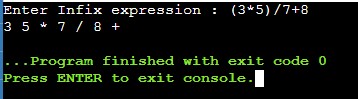
    Output: Run 2

    infix to postfix output