Author: admin

  • Java Program for Super keyword

    In this tutorial, we will write a program in java for the use of super keyword. Before that, you should have knowledge on the following topic in Java.


    Java Program for Super keyword

    Example of a super keyword to differentiate the members of the superclass from a subclass.

    class SuperClass
    {
      int id = 20;
      public void display()
      {
        System.out.println("Super Class display method");
      }
    }
    
    public class SubClass extends SuperClass
    {
      int id = 10;
      public void display()
      {
        System.out.println("Sub Class display method");
      }
    
      public void myMethods()
      {
        // Instantiating subclass
        SubClass s = new SubClass();
    
        // display method and value of sub class
        s.display();
        System.out.println("Sub Class id:" + s.id);
    
        // display method and value of super class using super
        super.display();
        System.out.println("Super Class id::" + super.id);
      }
    
      public static void main(String args[])
      {
        SubClass sub = new SubClass();
        sub.myMethods();
      }
    }

    Output:

    Base Class display method
    Sub Class id:10
    Super Class display method
    Super Class id::20

  • Inheritance Example in Java

    In this tutorial, we will write an Inheritance program in java. Before that, you should have knowledge on the following topic in Java.


    Basic Example for Inheritance:

    class Dog 
     {
      void dogName() 
      {
       System.out.println("My Name is Bruno");
      }
     }
    
     class Breed extends Dog 
     {
       void myBreed() 
       {
        System.out.println("German Shepard");
       }
     }
    
     public class Main 
     {
      public static void main(String args[]) 
      {
      Breed d = new Breed();
      d.dogName();
      d.myBreed();
      }
     }

    Output:

    My Name is Bruno
    German Shepard


    Example of Single Inheritance in Java:

     class SuperClass
     {
       public void methodSuper()
       {
         System.out.println("Super class method");
       }
     }
    
     class SubClass extends SuperClass
     {
       public void methodBase()
       {
         System.out.println("Sub class method");
       }
     }
     public class Main
     {
       public static void main(String args[])
       {
         SubClass s = new SubClass();
         s.methodSuper();
         s.methodBase();
       }
     }

    Output:

    Super class method
    Base class method


    Example of Multilevel Inheritance in Java:

    class FirstClass
    {
      public void displayFirst()
      {
        System.out.println("I am First Class");
      }
    }
    
    class SecondClass extends FirstClass
    {
      public void displaySecond()
      {
        System.out.println("I am Second Class");
      }
    }
    
    class ThirdClass extends SecondClass
    {
      public void displayThird()
      {
        System.out.println("I am Third Class");
      }
    }
    
    public class Main
    {
      public static void main(String[] args)
      {
        ThirdClass three = new ThirdClass();
        three.displayFirst();
        three.displaySecond();
        three.displayThird();
      }
    }

    Output:

    I am First Class
    I am Second Class
    I am Third Class


    Example of Hierarchical Inheritance in Java:

    class Animal
     {  
      void Dog()
      {
        System.out.println("I am dog");}  
     }  
        
     class Cat extends Animal
     {  
       void sleep()
       {
        System.out.println("I am Cat and I sleep");
       } 
     }
    
     class Horse extends Animal
     {  
       void run()
       {
        System.out.println("I am Horse and I run");
       }  
     }  
    
     public class Main
     {  
       public static void main(String args[])
       {  
        Horse h=new Horse();  
        h.Dog();  
        h.run();  
        
        Cat c=new Cat();  
        c.Dog();  
        c.sleep();
       }
            
     }

    Output:

    I am dog
    I am Horse and I run
    I am dog
    I am Cat and I sleep


  • Polymorphism Example in Java

    In this tutorial, we will write a polymorphism program in java. Before that, you should have knowledge on the following topic in Java.


    1. Method Overloading:

    Method Overloading allows the user to have more than one method that has the same name, they are differed by the number of the parameter lists, sequence, and data types of parameters.

    Example: With a number of arguments

    class ExampleTest
    {
      int add(int x, int y)
      {
        return x + y;
      }
      int add(int x, int y, int z)
      {
        return x + y + z;
      }
    }
    public class Main
    {
      public static void main(String args[])
      {
        ExampleTest obj = new ExampleTest();
        System.out.println(obj.add(50, 30));
        System.out.println(obj.add(20, 10, 20));
      }
    }

    Output:

    80
    50


    2. Method Overriding: 

    Method Overriding is a feature that allows the user to declare a method with the same name in a sub-class that is already present in a parent class. And that base is said to be overridden.

    Example for Method Overriding:

    class Dog
    {
      public void display()
      {
        System.out.println("I am A Dog");
      }
    }
    
    class breed extends Dog
    {
      public void display()
      {
        System.out.println("Breed: German Shepard");
      }
    }
    
    public class BreedTest
    {
    
      public static void main(String args[])
      {
        Dog d = new Dog();	// Dog reference and object
        Dog b = new breed(); // breed reference but Dog object
    
        d.display();	// runs the method in Dog class
        b.display();	// runs the method in Dog class
      }
    }

    Output:

    I am A Dog
    Breed: German Shepard


  • Encapsulation Example in java

    In this tutorial, we will write an encapsulation program in java. Before that, you should have knowledge on the following topic in Java.


    Encapsulation in Java using setter and getter

     class StudentInfo
     {
       private int id;
       private String stdName;
       private int stdAge;
    
       //Getter methods
       public int geStdiID()
       {
         return id;
       }
    
       public String getStdName()
       {
         return stdName;
       }
    
       public int getStdAge()
       {
         return stdAge;
       }
    
       // Setter methods
       public void geStdiID(int newId)
       {
         id = newId;
       }
    
       public void getStdName(String newName)
       {
         stdName = newName;
       }
    
       public void getStdAge(int newAge)
       {
         stdAge = newAge;
       }
     }
    
     public class EncapsTest
     {
       public static void main(String args[])
       {
         StudentInfo obj = new StudentInfo();
    
         obj.geStdiID(1101);
         obj.getStdName("Marshall");
         obj.getStdAge(20);
    
         System.out.println("Student Id: " + obj.geStdiID());
         System.out.println("Student Name: " + obj.getStdName());
         System.out.println("Student Age: " + obj.getStdAge());
       }
     }

    Output:

    Student Id: 1101
    Student Name: Marshall
    Student Age: 20


  • Example of Abstraction in Java

    In this tutorial, we will write a java program to demonstrate abstraction. Before that, you should have knowledge on the following topic in Java.


    Example of Abstraction in Java

    Source code: Example of abstract class in java:

    // Abstract class
      abstract class AbstractTest 
      {
        public abstract void animals(); //abstract method
        
        public void dog() 
        {
          System.out.println("Dog barks");
        }
      }
      
      class Cat extends AbstractTest  //inheriting AbstractTest class
      {
        public void animals() 
        {
          // animals body 
          System.out.println("Cat meows");
        }
      }
      
      public class Main 
      {
        public static void main(String[] args) 
        {
          Cat c = new Cat(); // Create an object
          c.animals();
          c.dog();
        }
      } 

    Output:

    Cat meows
    Dog barks


  • C Program to Convert Decimal to Binary

    In this tutorial, we will write a C program to convert decimal to binary. Before that, you must have knowledge of the following topics in C.

    Binary number

    The binary numbers are based on 0 and 1, so it is a base 2 number. They are the combination of 0 and 1. For example, 1001, 110101, etc.

    Decimal Number

    These are the numbers with a base of 10, which ranges from 0 to 9. These numbers are formed by the combination of 0 to 9 digits such as 24, 345, etc.

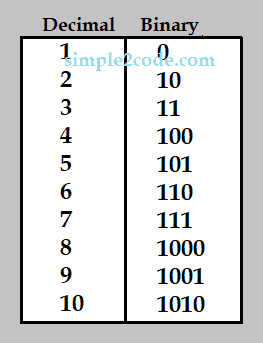
    Here is the chart where for the equivalent value of decimal and binary numbers.

    Decimal to binary

    Example:

    Input: 5
    Output: 101

    Input: 15
    Output: 1111

    Now let us go through a program for the conversion of decimal to binary in C using while loop.


    C Program to Convert Decimal to Binary using While loop

    #include <stdio.h>
    #include <conio.h>
    
    int main()
    {
      int deciNum, binaryNum[30], i = 0;
    
      printf("Enter a decimal number: ");
      scanf("%d", &deciNum);
    
      while (deciNum != 0)
      {
        binaryNum[i] = deciNum % 2;
        i++;
        deciNum = deciNum / 2;
      }
    
      printf("Equivalent Binary Value: ");
      for (i = (i - 1); i >= 0; i--)
        printf("%d", binaryNum[i]);
    
      getch();
      return 0;
    }

    Output:

    Enter a decimal number: 13
    Equivalent Binary Number: 1101


    C Program to Convert Decimal to Binary without using Array

    Source code: Decimal to Binary without using Array in C.

    #include <stdio.h>
    #include <conio.h>
    
    int main()
    {
      int deciNum, binaryNum = 0, mul = 1, rem;
    
      printf("Enter any decimal number: ");
      scanf("%d", &deciNum);
    
      while (deciNum > 0)
      {
        rem = deciNum % 2;
        binaryNum = binaryNum + (rem *mul);
        mul = mul * 10;
        deciNum = deciNum / 2;
      }
    
      printf("Equivalent Binary Value: %d", binaryNum);
    
      getch();
      return 0;
    }

    After the successful execution of the above program, it will produce the same output as the above program.


  • C Program to Convert Binary to Decimal

    In this tutorial, we will write a program to convert binary to decimal in C. Before that, you must have knowledge of the following topics in C.

    Binary number

    The binary numbers are based on 0 and 1, so it is a base 2 number. They are the combination of 0 and 1. For example, 1001, 110101, etc.

    Decimal Number

    These are the numbers with a base of 10, which ranges from 0 to 9. These numbers are formed by the combination of 0 to 9 digits such as 24, 345, etc.

    Here is the chart where for the equivalent value of decimal and binary numbers.

    Decimal to binary

    Example:

    Input: 101
    Output: 5

    Input: 111
    Output: 7

    Now let us go through a program for the conversion of binary to decimal in C using while loop.


    C Program to Convert Binary to Decimal using while loop

    In this program a math function pow() is used, it gives the power calculation and a header file math.h is required to add the beginning of the program.

    #include <stdio.h>
    #include <conio.h>
    #include <math.h>
    
    int main()
    {
      int binaryNum, deciNum = 0, i = 0, rem;
    
      printf("Enter a binary number: ");
      scanf("%d", &binaryNum);
    
      while (binaryNum != 0)
      {
        rem = binaryNum % 10;
        deciNum = deciNum + rem* pow(2, i);
        i++;
        binaryNum = binaryNum / 10;
      }
    
      printf("Equivalent Decimal Value: %d", deciNum);
    
      getch();
      return 0;
    }

    Output:

    Enter a binary number: 1111
    Equivalent Decimal Value: 15


    Convert Binary to Decimal in C without pow() Function

    Although if you do not want to use the pow() function then you simply replace the while loop of the above program with the following while loop code and others remain the same.

    while (binnum != 0)
    {
      rem = binnum % 10;
      decnum = decnum + (rem *i);
      i = i * 2;
      binnum = binnum / 10;
    }

    It will produce the same output as the above. Also, you do not need to include math.h header file.


  • C Program to Print ASCII Value of a Character

    In this tutorial, we will write a program to print ASCII value of a character in C programming. Before that, you should have knowledge on the following topic in C.

    ASCII stands for American Standard Code for Information Interchange. It is a 7-bit character set that contains 128 (0 to 127) characters. It represents the numerical value of a character.

    Example: ASCII value for character A is 65, B is 66 and a is 97, b is 98, and so on.


    C Program to Print ASCII Value of a Character

    #include <stdio.h>
    #include <conio.h>
    
    int main()
    {
      char ch;
      printf("Enter a Character: ");
      scanf("%c", &ch);
    
      printf("Its ASCII Value: %d", ch);
    
      getch();
      return 0;
    }

    Output:

    Enter a Character: A
    Its ASCII Value: 65


    C Program to print ASCII value of all Characters

    Source Code: Print the ASCII value of all the characters in C.

    #include <stdio.h>
    #include <conio.h>
    
    int main()
    {
      int i;
      printf("ASCII Value of all the Characters.\n");
    
      for (i = 0; i < 255; i++)
        printf("ASCII value of %c: %i\n", i, i);
    
      getch();
      return 0;
    }

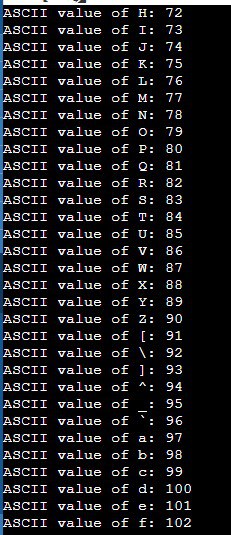
    Output: You will get the list of all the characters starting from 0 to 255 on the output display screen.

    ASCII value of character in C

  • Java Program to Convert Binary to Hexadecimal

    In this tutorial, we will write a Java Program to Convert a Binary Number to Hexadecimal Number. Before that, you must have knowledge of the following topics in java.

    Binary number

    The binary numbers are based on 0 and 1, so it is a base 2 number. They are the combination of 0 and 1. For example, 1001, 110101, etc.

    Hexadecimal number

    The hexadecimal number is represented with a base of 16. It has digits from 0 to 15 to represent, However after 9 the values are represented in Alphabet till 15 such as 10 is represented as A, 11 as B, 12 as C, 13 as D, 14 as E, and 15 as F.

    Input: 11011111
    Output: DF

    Input: 10001101
    Output: 8D

    Now let us go through a program for Binary to hexadecimal conversion in java.


    Java Program to Convert Binary to Hexadecimal using While loop

    import java.util.Scanner;
    
    public class Main
    {
      public static void main(String[] args)
      {
        int[] hexaDecnum = new int[1000];
        int i = 1, j = 0, rem, decNum = 0, binary;
    
        Scanner in = new Scanner(System.in);
    
        System.out.print("Enter a Binary Number: ");
        binary = in .nextInt();
    
        while (binary > 0)
        {
          rem = binary % 2;
          decNum = decNum + rem * i;
          i = i * 2;
          binary /= 10;
        }
    
        i = 0;
    
        while (decNum != 0)
        {
          hexaDecnum[i] = decNum % 16;
          decNum = decNum / 16;
          i++;
        }
    
        System.out.print("Equivalent Hexadecimal value: ");
        for (j = i - 1; j >= 0; j--)
        {
          if (hexaDecnum[j] > 9)
            System.out.print((char)(hexaDecnum[j] + 55) + "\n");
          else
            System.out.print(hexaDecnum[j] + "\n");
        }
      }
    }

    Output:

    Enter a Binary Number: 1010
    Equivalent Hexadecimal value: A


  • Java Program to Convert Hexadecimal to Binary

    In this tutorial, we will write a Java Program to Convert a Hexadecimal Number to Binary Number. Before that, you must have knowledge of the following topics in java.

    Binary number

    The binary numbers are based on 0 and 1, so it is a base 2 number. They are the combination of 0 and 1. For example, 1001, 110101, etc.

    Hexadecimal number

    The hexadecimal number is represented with a base of 16. It has digits from 0 to 15 to represent, However after 9 the values are represented in Alphabet till 15 such as 10 is represented as A, 11 as B, 12 as C, 13 as D, 14 as E, and 15 as F.

    Now let us go through a program for hexadecimal to binary conversion in java.


    Java Program to Convert Hexadecimal to Binary using While loop

    import java.util.Scanner;
    
    public class Main
    {
      public static int conversionFunc(String hexa)
      {
        String digits = "0123456789ABCDEF";
        hexa = hexa.toUpperCase();
        int result = 0;
        for (int i = 0; i < hexa.length(); i++)
        {
          char c = hexa.charAt(i);
          int d = digits.indexOf(c);
          result = 16 *result + d;
        }
    
        return result;
      }
    
      public static void main(String args[])
      {
        String hexDecNum;
        int decnum, i = 1, j;
        int binnum[] = new int[100];
        Scanner scan = new Scanner(System.in);
    
        System.out.print("Enter Hexadecimal Number: ");
        hexDecNum = scan.nextLine();
    
        //hexadecimal to decimal
        decnum = conversionFunc(hexDecNum);
    
        //decimal to binary
        while (decnum != 0)
        {
          binnum[i++] = decnum % 2;
          decnum = decnum / 2;
        }
    
        System.out.print("Equivalent Binary Value: ");
        for (j = i - 1; j > 0; j--)
        {
          System.out.print(binnum[j]);
        }
      }
    }

    Output:

    Enter Hexadecimal Number: AD
    Equivalent Binary Value: 10101101