Author: admin

  • Java Program to Print Diamond Pattern

    Java Program to Print Diamond Pattern

    In this tutorial, we will write a java program to print diamond pattern of stars. Before that, you should have knowledge on the following topic in Java.


    Java Program to Print Diamond Pattern

    Source Code: the program asks the user for the input of a number of rows for the diamond star pattern in java. Then using for loop, the diamond shape pattern is displayed on the screen.

    // Print Diamond star Pattern in java
    
    import java.util.Scanner;
    
    public class Main
    {
      public static void main(String args[])
      {
        int n, j, i, space = 1;
        Scanner scan = new Scanner(System.in);
    
        System.out.print("Enter the no. of Rows: ");
        n = scan.nextInt();
    
        space = n - 1;
    
        for (i = 1; i <= n; i++)
        {
          for (j = 1; j <= space; j++)
          {
            System.out.print(" ");
          }
    
          space--;
          for (j = 1; j <= (2 *i - 1); j++)
          {
            System.out.print("*");
          }
    
          System.out.println();
        }
    
        space = 1;
    
        for (i = 1; i <= (n - 1); i++)
        {
          for (j = 1; j <= space; j++)
          {
            System.out.print(" ");
          }
    
          space++;
          for (j = 1; j <= (2 *(n - i) - 1); j++)
          {
            System.out.print("*");
          }
    
          System.out.println();
        }
      }
    }

    Output:
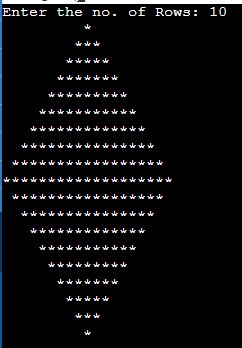
    java diamond pattern of star

  • Java Program to Print Floyd’s Triangle

    Java Program to Print Floyd’s Triangle

    In this tutorial, we will write a java program to display Floyd’s Triangle. Before that, you should have knowledge on the following topic in Java.


    Java Program to Print Floyd’s Triangle

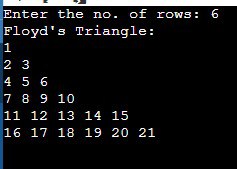
    The program asks the user for the number of rows for the Floyd triangle. Using inner and outer for loop it prints the pattern in java.

    //Print Floyd's Triangle in java
    
    import java.util.Scanner;
    
    public class Main
    {
      public static void main(String args[])
      {
        int range, i, j, k = 1;
        Scanner scan = new Scanner(System.in);
    
        System.out.print("Enter the no. of rows: ");
        range = scan.nextInt();
    
        System.out.print("Floyd's Triangle:\n");
        for (i = 1; i <= range; i++)
        {
          for (j = 1; j <= i; j++, k++)
          {
            System.out.print(k + " ");
          }
    
          System.out.println();
    
        }
      }
    }

    Output:

    print Floyd’s Triangle in java

  • Java Program to Calculate Grade of Students

    In this tutorial, we will write a java program to calculate the grade of the student. Before that, you should have knowledge on the following topic in java:

    Java Program to calculate and display Student Grades: The program simply takes a user input for the number of subjects and then for the marks obtained on each of those subjects.

    Then the sum of the marks is calculated and then the average of that sum is calculated. The average is calculated by dividing the sum of the marks by the number of subjects. Lastly, using the if-else ladder the grade is displayed on the screen.

    The grade is printed by following grade slab:

    • If marks > 80, Grade is A
    • If marks > 60 and <= 79, Grade is B
    • If marks > 40 and <= 59, Grade is C
    • Else Grade is D

    You can change the grades according to your need and your question. We will perform two different programs:

    1. Using if else ladder
    2. Using Switch Case

    Java program to find grade of a student using if else ladder

    import java.util.Scanner;
    
    public class Main
    {
      public static void main(String args[])
      {
        int marks[] = new int[5];
        int i, subjects;
        float sum = 0, avg;
        Scanner sc = new Scanner(System.in);
    
        System.out.print("Enter the number of subjects: ");
        subjects = sc.nextInt();
    
        System.out.println("Enter Marks for " + subjects + " Subjects: ");
        for (i = 0; i < subjects; i++)
        {
          marks[i] = sc.nextInt();
          sum = sum + marks[i];
        }
    
        avg = sum / subjects;
    
        System.out.print("Your Grade: ");
        if (avg > 80)
        {
          System.out.print("A");
        }
        else if (avg > 60 && avg <= 79)
        {
          System.out.print("B");
        }
        else if (avg > 40 && avg <= 59)
        {
          System.out.print("C");
        }
        else
        {
          System.out.print("D");
        }
      }
    }

    Output:

    Enter the number of subjects: 5
    Enter Marks for 5 Subjects:
    55
    84
    72
    67
    90
    Your Grade: B


    Java Program to find grade of a student using switch case

    import java.util.Scanner;
    
    public class Main
    {
      public static void main(String[] args)
      {
        int subjects, i;
        float sum = 0, percent;
        Scanner sc = new Scanner(System.in);
    
        System.out.println("Enter the Number of Subjects: ");
        subjects = sc.nextInt();
    
        System.out.println("Enter Marks for " + subjects + " Subjects:");
        for (i = 0; i < subjects; i++)
        {
          sum += sc.nextInt();
        }
    
        percent = (sum / (subjects *100)) *100;
        System.out.println("Percentage Obtained: " + percent);
    
        switch ((int) percent / 10)
        {
          case 9:
            System.out.println("Your Grade: A+");
            break;
          case 8:
            System.out.println("Your Grade: A");
            break;
          case 7:
            System.out.println("Your Grade: B");
            break;
          case 6:
            System.out.println("Your Grade: B+");
            break;
          case 5:
            System.out.println("Your Grade: C");
            break;
          default:
            System.out.println("Your Grade: D");
            break;
        }
      }
    }

    Enter the Number of Subjects:
    4
    Enter Marks for 4 Subjects:
    84
    79
    92
    85
    Percentage Obtained: 85.0
    Your Grade: A


  • C Program to Convert Octal to Decimal

    In this tutorial, we will write a program to convert octal to decimal in C using whille loop. Before that, you must have knowledge of the following topics in C.

    Octal number

    The octal numbers are the numbers with base 8 and use the digits 0 to 7. Example: 8 in decimal is represented as 10 in octal, 25 as 31, and so on.

    Decimal Number

    These are the numbers with a base of 10, which ranges from 0 to 9. These numbers are formed with the combination of 0 to 9 digits such as 24, 345, etc.

    Example:

    Input: 400
    Output: 256

    Let us go through a program for the Octal to Decimal Conversion in C. we will perform two different C programs.

    1. Basic program
    2. Using user-defined function

    C Program to Convert Octal to Decimal

    Source code:

    #include <stdio.h>
    #include <math.h>
    
    int main()
    {
      int octalNum, decimalNum = 0, i = 0;
    
      printf("Enter an octal number: ");
      scanf("%d", &octalNum);
    
      while (octalNum != 0)
      {
        decimalNum = decimalNum + (octalNum % 10) *pow(8, i++);
        octalNum = octalNum / 10;
      }
    
      printf("Equivalent Decimal Value: %d", decimalNum);
    
      return 0;
    }

    Output:

    Enter an octal number: 400
    Equivalent Decimal Value: 256


    Using Function

    Source code: convert octal to decimal using function in C.

    #include <stdio.h>
    #include <math.h>
    
    int conversionFunc(int oct)
    {
      int i = 0, decimalNum = 0, rem;
    
      while (oct > 0)
      {
        rem = oct % 10;
        oct /= 10;
    
        decimalNum = decimalNum + rem* pow(8, i);
        ++i;
      }
    
      return decimalNum;
    }
    
    int main()
    {
      int octNum;
    
      printf("Enter an Octal number: ");
      scanf("%d", &octNum);
    
      printf("Equivalent Decimal Value: %d", conversionFunc(octNum));
    
      return 0;
    }

    Output: After the successful execution of the program, it will produce the same out as the above program.


  • C Program to Convert Decimal to Octal using Recursion and Loop

    In this tutorial, we will write a program to convert decimal to octal in C. Before that, you must have knowledge of the following topics in C.

    Octal number

    The octal numbers are the numbers with base 8 and use the digits 0 to 7. Example: 8 in decimal is represented as 10 in octal, 25 as 31, and so on.

    Decimal Number

    These are the numbers with a base of 10, which ranges from 0 to 9. These numbers are formed with the combination of 0 to 9 digits such as 24, 345, etc.

    Example:

    Input: 256
    Output: 400

    Let us go through a program for the Decimal to Octal Conversion in C.


    1. Using While loop

    Here, we will write a C program to convert decimal number to octal number using while loop. The program simply takes a decimal number as an input from the user and after calculation gives an octal output.

    #include <stdio.h>
    
    int main()
    {
      int deciNum, octalNum = 0, rem, i = 1;
    
      printf("Enter a Decimal number: ");
      scanf("%d", &deciNum);
    
      while (deciNum != 0)
      {
        rem = deciNum % 8;
        octalNum = (rem *i) + octalNum;
        deciNum /= 8;
    
        i *= 10;
      }
    
      printf("Equivalent Octal Value: %d", octalNum);
    
      return 0;
    }

    Output:

    Enter a Decimal number: 256
    Equivalent Octal Value: 400


    2. Using Recursion

    Here, we will convert a decimal number to octal number using recursion in C. Learn more on Recursion and its use.

    #include <stdio.h>
    
    void conversionFunc(int); //prototype
    
    int main()
    {
      int deciNum;
    
      printf("Enter a Decimal number: ");
      scanf("%d", &deciNum);
    
      printf("Equivalent Octal Value: ");
      conversionFunc(deciNum);
    
      return 0;
    }
    
    //recursive function
    void conversionFunc(int dec)
    {
      if (dec > 0)
      {
        conversionFunc(dec / 8);
        printf("%d", dec % 8);
      }
    }

    Output: After the successful execution of the program, it will produce the same out as the above program.


  • C Program to Convert Binary to Octal

    In this tutorial, we will write a C program to convert a binary number into octal using a while loop. Before that, you must have knowledge of the following topics in C.

    Binary number

    The binary numbers are based on 0 and 1, so it is a base 2 number. They are the combination of 0 and 1. For example, 1001, 110101, etc.

    Octal number

    The octal numbers are the numbers with base 8 and use the digits 0 to 7. Example: 8 in decimal is represented as 10 in octal, 25 as 31, and so on.

    Example:

    Input: 101001
    Output: 51

    Let us go through a program for the Binary to Octal Conversion in C.


    C Program to Convert Binary to Octal

    Source Code: convert binary to octal using a function in C

    #include <stdio.h>
    #include <math.h>
    
    int conversionFunc(int binaryNum)
    {
      int octalNum = 0, decNum = 0, i = 0;
    
      while (binaryNum != 0)
      {
        decNum += (binaryNum % 10) *pow(2, i);
        ++i;
        binaryNum /= 10;
      }
    
      i = 1;
    
      while (decNum != 0)
      {
        octalNum += (decNum % 8) *i;
        decNum = decNum / 8;
        i *= 10;
      }
    
      return octalNum;
    }
    
    int main()
    {
      int binaryNum;
    
      printf("Enter a binary number: ");
      scanf("%d", &binaryNum);
    
      printf("Octal Equivalent Value: %d", conversionFunc(binaryNum));
    
      return 0;
    }

    Output:

    Enter a binary number: 101001
    Octal Equivalent Value: 51


  • C Program to Convert Octal to Binary

    In this tutorial, we will write a C program to convert an octal number into binary using a while loop. Before that, you must have knowledge of the following topics in C.

    Binary number

    The binary numbers are based on 0 and 1, so it is a base 2 number. They are the combination of 0 and 1. For example, 1001, 110101, etc.

    Octal number

    The octal numbers are the numbers with base 8 and use the digits 0 to 7. Example: 8 in decimal is represented as 10 in octal, 25 as 31, and so on.

    Example:

    Input: 51
    Output: 101001

    Let us go through a program for the Octal to Binary Conversion in C.


    C Program to Convert Octal to Binary

    Source code: convert octal number to binary number using function

    #include <math.h>
    #include <stdio.h>
    
    int conversionFunc(int octalNum)
    {
      int decNum = 0, i = 0;
      int binaryNum = 0;
    
      while (octalNum != 0)
      {
        decNum += (octalNum % 10) *pow(8, i);
        ++i;
        octalNum /= 10;
      }
    
      i = 1;
    
      while (decNum != 0)
      {
        binaryNum += (decNum % 2) *i;
        decNum = decNum / 2;
        i *= 10;
      }
    
      return binaryNum;
    }
    
    int main()
    {
      int octalNum;
    
      printf("Enter an octal number: ");
      scanf("%d", &octalNum);
    
      printf("Equivalent Binary Value: %d", conversionFunc(octalNum));
    
      return 0;
    }

    Output:

    Enter an octal number: 51
    Octal Binary Value: 101001


  • Example of this keyword in Java

    In this tutorial, we will write this keyword program in java. Before that, you should have knowledge on the following topic in Java.


    Example of this keyword in Java in constructor:

    class Student
     {
      String name;
      int marks;
    
      Student(String name, int marks)
      {
       this.name = name;   //use of this
       this.marks = marks; // use of this
      }
      void display()
      {
       System.out.println("Name: " + name + " marks:" + marks);
      }
     }
     public class main
     {
      public static void main (String[] args) 
      {
       Student st = new Student("Daniel", 90);
       st.display();
      }
     } 

    Output:

    Name: Daniel marks:90


    this: Invoke current class method:

    The method of the current class can be invoked by using this keyword. If this keyword is not used then the compiler automatically adds this keyword while invoking the method.

    source code:

     class Method
     {
      void m1()
      {
       System.out.println("This is method m1");
      }
      void m2()
      {
       System.out.println("This is method m2");
       this.m1();
      }
     }
     class Main
     {
      public static void main (String[] args) 
      {
       Method m = new Method();
       m.m2();
      }
     }

    Output:

    This is method m2
    This is method m1


  • Java example of Inner Class

    In this tutorial, we will write an inner class program in java. Before that, you should have knowledge on the following topic in Java.


    Example of Inner class in Java

    To demonstrate the example if Member inner Class in Java:

    class OuterClass 
     {
        
       // inner class declaring as private
       private class InnerClass 
       {
         public void displayInner() 
         {
           System.out.println("Inner class Acceseed");
         }
       }
        
       // method for accessing the inner class
       void displayingInner() 
       {
         InnerClass in = new InnerClass();
         in.displayInner();
       }
     }
        
     public class Main 
     {
    
       public static void main(String args[]) 
       {
        // Instantiating the outer class 
        OuterClass out = new OuterClass();
          
        // Accessing the displayingInner method.
        out.displayingInner();
        }
     }

    Output:

    Inner class Acceseed


    Example: Accessing static method of a static class in Java

    public class OuterClass
     {  
      void MethodOuter()
      {  
       System.out.println("Outer Class Method");
        
       class LocalClass   //Local Inner class
       {  
        void MethodInner()
        {
          System.out.println("Inner Class Method");
        }  
       }  
       LocalClass c = new LocalClass();  
       c.MethodInner();  
      }
    
      public static void main(String args[])
      {  
        OuterClass o = new OuterClass();  
        o.MethodOuter();  
      }  
     }

    Output:

    I am Inner Class


  • Example of Constructor in Java

    In this tutorial, we will write a constructor program in java. Before that, you should have knowledge on the following topic in Java.


    Constructor program in Java

    Basic Example for displaying the default values in Java:

     public class Employee
     {
       int id;
       String name;
       int age;
    
       //Method for Displaying default values  
       void display()
       {
         System.out.println(id + " " + name + " " + age);
       }
    
       public static void main(String args[])
       {
         //creating objects  
         Employee e1 = new Employee();
         Employee e2 = new Employee();
    
         e1.display();
         e2.display();
       }
     }

    Output:

    0 null 0
    0 null 0


    Example of Parameterized Constructor in Java:

    public class Employee
    {
      int id;
      String name;
      int age;
    
      //parameterized constructor  
      Employee(int i, String n, int a)
      {
        id = i;
        name = n;
        age = a;
      }
    
      //display the values  
      void display()
      {
        System.out.println(id + " " + name + " " + age);
      }
    
      public static void main(String args[])
      {
        //creating objects and passing values  
        Employee e1 = new Employee(101, "John", 30);
        Employee e2 = new Employee(105, "Ron", 32);
    
        //calling display method 
        e1.display();
        e2.display();
      }
    }

    Output:

    101 John 30
    105 Ron 32