Tag: java pattern program

  • 2 Different Alphabet Patterns in Java (sideways triangle)

    2 Different Alphabet Patterns in Java (sideways triangle)

    In this tutorial, we will go through two different alphabet pattern programs in java programming. Before that, you may go through the following topic in java.


    2 different Alphabet pattern program in Java

    Both of the programs below take the number of rows as the user input and using for loop it prints the desired output.

    The patterns include the sideways triangle or the pyramid with different alphabet patterns, also the half hourglass patterns containing different patterns.

    Pattern 1:

    import java.util.Scanner;
    
    public class Main
    {
      public static void main(String args[])
      {
        int rows, i, j;
        Scanner sc = new Scanner(System.in);
    
        System.out.print("Enter the no. of rows: ");
        rows = sc.nextInt();
    
        for (i = 0; i <= rows; i++)
        {
          int ch = 65;
          for (j = 0; j <= i; j++)
            System.out.print((char)(ch + j) + " ");
    
          System.out.println();
        }
        for (i = rows; i >= 0; i--)
        {
          int ch = 65;
          for (j = 0; j <= i - 1; j++)
            System.out.print((char)(ch + j) + " ");
    
          System.out.println();
        }
      }
    }

    Output:

    Enter the no. of rows: 5
    A
    A B
    A B C
    A B C D
    A B C D E
    A B C D E F
    A B C D E
    A B C D
    A B C
    A B
    A


    Pattern 2:

    import java.util.Scanner;
    
    public class Main
    {
      public static void main(String args[])
      {
        int rows, i, j;
        int character = 65;
        int count = 1;
        Scanner sc = new Scanner(System.in);
    
        System.out.print("Enter the no. of rows: ");
        rows = sc.nextInt();
    
        for (i = 1; i <= rows / 2 + 1; i++)
        {
          for (j = 1; j <= i; j++)
            System.out.print((char)(character + (count *j) - 1) + " ");
    
          System.out.println();
          count++;
        }
    
        for (i = 1; i <= rows / 2; i++)
        {
          for (j = 1; j <= rows / 2 + 1 - i; j++)
            System.out.print((char)(character + (count *j) - 1) + " ");
    
          System.out.println();
          count++;
        }
      }
    }

    Output:

    Enter the no. of rows: 9
    A
    B D
    C F I
    D H L P
    E J O T Y
    F L R X
    G N U
    H P
    I


  • Alphabet Pattern Programs in Java (Diamond Shape)

    Alphabet Pattern Programs in Java (Diamond Shape)

    In this tutorial, we will go through different alphabet patterns in java. Before that, you may go through the following topic in java.

    Both of the programs below take the user input for the number of rows to be printed for the alphabet pattern in java for the diamond shape.


    Alphabet diamond pattern in java

    import java.util.Scanner;
    
    public class Main
    {
      public static void main(String args[])
      {
        int rows, i, j, k;
        Scanner sc = new Scanner(System.in);
    
        System.out.print("Enter the no. of rows: ");
        rows = sc.nextInt();
    
        System.out.print("Diamond Shape Pattern: \n\n");
        for (i = 0; i <= rows; i++)
        {
          int ch = 65;
          for (j = rows; j >= i; j--)
          {
            System.out.print(" ");
          }
          for (k = 0; k <= i; k++)
          {
            System.out.print((char)(ch + k) + " ");
          }
          System.out.println();
        }
    
        for (i = 0; i <= rows; i++)
        {
          int ch = 65;
          for (j = -1; j <= i; j++)
          {
            System.out.print(" ");
          }
          for (k = 0; k <= (rows - 1) - i; k++)
          {
            System.out.print((char)(ch + k) + " ");
          }
          System.out.println();
        }
      }
    }

    Output:

    Alphabet diamond pattern in java

    Hollow Diamond Alphabet Pattern in java

    import java.util.Scanner;
    
    public class Main
    {
      public static void main(String args[])
      {
        int rows, i, j;
        int ch = 65;
        Scanner sc = new Scanner(System.in);
    
        System.out.print("Enter the no. of rows: ");
        rows = sc.nextInt();
    
        System.out.print("Diamond Shape Pattern: \n\n");
    
        //Upper part of diamond
        for (i = 1; i <= rows; i++)
        {
          for (j = rows; j > i; j--)
            System.out.print(" ");
    
          System.out.print((char) ch++);
    
          for (j = 1; j < (i - 1) *2; j++)
            System.out.print(" ");
    
          if (i == 1)
            System.out.print("\n");
          else
            System.out.print((char) ch++ + "\n");
        }
    
        //lower part of diamond
        ch = 65;
        for (i = rows - 1; i >= 1; i--)
        {
          for (j = rows; j > i; j--)
            System.out.print(" ");
    
          System.out.print((char) ch++);
    
          for (j = 1; j < (i - 1) *2; j++)
            System.out.print(" ");
    
          if (i == 1)
            System.out.print("\n");
          else
            System.out.print((char) ch++ + "\n");
        }
      }
    }

    Output:

    Hollow Diamond Alphabet Pattern in java

  • Java Program to print Hollow Rectangle or Square star patterns

    Java Program to print Hollow Rectangle or Square star patterns

    In this tutorial, we will write a program to display a hollow pattern of stars in java. We will write code for two different shapes patterns. Before that, you may go through the following topic in java.

    Hollow rectangle star pattern in java

    The program takes a user input for the number of rows and columns for the hollow rectangle. Then using two for loops it will print the star rectangular pattern in java.

    Example:

    Inputs:
          Rows: 6
          Columns:10
    Output:
    **********
    *        *
    *        *
    *        *
    *        *
    **********

    Java Program to print Hollow Rectangle Star Pattern.

    import java.util.Scanner;
    
    public class Main
    {
      public static void main(String args[])
      {
        int rows, columns, i, j;
        Scanner sc = new Scanner(System.in);
    
        System.out.print("Enter the no. of rows: ");
        rows = sc.nextInt();
        System.out.print("Enter the no. of columns: ");
        columns = sc.nextInt();
    
        System.out.print("Rectangular star Pattern: \n\n");
        for (i = 1; i <= rows; i++)
        {
          for (j = 1; j <= columns; j++)
          {
            if (i == 1 || i == rows || j == 1 || j == columns)
              System.out.print("*");
            else
              System.out.print(" ");
          }
    
          System.out.println();
        }
      }
    }

    Output:

    Hollow rectangle star pattern in java

    Hollow square star pattern in java

    As the square contains only sides and both length and breadth are equal so the program only takes user input for a number of rows and prints the same number of rows and columns.

    Example:

    Inputs:
       Rows: 7
    Output:
    *******
    *     *
    *     *
    *     *
    *     *
    *     *
    *******

    Java program to print hollow square pattern of stars

    import java.util.Scanner;
    
    public class Main
    {
      public static void main(String[] args)
      {
        int rows, i, j;
        Scanner sc = new Scanner(System.in);
    
        System.out.print("Enter the number of rows: ");
        rows = sc.nextInt();
    
        for (i = 1; i <= rows; i++)
        {
          for (j = 1; j <= rows; j++)
          {
            if (i == 1 || i == rows ||
              j == 1 || j == rows)
              System.out.print("*");
            else
              System.out.print(" ");
          }
          System.out.println();
        }
      }
    }

    Output:

    Hollow square star pattern in java

  • Hollow Diamond Pattern in Java

    Hollow Diamond Pattern in Java

    In this tutorial, we will write a program to print a hollow diamond star pattern in java. We will go through two examples. Before that, you may go through the following topic in java.

    The program takes a user input for the number of rows for the hollow pattern using the Scanner class. We will use a for loop to iterate and print the pattern.

    The user can give the input number as they wish and get the hollow diamond star pattern according to their input provided.


    Java Program To Display Hollow Diamond Star Pattern

    import java.util.Scanner;
    
    public class Main
    {
      public static void main(String[] args)
      {
        int rows, i, j;
        Scanner sc = new Scanner(System.in);
    
        System.out.print("Enter the number of rows: ");
        rows = sc.nextInt();
    
        //Upper part of diamond
        for (i = 1; i <= rows; i++)
        {
          for (j = rows; j > i; j--)
            System.out.print(" ");
    
          System.out.print("*");
    
          for (j = 1; j < (i - 1) *2; j++)
            System.out.print(" ");
    
          if (i == 1)
            System.out.print("\n");
          else
            System.out.print("*\n");
        }
    
        //lower part of diamond
        for (i = rows - 1; i >= 1; i--)
        {
          for (j = rows; j > i; j--)
            System.out.print(" ");
    
          System.out.print("*");
    
          for (j = 1; j < (i - 1) *2; j++)
            System.out.print(" ");
    
          if (i == 1)
            System.out.print("\n");
          else
            System.out.print("*\n");
        }
      }
    }

    Output:

    Hollow Diamond Pattern in Java

    Print Hollow Diamond Pattern using Star in Java using while loop

    The program below takes the rows input from the user as the above program did but here we will produce a hollow diamond pattern using a while loop instead of for loop.

    import java.util.Scanner;
    
    public class Main
    {
      public static void main(String[] args)
      {
        int rows, i, j;
        Scanner sc = new Scanner(System.in);
    
        System.out.print("Enter the number of rows: ");
        rows = sc.nextInt();
    
        //Upper part of diamond
        i = 1;
        while (i <= rows)
        {
          j = rows;
          while (j > i)
          {
            System.out.print(" ");
            j--;
          }
          System.out.print("*");
    
          j = 1;
          while (j < (i - 1) *2)
          {
            System.out.print(" ");
            j++;
          }
    
          if (i == 1)
            System.out.print("\n");
          else
            System.out.print("*\n");
    
          i++;
        }
    
        //lower part of diamond
        i = rows - 1;
        while (i >= 1)
        {
          j = rows;
          while (j > i)
          {
            System.out.print(" ");
            j--;
          }
    
          System.out.print("*");
    
          j = 1;
          while (j < (i - 1) *2)
          {
            System.out.print(" ");
            j++;
          }
    
          if (i == 1)
            System.out.print("\n");
          else
            System.out.print("*\n");
    
          i--;
        }
      }
    }

    The above program with a while loop will produce the same result as the for loop has produced. The only difference is we used while instead of for loop.


  • Right Arrow Star Pattern in Java

    Right Arrow Star Pattern in Java

    In this tutorial, we will write a java program to print right arrow star pattern. Before that, you may go through the following topic in java.


    Right Arrow Star Pattern in Java

    This is a program on the arrowhead pattern in java. The program takes a user input for the number of rows in a pattern and using for loop, it displays the pattern.

    import java.util.Scanner;
    
    public class Main
    {
      public static void main(String args[])
      {
        int rows, i, j, k;
        Scanner sc = new Scanner(System.in);
    
        System.out.print("Enter the number of rows: ");
        rows = sc.nextInt();
    
        System.out.print("Output:\n");
    
        //upper part of the arrow head
        for (i = 1; i < rows; i++)
        {
          for (j = 0; j < i; j++)
            System.out.print(" ");
    
          for (k = 0; k < i; k++)
            System.out.print("*");
    
          System.out.println();
        }
    
        //lower part of the arrow head
        for (i = 0; i < rows; i++)
        {
          for (j = 0; j < rows - i; j++)
            System.out.print(" ");
    
          for (k = 0; k < rows - i; k++)
            System.out.print("*");
    
          System.out.println();
        }
      }
    }

    Output:

    Right Arrow Star Pattern in Java

    User Input for Character

    import java.util.Scanner;
    
    public class Main
    {
      public static void main(String args[])
      {
        int rows, i, j, k;
        char symbol;
        Scanner sc = new Scanner(System.in);
    
        System.out.print("Enter the number of rows: ");
        rows = sc.nextInt();
        System.out.print("Enter the symbol for the pattern: ");
        symbol = sc.next().charAt(0);
    
        System.out.print("Output:\n");
    
        //upper part of the arrow head
        for (i = 1; i < rows; i++)
        {
          for (j = 0; j < i; j++)
            System.out.print(" ");
    
          for (k = 0; k < i; k++)
            System.out.print(symbol);
    
          System.out.println();
        }
    
        //lower part of the arrow head
        for (i = 0; i < rows; i++)
        {
          for (j = 0; j < rows - i; j++)
            System.out.print(" ");
    
          for (k = 0; k < rows - i; k++)
            System.out.print(symbol);
    
          System.out.println();
        }
      }
    }

    Output:

    Right Arrow Star Pattern in Java 2

  • Right Angle Triangle Character Pattern in Java: Pattern 1

    Right Angle Triangle Character Pattern in Java: Pattern 1

    In this tutorial, we will write a program to display a right-angle triangle pattern in java using the alphabet. Before that, you may go through the following topic in java.

    The program below takes the user input from the user for the number of rows and display the right triangle character pattern in various character orders.

    Right angled triangle pattern

    import java.util.Scanner;
    
    public class Main
    {
      public static void main(String args[])
      {
        int rows, i, j;
        int ch = 64;
        Scanner sc = new Scanner(System.in);
    
        System.out.print("Enter the number of rows: ");
        rows = sc.nextInt();
    
        System.out.print("Output:\n");
        for (i = 1; i <= rows; i++)
        {
          for (j = 1; j <= i; j++)
            System.out.print((char)(i + ch)+" ");
    
          System.out.println();
        }
      }
    }

    Output:

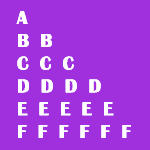
    Enter the number of rows: 6
    Output:
    A
    B B
    C C C
    D D D D
    E E E E E
    F F F F F F


  • Inverted Right Triangle Alphabet Pattern in Java: Pattern 1

    Inverted Right Triangle Alphabet Pattern in Java: Pattern 1

    In this tutorial, we will write a java program to display the reverse right triangle pattern using the alphabet. These are character pattern programs in java. Before that, you may go through the following topic in java.

    The programs below take the user input from the user for the number of rows and display the reverse right triangle character pattern in various character orders.

    This program can also be called the inverted half pyramid in java or Floyd’s triangle alphabet pattern in java.

    Reverse right angled triangle pattern

    In this program, the decrement of the Alphabet starts from the right corner of the pattern.

    import java.util.Scanner;
    
    public class Main
    {
      public static void main(String args[])
      {
        int rows, i, j;
        int ch = 64;
        Scanner sc = new Scanner(System.in);
    
        System.out.print("Enter the number of rows: ");
        rows = sc.nextInt();
    
        System.out.print("Output:\n\n");
        for (i = rows; i >= 1; i--)
        {
          for (j = 1; j <= i; j++)
          {
            System.out.print((char)(j + ch));
          }
    
          System.out.println();
        }
      }
    }

    Output:

    Enter the number of rows: 6
    Output:


    ABCDEF
    ABCDE
    ABCD
    ABC
    AB
    A


  • Inverted Hourglass Pattern in Java using Numbers

    Inverted Hourglass Pattern in Java using Numbers

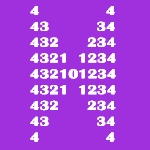
    In this tutorial, we will write a java program to print the inverted hourglass pattern using numbers. Before that, you may go through the following topic in java.


    Inverted Hourglass Pattern in Java

    import java.util.Scanner;
    
    public class Main
    {
      public static void main(String[] args)
      {
        Scanner sc = new Scanner(System.in);
    
        System.out.print("Enter the number of rows: ");
        int n = sc.nextInt();
        int nsp = 2 *n - 1;
    
        int nr = 2 *n + 1;
        int num = n;
        int a = 0;
    
        for (int i = 1; i <= nr; i++)
        {
          if (i > n + 1)
            a = nr - i + 1;
          else
            a = i;
    
          //numbers
          for (int cst = 1; cst <= a; cst++)
          {
            System.out.print(num);
            num--;
          }
    
          //Spaces
          for (int csp = 1; csp <= nsp; csp++)
          {
            System.out.print(" ");
          }
    
          for (int cst = 1; cst <= a; cst++)
          {
            num++;
            if (num != 0)
              System.out.print(num);
          }
    
          if (i <= (nr) / 2)
            nsp -= 2;
          else
            nsp += 2;
    
          System.out.println();
        }
      }
    }

    Output:

    Inverted Hourglass Pattern in Java

  • Similar Alphabet Pyramid Pattern in Java

    Similar Alphabet Pyramid Pattern in Java

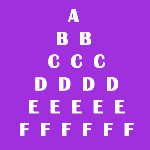
    In this tutorial, we will write an alphabet triangular pattern in java where the characters or letters are every row have the same alphabet. Before that, you may go through the following topic in java.

    Example:

    Rows Input: 5
    Output:
           A
          B B
         C C C
        D D D D
       E E E E E
    

    Alphabet Pyramid Pattern in Java

    import java.util.Scanner;
    
    public class Main
    {
      public static void main(String args[])
      {
        int rows, i, j;
        Scanner scan = new Scanner(System.in);
    
        System.out.print("Enter the number of rows: ");
        rows = scan.nextInt();
    
        System.out.print("Output:\n");
        for (i = 1; i <= rows; i++)
        {
          for (j = 1; j <= rows - i; j++)
            System.out.print(" ");
    
          for (j = 1; j <= i; j++)
            System.out.print((char)(char)(i + 64) + " ");
    
          System.out.println();
        }
      }
    }

    Output:

    Enter the number of rows: 8
    Output:
           A
          B B
         C C C
        D D D D
       E E E E E
      F F F F F F
     G G G G G G G
    H H H H H H H H

  • Java Program to print Half Pyramid using Alphabets in Increasing order

    Java Program to print Half Pyramid using Alphabets in Increasing order

    In this tutorial, we will write a program to display half alphabet pyramid patterns in java. Before that, you may go through the following topic in java.

    Example:

    Rows Input: 5
    Output:
    A
    A B
    A B C
    A B C D
    A B C D E

    This program is also known as right-angled triangle patterns using the alphabet in java as the right angle is formed on the right side of the pattern.


    Java Program to print Half Pyramid using Alphabets

    The program takes a user input for the number of rows to be displayed on the screen. The Alphabet starts from A and increases at every row such as A, Ab, ABC, and so on.

    import java.util.Scanner;
    
    public class Main
    {
      public static void main(String args[])
      {
        int rows, i, j;
        char ch;
        Scanner scan = new Scanner(System.in);
    
        System.out.print("Enter the number of rows: ");
        rows = scan.nextInt();
    
        System.out.print("Output:\n");
        for (i = 1; i <= rows; i++)
        {
          ch = 'A';
          for (j = 1; j <= i; j++)
          {
            System.out.print(" " + ch++);
          }
    
          System.out.print("\n");
        }
      }
    }

    Output:

    Enter the number of rows: 7
    Output:
    A
    A B
    A B C
    A B C D
    A B C D E
    A B C D E F
    A B C D E F G