
This article is based on the Java Program to create Login Window using AWT Controls. Here we will use the AWT components Label, Button and Textfield. We will see the code to create a user_name and password text field with login and signup buttons.
AWT program in Java with output:
Awt Program in java with Output to Create Login Window
import java.awt.*;
import java.awt.event.*;

class LoginWindowAWT extends Frame
{
    //Declaring text fields and Buttons
    TextField userName, password;
    Button btn1, btn2;

    LoginWindowAWT()
    {
        setLayout(new FlowLayout());
        this.setLayout(null);

        //Setting the name and password that will be displayed
        Label u_name = new Label("User Name:",Label.CENTER);
        Label pass = new Label("Password:",Label.CENTER);

        //username declaration
        userName = new TextField(20);
        this.add(u_name);
        this.add(userName);

        //Password declaration
        password = new TextField(20);
        this.add(pass);
        this.add(password);

        password.setEchoChar('#');

        //Button Declaration
        btn1 =new Button("LogIn");
        btn2 =new Button("SignUp");
        this.add(btn1);
        this.add(btn2);

        //Setting the display Bounds
        userName.setBounds(200,100,90,20);
        u_name.setBounds(70,90,90,40);


        password.setBounds(200,140,90,20);
        pass.setBounds(70,130,90,40);

        btn1.setBounds(100,260,70,40);
        btn2.setBounds(180,260,70,40);

    }
    public static void main(String args[])
    {
        //creating an object
        LoginWindowAWT ml=new LoginWindowAWT();

        //background Color
        ml.setBackground(Color.RED) ;

        ml.setTitle("Login Window AWT");
        ml.setVisible(true);
        ml.setSize(400,400);

    }
}
Output: Save the file with .java extension and open the command prompt on that directory and run the following code.
C:\java>javac LoginWindowAWT.java
C:\java>java LoginWindowAWT
You will see the following result:
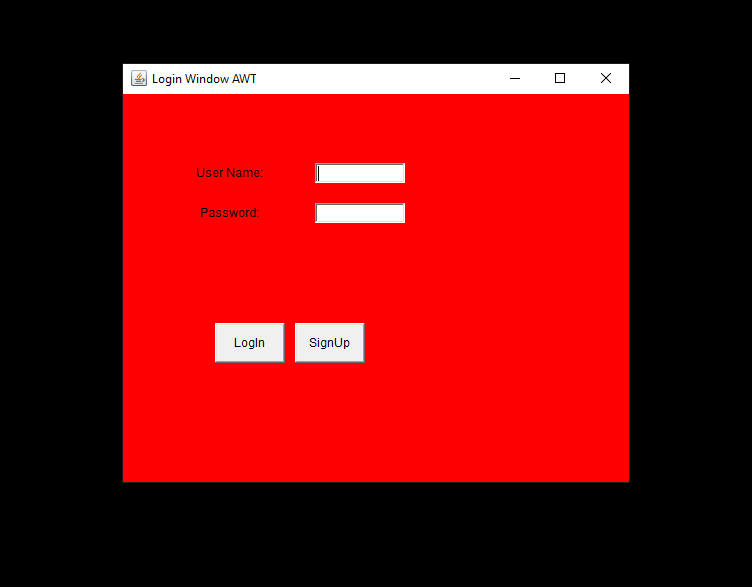
This is the end of the article to create a Login Window with an AWT program in Java with output.
Learn more about Java Programs.