
The following program shows how to insert an element at a specific position in an Array in Java.
The program takes the following as input:
- The size of an array.
- Value of elements of an array.
- The position where the user wants to insert the new element.
- The value of the element itself that the user wants to insert.
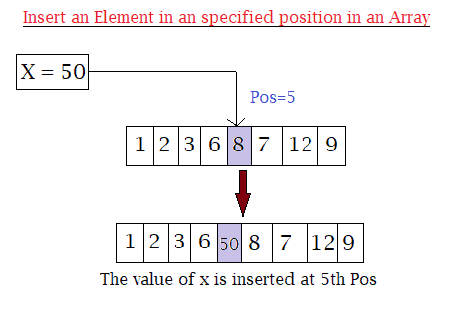
Lastly displays the final result where the new elements have been inserted.
Program to Insert an Element in an Array at a Specified Position in Java
import java.util.Scanner;
public class Insert_Array
{
  public static void main(String[] args)
  {
    int n, x, pos;
    Scanner s = new Scanner(System.in);

    System.out.print("Enter size of an Array: ");
    n = s.nextInt();

    int a[] = new int[n + 1];

    System.out.println("Enter " + n + " elements in an array:");
    for (int i = 0; i < n; i++)
    {
      a[i] = s.nextInt();
    }

    System.out.print("Enter the position where you want to insert new element: ");
    pos = s.nextInt();

    System.out.print("Enter the element you want to insert at " + pos + " position: ");
    x = s.nextInt();

    //insertion
    for (int i = (n - 1); i >= (pos - 1); i--)
    {
      a[i + 1] = a[i];
    }
    a[pos - 1] = x;

    //Displaying after insertion
    System.out.print("Array after insertion: ");
    for (int i = 0; i < n; i++)
    {
      System.out.print(a[i] + " ");
    }
    System.out.print(a[n]);
  }
}
Output:
Enter size of an Array: 5
Enter 5 elements in an array:
1
2
3
4
5
Enter the position where you want to insert new element: 3
Enter the element you want to insert at 3 position: 9
Array after insertion: 1 2 9 3 4 5