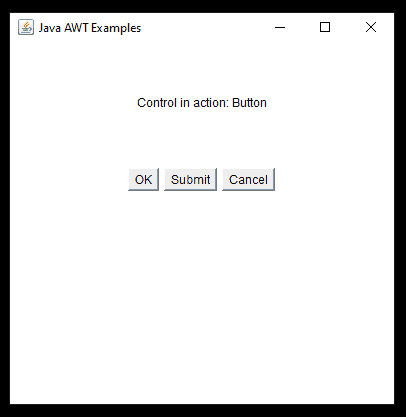
This a Demo Example AWT (Abstract Window Toolkit) Control in Java.
    import java.awt.*;
    import java.awt.event.*;

    public class AwtControlDemo {

        private Frame mainFrame;
        private Label headerLabel;
        private Label statusLabel;
        private Panel controlPanel;

        public AwtControlDemo(){
            prepareGUI();
        }

        public static void main(String[] args){
            AwtControlDemo  awtControlDemo = new AwtControlDemo();
            awtControlDemo.showEventDemo();
        }

        private void prepareGUI(){
            mainFrame = new Frame("Java AWT Examples");
            mainFrame.setSize(400,400);
            mainFrame.setLayout(new GridLayout(3, 1));
            mainFrame.addWindowListener(new WindowAdapter() {
                public void windowClosing(WindowEvent windowEvent){
                System.exit(0);
                }
            });
            headerLabel = new Label();
            headerLabel.setAlignment(Label.CENTER);
            statusLabel = new Label();
            statusLabel.setAlignment(Label.CENTER);
            statusLabel.setSize(350,100);

            controlPanel = new Panel();
            controlPanel.setLayout(new FlowLayout());

            mainFrame.add(headerLabel);
            mainFrame.add(controlPanel);
            mainFrame.add(statusLabel);
            mainFrame.setVisible(true);
        }

        private void showEventDemo(){
            headerLabel.setText("Control in action: Button");

            Button okButton = new Button("OK");
            Button submitButton = new Button("Submit");
            Button cancelButton = new Button("Cancel");

            okButton.setActionCommand("OK");
            submitButton.setActionCommand("Submit");
            cancelButton.setActionCommand("Cancel");

            okButton.addActionListener(new ButtonClickListener());
            submitButton.addActionListener(new ButtonClickListener());
            cancelButton.addActionListener(new ButtonClickListener());

            controlPanel.add(okButton);
            controlPanel.add(submitButton);
            controlPanel.add(cancelButton);

            mainFrame.setVisible(true);
        }

        private class ButtonClickListener implements ActionListener{
            public void actionPerformed(ActionEvent e) {
                String command = e.getActionCommand();
                if( command.equals( "OK" ))  {
                statusLabel.setText("Ok Button clicked.");
                }
                else if( command.equals( "Submit" ) )  {
                statusLabel.setText("Submit Button clicked.");
                }
                else  {
                statusLabel.setText("Cancel Button clicked.");
                }
            }
        }
    }
The output of the above code.