

In this tutorial, we will write a java program to print hollow inverted right triangle star pattern. Before that, you may go through the following topic in java.
We will display the hollow inverted right triangle pattern of stars in java using different loops. We will use for loop and while and write two different codes.
The programs however take the number of rows as an input from the user and print the hollow pattern. There is a use of if..else statement in the program to check the boolean condition. It is placed inside the for loop and while loop.
Hollow Inverted Right Triangle Star Pattern in Java
Using For Loop
import java.util.Scanner;

public class Main
{
  public static void main(String args[])
  {
    int rows, i, j, k;
    Scanner sc = new Scanner(System.in);

    System.out.print("Enter the no. of rows: ");
    rows = sc.nextInt();

    for (i = rows; i > 0; i--)
    {
      if (i == 1 || i == rows)
      {
        for (j = 1; j <= i; j++)
          System.out.print("*");
      }
      else
      {
        for (k = 1; k <= i; k++)
        {
          if (k == 1 || k == i)
            System.out.print("*");
          else
            System.out.print(" ");
        }
      }
      System.out.println();
    }
  }
}
Output:
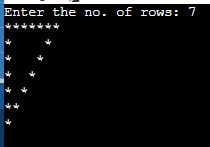
Using While Loop
import java.util.Scanner;

public class Main
{
  public static void main(String args[])
  {
    int rows, i, j;
    Scanner sc = new Scanner(System.in);

    System.out.print("Enter the no. of rows: ");
    rows = sc.nextInt();
    i = rows;

    while (i > 0)
    {
      j = 1;
      while (j <= i)
      {
        if (j == 1 || j == i || i == 1 || i == rows)
          System.out.print("*");
        else
          System.out.print(" ");
        j++;
      }
      System.out.println();
      i--;
    }
  }
}
Output: