
It is a loop control statement. It is used to continue the loop in the program. The use of continue inside a loop skips the remaining code and transfer the current flow of the execution to the beginning o the loop.
In case of for loop, the continue statement causes the program to jump and pass the execution to the condition and update expression by skipping further statement. Whereas in the case of while and do…while loops, the continue statement passes the control to the conditional checking expression.
continue statement Flowchart:
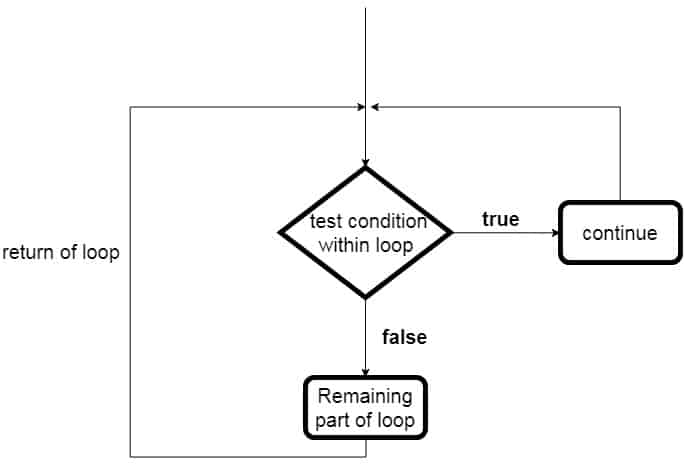
Syntax of continue statement in C#:
//continue syntax
continue;
Example of C# continue Statement
using System;

public class ContinueStatement
{
   public static void Main(string[] args)
   {
      for (int i = 1; i <= 10; i++)
      {
         if (i == 7)
         {
            // 7 is skipped and control passed to for loop
            continue;
         }

         Console.WriteLine("Value of i: {0}", i);
      }
   }
}
Output:
Value of i: 1
Value of i: 2
Value of i: 3
Value of i: 4
Value of i: 5
Value of i: 6
Value of i: 8
Value of i: 9
Value of i: 10
Example: C# continue program in nested loops
using System;

public class ContinueNested
{
   public static void Main(string[] args)
   {
      //outer loop
      for (int i = 1; i <= 2; i++)
      {
         //inner loop
         for (int j = 1; j <= 2; j++)
         {
            if (i == 1 && j == 2)
            {
                //skips when i=2 and j=2 and control goes to the outer loop
               continue;
            }

            Console.WriteLine("i: {0}, j: {1}", i, j);
         }
      }
   }
}
Output:
i: 1, j: 1
i: 2, j: 1
i: 2, j: 2
In the above output, i: 1, j: 2 is skipped as the continue statement stopped the further execution after that and transferred the execution control to the beginning of the outer loop.