In this tutorial, we will write a C++ program to read a file and display its contents. In order to understand the program, you should have knowledge of the topic in C++ below.
Before writing a program: To read a file using C++ program, you first need to create a file and give it a name and save the file inside the current directory (i.e the directory where the C++ program will be saved).
Consider a text file name test.txt is saved which has the following content in it.
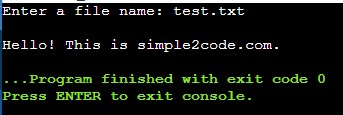
Hello! This is simple2code.com.
Now let us write a program to read this file in C++.
C++ Program to Read a File
#include <iostream>
#include <fstream>
#include <stdio.h>
using namespace std;

int main()
{
   ifstream file;
   char str[100], fname[100];

   cout << "Enter a file name: ";
   cin >> fname;

   file.open(fname);

   if (!file)
   {
      cout << "Error Occurred while opening file!";
      exit(0);
   }

   cout << "\n";

   while (file.eof() == 0)
   {
      file >> str;
      cout << str << " ";
   }

   file.close();

   return 0;

}
Output: After the execution, the following output will be displayed on the screen.