Blog

  • Java Program to make a Calculator using a Switch Statement

    This Java program simply creates an option to chose the Operators just like any calculator. A switch statement is used for creating an option in programming that will make case for a different option and operate according to the option that the user provides. It will also take two operands (numbers) at the beginning.

    If you do not know about the Switch Case statement or Data Types in java, click the link below to learn about them as this program uses one.


    Java Program to make a Calculator using a Switch Statement

     //Making Calculator using a switch in Java
      
     import java.util.Scanner;
    
     public class CalculatorJava
     {
       public static void main(String[] args)
       {
         double result;
         char operator;
         Scanner reader = new Scanner(System.in);
    
         System.out.print("Enter first numbers: ");
         double num1 = reader.nextDouble();
    
         System.out.print("Enter second numbers: ");
         double num2 = reader.nextDouble();
    
         System.out.print("Choose an operator(+, -, *, /): ");
         operator=reader.next().charAt(0);
    
         //switch case 
         switch (operator)
         {
           case '+':
             result = num1 + num2;
             break;
    
           case '-':
             result = num1 - num2;
             break;
    
           case '*':
             result = num1 * num2;
             break;
    
           case '/':
             result = num1 / num2;
             break;
    
           default:
             System.out.printf("Error! operator is not correct");
             return;
         }
    
         //Displaying result
         System.out.printf("%.1f %c %.1f = %.1f", num1, operator, num2, result);
       }
     }

    Output:

    Enter first numbers: 5
    Enter second numbers: 3
    Choose an operator (+, -, *, /): -
    5.0 - 3.0 = 2.0

  • Java Program to Calculate the Simple Interest

    Here, you will learn how to calculate the Simple Interest in Java using the Formula ((p * r * t) / 100)) where,

    • p = Principal
    • r = Rate of Interest
    • t = Time Period

    The program takes the user input for Principal, Rate, and Time, calculates the result, and displays the result on the screen.

    If you do not know about the operators or Data Types in java, click the link below to learn about operators as this program is using one.


    Java Program to Calculate the Simple Interest

     //Simple Interest in Java
      
     import java.util.Scanner;
    
     public class SimpleInterestJava
     {
        public static void main(String args[]) 
        {
         float p, r, t, SI;
        
         Scanner scan = new Scanner(System.in);
        
         System.out.print("Enter the value for Principal: ");
         p = scan.nextFloat();
        
         System.out.print("Enter the value for Rate of interest: ");
         r = scan.nextFloat();
        
         System.out.print("Enter the value for Time period: ");
         t = scan.nextFloat();
         scan.close();
        
         SI = (p * r * t) / 100;
         System.out.print("Simple Interest is: " +SI);
        }
     }

    Output:

    Enter the value for Principal: 1000
    Enter the value for Rate of interest: 5
    Enter the value for Time period: 2
    Simple Interest is: 100.0

    The above source code to calculate the Simple Interest in Java is compiled and ran successfully on a windows system. Browse through Java Program to learn more.


  • Java Program to Calculate the Area of a Triangle

    Here, you will learn how to calculate the Area of a Triangle using the Formula [(Base* Height)/2]. The program takes the user input for the Base and Height of a triangle, calculates the result, and displays the result on the screen.

    If you do not know about the operators in java, click the link below to learn about operators as this program is using one.


    Java Program to Calculate the Area of a Triangle

     //Area of a traingle
    
     import java.util.Scanner;
    
     public class AreaOfTriangle 
     {
        public static void main(String args[]) 
        {   
            Scanner sc = new Scanner(System.in);
    
            System.out.println("Enter the base of the Triangle:");
            float base = sc.nextFloat();
    
            System.out.println("Enter the height of the Triangle:");
            float height = sc.nextFloat();
    
            //Area = (base*height)/2
            float area = (base* height)/2;
            System.out.println("Area of the Triangle is: " + area);      
        }
     }

    Output:

    Enter the base of the Triangle:
    8
    Enter the height of the Triangle:
    10
    Area of the Triangle is: 40.0


  • Java Program to Calculate the Area of a Square

    Here, you will learn how to calculate the Area of a Square using the Formula (Side* Side). The Program takes the user input for Side, calculates the result, and displays the result on the screen.

    If you do not know about the operators in java, click the link below to learn about operators as this program is using one.


    Java Program to Calculate the Area of a Square

     //Area of a square
      
     import java.util.Scanner;
     
     public class AreaofSquare 
     {
        public static void main (String[] args)
        {
            Scanner scanner = new Scanner(System.in);
            
            System.out.print("Enter Side of Square: ");
            float side = scanner.nextInt();
            
            //Area = side*side
            float area = side*side; 
            System.out.println("Area of Square is: "+area);
        }
     }

    Output:

    Enter Side of Square: 4
    Area of Square is: 16.0


  • Java Program to Calculate the Area of a Rectangle

    Here, you will learn how to calculate the Area of a Rectangle using the Formula (Length * Breadth). The program takes the user input for length and breadth, calculates the result, and displays the result on the screen.

    If you do not know about the operators in java, click the link below to learn about operators as this program is using one.


    Java Program to Calculate the Area of a Rectangle

    import java.util.Scanner;
    
    public class AreaRectangle
    {
      public static void main(String[] args)
      {
        int len, br, result;
        Scanner sc = new Scanner(System.in);
    
        //Taking Inputs from Users
        System.out.print("Enter the length: ");
        len = sc.nextInt();
        System.out.print("Enter the breadth: ");
        br = sc.nextInt();
    
        sc.close();
        result = len * br;
        System.out.println("Area of a rectangle: " + result);
      }
    }

    Output:

    Enter the length: 2
    Enter the breadth: 5
    Area of a rectangle: 10


  • Java Program to Calculate the Area and Circumference of a Circle

    The java program below uses Math.PI property of java that returns approx 3.14159. The program takes the user input for the value of radius and calculates using the formula of Area and Circumference of a circle and displays the output accordingly.


    Java Program to Calculate the Area and Circumference of a Circle

     //Area and circumference of circle
    
     import java.util.Scanner;
    
     public class AreaCircumCircle
     {
        
       public static void main(String args[])
       {
         Scanner sc = new Scanner(System.in);
         System.out.print("Enter the radius: ");
        
         double radius = sc.nextDouble();
        
         //Area = PI*radius*radius
         double area = Math.PI * (radius * radius);
         System.out.println("The area of a circle is: " + area);
        
         //Circumference = 2*PI*radius
         double circumference= Math.PI * 2*radius;
         System.out.println( "The circumference of a circle is:"+circumference) ;
       }
     }

    Output:

    Enter the radius: 7
    The area of a circle is: 153.93804002589985
    The circumference of a circle is:43.982297150257104


  • Java Program to Check whether the Number is Odd or Even

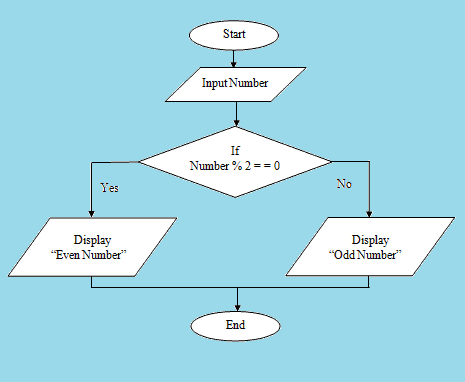
    Here, you will learn to check the number taken from the user as an input using a scanner is Odd or Even. After checking display the result accordingly.

    The concept of checking the number using the Modulus operator. First, calculate the number by modulus by 2, and if the Number mod 2 is equal to 0 then it is an even number else not.

    Flowchart for odd or even number

    Odd_Even_flowchart

    Java Program to Check whether the Number is Odd or Even

     //check the number for odd and even
      
     import java.util.Scanner;
     
     public class CheckEvenOdd 
     {
        public static void main(String[] args) 
        {
            Scanner sc = new Scanner(System.in);
            
            System.out.print("Enter an integer: ");
            int num = sc.nextInt();
            
            if(num % 2 == 0)
                System.out.println(num + " is even");
            else
                System.out.println(num + " is odd");
        }
     }

    Output:

    Enter an integer: 43
    43 is odd


  • Java Program to find the Product of Two Numbers

    The example below shows how to take two integers as an input from the user using Scanner and multiply them and display the final result on the screen in Java.

    Before that, if you do not about the operators in Java, click the link below and learn about it.


    Java program to find the Product of Two Numbers:

    //product of two numbers
    
     import java.util.Scanner;
    
     public class ProductOfTwoNumbers 
     {
        public static void main(String[] args) 
        {
            Scanner scan = new Scanner(System.in);
            System.out.print("Enter first number: ");
    
            // reads the input number
            int num1 = scan.nextInt();
            
            System.out.print("Enter second number: ");
            int num2 = scan.nextInt();
    
            // Closing Scanner after the use
            scan.close();
            
            // product of two numbers
            int product = num1*num2;
            
            // Displaying the result
            System.out.println("Product of two numbers is: "+product);
        }
     }

    Output:

     Enter first number: 7
     Enter second number: 7
     Product of two numbers is: 49

  • Java Program to Add Two Numbers

    This Java program adds two integers given in the program and displays the result on the screen.

    To understand the topic, you need to have a basic understanding of two basic topics in Java.


    Java Program for the Sum of two numbers

    //Addition of two numbers
     
     public class AddTwoNumbers 
     {
    
       public static void main(String[] args) 
       {
            
         int num1 = 20, num2 = 30, sum;
         sum = num1 + num2; //adding two numbers
    
         //Display result
         System.out.println("Sum of num1 and num2: "+sum);
       }
    }

    Output:

    Sum of num1 and num2: 50


    Java Program for the Sum of two numbers using Scanner

    The Scanner class is used to get the inputs from the users in Java programming. We need to import a scanner class at the beginning.

    import java.util.Scanner;
    public class AddTwoNumbers
    {
      public static void main(String[] args)
      {
        int num1, num2, sum;
        Scanner sc = new Scanner(System.in);
    
        //Taking Inputs from Users
        System.out.println("Enter First Number: ");
        num1 = sc.nextInt();
        System.out.println("Enter Second Number: ");
        num2 = sc.nextInt();
    
        sc.close();
        sum = num1 + num2;
        System.out.println("Sum of these numbers: " + sum);
      }
    }

    Output:

    Enter First Number:
    10
    Enter Second Number:
    5
    Sum of these numbers: 15


  • Java – File Class with Example

    Java file Class deals directly with the file and file system. That is, it is the abstract representation of file or directory pathname. It defines the properties of the file itself rather than describing how information is stored in or retrieved from files.

    File class contains various methods for working with the pathname, deleting and renaming files, creation of new directories, and many more. A file object is created to manipulate with disk’s permissions, time, date, and directory path, etc.

    Create File Object:

    A File object is created as shown below,

     File f = new File("/user/pusp/simple2code"); 

    To create a file object, the following constructor can be used:

    • File(File parent, String child):
      Creates a new File instance from a parent abstract pathname and a child pathname string.
    • File(String pathname):
      Creates a new File instance by converting the given pathname string into an abstract pathname.
    • File(String parent, String child):
      Creates a new File instance from a parent pathname string and a child pathname string.
    • File(URI uri):
      Creates a new File instance, URI into an abstract pathname.

    Some Useful Methods:

    • static File createTempFile(String prefix, String suffix): This method is used to create an empty file in the default temporary-file directory.
    • boolean canRead(): This method is used to test whether the application can read the file denoted by this abstract pathname.
    • boolean canWrite(): This method is used to test whether the application can modify the file denoted by this abstract pathname.
    • boolean delete(): This method is used to delete the file or directory denoted by this abstract pathname.
    • boolean createNewFile(): This method is used for atomically creating a new, empty file named by this abstract pathname.
    • boolean canExecute(): Method is used to test whether the application can execute the file denoted by this abstract pathname.
    • boolean isDirectory(): Method is used to test whether the file denoted by this pathname is a directory.
    • boolean isFile(): Method is used to test whether the file denoted by this abstract pathname is a normal file.
    • String getName(): Method is used to return the name of the file or directory denoted by this abstract pathname.
    • String getParent(): Method is used to return the pathname string of this abstract pathname’s parent.
    • boolean mkdir(): Method is used to create the directory named by this abstract pathname.
    • URI toURI(): Method is used to construct a file URI that represents this abstract pathname.
    • File[] listFiles(): Method is used to return an array of abstract pathnames denoting the files in the directory.

    Java Program example to demonstrate Files Class

    To check whether the new file is created or it already exists:

     import java.io.*;  
    
      public class FileCreated 
      {  
       public static void main(String[] args) 
       {  
    
        try {  
        File file = new File("javaCode.txt");  
        if (file.createNewFile()) {  
            System.out.println("New File is created.");  
        } else {  
            System.out.println("File already exists.");  
        }  
        } catch (IOException e) {  
          e.printStackTrace();  
        }  
    
       }  
      }

    Output:

     New File is created.

    A new text file named ‘javaCode.txt‘ will be created at the same directory where you saved the java file.