We write a program to find duplicate characters in a string in java. For example, consider a string “nut cutter“, duplicate characters in it are : u: 2, t : 3.
Program Approach:
First, we created a string variable and take the user input for a string to compare with. And initialize a variable num to keep the number of counts. Then we convert the string variable to characters by creating a character array. Then with iteration(for loop), we compare the two characters and if the character of the compared index is matched, then we display that character with the increase of num with each iteration.
The for loop will continue till the length of the entered string is finished.
Java program of string to check duplicate characters.
import java.util.Scanner;

public class FindDuplicateCharacters
{
  public static void main(String[] args)
  {
    String str;
    int num = 0;
    Scanner in = new Scanner(System.in);

    //Get input String
    System.out.println("Enter a string: ");
    str = in.nextLine();

    /*//if you want to define the string in a program
    //follow the below code and remove above
    String str = new String("simple2code.com");*/


    char[] chars = str.toCharArray();

    System.out.println("Duplicate characters are:");

    for (int i=0; i<str.length();i++)
    {
      for(int j=i+1; j<str.length();j++)
      {
         if (chars[i] == chars[j])
         {
            System.out.println(chars[j]);
            num++;
            break;
          }
      }
     }
   }
}
The output of duplicate characters in java
Enter a string:
simple2code.com
Duplicate characters are:
m
e
c
o
In this tutorial, we will learn to write a Java program to remove duplicates from an ArrayList, we will learn to remove duplicate elements by various approaches.
ArrayList is a collection type used mostly in java. It is the list interface from Java’s collection framework that allows duplicates in its list. It provides insertion order, flexibility in the program, and duplicates in a list.
We will see two ways to remove duplicates in java ArrayList
Using HashSet
Using LinkedHashSet
1. Remove duplicate elements using HashSet in ArrayList in java
HashSet is one of the methods to remove elements from ArrayList. It does not follow insertion order which is the disadvantage of using it because once the duplicates elements are removed, the elements will not be in an insertion order inside ArrayList.
Program:
import java.util.ArrayList;
import java.util.HashSet;

public class HashSetDuplicates
{
    public static void main(String[] args)
    {
        //ArrayList
        ArrayList<String> ListwithDuplicates = new ArrayList<String>();
    /*
     Duplicate elements in the following ArrayList
     Rick, Dayrl, Glenn
    */
        ListwithDuplicates.add("Rick");
        ListwithDuplicates.add("Glenn");
        ListwithDuplicates.add("Dayrl");
        ListwithDuplicates.add("Carol");
        ListwithDuplicates.add("Rick");
        ListwithDuplicates.add("Dayrl");
        ListwithDuplicates.add("Maggie");
        ListwithDuplicates.add("Glenn");

        //Constructing HashSet
        HashSet<String> set = new HashSet<String>(ListwithDuplicates);

        //List with no duplicate elementsusing set
        ArrayList<String> listWithNoDuplicates = new ArrayList<String>(set);

        //Display list With No Duplicate Elements in ArrayList
        System.out.println("After removal of Duplicates ");
        System.out.println(listWithNoDuplicates);
    }
}
The output of removing duplicate elements using HashSet:
After removal of Duplicates
[Rick, Dayrl, Glenn, Carol, Maggie]
2. Remove duplicate elements using LinkedHashSet in ArrayList in java
LinkedHashSet is also one of the other methods to remove elements from ArrayList. The advantage of using LinkedHashSet is that it does not allow duplicates and also maintains insertion order. It is the useful property of LinkedHashSet that is used in removing Duplicates elements from ArrayList.
Program:
import java.util.ArrayList;
import java.util.LinkedHashSet;

public class LinkedHashSetDuplicates
{
    public static void main(String[] args)
    {
        //ArrayList
        ArrayList<String> ListwithDuplicates = new ArrayList<String>();
    /*
     Duplicate elements in the following ArrayList
     Rick, Dayrl, Glenn
    */
        ListwithDuplicates.add("Rick");
        ListwithDuplicates.add("Glenn");
        ListwithDuplicates.add("Dayrl");
        ListwithDuplicates.add("Carol");
        ListwithDuplicates.add("Rick");
        ListwithDuplicates.add("Dayrl");
        ListwithDuplicates.add("Maggie");
        ListwithDuplicates.add("Glenn");

        //Constructing HashSet
        LinkedHashSet<String> set = new LinkedHashSet<String>(ListwithDuplicates);

        //List with no duplicate elementsusing set
        ArrayList<String> listWithNoDuplicates = new ArrayList<String>(set);

        //Display list With No Duplicate Elements in ArrayList
        System.out.println("After removal of Duplicates ");
        System.out.println(listWithNoDuplicates);
    }
}
Output:
After removal of Duplicates
[Rick, Glenn, Dayrl, Carol, Maggie]
A number is said to be a Palindrome number if it remains the same when its digits are reversed or are the same as forward. It is also applied to the word, phrase, or other sequences of symbols.
For example: 14141, 777, 272 are palindrome numbers as they remain the same even if reversed. If we take the example of ‘mam’ or ‘madam’, these are also palindrome words.
Java Program to Check whether the Number is Palindrome or not using While loop
//check the number for Palindrome using while loop(user inputs) in java

 import java.util.Scanner;

 public class PalindromeCheck
 {
   public static void main(String[] args)
   {
     int n, rev = 0, remainder, originalNumber;

     Scanner sc = new Scanner(System.in);

     System.out.print("Enter an integer: ");
     n = sc.nextInt();

     originalNumber = n;

     // reversing
     while( n!= 0 )
     {
       remainder = n % 10;
       rev = rev  * 10 + remainder;
       n /= 10;
     }

     // Displaying
     if (originalNumber == rev )
         System.out.println(originalNumber + " is a palindrome.");
     else
           System.out.println(originalNumber + " is not a palindrome.");
    }
 }
Palindrome: A string is said to be in a Palindrome if it remains the same when its elements are reversed or are the same as forward.
For example: 14141, 777, 272 are palindrome numbers as they remain the same even if reversed. If we take the example of ‘mam’ or ‘madam’, these are also palindrome words.
Java program to check String is palindrome or not
 //check for the string Palindrome

 import java.util.Scanner;

 public class StringPalindrome
 {
    public static void main(String args[])
    {
      String str1, str2= "";
      Scanner sc = new Scanner(System.in);

      System.out.print("Enter the String: ");
      str1 = sc.nextLine();

      for(int i = str1.length() - 1; i >= 0; i--)
      {
        str2 += str1.charAt(i);
      }

      //equalsIgnoreCase = This method returns true if the argument is not null and
      //it represents an equivalent String ignoring case, else false
      if(str1.equalsIgnoreCase(str2))
      {
        System.out.println("The entered string is palindrome.");
      }
      else
      {
        System.out.println("The entered  string is not palindrome.");
      }
    }
 }
Output:
Enter the String: Madam
The entered string is palindrome.
Using StringBuilder’s reverse() function:
Java program to check String is palindrome or not using the StringBuilder reverse() function. This function takes the string and reversed it or takes each of the elements from backward.
import java.util.Scanner;

public class Main {

 public static void main(String[] args)
 {
   Scanner scanner = new Scanner(System.in);

   System.out.print("Enter the sstring to be check : ");
   String str = scanner.nextLine();

   StringBuilder strBdr = new StringBuilder(str);

   //reversing
   strBdr.reverse();

   //Display
   if(str.equals(strBdr.toString()))
   {
     System.out.println("Entered String is palindrome");
   }
   else
   {
     System.out.println("Entered String is not palindrome");
   }
 }
}
Output:
Enter the sstring to be check : Madam
Entered String is palindrome
In this tutorial on Java Program to check whether the number is Palindrome or not, we will learn what is palindrome number is and its programming implementation with an explanation.
What is a palindrome number?
A number is said to be a Palindrome number if it remains the same when its digits are reversed or are the same as forward. It is also applied to the word, phrase or other sequences of symbols.
For example: 14141, 777, 272 are palindrome numbers as they remain the same even if reversed. If we take an example of ‘mam’ or ‘madam’, these are also palindrome words.
Explanation: To check the palindrome number we use the logic to create a program. With the help of a while loop and arithmetic operators such as the remainder operator(%) and the division operator(/), we create a java program to check for palindrome numbers.
First, take the user input and run the while loop until the entered number(n) is not zero. Inside while loop, we take the remainder that returns the remainder in a division of n/10 that is remainder = n % 10;. Then inside rev variable put the following rev = rev * 10 + remainder;. At last, n is divided by 10 and returns the quotient.
After the end of the while loop, we check if the original number is equal to the reversed number. If true print accordingly as shown in the program.
Java Program to check whether the number is palindrome or not
 //check the number for palindrome

 import java.util.Scanner;

 public class PalindromeCheck
 {
   public static void main(String[] args)
   {
     int n, rev = 0, remainder, originalNumber;

     Scanner sc = new Scanner(System.in);

     System.out.print("Enter an integer: ");
     n = sc.nextInt();

     originalNumber = n;

     // reversing
     while( n!= 0 )
     {
       remainder = n % 10;
       rev = rev  * 10 + remainder;
       n /= 10;
     }

     // Displaying
     if (originalNumber == rev )
        System.out.println(originalNumber + " is a palindrome.");
     else
        System.out.println(originalNumber + " is not a palindrome.");
   }
 }
The explanation is the same as checking for prime numbers, the only difference is that we set the last range number that is we take user input for the last number and check for prime number from 1 to that last number.
And if the boolean variable isPrime is true after checking for each number, it will print the number for each iteration.
Java Program to list Prime Numbers using for Loop
 //list Prime numbers using for loop

 import java.util.Scanner;

 public class ListingPrimeNumbers
 {

   public static void main(String[] args)
   {

     Scanner scanner = new Scanner(System.in);

     System.out.println("Enter the last number:");
     int num = scanner.nextInt();

     System.out.println("Displaying Prime numbers between 1 to " +num);

     for(int i = 1; i < num; i++)
     {

       boolean isPrime = true;

       //checking for prime
       for(int j=2; j < i ; j++)
       {

        if(i % j == 0)
        {
         isPrime = false;
         break;
        }
       }
      //Displaying the numbersr
      if(isPrime)
        System.out.print(i + " ");
    }
  }
 }
Output:
Enter the last number:
50
Displaying Prime numbers between 1 to 50
1 2 3 5 7 11 13 17 19 23 29 31 37 41 43 47
In this tutorial, we will write a program to check whether the number is prime or not in java. Before that, you should have knowledge on the following topic in java.
A number is said to be a prime number if it is divisible by itself and 1. Example: 3, 5, 7, 11, 13, 17, 19, etc.
Explanation: We take a boolean variableisPrime and assigned it to be true. Then we take the user input and start a for loop for i = 2 end the loop for i less than half of the number entered. i will increase by 1 after each iteration.
Inside for loop, a temp variable will contain the remainder of each iteration. And then if statement will check for temp to be 0 that is if the remainder is zero, isPrime is set to false. If isPrime is true, the number is Prime number else not.
Java Program to check whether a Number is Prime or Not
source code: Java Program to check for the prime number.
 //check for the prime Number

 import java.util.Scanner;
 public class PrimrNumberCheck
 {
   public static void main(String args[])
   {
     int temp;
     boolean isPrime = true;
     Scanner scan = new Scanner(System.in);

     System.out.print("Enter any number: ");

     int num = scan.nextInt();
     scan.close();

     for (int i = 2; i <= num / 2; i++)
     {
       temp = num % i;
       if (temp == 0)
       {
         isPrime = false;
         break;
       }
     }

     if (isPrime)
       System.out.println(num + " is a Prime Number"); //If isPrime is true
     else
       System.out.println(num + " is not a Prime Number"); //If isPrime is false
   }
 }
This post focuses on the various Java pattern program specifically Top 10 Different Number Pattern Programs in Java. Patterns are one of the easiest ways to improve the coding skills for java. The frequent use of loops can increase your skills and printing them in order.
This article covers various Numeric pattern programs. Other are:
 //Pattern with Number

 public class Pattern2
 {
   public static void main(String[] args)
   {
    int lines=10, i=1, j;


    for(i=1;i<=lines;i++)
    {
      for(j=1;j<=i;j++)
      {
       System.out.print(i*j+" ");
      }

     System.out.println("");
    }
 }
 }
Pattern programs in java: Pattern 3
 12345
 1234
 123
 12
 1
 //Pattern with Numbers

 public class Pattern3
 {
    public static void main(String[] args)
    {
    int count = 5;
    for(int i = count; i > 0 ; i-- )
     {
       for(int j = 1; j <= i ; j++)
        {
          System.out.print(j);
        }
          System.out.println("");
        }
    }
 }
Now with user input:
Pattern programs in java: Pattern 4
Enter the number of rows: 5
1
1 2
1 2 3
1 2 3 4
1 2 3 4 5
1 2 3 4
1 2 3
1 2
1
import java.util.Scanner;

public class Pattern4
{
  public static void main(String[] args)
  {
    Scanner sc = new Scanner(System.in);

    System.out.print("Enter the number of rows: ");
    int rows = sc.nextInt();

    for (int i = 1; i <= rows; i++)
        {
            for (int j = 1; j <= i; j++)
            {
                System.out.print(j+" ");
            }

            System.out.println();
        }

        for (int i = rows-1; i >= 1; i--)
        {
            for (int j = 1; j <= i; j++)
            {
                System.out.print(j+" ");
            }

            System.out.println();
        }

    sc.close();

  }
}
Pattern programs in java: Pattern 5
Enter the number of rows: 5
1
2 2
3 3 3
4 4 4 4
5 5 5 5 5
import java.util.Scanner;

public class Pattern5
{
  public static void main(String[] args)
  {
    Scanner sc = new Scanner(System.in);

    System.out.print("Enter the number of rows: ");
    int rows = sc.nextInt();

   for (int i = 1; i <= rows; i++)
   {
    for (int j = 1; j <= i; j++)
    {
       System.out.print(i+" ");
     }

    System.out.println();
   }

   sc.close();
 }
}
Pattern programs in java: Pattern 6
Enter the number of rows: 5
5 4 3 2 1
4 3 2 1
3 2 1
2 1
1
import java.util.Scanner;

public class Pattern6
{
  public static void main(String[] args)
  {
    Scanner sc = new Scanner(System.in);

    System.out.print("Enter the number of rows: ");
    int rows = sc.nextInt();

    for (int i = rows; i >= 1; i--)
    {
      for (int j = i; j >= 1; j--)
      {
        System.out.print(j+" ");
      }

     System.out.println();
    }

    sc.close();
  }
}
Pattern programs in java: Pattern 7
Enter the number of rows: 5
1 2 3 4 5
1 2 3 4
1 2 3
1 2
1
1 2
1 2 3
1 2 3 4
1 2 3 4 5
import java.util.Scanner;

public class Pattern7
{
  public static void main(String[] args)
  {
    Scanner sc = new Scanner(System.in);

    System.out.print("Enter the number of rows: ");
    int rows = sc.nextInt();

    for (int i = rows; i >= 1; i--)
    {
        for (int j = 1; j <= i; j++)
        {
          System.out.print(j+" ");
        }

     System.out.println();
    }

    for (int i = 2; i <= rows; i++)
    {
        for (int j = 1; j <= i; j++)
        {
          System.out.print(j+" ");
        }

     System.out.println();
    }

    sc.close();
  }
}
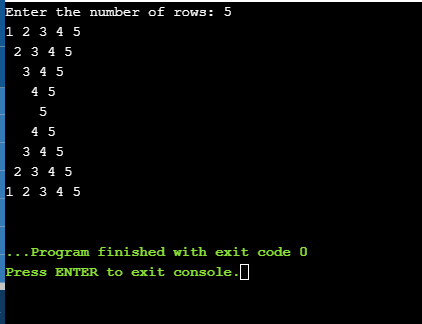
Pattern programs in java: Pattern 8
Enter the number of rows: 5
12345
 2345
  345
   45
    5
   45
  345
 2345
12345
import java.util.Scanner;

public class Pattern8
{
  public static void main(String[] args)
  {
    Scanner sc = new Scanner(System.in);

    System.out.print("Enter the number of rows: ");
    int rows = sc.nextInt();

    for (int i = 1; i <= rows; i++)
    {
       for (int j = 1; j < i; j++)
        {
            System.out.print(" ");
        }
        for (int j = i; j <= rows; j++)
        {
            System.out.print(j);
        }

      System.out.println();
    }

    for (int i = rows-1; i >= 1; i--)
    {
        for (int j = 1; j < i; j++)
        {
            System.out.print(" ");
        }
        for (int j = i; j <= rows; j++)
        {
            System.out.print(j);
        }

      System.out.println();
    }

    sc.close();
  }
}
Pattern programs in java: Pattern 9
Enter the number of rows: 5
1
10
101
1010
10101
import java.util.Scanner;

public class Pattern9
{
  public static void main(String[] args)
  {
    Scanner sc = new Scanner(System.in);

    System.out.print("Enter the number of rows: ");
    int rows = sc.nextInt();

    for (int i = 1; i <= rows; i++)
    {
      for (int j = 1; j <= i; j++)
      {
        if(j%2 == 0)
        {
          System.out.print(0);
        }
        else
        {
          System.out.print(1);
        }
      }

    System.out.println();
    }

    sc.close();
  }
}
Pattern programs in java: Pattern 10
import java.util.Scanner;

public class pattern10
{
  public static void main(String[] args)
  {
    Scanner sc = new Scanner(System.in);

    System.out.print("Enter the number of rows: ");
    int rows = sc.nextInt();

    for (int i = 1; i <= rows; i++)
    {
        for (int j = 1; j < i; j++)
        {
          System.out.print(" ");
        }

        for (int j = i; j <= rows; j++)
        {
          System.out.print(j+" ");
        }

     System.out.println();
    }

    for (int i = rows-1; i >= 1; i--)
    {
        for (int j = 1; j < i; j++)
        {
          System.out.print(" ");
        }

        for (int j = i; j <= rows; j++)
        {
          System.out.print(j+" ");
        }

     System.out.println();
    }

    sc.close();
  }
}
Pattern programs in java: Pattern 11
 1
 2 3
 4 5 6
 7 8 9 10
public class Pattern11
 {
     public static void main(String[] args)
     {
        int rows = 4, num = 1;
        for(int i = 1; i <= rows; i++)
        {
          for(int j = 1; j <= i; j++)
          {
            System.out.print(num + " ");
            ++num;
          }
        System.out.println();
        }
     }
 }
Pattern programs in java: Pattern 12
Pyramid
       1
      2 2
     3 3 3
    4 4 4 4
   5 5 5 5 5
 //Pattern with numbers

 public class Pattern9
 {
    public static void main(String[] args)
    {
        int rows = 5, count = 1;

        System.out.println("Pyramid");

        for (int i = rows; i > 0; i--)
        {
        for (int j = 1; j <= i; j++)
        {
            System.out.print(" ");
        }

        for (int j = 1; j <= count; j++)
        {
            System.out.print(count+" ");
        }

         System.out.println();

        count++;
        }
    }
 }
This post focuses on the various Java pattern program specifically Top 10 Different Star Pattern Programs in Java. Patterns are one of the easiest ways to improve the coding skills for java. The frequent use of loops can increase your skills and printing pattern in order. This article covers various star patterns. Other are:
//Pattern Inverted Half Pyramid

public class Pattern2
 {
  public static void main(String[] args)
  {
    int rows = 6;
    System.out.println("Inverted Half Pyramid:");
    for(int i = rows; i >= 1; --i)
    {
        for(int j = 1; j <= i; ++j)
        {
            System.out.print("* ");
        }
        System.out.println();
    }
  }
 }
Pattern programs in java: Pattern 3
      *
     ***
    *****
   *******
  *********
 ***********
 //Pattern full pyramid

 public class Main
 {
  public static void main(String[] args)
  {
    int rows = 6;

    System.out.println();

    for (int i = 0; i < rows + 1; i++)
    {
    for (int j = rows; j > i; j--)
    {
            System.out.print(" ");
        }
        for (int k = 0; k < (2 * i - 1); k++)
        {
            System.out.print("*");
        }
        System.out.println();
    }
  }
 }
Pattern programs in java: Pattern 4
Enter the number of rows: 5
* * * * *
 * * * *
  * * *
   * *
    *
import java.util.Scanner;

public class pattern4
{
  public static void main(String[] args)
  {
    Scanner sc = new Scanner(System.in);

    System.out.print("Enter the number of rows: ");
    int rows = sc.nextInt();

    for (int i= 0; i<= rows-1 ; i++)
    {
        for (int j=0; j<=i; j++)
        {
            System.out.print(" ");
        }
        for (int k=0; k<=rows-1-i; k++)
        {
            System.out.print("*" + " ");
        }
        System.out.println();
    }

    sc.close();

  }
}
Pattern programs in java: Pattern 5
 Enter the number of rows: 5
     *
    * *
   * * *
  * * * *
 * * * * *
  * * * *
   * * *
    * *
     *
import java.util.Scanner;

public class Pattern5
{
  public static void main(String[] args)
  {
    Scanner sc = new Scanner(System.in);

    System.out.print("Enter the number of rows: ");
    int rows = sc.nextInt();

    for (int i= 0; i<= rows-1 ; i++)
    {
        for (int j=rows-1; j>=i; j--)
        {
            System.out.print(" ");
        }
        for (int k=0; k<=i; k++)
        {
            System.out.print("*" + " ");
        }
        System.out.println("");
    }
    for (int i= 0; i<= rows-1 ; i++)
    {
        for (int j=-1; j<=i; j++)
        {
            System.out.print(" ");
        }
        for (int k=0; k<=rows-2-i; k++)
        {
            System.out.print("*" + " ");
        }
        System.out.println("");
    }

    sc.close();

  }
}
Pattern programs in java: Pattern 6
The half diamond pattern in java.
Enter the number of rows: 5
*
* *
* * *
* * * *
* * * * *
* * * *
* * *
* *
*
import java.util.Scanner;

public class Pattern6
{
  public static void main(String[] args)
  {
    Scanner sc = new Scanner(System.in);

    System.out.print("Enter the number of rows: ");
    int rows = sc.nextInt();

    for (int i= 0; i<= rows-1 ; i++)
    {
        for (int j=0; j<=i; j++)
        {
          System.out.print("*"+ " ");

        }
    System.out.println("");

    }

    for (int i=rows-1; i>=0; i--)
    {
        for(int j=0; j <= i-1;j++)
        {
            System.out.print("*"+ " ");
        }
     System.out.println("");
    }

    sc.close();

  }
}
Pattern programs in java: Pattern 7
The left half diamond pattern in java.
Enter the number of rows: 5
    *
   **
  ***
 ****
*****
 ****
  ***
   **
    *
import java.util.Scanner;

public class Pattern7
{
  public static void main(String[] args)
  {
    Scanner sc = new Scanner(System.in);

    System.out.print("Enter the number of rows: ");
    int rows = sc.nextInt();

    for (int i= 1; i<= rows ; i++)
    {
        for (int j=i; j < rows ;j++)
        {
            System.out.print(" ");
        }
        for (int k=1; k<=i;k++)
        {
            System.out.print("*");
        }
        System.out.println("");
    }
    for (int i=rows; i>=1; i--)
    {
        for(int j=i; j<=rows;j++)
        {
            System.out.print(" ");
        }
        for(int k=1; k<i ;k++)
        {
            System.out.print("*");
        }
        System.out.println("");

    }

    sc.close();

  }
}
Pattern programs in java: Pattern 8
Half hourglass pattern in java
Enter the number of rows: 5
* * * * *
* * * *
* * *
* *
*
*
* *
* * *
* * * *
* * * * *
import java.util.Scanner;

public class Pattern8
{
  public static void main(String[] args)
  {
    Scanner sc = new Scanner(System.in);

    System.out.print("Enter the number of rows: ");
    int rows = sc.nextInt();

    for (int i= rows-1; i>= 0; i--)
    {
        for (int j=i; j>=0; j--)
        {
            System.out.print("*"+ " ");
        }
        System.out.println("");
    }
    for (int i=0; i<= rows-1; i++)
    {
        for(int j=i; j >= 0;j--)
        {
            System.out.print("*"+ " ");
        }
        System.out.println("");
    }

    sc.close();

  }
}
Pattern programs in java: Pattern 9
Hourglass pattern in java.
Enter the number of rows: 5
* * * * *
 * * * *
  * * *
   * *
    *
    *
   * *
  * * *
 * * * *
* * * * *
import java.util.Scanner;

public class Pattern9
{
  public static void main(String[] args)
  {
    Scanner sc = new Scanner(System.in);

    System.out.print("Enter the number of rows: ");
    int rows = sc.nextInt();

    for (int i= 0; i<= rows-1 ; i++)
    {
        for (int j=0; j <i; j++)
        {
          System.out.print(" ");
        }
        for (int k=i; k<=rows-1; k++)
        {
          System.out.print("*" + " ");

        }
     System.out.println("");
    }

    for (int i= rows-1; i>= 0; i--)
    {
        for (int j=0; j< i ;j++)
        {
          System.out.print(" ");
        }
        for (int k=i; k<=rows-1; k++)
        {
          System.out.print("*" + " ");
        }
     System.out.println("");
    }

    sc.close();

  }
}
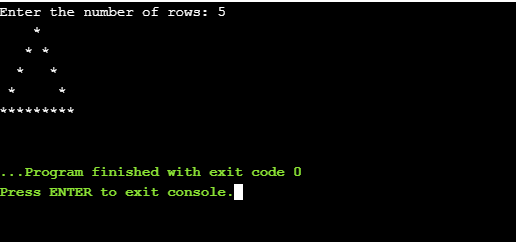
Pattern programs in java: Pattern 10
Hollow triangle star pattern in java.
import java.util.Scanner;

public class Pattern10
{
  public static void main(String[] args)
  {
    Scanner sc = new Scanner(System.in);

    System.out.print("Enter the number of rows: ");
    int rows = sc.nextInt();

    for (int i=1; i<= rows ; i++)
    {
        for (int j = i; j < rows ; j++)
        {
            System.out.print(" ");
        }
        for (int k = 1; k <= (2*i -1) ;k++)
        {
            if( k==1 || i == rows || k==(2*i-1))
            {
                System.out.print("*");
            }
            else
            {
                System.out.print(" ");
            }
        }
        System.out.println("");
    }

    sc.close();

  }
}