Blog

  • Java Program to List Even Numbers within a Range

    The program shows how to List Even Numbers within a Range in java. The program uses a scanner class to take the input of the last number(n) from the user.

    Therefore it displays all the even numbers between 1 to n using for loop and if statement.

    If you do not know the working process of for loop and if statement then click the link below.


    Java Program to List all the Even Numbers within a Range

     //list even numbers using for loop
    
     import java.util.Scanner;
    
     public class ListOfEvenNumbers
     {
      
       public static void main(String[] args) 
       {
         
         Scanner scanner = new Scanner(System.in);
         
         System.out.println("Enter the last number:");
         int num = scanner.nextInt();
     
         System.out.println("Displaying even numbers between 1 to " +num);
         
         for(int i=1; i <= num; i++)
         {
          // if the number is divisible by 2 then it is even
          if( i % 2 == 0)
          {
            System.out.print(i + " ");
          }
         }
       }
     }

    Output:

    Enter the last number:
    50
    Displaying even numbers between 1 to 50
    2 4 6 8 10 12 14 16 18 20 22 24 26 28 30 32 34 36 38 40 42 44 46 48 50 

  • Java Program to Calculate Average of Elements in an Array

    The program shows how to Calculate the Average in an Array element in java. The program uses a scanner class to take the input from the user. It takes the size of an array and the array elements and adds those elements and displays them accordingly.

    If you do not know the working process of for loop then click the link below.


    Java Program to Calculate Average of Elements in an Array

     //calculate the average in an array element using for loop
    
     import java.util.Scanner;
    
     public class AverageForLoop
     {
        public static void main(String args[])
        {
          int num, sum = 0;
          float average;
          Scanner s = new Scanner(System.in);
          
          System.out.print("Enter the number of elements for an array: ");
          num = s.nextInt();
          
          int a[] = new int[num];
          
          System.out.println("Enter elements of array:");
          for(int i = 0; i < num; i++)
          {
              a[i] = s.nextInt();
          }
             
         
         for(int i=0; i < a.length ; i++)
           sum = sum + a[i];
         
         //calculate average value
         average = sum / num;
         
         System.out.println("Average value of array elements is : " +average);
            
        }
     }

    Output:

    Enter the number of elements for an array: 5
    Enter elements of array:
    1
    2
    3
    4
    5
    Average value of array elements is : 3.0


  • Java Program to Generate First n Whole Numbers using a do-while loop

    The program shows how to Generate First n Whole Numbers in java. The program is pretty simple n is already defined in a program. Although you can use the scanner class to take the inputs from the user.

    If you do not know the working process of do-while loop then click the link below.


    Java Program to Generate First n Whole Numbers

     //generate first n whole numbers using do-while loop 
    
     public class DoWhileNNumbers 
     {
        public static void main(String args[]) 
        {
          int num = 0;
          int N = 10;
        
          System.out.println("First 5 whole Number ");
          do
          {
           System.out.print(num + " ");
           num++; // Incrementing 
          } while ( num <= N );
        }
     }

    Output:

    First 5 whole Number
    0 1 2 3 4 5 6 7 8 9 10


  • Java Program to Count Backward of a Number using a do-while loop

    In this tutorial, we will write a program to count the number backward in java. The program uses a scanner class to take the input from the user and with a do-while loop, it counts backward and displays the result.

    If you do not know the working process of do-while loop then click the link below.


    Java Program to Count Backward of a Number

     //count backward of a number using do-while loop in java
    
     import java.util.Scanner;
    
     public class CountBackNumber
     {
       public static void main(String args[])
       {
         int n = 5;
         Scanner scanner = new Scanner(System.in);
    
         System.out.println("Enter the number from where you want to back count: ");
         n = scanner.nextInt();
    
         do {
           System.out.print(n + " ");
           n--;  // Decrementing N by 1 in each iteration
         } while (n >= 0);
       }
     }

    Output:

    Enter the number from where you want to back count:
    10
    10 9 8 7 6 5 4 3 2 1 0


  • Java Program to Find the Transpose of a Matrix

    In this tutorial, we will write a program to calculate the Transpose of a matrix in Java. As this program is based on Array and uses of for loop so you may go through the following first.

    Transpose of a matrix refers to converting the rows of a matrix into columns and columns of a matrix into rows. Consider a matrix A of 2 * 3 dimension, after transpose of A, the A matrix becomes 3 * 2 dimension.

    The Program takes the input for both the column and row elements from the user using the scanner class and transposes for that matrix is calculated. And lastly displays the final result with altered rows and columns.


    Java Program to Find the Transpose of a Matrix

      //transpose of a matrix in java
      
     import java.util.Scanner;
    
     public class TransposeOfMatrix
     {
        public static void main(String args[])
        {
            int row, col, i, j;
        
            Scanner in = new Scanner(System.in);
            System.out.println("Enter the rows and columns of the matrix");
            row = in.nextInt();
            col = in.nextInt();
        
            int matrix[][] = new int[row][col];
            
            System.out.println("Enter the elements of matrix");
        
            for (i = 0; i < row; i++)
            {
             for (j = 0; j < col; j++)
             {
              matrix[i][j] = in.nextInt();
             }
            }
            int transpose[][] = new int[col][row];
            
            for (i = 0; i < row; i++)
            {
             for (j = 0; j < col; j++)  
             {            
                transpose[j][i] = matrix[i][j];
             }
            }
                
        
            System.out.println("Transpose of a entered matrix are:");
        
            for (i = 0; i < col; i++)
            {
             for (j = 0; j < row; j++)
             {
               System.out.print(transpose[i][j]+"\t");
             }
            System.out.print("\n");
            }
        }
     }

    Output:

     Enter the rows and columns of the matrix
     2
     3
     Enter the elements of matrix
     1
     2
     3
     4
     5
     6
     Transpose of a entered matrix are:
     1	 4	
     2	 5	
     3	 6

  • Java Program for the Multiplication of Two Matrices

    In this tutorial, we will write a java program to calculate the multiplication of two matrices. As this program is based on Array and uses of for loop so you may go through the following first.

    Matrices mean having two-dimension that is there are columns and rows in the following java example.

    The Program takes the input for both the column and row elements from the user using the scanner class and a third two-dimensional array is created to store the multiplication result of two matrices. And lastly displays the final result.


    Java Program to Multiply Two Matrices

     //multiplication of a matrix
      
     import java.util.Scanner;
    
     public class MultilicationMatrix
     {
        public static void main(String args[])
        {
        int r1, r2,c1,c2,i,j,k,sum;
        Scanner in = new Scanner(System.in);
        
        //first matrix
        System.out.println("Enter the number of rows of matrix1");
        r1 = in.nextInt();
        System.out.println("Enter the number columns of matrix 1");
        c1 = in.nextInt();
        
        //second matrix
        System.out.println("Enter the number of rows of matrix2");
        r2 = in.nextInt();
        System.out.println("Enter the number of columns of matrix 2");
        c2 = in.nextInt();
        
        //condition for multiplication
       if(c1==r2)
       {
        
        int mat1[][] = new int[r1][c1]; 
        int mat2[][] = new int[r2][c2]; 
        int result[][] = new int[r1][c2];
        
        System.out.println("Enter the elements of matrix1");
        for ( i= 0 ; i < r1 ; i++ )
        { 
         for ( j= 0 ; j < c1 ;j++ )
         {
          mat1[i][j] = in.nextInt();
         }
        }
        
        System.out.println("Enter the elements of matrix2");
        for ( i= 0 ; i < r2 ; i++ )
        { 
         for ( j= 0 ; j < c2 ;j++ )
         {
          mat2[i][j] = in.nextInt();
         }
        }
        
        System.out.println("Result of multiplication:-");
        for ( i= 0 ; i < r1 ; i++ )
        {
        
         for ( j = 0 ; j < c2; j++)
         {
            sum = 0;
            for ( k = 0 ; k < r2; k++ )
            {
             sum += mat1[i][k] * mat2[k][j] ;
            }
            result[i][j] = sum;
         }
        } 
        for ( i= 0 ; i < r1; i++ )
        {
         for ( j=0 ; j < c2; j++ )
         {
          System.out.print(result[i][j]+" ");
         }
          System.out.println();
         }
      }
      else
        System.out.print("Multiplication cannot be processed");
      }
        
     }

    Output:

     Enter the number of rows of matrix1
     2
     Enter the number columns of matrix 1
     3
     Enter the number of rows of matrix2
     3
     Enter the number of columns of matrix 2
     2
     Enter the elements of matrix1
     2
     3
     4 
     2
     1
     4
     Enter the elements of matrix2
     5
     4
     2 
     3
     5
     3
     Result of multiplication:
     36  29
     32  23
  • Java Program for the Subtraction of Two Matrices

    This tutorial shows how to subtract two matrices in Java. As this program is based on Array and uses of for loop so you may go through the following first.

    Matrices mean having two-dimension that is there are columns and rows in the following java example.

    The Program takes the input for both the column and row elements from the user using the scanner class and a third two-dimensional array is created to store the subtraction result of two matrices. And lastly displays the final result.


    Java Program to Subtract Two Matrices

      //subtraction of matrices in java
    
      import java.util.Scanner;
    
      public class SubtractionMatrix
      {
        public static void main(String args[])
        {
          int row, col, i, j;
          Scanner sc = new Scanner(System.in);
    
          System.out.println("Enter the number of rows");
          row = sc.nextInt();
    
          System.out.println("Enter the number  columns");
          col = sc.nextInt();
    
          int mat1[][] = new int[row][col];
          int mat2[][] = new int[row][col];
          int result[][] = new int[row][col];
    
          //First matrix Input
          System.out.println("Enter the elements of matrix1");
          for (i = 0; i < row; i++)
          {
    
            for (j = 0; j < col; j++)
              mat1[i][j] = sc.nextInt();
          }
    
          //Second matrix Input
          System.out.println("Enter the elements of  matrix2");
          for (i = 0; i < row; i++)
          {
    
            for (j = 0; j < col; j++)
              mat2[i][j] = sc.nextInt();
          }
    
          //Subtraction
          for (i = 0; i < row; i++)
            for (j = 0; j < col; j++)
              result[i][j] = mat1[i][j] - mat2[i][j];
    
          System.out.println("Result of subtraction:-");
    
          for (i = 0; i < row; i++)
          {
            for (j = 0; j < col; j++)
              System.out.print(result[i][j] + "\t");
    
            System.out.println();
          }
        }
      }

    Output:

     Enter the number of rows
     3
     Enter the number  columns
     2
     Enter the elements of matrix1
     4
     6
     8
     1
     2
     6
     Enter the elements of  matrix2
     0
     0
     0
     0
     0
     0
     Result of subtraction:-
     4	 6	
     8	 1	
     2	 6

  • Java Program for the Addition of Two Matrices

    In this tutorial, we will learn how to write a program to add two matrices in Java. As this program is based on Array and uses of for loop so you may go through the following first.

    Matrices mean having two-dimension that is there are columns and rows in the following java example.

    The Program takes the input for both the column and row elements from the user using the scanner class and a third two-dimensional array is created to store the sum result of two matrices. And lastly displays the final result.


    Java Program to Add Two Matrices

      //Addition of a matrix
    
     import java.util.Scanner;
    
     public class AdditionOfMatrix
     {
        public static void main(String args[])
        {
          int row, col, i, j;
          Scanner sc= new Scanner(System.in);
        
          System.out.println("Enter the number of rows");
          row = sc.nextInt();
            
          System.out.println("Enter the number  columns");
          col  = sc.nextInt();
        
          int mat1[][] = new int[row][col];
          int mat2[][] = new int[row][col];
          int result[][] = new int[row][col];
        
        //First matrix Input
          System.out.println("Enter the elements of matrix1");
          for (  i= 0 ; i < row ; i++ )
          {   
            for ( j= 0 ; j < col ;j++ )
            mat1[i][j] = sc.nextInt();
          }
            
         //Second matrix Input
          System.out.println("Enter the elements of  matrix2");
          for (  i= 0 ; i < row ; i++ )
           {
             for ( j= 0 ; j < col ;j++ )
             mat2[i][j] = sc.nextInt();
        
           }
        
        //Addition
          for (  i= 0 ; i < row ; i++ )
             for ( j= 0 ; j < col ;j++ )
                 result[i][j] =  mat1[i][j] + mat2[i][j]  ;   
        
          System.out.println("Result of Addition:-");
        
          for (  i= 0 ; i < row ; i++ )
          {  
            for ( j= 0 ; j < col ;j++ )
               System.out.print(result[i][j]+"\t");
            
            System.out.println();
         }
        
        }
     }

    Output:

     Enter the number of rows
     3
     Enter the number  columns
     2
     Enter the elements of matrix1
     1
     1
     1
     1
     1
     1
     Enter the elements of  matrix2
     1
     1
     1
     1
     1
     1
     Result of Addition:-
     2	 2	
     2 	 2	
     2 	 2

  • Java Program to Insert an Element in a Specified Position in an Array

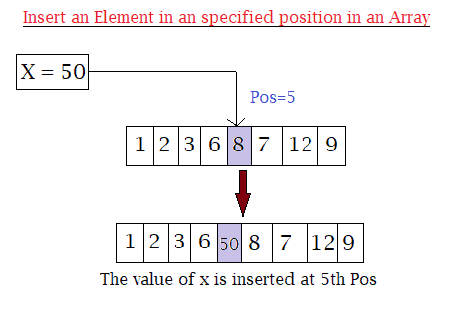
    The following program shows how to insert an element at a specific position in an Array in Java.

    The program takes the following as input:

    • The size of an array.
    • Value of elements of an array.
    • The position where the user wants to insert the new element.
    • The value of the element itself that the user wants to insert.
    Array Insertion in java

    Lastly displays the final result where the new elements have been inserted.


    Program to Insert an Element in an Array at a Specified Position in Java

    import java.util.Scanner;
    public class Insert_Array
    {
      public static void main(String[] args)
      {
        int n, x, pos;
        Scanner s = new Scanner(System.in);
    
        System.out.print("Enter size of an Array: ");
        n = s.nextInt();
    
        int a[] = new int[n + 1];
    
        System.out.println("Enter " + n + " elements in an array:");
        for (int i = 0; i < n; i++)
        {
          a[i] = s.nextInt();
        }
    
        System.out.print("Enter the position where you want to insert new element: ");
        pos = s.nextInt();
    
        System.out.print("Enter the element you want to insert at " + pos + " position: ");
        x = s.nextInt();
    
        //insertion
        for (int i = (n - 1); i >= (pos - 1); i--)
        {
          a[i + 1] = a[i];
        }
        a[pos - 1] = x;
    
        //Displaying after insertion
        System.out.print("Array after insertion: ");
        for (int i = 0; i < n; i++)
        {
          System.out.print(a[i] + " ");
        }
        System.out.print(a[n]);
      }
    }

    Output:

    Enter size of an Array: 5
    Enter 5 elements in an array:
    1
    2
    3
    4
    5
    Enter the position where you want to insert new element: 3
    Enter the element you want to insert at 3 position: 9
    Array after insertion: 1 2 9 3 4 5


  • Java Program to Find the Largest Element in an Array

    In this tutorial, we will write a java program to print the largest element present in an array. If you do not about the array and for loops working process then click the link below, as this program uses them.

    The program below takes the number element and all the values of the elements from the user as input and finds the largest element among them in java.


    Java Program to Find the Largest Element in an Array

     //largest element in an array in java
      
     import java.util.Scanner;
    
     public class LargestElementsArray 
     {
      public static void main(String[] args) 
      {
        int num, largest;
        Scanner s = new Scanner(System.in);
        
        System.out.print("Enter the number of elements for an array:");
        num = s.nextInt();
        
        int a[] = new int[num];
        
        System.out.println("Enter elements of array:");
        for(int i = 0; i < num; i++)
        {
            a[i] = s.nextInt();
        }
        
        largest = a[0];
        
        for(int i = 0; i < num; i++)
        {
          if(largest < a[i])
          {
            largest = a[i];
          }
        }
        
        System.out.println("Largest elements in an array is:"+largest);
      }
     }

    Output:

    Enter number of elements in the array:5
    Enter elements of array:
    4
    67
    89
    32
    4
    Largest elements in an array is:89