Author: admin

  • Java Program to Swap Two Numbers using the Third variable

    Here you will learn how Swap two numbers using the third Variable.

    The program declares a temp variable to temporarily store the value of one of the two values. If you want to know how to swap numbers without using a third variable, click the link below.


    Java Program to Swap two numbers using Third Variable

     //swap two number
    
     import java.util.*;
    
     public class SwapTwoNumbersJava
     {
      public static void main(String []s)
      {
        int a, b, temp;
        
        Scanner sc=new Scanner(System.in);
    
        System.out.print("Enter value of a: ");
        a=sc.nextInt();
        
        System.out.print("Enter value of b: ");
        b=sc.nextInt();
    
        System.out.println("Values before swapping - a: "+ a +", b: " + b);
        
        //swap
        temp=a;
        a=b;
        b=temp;
        
        //displaying after swap
        System.out.println("Values after swapping  - a: "+ a +", b: " + b);
      }
     }

    Output:

     Enter value of a: 24
     Enter value of b: 25
     Values before swapping - a: 24, b: 25
     Values after swapping  - a: 25, b: 24
  • Java Exercise: How to Divide in Java

    Division in Java:

    This article will show you the process to divide in Java with output.

    The division is one of the basic operations in java. Others include addition, subtraction, and multiplication. For dividing in java, a division operator (/)is used. This operator takes two operands(the natural numbers to be divided) to divide them.

    We will see two ways for java division:

    • First by declaring the number to be divided inside the program.
    • Second by taking the user input.

    1. Java Program to divide two numbers.

    public class DivisionJava 
    {
     public static void main(String[] args) 
     {
     //declaring operands
     float num1 = 70, num2 = 3;
     
     //division
     float result = num1/num2;
     
     //Display
     System.out.println("The result is: "+result);
     }
    }

    The output of the division in java:

    The result is: 23.333334

    2. Java Program to Divide two Numbers taking User’s Input

    import java.util.Scanner;
    
    public class JavaDivision 
    {
      public static void main(String[] args) 
      {
        Scanner input = new Scanner (System.in);
        
        System.out.print("Enter the first number (Denominator): ");
        int num1 = input.nextInt();
        
        System.out.print("Enter the second number (Numerator): ");
        int num2 = input.nextInt();
        
        //Division
        int result = (num1/num2);
    
        System.out.println("\nThe result of division is:" +result);
      }
    }

    The output of the user input division in Java:

    Enter the first number (Denominator): 70
    Enter the second number (Numerator): 3
    
    The result of division is:23.333334

  • Java Program to Swap Two Numbers Without using the Third Variable

    This post covers the Java Program to swap two numbers without using the third variable. It is easy to swap two numbers using the third variable, we assigned one to a temporary(temp) variable and swap with others.

    Now let us see without using the third variable.


    Explanation:
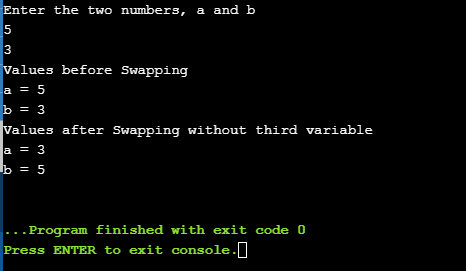
    With the help of a Scanner class, we take the user input for two integers (a = 5, b = 3).
    Now during the process of swapping, we assigned the value of a equal to the sum of a and b that is,
    a = a + b;
    (a = 5+3 = 8).

    Second, we assigned the value of b equal to the difference between a and b that is,
    b = a - b
    (b= 8 – 3 = 5).

    Lastly, we assigned the value of a equal to the difference between a and b that is,
    a = a - b
    (a= 8 – 5 = 3).

    Then print those swapped values as shown in the program below.


    Java program to swap two numbers without using Third Variable

    //Swapping of two numbers
    
    import java.util.Scanner;
    class SwapTwoNumbers
    {
       public static void main(String args[])
       {
    
        int a, b;
        System.out.println("Enter the two numbers, a and b");
    
        Scanner in = new Scanner(System.in);
    
        a = in.nextInt();
        b = in.nextInt();
      
        System.out.println("Values before Swapping\na = "+a+"\nb = "+b);
        
        a = a + b;
        b = a - b;
        a = a - b;
    
        System.out.println("Values after Swapping without third variable\na = "+a+"\nb = "+b);
       }
    }
    

    Output:


  • Java Program to Check Whether the Given Number Is Binary or Not

    In this post, we will write a program on how to check whether given number is binary or not in java. Let start by knowing the Binary number and then see the example with an explanation.

    What is a Binary Number?

    binary number is a number expressed in the base-2 numeral system that is the number that contains 2 symbols to represent all the numbers. The symbols are 0 and 1.

    For example: 101011, 110011110, 10001111 are binary numbers.


    Let’s see an explanation to find out whether the given number is binary or not in java:

    There are many ways we can find the binary number in java, In this one, we will create a separate function and pass the number that needed to be check and print the result.

    First, take the user input with the Scanner class and pass that number to the numBinaryOrNot() function as an argument. Then declare a boolean variable (isBinary). After that execute while loop until the passed number is not equal to zero (copyNum != 0).

    Inside while loop, take the remainder and check if the remainder is greater than 1 or not. If it is greater then change the boolean value to false and break else divide the number by 10. The loop continues till all the numbers are checked.

    At last, check if the boolean value is still true then the number is binary number print the result else it is not a binary number.


    Java Program to Check Whether the Given Number Is Binary or Not

    import java.util.Scanner;
    
    public class CheckForBinary
    {
       static void numBinaryOrNot(int num)
       {
        boolean isBinary = true;
    
        int copyNum = num;
    
        while (copyNum != 0)
        {
          int temp = copyNum%10;  
    
          if(temp > 1)
           {
             isBinary = false;
             break;
           }
            else
           {
             copyNum = copyNum/10;    
           }
        }
    
         if (isBinary)
         {
            System.out.println(num+" is a binary number");
         }
         else
         {
            System.out.println(num+" is not a binary number");
         }
       }
     
      public static void main(String[] args)
      {
        Scanner sc=new Scanner(System.in);
        
        System.out.println("Enter a number");
        int num = sc.nextInt();
    
        numBinaryOrNot(num);
      }
    }

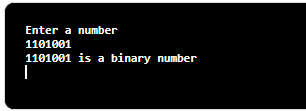
    The output to check for the binary number in java:

    Binary Number

  • Java Program for Happy Number

    This is an explanation and example for Happy Number in Java. And Let’s begin with an explanation:

    Define Happy Number

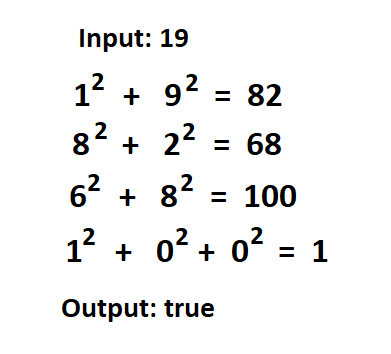
    A number is said to be a happy number if it yields 1 after a few steps and each step is the sum of the squares of the digits of its results. The sum of the squares starts with the given number and till it reaches one.

    Follow the diagram below:

    happy number
    Happy Number

    Explanation: In the above diagram input is 19. Then the digits 1 and 9 are squared which gives the result 82. After that, the digits 8 and 2 are squared and yield the results 68 and this continues till the final result is 1. And then we can say that 19 is a happy number, if not then it is not a happy number.

    If you do not know how to create a function or if you want to learn about the method, click on the link below.


    Java program to check whether the Number is Happy Number or Not:

    import java.util.Scanner;
    
    public class CheckHN
    {    
       //function to check for happyNumber
       public static int checkForHN(int num)
        {  
          int temp = 0, sum = 0;  
          
          //calculation 
          while(num > 0){  
            temp = num%10;  
            sum = sum + (temp*temp);  
            num = num/10;  
          }  
         return sum;  
        }  
          
        public static void main(String[] args) 
        { 
          Scanner sc = new Scanner(System.in);
        
          System.out.print("Enter the number: ");
          int num = sc.nextInt();
         
          int result = num;  
          
         while(result != 1 && result != 4){  
            result = checkForHN(result);  
         }  
              
        //check for 1  
        if(result == 1)  
            System.out.println(num + " is a happy number");  
        else if(result == 4)  
            System.out.println(num + " is not a happy number");     
        }  
    }  

    Output:

    Enter the number: 32
    32 is a happy number


    Java program to Print Happy Number between 1 to 100:

    import java.util.Scanner;
    
    public class Main  
    {    
       //function to check for happyNumber
       public static int checkForHN(int num)
        {  
          int temp = 0, sum = 0;  
          
          //calculation 
          while(num > 0){  
            temp = num%10;  
            sum = sum + (temp*temp);  
            num = num/10;  
          }  
         return sum;  
        }  
          
        public static void main(String[] args) 
        { 
         System.out.println("Happy Numbers between 1 to 100");  
        
        //checking in a loop
         for(int i = 1; i <= 100; i++)
         {  
           int result = i; 
          
          while(result != 1 && result != 4)
          {  
            result = checkForHN(result);  
          }  
              
         //check for 1  
         if(result == 1){
          System.out.print(i + " "); 
          }
         }
        }  
    }  

    Output:

    Happy Numbers between 1 to 100
    1 7 10 13 19 23 28 31 32 44 49 68 70 79 82 86 91 94 97 100

    Then again, You can print the first 10 Happy Number by changing the loop value to 10 and calling the checkForHN() function.


  • Java Program to make a Calculator using a Switch Statement

    This Java program simply creates an option to chose the Operators just like any calculator. A switch statement is used for creating an option in programming that will make case for a different option and operate according to the option that the user provides. It will also take two operands (numbers) at the beginning.

    If you do not know about the Switch Case statement or Data Types in java, click the link below to learn about them as this program uses one.


    Java Program to make a Calculator using a Switch Statement

     //Making Calculator using a switch in Java
      
     import java.util.Scanner;
    
     public class CalculatorJava
     {
       public static void main(String[] args)
       {
         double result;
         char operator;
         Scanner reader = new Scanner(System.in);
    
         System.out.print("Enter first numbers: ");
         double num1 = reader.nextDouble();
    
         System.out.print("Enter second numbers: ");
         double num2 = reader.nextDouble();
    
         System.out.print("Choose an operator(+, -, *, /): ");
         operator=reader.next().charAt(0);
    
         //switch case 
         switch (operator)
         {
           case '+':
             result = num1 + num2;
             break;
    
           case '-':
             result = num1 - num2;
             break;
    
           case '*':
             result = num1 * num2;
             break;
    
           case '/':
             result = num1 / num2;
             break;
    
           default:
             System.out.printf("Error! operator is not correct");
             return;
         }
    
         //Displaying result
         System.out.printf("%.1f %c %.1f = %.1f", num1, operator, num2, result);
       }
     }

    Output:

    Enter first numbers: 5
    Enter second numbers: 3
    Choose an operator (+, -, *, /): -
    5.0 - 3.0 = 2.0


  • Java Program to Calculate the Simple Interest

    Here, you will learn how to calculate the Simple Interest in Java using the Formula ((p * r * t) / 100)) where,

    • p = Principal
    • r = Rate of Interest
    • t = Time Period

    The program takes the user input for Principal, Rate, and Time, calculates the result, and displays the result on the screen.

    If you do not know about the operators or Data Types in java, click the link below to learn about operators as this program is using one.


    Java Program to Calculate the Simple Interest

     //Simple Interest in Java
      
     import java.util.Scanner;
    
     public class SimpleInterestJava
     {
        public static void main(String args[]) 
        {
         float p, r, t, SI;
        
         Scanner scan = new Scanner(System.in);
        
         System.out.print("Enter the value for Principal: ");
         p = scan.nextFloat();
        
         System.out.print("Enter the value for Rate of interest: ");
         r = scan.nextFloat();
        
         System.out.print("Enter the value for Time period: ");
         t = scan.nextFloat();
         scan.close();
        
         SI = (p * r * t) / 100;
         System.out.print("Simple Interest is: " +SI);
        }
     }

    Output:

    Enter the value for Principal: 1000
    Enter the value for Rate of interest: 5
    Enter the value for Time period: 2
    Simple Interest is: 100.0

    The above source code to calculate the Simple Interest in Java is compiled and ran successfully on a windows system. Browse through Java Program to learn more.


  • Java Program to Calculate the Area of a Triangle

    Here, you will learn how to calculate the Area of a Triangle using the Formula [(Base* Height)/2]. The program takes the user input for the Base and Height of a triangle, calculates the result, and displays the result on the screen.

    If you do not know about the operators in java, click the link below to learn about operators as this program is using one.


    Java Program to Calculate the Area of a Triangle

     //Area of a traingle
    
     import java.util.Scanner;
    
     public class AreaOfTriangle 
     {
        public static void main(String args[]) 
        {   
            Scanner sc = new Scanner(System.in);
    
            System.out.println("Enter the base of the Triangle:");
            float base = sc.nextFloat();
    
            System.out.println("Enter the height of the Triangle:");
            float height = sc.nextFloat();
    
            //Area = (base*height)/2
            float area = (base* height)/2;
            System.out.println("Area of the Triangle is: " + area);      
        }
     }

    Output:

    Enter the base of the Triangle:
    8
    Enter the height of the Triangle:
    10
    Area of the Triangle is: 40.0


  • Java Program to Calculate the Area of a Square

    Here, you will learn how to calculate the Area of a Square using the Formula (Side* Side). The Program takes the user input for Side, calculates the result, and displays the result on the screen.

    If you do not know about the operators in java, click the link below to learn about operators as this program is using one.


    Java Program to Calculate the Area of a Square

     //Area of a square
      
     import java.util.Scanner;
     
     public class AreaofSquare 
     {
        public static void main (String[] args)
        {
            Scanner scanner = new Scanner(System.in);
            
            System.out.print("Enter Side of Square: ");
            float side = scanner.nextInt();
            
            //Area = side*side
            float area = side*side; 
            System.out.println("Area of Square is: "+area);
        }
     }

    Output:

    Enter Side of Square: 4
    Area of Square is: 16.0


  • Java Program to Calculate the Area of a Rectangle

    Here, you will learn how to calculate the Area of a Rectangle using the Formula (Length * Breadth). The program takes the user input for length and breadth, calculates the result, and displays the result on the screen.

    If you do not know about the operators in java, click the link below to learn about operators as this program is using one.


    Java Program to Calculate the Area of a Rectangle

    import java.util.Scanner;
    
    public class AreaRectangle
    {
      public static void main(String[] args)
      {
        int len, br, result;
        Scanner sc = new Scanner(System.in);
    
        //Taking Inputs from Users
        System.out.print("Enter the length: ");
        len = sc.nextInt();
        System.out.print("Enter the breadth: ");
        br = sc.nextInt();
    
        sc.close();
        result = len * br;
        System.out.println("Area of a rectangle: " + result);
      }
    }

    Output:

    Enter the length: 2
    Enter the breadth: 5
    Area of a rectangle: 10