The explanation is the same as checking for prime numbers, the only difference is that we set the last range number that is we take user input for the last number and check for prime number from 1 to that last number.
And if the boolean variable isPrime is true after checking for each number, it will print the number for each iteration.
Java Program to list Prime Numbers using for Loop
 //list Prime numbers using for loop

 import java.util.Scanner;

 public class ListingPrimeNumbers
 {

   public static void main(String[] args)
   {

     Scanner scanner = new Scanner(System.in);

     System.out.println("Enter the last number:");
     int num = scanner.nextInt();

     System.out.println("Displaying Prime numbers between 1 to " +num);

     for(int i = 1; i < num; i++)
     {

       boolean isPrime = true;

       //checking for prime
       for(int j=2; j < i ; j++)
       {

        if(i % j == 0)
        {
         isPrime = false;
         break;
        }
       }
      //Displaying the numbersr
      if(isPrime)
        System.out.print(i + " ");
    }
  }
 }
Output:
Enter the last number:
50
Displaying Prime numbers between 1 to 50
1 2 3 5 7 11 13 17 19 23 29 31 37 41 43 47
In this tutorial, we will write a program to check whether the number is prime or not in java. Before that, you should have knowledge on the following topic in java.
A number is said to be a prime number if it is divisible by itself and 1. Example: 3, 5, 7, 11, 13, 17, 19, etc.
Explanation: We take a boolean variableisPrime and assigned it to be true. Then we take the user input and start a for loop for i = 2 end the loop for i less than half of the number entered. i will increase by 1 after each iteration.
Inside for loop, a temp variable will contain the remainder of each iteration. And then if statement will check for temp to be 0 that is if the remainder is zero, isPrime is set to false. If isPrime is true, the number is Prime number else not.
Java Program to check whether a Number is Prime or Not
source code: Java Program to check for the prime number.
 //check for the prime Number

 import java.util.Scanner;
 public class PrimrNumberCheck
 {
   public static void main(String args[])
   {
     int temp;
     boolean isPrime = true;
     Scanner scan = new Scanner(System.in);

     System.out.print("Enter any number: ");

     int num = scan.nextInt();
     scan.close();

     for (int i = 2; i <= num / 2; i++)
     {
       temp = num % i;
       if (temp == 0)
       {
         isPrime = false;
         break;
       }
     }

     if (isPrime)
       System.out.println(num + " is a Prime Number"); //If isPrime is true
     else
       System.out.println(num + " is not a Prime Number"); //If isPrime is false
   }
 }
This post focuses on the various Java pattern program specifically Top 10 Different Number Pattern Programs in Java. Patterns are one of the easiest ways to improve the coding skills for java. The frequent use of loops can increase your skills and printing them in order.
This article covers various Numeric pattern programs. Other are:
 //Pattern with Number

 public class Pattern2
 {
   public static void main(String[] args)
   {
    int lines=10, i=1, j;


    for(i=1;i<=lines;i++)
    {
      for(j=1;j<=i;j++)
      {
       System.out.print(i*j+" ");
      }

     System.out.println("");
    }
 }
 }
Pattern programs in java: Pattern 3
 12345
 1234
 123
 12
 1
 //Pattern with Numbers

 public class Pattern3
 {
    public static void main(String[] args)
    {
    int count = 5;
    for(int i = count; i > 0 ; i-- )
     {
       for(int j = 1; j <= i ; j++)
        {
          System.out.print(j);
        }
          System.out.println("");
        }
    }
 }
Now with user input:
Pattern programs in java: Pattern 4
Enter the number of rows: 5
1
1 2
1 2 3
1 2 3 4
1 2 3 4 5
1 2 3 4
1 2 3
1 2
1
import java.util.Scanner;

public class Pattern4
{
  public static void main(String[] args)
  {
    Scanner sc = new Scanner(System.in);

    System.out.print("Enter the number of rows: ");
    int rows = sc.nextInt();

    for (int i = 1; i <= rows; i++)
        {
            for (int j = 1; j <= i; j++)
            {
                System.out.print(j+" ");
            }

            System.out.println();
        }

        for (int i = rows-1; i >= 1; i--)
        {
            for (int j = 1; j <= i; j++)
            {
                System.out.print(j+" ");
            }

            System.out.println();
        }

    sc.close();

  }
}
Pattern programs in java: Pattern 5
Enter the number of rows: 5
1
2 2
3 3 3
4 4 4 4
5 5 5 5 5
import java.util.Scanner;

public class Pattern5
{
  public static void main(String[] args)
  {
    Scanner sc = new Scanner(System.in);

    System.out.print("Enter the number of rows: ");
    int rows = sc.nextInt();

   for (int i = 1; i <= rows; i++)
   {
    for (int j = 1; j <= i; j++)
    {
       System.out.print(i+" ");
     }

    System.out.println();
   }

   sc.close();
 }
}
Pattern programs in java: Pattern 6
Enter the number of rows: 5
5 4 3 2 1
4 3 2 1
3 2 1
2 1
1
import java.util.Scanner;

public class Pattern6
{
  public static void main(String[] args)
  {
    Scanner sc = new Scanner(System.in);

    System.out.print("Enter the number of rows: ");
    int rows = sc.nextInt();

    for (int i = rows; i >= 1; i--)
    {
      for (int j = i; j >= 1; j--)
      {
        System.out.print(j+" ");
      }

     System.out.println();
    }

    sc.close();
  }
}
Pattern programs in java: Pattern 7
Enter the number of rows: 5
1 2 3 4 5
1 2 3 4
1 2 3
1 2
1
1 2
1 2 3
1 2 3 4
1 2 3 4 5
import java.util.Scanner;

public class Pattern7
{
  public static void main(String[] args)
  {
    Scanner sc = new Scanner(System.in);

    System.out.print("Enter the number of rows: ");
    int rows = sc.nextInt();

    for (int i = rows; i >= 1; i--)
    {
        for (int j = 1; j <= i; j++)
        {
          System.out.print(j+" ");
        }

     System.out.println();
    }

    for (int i = 2; i <= rows; i++)
    {
        for (int j = 1; j <= i; j++)
        {
          System.out.print(j+" ");
        }

     System.out.println();
    }

    sc.close();
  }
}
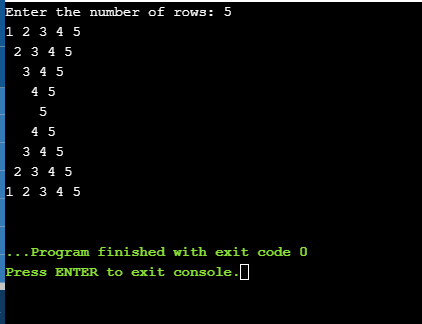
Pattern programs in java: Pattern 8
Enter the number of rows: 5
12345
 2345
  345
   45
    5
   45
  345
 2345
12345
import java.util.Scanner;

public class Pattern8
{
  public static void main(String[] args)
  {
    Scanner sc = new Scanner(System.in);

    System.out.print("Enter the number of rows: ");
    int rows = sc.nextInt();

    for (int i = 1; i <= rows; i++)
    {
       for (int j = 1; j < i; j++)
        {
            System.out.print(" ");
        }
        for (int j = i; j <= rows; j++)
        {
            System.out.print(j);
        }

      System.out.println();
    }

    for (int i = rows-1; i >= 1; i--)
    {
        for (int j = 1; j < i; j++)
        {
            System.out.print(" ");
        }
        for (int j = i; j <= rows; j++)
        {
            System.out.print(j);
        }

      System.out.println();
    }

    sc.close();
  }
}
Pattern programs in java: Pattern 9
Enter the number of rows: 5
1
10
101
1010
10101
import java.util.Scanner;

public class Pattern9
{
  public static void main(String[] args)
  {
    Scanner sc = new Scanner(System.in);

    System.out.print("Enter the number of rows: ");
    int rows = sc.nextInt();

    for (int i = 1; i <= rows; i++)
    {
      for (int j = 1; j <= i; j++)
      {
        if(j%2 == 0)
        {
          System.out.print(0);
        }
        else
        {
          System.out.print(1);
        }
      }

    System.out.println();
    }

    sc.close();
  }
}
Pattern programs in java: Pattern 10
import java.util.Scanner;

public class pattern10
{
  public static void main(String[] args)
  {
    Scanner sc = new Scanner(System.in);

    System.out.print("Enter the number of rows: ");
    int rows = sc.nextInt();

    for (int i = 1; i <= rows; i++)
    {
        for (int j = 1; j < i; j++)
        {
          System.out.print(" ");
        }

        for (int j = i; j <= rows; j++)
        {
          System.out.print(j+" ");
        }

     System.out.println();
    }

    for (int i = rows-1; i >= 1; i--)
    {
        for (int j = 1; j < i; j++)
        {
          System.out.print(" ");
        }

        for (int j = i; j <= rows; j++)
        {
          System.out.print(j+" ");
        }

     System.out.println();
    }

    sc.close();
  }
}
Pattern programs in java: Pattern 11
 1
 2 3
 4 5 6
 7 8 9 10
public class Pattern11
 {
     public static void main(String[] args)
     {
        int rows = 4, num = 1;
        for(int i = 1; i <= rows; i++)
        {
          for(int j = 1; j <= i; j++)
          {
            System.out.print(num + " ");
            ++num;
          }
        System.out.println();
        }
     }
 }
Pattern programs in java: Pattern 12
Pyramid
       1
      2 2
     3 3 3
    4 4 4 4
   5 5 5 5 5
 //Pattern with numbers

 public class Pattern9
 {
    public static void main(String[] args)
    {
        int rows = 5, count = 1;

        System.out.println("Pyramid");

        for (int i = rows; i > 0; i--)
        {
        for (int j = 1; j <= i; j++)
        {
            System.out.print(" ");
        }

        for (int j = 1; j <= count; j++)
        {
            System.out.print(count+" ");
        }

         System.out.println();

        count++;
        }
    }
 }
This post focuses on the various Java pattern program specifically Top 10 Different Star Pattern Programs in Java. Patterns are one of the easiest ways to improve the coding skills for java. The frequent use of loops can increase your skills and printing pattern in order. This article covers various star patterns. Other are:
//Pattern Inverted Half Pyramid

public class Pattern2
 {
  public static void main(String[] args)
  {
    int rows = 6;
    System.out.println("Inverted Half Pyramid:");
    for(int i = rows; i >= 1; --i)
    {
        for(int j = 1; j <= i; ++j)
        {
            System.out.print("* ");
        }
        System.out.println();
    }
  }
 }
Pattern programs in java: Pattern 3
      *
     ***
    *****
   *******
  *********
 ***********
 //Pattern full pyramid

 public class Main
 {
  public static void main(String[] args)
  {
    int rows = 6;

    System.out.println();

    for (int i = 0; i < rows + 1; i++)
    {
    for (int j = rows; j > i; j--)
    {
            System.out.print(" ");
        }
        for (int k = 0; k < (2 * i - 1); k++)
        {
            System.out.print("*");
        }
        System.out.println();
    }
  }
 }
Pattern programs in java: Pattern 4
Enter the number of rows: 5
* * * * *
 * * * *
  * * *
   * *
    *
import java.util.Scanner;

public class pattern4
{
  public static void main(String[] args)
  {
    Scanner sc = new Scanner(System.in);

    System.out.print("Enter the number of rows: ");
    int rows = sc.nextInt();

    for (int i= 0; i<= rows-1 ; i++)
    {
        for (int j=0; j<=i; j++)
        {
            System.out.print(" ");
        }
        for (int k=0; k<=rows-1-i; k++)
        {
            System.out.print("*" + " ");
        }
        System.out.println();
    }

    sc.close();

  }
}
Pattern programs in java: Pattern 5
 Enter the number of rows: 5
     *
    * *
   * * *
  * * * *
 * * * * *
  * * * *
   * * *
    * *
     *
import java.util.Scanner;

public class Pattern5
{
  public static void main(String[] args)
  {
    Scanner sc = new Scanner(System.in);

    System.out.print("Enter the number of rows: ");
    int rows = sc.nextInt();

    for (int i= 0; i<= rows-1 ; i++)
    {
        for (int j=rows-1; j>=i; j--)
        {
            System.out.print(" ");
        }
        for (int k=0; k<=i; k++)
        {
            System.out.print("*" + " ");
        }
        System.out.println("");
    }
    for (int i= 0; i<= rows-1 ; i++)
    {
        for (int j=-1; j<=i; j++)
        {
            System.out.print(" ");
        }
        for (int k=0; k<=rows-2-i; k++)
        {
            System.out.print("*" + " ");
        }
        System.out.println("");
    }

    sc.close();

  }
}
Pattern programs in java: Pattern 6
The half diamond pattern in java.
Enter the number of rows: 5
*
* *
* * *
* * * *
* * * * *
* * * *
* * *
* *
*
import java.util.Scanner;

public class Pattern6
{
  public static void main(String[] args)
  {
    Scanner sc = new Scanner(System.in);

    System.out.print("Enter the number of rows: ");
    int rows = sc.nextInt();

    for (int i= 0; i<= rows-1 ; i++)
    {
        for (int j=0; j<=i; j++)
        {
          System.out.print("*"+ " ");

        }
    System.out.println("");

    }

    for (int i=rows-1; i>=0; i--)
    {
        for(int j=0; j <= i-1;j++)
        {
            System.out.print("*"+ " ");
        }
     System.out.println("");
    }

    sc.close();

  }
}
Pattern programs in java: Pattern 7
The left half diamond pattern in java.
Enter the number of rows: 5
    *
   **
  ***
 ****
*****
 ****
  ***
   **
    *
import java.util.Scanner;

public class Pattern7
{
  public static void main(String[] args)
  {
    Scanner sc = new Scanner(System.in);

    System.out.print("Enter the number of rows: ");
    int rows = sc.nextInt();

    for (int i= 1; i<= rows ; i++)
    {
        for (int j=i; j < rows ;j++)
        {
            System.out.print(" ");
        }
        for (int k=1; k<=i;k++)
        {
            System.out.print("*");
        }
        System.out.println("");
    }
    for (int i=rows; i>=1; i--)
    {
        for(int j=i; j<=rows;j++)
        {
            System.out.print(" ");
        }
        for(int k=1; k<i ;k++)
        {
            System.out.print("*");
        }
        System.out.println("");

    }

    sc.close();

  }
}
Pattern programs in java: Pattern 8
Half hourglass pattern in java
Enter the number of rows: 5
* * * * *
* * * *
* * *
* *
*
*
* *
* * *
* * * *
* * * * *
import java.util.Scanner;

public class Pattern8
{
  public static void main(String[] args)
  {
    Scanner sc = new Scanner(System.in);

    System.out.print("Enter the number of rows: ");
    int rows = sc.nextInt();

    for (int i= rows-1; i>= 0; i--)
    {
        for (int j=i; j>=0; j--)
        {
            System.out.print("*"+ " ");
        }
        System.out.println("");
    }
    for (int i=0; i<= rows-1; i++)
    {
        for(int j=i; j >= 0;j--)
        {
            System.out.print("*"+ " ");
        }
        System.out.println("");
    }

    sc.close();

  }
}
Pattern programs in java: Pattern 9
Hourglass pattern in java.
Enter the number of rows: 5
* * * * *
 * * * *
  * * *
   * *
    *
    *
   * *
  * * *
 * * * *
* * * * *
import java.util.Scanner;

public class Pattern9
{
  public static void main(String[] args)
  {
    Scanner sc = new Scanner(System.in);

    System.out.print("Enter the number of rows: ");
    int rows = sc.nextInt();

    for (int i= 0; i<= rows-1 ; i++)
    {
        for (int j=0; j <i; j++)
        {
          System.out.print(" ");
        }
        for (int k=i; k<=rows-1; k++)
        {
          System.out.print("*" + " ");

        }
     System.out.println("");
    }

    for (int i= rows-1; i>= 0; i--)
    {
        for (int j=0; j< i ;j++)
        {
          System.out.print(" ");
        }
        for (int k=i; k<=rows-1; k++)
        {
          System.out.print("*" + " ");
        }
     System.out.println("");
    }

    sc.close();

  }
}
Pattern programs in java: Pattern 10
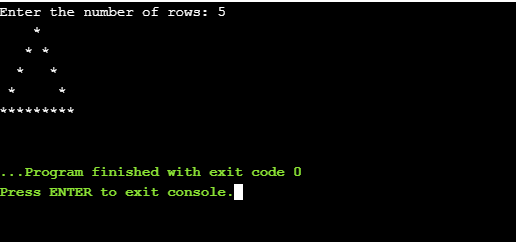
Hollow triangle star pattern in java.
import java.util.Scanner;

public class Pattern10
{
  public static void main(String[] args)
  {
    Scanner sc = new Scanner(System.in);

    System.out.print("Enter the number of rows: ");
    int rows = sc.nextInt();

    for (int i=1; i<= rows ; i++)
    {
        for (int j = i; j < rows ; j++)
        {
            System.out.print(" ");
        }
        for (int k = 1; k <= (2*i -1) ;k++)
        {
            if( k==1 || i == rows || k==(2*i-1))
            {
                System.out.print("*");
            }
            else
            {
                System.out.print(" ");
            }
        }
        System.out.println("");
    }

    sc.close();

  }
}
This post focuses on the various Java pattern program specifically Top 10 Different Alphabet Pattern Programs in Java. Patterns are one of the easiest ways to improve the coding skills for java. The frequent use loops can increase your skills and printing pattern in order. This article covers various Alphabet patterns. Other are:
 A
 B B
 C C C
 D D D D
 E E E E E
 F F F F F F
 G G G G G G G
 H H H H H H H H
Let us understand the code:
 //Pattern with alphabets

 public class Pattern1
 {
    public static void main(String[] args)
    {
        int count = 7;
        for(int i = 0 ; i <= count  ; i++)
        {
         for(int j = 0 ; j <= i ; j++)
         {
          System.out.print(" "+(char)(65 + i));
         }
          System.out.println("");
        }
    }
 }
Pattern programs in java: Pattern 2
Enter the number of rows: 5
A
A B
A B C
A B C D
A B C D E
import java.util.Scanner;
public class Pattern2
{
    public static void main(String[] args)
    {
        Scanner sc = new Scanner(System.in);

        System.out.print("Enter the number of rows: ");
        int rows = sc.nextInt();

       // ASCII value of alphabet 'A'
        int alph = 65;

        for (int i=0; i< rows; i++)
        {
            for (int j=0; j<=i; j++)
            {
              System.out.print((char) (alph+j) + " ");
            }
            System.out.println();
        }

        sc.close();
    }
}
Pattern programs in java: Pattern 3
Enter the number of rows: 5
A B C D E F
A B C D E
A B C D
A B C
A B
A
A
A B
A B C
A B C D
A B C D E
A B C D E F
import java.util.Scanner;
public class Pattern3
{
    public static void main(String[] args)
    {
        Scanner sc = new Scanner(System.in);

        System.out.print("Enter the number of rows: ");
        int rows = sc.nextInt();

       for (int i = 5; i >= 0; i--)
       {
        // ASCII value of alphabet 'A'
        int alph = 65;

        for (int j = 0; j <= i; j++)
            System.out.print((char) (alph + j) + " ");

        System.out.println();
       }

      for (int i = 0; i<= 5; i++)
      {
       int alph = 65;
       for (int j = 0; j <= i; j++)
          System.out.print((char) (alph + j) + " ");

       System.out.println();
      }

    sc.close();
  }
}
Pattern programs in java: Pattern 4
Enter the number of rows: 5
E
E D
E D C
E D C B
E D C B A
import java.util.Scanner;
public class Pattern4
{
    public static void main(String[] args)
    {
        Scanner sc = new Scanner(System.in);

        System.out.print("Enter the number of rows: ");
        int rows = sc.nextInt();

       // ASCII value of alphabet 'A'
       int alphabet = 65;

        for (int i=rows-1; i>=0 ; i--)
        {
          for (int j=rows-1; j>=i; j--)
          {
            System.out.print((char) (alphabet+j) + " ");
          }
         System.out.println();
        }

    sc.close();
  }
}
Pattern programs in java: Pattern 5
Full pyramid character pattern in Java.
Enter the number of rows: 5
      A
     A B
    A B C
   A B C D
  A B C D E
import java.util.Scanner;
public class Pattern5
{
    public static void main(String[] args)
    {
        Scanner sc = new Scanner(System.in);

        System.out.print("Enter the number of rows: ");
        int rows = sc.nextInt();

       // ASCII value of alphabet 'A'
       int alphabet = 65;

       for (int i= 0; i<= rows-1 ; i++)
        {
            for (int j=rows-1; j>i; j--)
            {
                 System.out.print(" ");
            }
            for (int k=0; k<=i; k++)
            {
                 System.out.print((char) (alphabet+k) + " ");
            }
            System.out.println();
        }

    sc.close();
  }
}
Pattern programs in java: Pattern 6
Inverted pyramid pattern of alphabets in java.
Enter the number of rows: 5
   A B C D E
    A B C D
     A B C
      A B
       A
import java.util.Scanner;

public class Pattern6
{
    public static void main(String[] args)
    {
        Scanner sc = new Scanner(System.in);

        System.out.print("Enter the number of rows: ");
        int rows = sc.nextInt();

       // ASCII value of alphabet 'A'
       int alphabet = 65;

       for (int i= 0; i<= rows-1 ; i++)
        {
            for (int j=0; j<=i; j++)
            {
                System.out.print(" ");
            }
            for (int k=0; k<=rows-1-i; k++)
            {
              System.out.print((char) (alphabet + k) + " ");
            }
            System.out.println();
        }

    sc.close();
  }
}
Pattern programs in java: Pattern 7
Enter the number of rows: 6
A B C D E F
 B C D E F
  C D E F
   D E F
    E F
     F
     F
    E F
   D E F
  C D E F
 B C D E F
A B C D E F
import java.util.Scanner;

public class Pattern7
{
    public static void main(String[] args)
    {
        Scanner sc = new Scanner(System.in);

        System.out.print("Enter the number of rows: ");
        int rows = sc.nextInt();

       // ASCII value of alphabet 'A'
       int alphabet = 65;

       for (int i= 0; i<= rows-1 ; i++)
       {
        for (int j=0; j<i; j++)
        {
          System.out.print(" ");
        }
        for (int k=i; k<=rows-1; k++)
        {
          System.out.print((char) (alphabet + k) + " ");
        }
        System.out.println("");
       }

        for (int i= rows-1; i>= 0; i--)
        {
         for (int j=0; j<i; j++)
         {
           System.out.print(" ");
         }
         for (int k=i; k<=rows-1; k++)
         {
           System.out.print((char) (alphabet + k) + " ");
         }
        System.out.println("");
        }

    sc.close();
  }
}
Pattern programs in java: Pattern 8
Enter the number of rows: 5
A
A B
A B C
A B C D
A B C D E
A B C D
A B C
A B
A
import java.util.Scanner;
public class Pattern8
{
    public static void main(String[] args)
    {
        Scanner sc = new Scanner(System.in);

        System.out.print("Enter the number of rows: ");
        int rows = sc.nextInt();

       // ASCII value of alphabet 'A'
       int alphabet = 65;

       for (int i= 0; i<= rows-1 ; i++)
        {
         for (int j=0; j<=i; j++)
         {
            System.out.print((char) (alphabet + j)+ " ");
         }
        System.out.println("");
        }
        for (int i=rows-1; i>=0; i--)
        {
         for(int j=0; j <= i-1;j++)
         {
            System.out.print((char) (alphabet + j)+ " ");
         }
        System.out.println("");
        }

    sc.close();
  }
}
Pattern programs in java: Pattern 9
Enter the number of rows: 5
     A
    BB
   CCC
  DDDD
 EEEEE
FFFFFF
import java.util.Scanner;
public class Pattern9
{
    public static void main(String[] args)
    {
        Scanner sc = new Scanner(System.in);

        System.out.print("Enter the number of rows: ");
        int rows = sc.nextInt();

       // ASCII value of alphabet 'A'
       int alphabet = 65;

       for (int i= 0; i<= rows; i++)
        {
         for (int j=1; j<=rows-i; j++)
         {
            System.out.print(" ");
         }

         for (int k=0;k<=i;k++)
         {
            System.out.print((char) (i+alphabet));
         }
            System.out.println("");
        }

    sc.close();
  }
}
Pattern programs in java: Pattern 10
import java.util.Scanner;
public class Pattern10
{
    public static void main(String[] args)
    {
        Scanner sc = new Scanner(System.in);

        System.out.print("Enter the number of rows: ");
        int rows = sc.nextInt();

       // ASCII value of alphabet 'A'
       int alphabet = 65;

       for (int i= 1; i<= rows ; i++)
        {
         int count = rows -1;
         int temp = i;

         for (int j=1; j<=i; j++)
         {
            System.out.printf("%4c", (char)temp + alphabet-1);
            temp = temp + count;
            count--;
         }
        System.out.println("");
        }

    sc.close();
  }
}
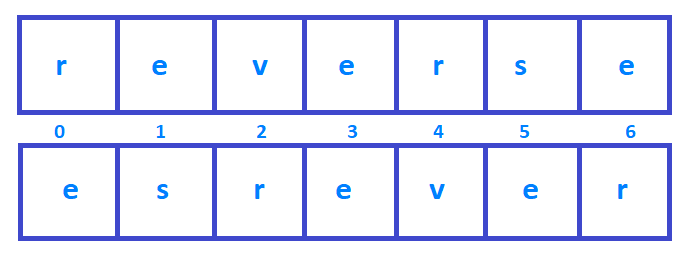
In this tutorial, we will write a program to reverse a string in Java. It means displaying the string from backward.
Consider the string reverse, we write a java program in various ways to reverse it and it will be displayed as esrever. Some of the ways to do it are using:
for loop
recursion
StringBuffer.
Write a java program to reverse a string:
Using for loop
 //reverse a string

 import java.util.Scanner;

 class ReversingString
 {
    public static void main(String args[])
    {
       String str, revString= "";
       Scanner in = new Scanner(System.in);

      //user input
       System.out.println("Enter a string: ");
       str= in.nextLine();

       int length = str.length();

       for (int i = length - 1 ; i >= 0 ; i--)
       {
        revString += str.charAt(i);
       }

       //display the reverse result
       System.out.println("Reverse of the entered string: " + revString);
    }
 }
Output: when the code is is executed it shows the following result.
Enter a string:
I am learning java
Reverse of the entered string: avaj gninrael ma I
Using StringBuffer:
In this method, we use reverse() method of StringBufferclass to reverse a string in java.
//reverse a string Using StringBuffer

import java.util.Scanner;

class ReverseOfString
{
  public static void main(String args[])
  {
    String str;
    Scanner in = new Scanner(System.in);

    //user input
    System.out.println("Enter the string: ");
    str= in.nextLine();

    //using StringBuffer
    StringBuffer sb = new StringBuffer(str);
    System.out.println("Reverse of entered string is:"+sb.reverse());

  }
}
Output:
Enter the string:
reverse
Reverse of entered string is: esrever
Using Recursion:
 //reverse a string using recursion

 import java.util.Scanner;

 class Main
 {
  public static void main(String args[])
  {
    Main rvrs = new Main();

    String str, revString= "";
    Scanner in = new Scanner(System.in);
    //user input
    System.out.println("Enter a string: ");
    str= in.nextLine();

   String reverse = rvrs.reverseString(str);
   System.out.println("Reverse of entered string is: "+reverse);

  }

  public String reverseString(String str)
  {
  if ((null == str) || (str.length() <= 1))
     {
       return str;
     }

     return reverseString(str.substring(1)) + str.charAt(0);
  }
 }
Output:
Enter the string:
reverse
Reverse of entered string is: esrever
The following Program to Check if the Entered year is a leap year or not, the if-else statement has been used. If you want to learn about the if-else statement in Java, click the link below.
A leap year comes after every 4 years and has 366 days that year instead of 365 days. In the leap year, an additional day is added to the February month has 29 days instead of 28 days.
Now let us understand through mathematical logic,
If a year is divisible by 4 then it is leap year.
If a year is divisible by 400 and not divisible by 100 then it is also a leap year.
Example: 2000, 2004, 2008, etc are the leap years.
Java Program to Check for Leap Year
 //check for leap year in java

 import java.util.*;

 public class LeapYearJava
 {
   public static void main(String[] args)
   {
     int n;
     int year;
     Scanner sc = new Scanner(System.in);

     System.out.println("Enter the year");
     n = sc.nextInt();

     year = n;
     boolean leap = false;

     if (year % 4 == 0)
     {
       if (year % 100 == 0)
       {
         // year is divisible by 400, hence the year is a leap year
         if (year % 400 == 0)
           leap = true;
         else
           leap = false;
       }
       else
         leap = true;
     }
     else
       leap = false;

     //Display
     if (leap)
       System.out.println(year + " is a leap year.");
     else
       System.out.println(year + " is not a leap year.");
   }
 }
In this tutorial, we will write a Java Program to check Armstrong number. We will write two different programs to check the armstrong number in java.
1. What is an Armstrong number? 2. Java program to check the Armstrong Number(for any digit number) using a while and for. 3. Java program to check the Armstrong Number(using Math.pow() method).
What is an Armstrong Number?
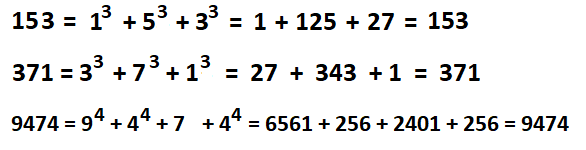
A number is said to be an Armstrong Number if even after the sum of its digits, where each digit is raised to the power of the number of digits is equal to the original number. For example 153, 371, 407, 9474, etc are Armstrong Numbers.
Follow the below calculation.
Java program to check the Armstrong Number using while and for loops
import java.util.Scanner;

 public class ArmstrongNumber
 {
  public static void main(String[] args)
  {
    int n, num, totalDigits, remainder, result = 0;

    System.out.println("Enter the Number:");
    Scanner scanner = new Scanner(System.in);

    n = scanner.nextInt();
    scanner.close();

    //setting the power to the no. of digits
    totalDigits = String.valueOf(n).length();

    num = n;

    while (num != 0)
    {
        remainder = num % 10;
        int lastDigits = 1;

        for(int i = 0; i < totalDigits; i++)
         {
           lastDigits = lastDigits * remainder;
         }

        result = result + lastDigits;
        num /= 10;
    }

    if(result == n)
        System.out.println(n + " is an Armstrong number.");
    else
        System.out.println(n + " is not an Armstrong number.");
  }
 }
Output: You can check for any digit Number.
Enter the Number:
9474
9474 is an Armstrong number.
Explanation: First we create required variables(n, num, totalDigits, remainder, result). Get User Input and store it in n, then we need the number of digits present in that number and store it n totalDigits using code (totalDigits = String.valueOf(n).length();). After that, copy the entered number to num.
Now start the while loop checking num is not equal to zero. While stops as soon as num becomes zero. After each iteration of the while loop, the last digit of num is stored in remainder for the second use. We initiate an int variable lastDigits = 1.
Now the for loop runs until the totalDigits less than i where is initiated as 0 and increase by 1 after each iteration. Inside for loop lastDigits is multiplied to remainder and the result is added to lastDigits.
After the end of for loop, the value of lastDigits is assigned to the result variable. and at the end, we divide the num by 10 i.e num /= 10; which will remove the last digit from the number. This step is continued until the num becomes 0.
At last, we will check with if-else statement whether the result is equal to the original number or not. If it is found equal,l then the entered number is an Armstrong Number.
Java program to check the Armstrong Number using Math.pow() method
 //check for armstrong number

import java.util.Scanner;

 public class ArmstrongNumber
 {
  public static void main(String[] args)
  {
    int n, num, power, remainder, result = 0;


    System.out.print("Enter the Number: ");
    Scanner scanner = new Scanner(System.in);

    n = scanner.nextInt();
    scanner.close();

    //seting the power to the no. of digits
    power = String.valueOf(n).length();

    num = n;

    while (num != 0)
    {
        remainder = num % 10;
        result += Math.pow(remainder, power);
        num /= 10;
    }

    if(result == n)
        System.out.println(n + " is an Armstrong number.");
    else
        System.out.println(n + " is not an Armstrong number.");
  }
 }
Output: You can check for any digit Number.
Enter the Number: 370
370 is an Armstrong number
Explanation: In the above program we use the inbuilt method (Math.pow()) which makes it easy for us to calculate the raised power to the number.
The process is the same as explained above, only the difference is instead of for loop we use the method(Math.pow()) as result += Math.pow(remainder, power);.
If we were to calculate for the only three-digit number then we can simply replace the code: result += Math.pow(remainder, power); with result = result + remainder*remainder*remainder;
In this java program tutorial, we will write a java program to display the Fibonacci series. Let us first understand what is Fibonacci series is and then the Java program to generate them.
What is Fibonacci Series?
Fibonacci series is the series of numbers where the next number is achieved by the addition of the previous two numbers. The initial addition of two numbers is 0 and 1.
For example: 0,1,1,2,3,5,8,13….etc.
We will see two ways to print the Fibonacci Series.
Program Explanation: First, we need to initialize the two terms as 0 and 1 as a = 0, b = 0; then get user input for the total number of elements in a series which is stored in an integer variable n.
After that start iteration up to the number of elements the user inputs. Inside for loop, we assigned the b value in a and the sum value in b and the sum is the addition of a and b. Then we print the value at every iteration as shown in a program.
At last, the program exits the iteration when integer i is less than or equal to the number of elements as, i <= n.
1. Java program to display Fibonacci series using for loop
//Fibonacci series in java

import java.util.Scanner;

public class FibonacciJava
{
  public static void main(String[] args)
  {
    int n, a = 0, b = 0, sum = 1;

    Scanner s = new Scanner(System.in);

    System.out.print("Enter the Number:");
    n = s.nextInt();

    System.out.print("Fibonacci Series of entered number are:");
    for (int i = 1; i <= n; i++)	//display
    {
      a = b;
      b = sum;
      sum = a + b;
      System.out.print(a + " ");
    }
  }
}
Output:
Enter the Number:6
Fibonacci Series of entered number are:0 1 1 2 3 5
2. Fibonacci series using Recursion in java
//Fibonacci Using Recursion

import java.util.Scanner;
public class FiboSeries
{
    public static int fiboRecursion(int n)
    {
     if(n == 0)
     {
       return 0;
     }
     if(n == 1 || n == 2)
     {
       return 1;
     }
     return fiboRecursion(n-2) + fiboRecursion(n-1);
    }

  public static void main(String args[])
  {
    int number;
    Scanner s = new Scanner(System.in);

    System.out.print("Enter the Number:");
    number = s.nextInt();

    System.out.print("Fibonacci Series of entered number: ");

    for(int i = 0; i < number; i++)
    {
	System.out.print(fiboRecursion(i) +" ");
    }
  }
}
After executing, the following output will be obtained.
Enter the Number:8
Fibonacci Series of entered number: 0 1 1 2 3 5 8 13
Example: Java Program to Reverse the Number using while loop
//reverse a number in java

 import java.util.Scanner;

 public class ReverseNumberJava
 {
   public static void main(String args[])
   {
     int n, rev = 0;

     Scanner in = new Scanner(System.in);

     System.out.print("Enter an integer to reverse: ");
     n = in .nextInt();

     while (n != 0)
     {
       rev = rev * 10;
       rev = rev + n % 10;
       n = n / 10;
     }

     System.out.println("Reverse of the entered interger is " + rev);
   }
 }
Output of reversing a number:
Enter an integer to reverse: 1234567
Reverse of the entered interger is 7654321