Author: admin

  • Quick Sort in Java

    In this post, we will learn how to implement Quick Sort in java. First, we will start by understanding the Quick Sort algorithm.

    Quick Sort Algorithm

    Quicksort algorithm is a way of rearranging the elements in an array in ascending or descending order. Quicksort is another Divide and Conquer algorithm.

    It takes two empty arrays to hold elements, the first is less than the pivot value and the second element greater than the pivot value, and then sort the element around it or inside it. It involves Swapping and partitioning a section of the array.

    Time Complexity of Quick Sort:

    • Best case:  0(n log n)
    • Average case:  0(n log n)
    • Worst case:  0(n^2)

    Implementation of Quick sort in java

    import java.util.Arrays;
    
    public class QuickSort
    {
      private static int array[];
    
      public static void Qsort(int[] arr)
      {
        if (arr == null || arr.length == 0)
        {
          return;
        }
    
        array = arr;
    
        quickSort(0, array.length - 1);
      }
    
      private static void quickSort(int left, int right)
      {
        int i = left;
        int j = right;
    
        // finding pivot number
        int pivot = array[left + (right - left) / 2];
    
        while (i <= j)
        {
          //Find element greater than pivot
          while (array[i] < pivot)
          {
            i++;
          }
    
          while (array[j] > pivot)
          {
            j--;
          }
    
          if (i <= j)
          {
            exchange(i, j);
            i++;
            j--;
          }
        }
    
        // recursssive
        if (left < j)
          quickSort(left, j);
        if (i < right)
          quickSort(i, right);
      }
    
      private static void exchange(int i, int j)
      {
        int temp = array[i];
        array[i] = array[j];
        array[j] = temp;
      }
    
      public static void main(String a[])
      {
        int[] arr = { 56, 33, 90, 2, 22, 4, 1, 8, 16, 9, 20 };
    
        System.out.println("Array Before Sorting : ");
        System.out.println(Arrays.toString(arr));
    
        Qsort(arr);
    
        System.out.println("Array After Sorting : ");
        System.out.println(Arrays.toString(array));
    
      }
    }

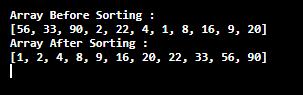
    The output of Quicksort algorithm in java:

  • Insertion Sort in java

    In this tutorial, we will learn how to implement Insertion Sort in java. First, we will start by understanding the Insertion Sort algorithm.

    Insertion Sort Algorithm

    Insertion sort is a simple sorting algorithm that sorts the elements in an array by comparing the values at index with all its prior elements. This process takes more time so it is only used for small data set.

    This sorting takes the first index element and compares it to its largest value in an array and it moves the element to its right location.

    Before we begin, you need to have an idea of the following:

    Time Complexity of Heap Sort:

    • Best case:  0(n)
    • Average case:  0(n^2)
    • Worst case:  0(n^2)

    Implementation of Insertion Sort in java

    public class InsertionSortJava
    {
      public static void insertionSort(int array[])
      {
        int n = array.length;
        for (int j = 1; j < n; j++)
        {
          int key = array[j];
          int i = j - 1;
          while ((i > -1) && (array[i] > key))
          {
            array[i + 1] = array[i];
            i--;
          }
    
          array[i + 1] = key;
        }
      }
    
      public static void main(String a[])
      {
        int[] arr = { 5, 11, 32, 1, 45, 6, 2 };
        System.out.println("Array before sorting: ");
        for (int i = 0; i < arr.length; i++)
        {
          System.out.print(arr[i] + " ");
        }
    
        System.out.println();
    
        insertionSort(arr);	//sorting array using insertion sort    
    
        System.out.println("Array after Insertion Sorting: ");
        for (int i = 0; i < arr.length; i++)
        {
          System.out.print(arr[i] + " ");
        }
      }
    }

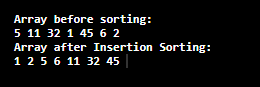
    The output of Insertion sort algorithm in java:


  • Heap Sort in Java

    In this tutorial, we will learn how to implement Heap Sort in java. First, we will start by understanding the Heap Sort algorithm.

    Heap Sort Algorithm

    Heap is a tree in heap sorting that possesses some specific properties whose value should be greater than or equal to that of the children node.

    Heapsort is a comparison-based sorting algorithm and is also considered as the improved Selection sort. It is based on a Binary Heap data structure so to understand we must know two types of data structure:
    Arrays and trees

    What is Binary heap?

    Complete Binary tree:
    A complete binary tree is a binary tree in which every level, except possibly the last, is completely filled, and all nodes are as far left as possible.

    Binary Heap:
    A binary heap is a complete binary tree where the parent node is greater than its two children node.

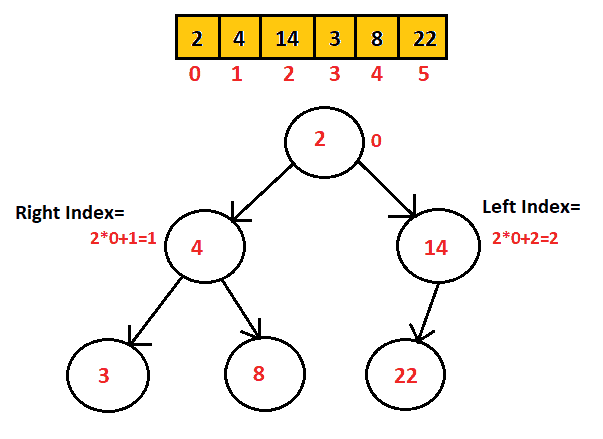
    Representation of Binary tree:
    Considering the height of a tree be “h“, then:

    • Index of left child = 2*(index of its parent)+1
    • Index of right child = 2*(index of its parent)+2
    Binary heap

    Types of heaps:

    • Min heap
    • Max heap

    Min heap and max heap are the binary heaps that represent the ordering of an array.

    • Min heap: In this binary heap, the value of the parent node is always greater than its child node.
    • Max heap: In this binary heap, the value of the parent node is always less than its child node.

    A heap sorting algorithm for increasing order:

    • First, create a max Heap from the input array.
    • Replace the root element (which has the largest element) with the last element in the array. Then heapify the root of the tree.
    • Now repeat the steps until all elements are sorted in an array.

    A heap sorting algorithm for decreasing order.

    • First, create a min Heap from the input array.
    • Replace the root element (which has the smallest element) with the last element in the array. Then heapify the root of the tree.
    • Now repeat the steps until all elements are sorted in an array.

    Before we begin, you need to have an idea of the following:

    Time Complexity of Heap Sort:

    • Best case:  0(nlogn)
    • Average case:  0(nlogn)
    • Worst case:  0(nlogn)

    Java Program to implement heap sort

    import java.util.Arrays;
    
    public class HeapSortAlgo
    {
      public void sort(int arrA[])
      {
        int size = arrA.length;
    
        // create heap
        for (int i = size / 2 - 1; i >= 0; i--)
          heapify(arrA, size, i);
    
        //Replacement of element
        for (int i = size - 1; i >= 0; i--)
        {
          //arrA[0] being max element
          int x = arrA[0];
          arrA[0] = arrA[i];
          arrA[i] = x;
    
          // call max
          heapify(arrA, i, 0);
        }
      }
    
      void heapify(int arrA[], int heapSize, int i)
      {
        // Initializing
        int largest = i;
        //Indexes
        int leftChild = 2 *i + 1;
        int rightChild = 2 *i + 2;
    
        // If left child is larger than root
        if (leftChild < heapSize && arrA[leftChild] > arrA[largest])
          largest = leftChild;
    
        //if right child is larger than root
        if (rightChild < heapSize && arrA[rightChild] > arrA[largest])
          largest = rightChild;
    
        // If root is not largest
        if (largest != i)
        {
          int swap = arrA[i];
          arrA[i] = arrA[largest];
          arrA[largest] = swap;
    
          // Recursive call
          heapify(arrA, heapSize, largest);
        }
      }
    
      public static void main(String args[])
      {
        int arrA[] = { 6, 23, 9, 15, 4, 1, 11 };
    
        System.out.println("Array before sorting: " + Arrays.toString(arrA));
        HeapSortAlgo heapSort = new HeapSortAlgo();
        heapSort.sort(arrA);
    
        System.out.println("Array after heap sort: " + Arrays.toString(arrA));
      }
    }

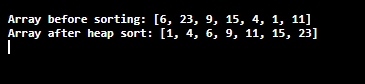
    The output of Heap sorting in Java:


  • Selection Sort in Java

    In this post, we will learn how to implement Selection Sort in java. First, we will start by understanding the Selection sort algorithm.

    Selection Sort Algorithm

    The selection sort is a simple sorting algorithm which is an in-place comparison-based algorithm. It has two parts where the left end has a sorted part and the right end has an unsorted part.

    In the beginning, the left end is empty and the right end has all the elements then the smallest element from the right end is brought to the left end and swapped with the leftmost element. This process continues until the element from the right end is brought to the left by swapping.

    Although, it may cause a problem with the large inputs.

    Before we begin, you need to have an idea of the following:

    Time Complexity of Selection Sort:

    • Best case:  0(n^2)
    • Average case:  0(n^2)
    • Worst case:  0(n^2)

    Implementation of selection sort in java

    import java.util.Arrays;
    
    public class Main
    {
      public static int[] selectionSort(int[] arr)
      {
        for (int i = 0; i < arr.length - 1; i++)
        {
          int index = i;
    
          for (int j = i + 1; j < arr.length; j++)
          {
            if (arr[j] < arr[index])
              index = j;
          }
    
          int smallerNumber = arr[index];
          arr[index] = arr[i];
          arr[i] = smallerNumber;
        }
    
        return arr;
      }
    
      public static void main(String a[])
      {
        int[] arr = { 25, 5, 12, 60, 2, 1 };
        System.out.println("Array Before Sorting: ");
        System.out.println(Arrays.toString(arr));
    
        arr = selectionSort(arr);
    
        System.out.println("Array After Sorting: ");
        System.out.println(Arrays.toString(arr));
      }
    }

    The output of the Selection sort algorithm in java:


  • Counting Sort in Java

    In this post, we will learn how to implement Counting Sort in java. First, we will start by understanding the Counting Sort algorithm.

    Counting Sort Algorithm

    Counting Sort Algorithm is an integer-based algorithm, non-comparison, and linear sorting algorithm. The counting sort algorithm sorts the elements in an array in a specific range. It is based on keys between the specific range.

    Counting sort calculates the number of occurrences of objects and stores their key values. Then by adding the previous key elements, a new array is formed.

    Before we begin, you need to have an idea on following:

    Time Complexity of Counting Sort:

    • Best case:  0(n+k)
    • Average case:  0(n+k)
    • Worst case:  0(n+k)

    Implementation of Counting Sort in java

    import java.util.Arrays;
    
    public class CountingSortJava
    {
      public static void main(String[] args)
      {
        int[] arr = { 5, 34, 3, 2, 34, 3, 5, 2, 5, 34, 6, 2 };
        int k = 34;
    
        System.out.println("Array before sorting");
        System.out.println(Arrays.toString(arr));
    
        countingSortFn(arr, k);
    
        System.out.println("Array after Counting sorting: ");
        System.out.println(Arrays.toString(arr));
    
      }
    
      public static void countingSortFn(int[] input, int k)
      {
       	// creating buckets 
        int counter[] = new int[k + 1];
    
       	// filling buckets 
        for (int i: input)
        {
          counter[i]++;
        }
    
       	// sorting 
        int ndx = 0;
        for (int i = 0; i < counter.length; i++)
        {
          while (0 < counter[i])
          {
            input[ndx++] = i;
            counter[i]--;
          }
        }
      }
    }

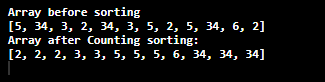
    The output of Counting sort algorithm in java:


  • Special Number Program in Java

    Here we will learn how to do programming on Special Number. We will start by understanding, what is Special Numbers and solve the following two questions on a special number in java.

    Question:
    1. Write a program in Java to check whether a number is Special or not.
    2. Write a Java Program to find all special numbers between the interval.

    Also before we begin, if you do not know the working idea of for, while loop and if-else statement in java then click the link below and learn about them as this program uses them.

    What is a Special Number?

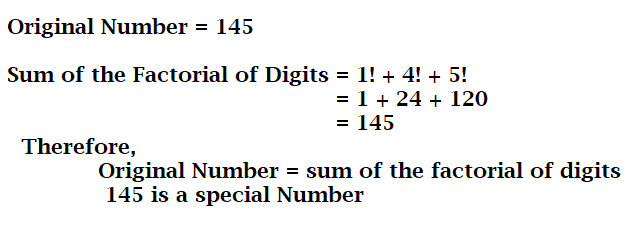
    A special number is a number whose sum of the factorial of its digits is equal to the original number. Example: 145 is a special number.

    Java Special Number

    Java Program to check whether a number is Special or not

    To check for a special number, we take the number from the user, then separate the digits using the % operator, and then calculating the factorial of that individual digits. At last, add the digits and check if it’s equal to the original number and print the result accordingly as shown in the following program.

    Source Code:

    import java.util.Scanner;
    
    class Main
    {
      public static void main(String[] args)
      {
        int digit, num, sum = 0, temp;
    
        Scanner in = new Scanner(System.in);
        System.out.println("Enter a number you want to check for special number:");
        num = in .nextInt();
    
        temp = num;
    
       // calculating sum of the factorial of its digit
        while (temp != 0)
        {
          digit = temp % 10;
    
         //calculating factorial of a number(digit)
          int fact = 1;
          for (int i = 2; i <= digit; i++)
          {
            fact = fact * i;
          }
    
          sum += fact;	//calling factorial function
          temp = temp / 10;
        }
    
       //check and display the result
        if (sum == num)
          System.out.println(num + " is a Special number");
        else
          System.out.println(num + " is Not a Special Number");
    
      }
    }

    The output of a special numbers in Java.


    Java Program to find all the special numbers between the interval

    In this program, we have created a different function to calculate the sum of the digit and factorial of a number. The program takes two inputs from the user Lower Value and Upper-Value inputs and runs the loop for those values. Also if no special number is found between the upper and lower value, the program prints no value as shown in the program.

    We have used boolean values to check if at least one value is found or not and perform accordingly.

    Source Code:

    import java.util.Scanner;
    
    class Main
    {
      public static void main(String[] args)
      {
        int lowerValue, upperValue;
        boolean checkSpecial = false;
    
        Scanner in = new Scanner(System.in);
        System.out.println("Enter the lowerValue and upperValue Number:");
        lowerValue = in .nextInt();
        upperValue = in .nextInt();
    
        for (int i = lowerValue; i <= upperValue; i++)
        {
          //calling function called specialFunction()
          if (specialFunction(i))
          {
            System.out.print(i + " ");
            checkSpecial = true;
          }
        }
    
        //display this if no special number are found
        if (!checkSpecial)
          System.out.println("Interval between " + lowerValue + " and " + upperValue + " has no special number");
      }
    
      private static boolean specialFunction(int num)
      {
        int digit, sum = 0, temp;
    
        temp = num;
    
        // calculating sum of the factorial of its digit
        while (temp != 0)
        {
          digit = temp % 10;
    
          //calculating factorial of a number(digit)
          int fact = 1;
          for (int i = 2; i <= digit; i++)
          {
            fact = fact * i;
          }
    
          sum += fact;  //calling factorial function
          temp = temp / 10;
        }
    
        return sum == num;
      }
    }

    The output of a special number.


  • Java Program to Find the LCM of Two Numbers

    Here, we will write a program to calculate the LCM of two numbers in java. LCM stands for Lowest Common Factor. The Numbers will be taken as input from the user using the scanner class.

    Before we start, click on the links below to have a proper working idea of the if statement and break statement that this program uses.


    Program to Find the LCM of Two Numbers in Java

     //find the lcm of two number in java
      
     import java.util.Scanner;
    
     public class LCM 
     {
        public static void main(String[] args) 
        {
          int num1, num2, lcm;
            
          Scanner s = new Scanner(System.in);
          System.out.print("Enter the first number: ");
          num1 = s.nextInt(); 
            
          Scanner sc = new Scanner(System.in);
          System.out.print("Enter the second number: ");
          num2 = sc.nextInt();
            
          // maximum number between n1 and n2 is stored in lcm
          lcm = (num1 > num2) ? num1 : num2;
            
          while(true)
          {
            if( lcm % num1 == 0 && lcm % num2 == 0 )
            {
              System.out.printf("The LCM of %d and %d is %d.", num1, num2, lcm);
              break;
             }
            ++lcm;
          }
        }
     }

    Output:

    Enter the first number: 81
    Enter the second number: 27
    The LCM of 81 and 27 is 81.


  • Java Program to Find the Greatest of Three numbers using if-elseif statement

    The following program takes three integers from the user and finds the largest of those three numbers. The program uses if..else if statement to check the greatest of three and print them accordingly.

    Before we start, click on the links below to have a proper working idea of if..else if statement that this program uses.


    Java Program to Find the Greatest of Three Numbers

     //greatest of three numbers using if-elseif statement in java
    
     import java.util.Scanner;
    
     public class GreatestNumber 
     {
         public static void main(String[] args) 
         {
            int num1, num2, num3;
            
            Scanner s = new Scanner(System.in);
            System.out.println("Enter the first number:");
            num1 = s.nextInt();
            
            System.out.println("Enter the second number:");
            num2 = s.nextInt();
            
            System.out.println("Enter the third number:");
            num3 = s.nextInt();
            
            
            if(num1 > num2 && num1 > num3)
            {
                System.out.println("Largest number is:"+num1);
            }
            else if(num2 > num3)
            {
                System.out.println("Largest number is:"+num2);
            }
            else
            {
                System.out.println("Largest number is:"+num3);
            }
    
         }
     }

    Output:

    Enter the first number:
    34
    Enter the second number:
    89
    Enter the third number:
    23
    Largest number is:89


  • Java Program to Find the Greatest of Three Numbers

    The following program takes three integers from the user and finds the largest of those three numbers. The program uses if..elseif statement to check the greatest of three and print them accordingly.

    Before we start, click on the links below to have a proper working idea of if..elseif statement that this program uses.


    Program to Find the Greatest of Three Numbers in Java

     //find the greatest of three numbers in java
    
     import java.util.Scanner;
    
     public class GreatestNumber 
     {
       public static void main(String[] args) 
       {
         int num1, num2, num3;
            
         Scanner s = new Scanner(System.in);
         System.out.println("Enter the first number:");
         num1 = s.nextInt();
            
         System.out.println("Enter the second number:");
         num2 = s.nextInt();
            
         System.out.println("Enter the third number:");
         num3 = s.nextInt();
            
            
         if(num1 > num2 && num1 > num3)
         {
           System.out.println("Largest number is:"+num1);
         }
         else if(num2 > num3)
         {
           System.out.println("Largest number is:"+num2);
         }
         else
         {
           System.out.println("Largest number is:"+num3);
         }
        
       }
     }

    Output:

    Enter the first number:
    34
    Enter the second number:
    89
    Enter the third number:
    23
    Largest number is:89


  • Java Program to Display the Odd Numbers

    The following program takes the value for n that is the max limit of n from the user. The program starts checking for odd numbers between this range 1 to n and it displays all the odd numbers lying within that range.

    Before we start, click on the links below to have a proper working idea of for loop and if statement that this program uses.


    Program to display the Odd Numbers within the range in Java

    //display the odd number in java
    
     import java.util.*;
    
     public class DisplayOddNumbers
     {
        public static void main(String args[]) 
        {
      int n;
      Scanner sc=new Scanner(System.in);
      
      System.out.print("Enter the number: ");
        n=sc.nextInt();
        
      System.out.print("Odd Numbers between 1 to "+n+" are: ");
      
        for (int i = 1; i <= n; i++) 
        {
          // if the number is not divisible by 2 then it is even
          if (i % 2 != 0) 
          {
            System.out.print(i + " ");
          }
        }
      }
     }

    Output:

    Enter the number: 10
    Odd Numbers between 1 to 10 are: 1 3 5 7 9