Author: admin

  • Binary Search in C

    Binary search in C programming is to find an element’s position in a sorted Array. The following program for binary search finds the location of a searched element from the array.

    Binary search is applied to sorted elements. So if the array is not sorted, you must sort it using a sorting technique. You can use any one of the sorting algorithms in c such as merge or bubble sort etc.

    The search for the element that is to be searched and if found in an array, it will print its index number that the key is present.

    Binary Search Time Complexity:

    • Best case:  O(1)
    • Average case:  O(log n)
    • Worst case:  O(log n)

    C Program for Binary Search

    Source Code:

    #include <stdio.h>
    
    int main()
    {
      int arr[100], i, numElemt, first, last, mid, searchElemt;
    
      printf("How many elements do you want?\n");
      scanf("%d", &numElemt);
    
      printf("Enter the Elements:\n", numElemt);
    
     //taking the elements 
      for (i = 0; i < numElemt; i++)
        scanf("%d", &arr[i]);
    
      printf("Enter the specific elements from the list that needed to be searched:\n");
      scanf("%d", &searchElemt);
    
      first = 0;
      last = numElemt - 1;
      mid = (first + last) / 2;
    
      while (first <= last)
      {
        if (arr[mid] < searchElemt)
        {
          first = mid + 1;
        }
        else if (arr[mid] == searchElemt)
        {
          printf("The elements you are searching is found at location: %d.\n", mid + 1);
          break;
        }
        else
        {
          last = mid - 1;
        }
    
        mid = (first + last) / 2;
      }
    
    //if the searching element is not on the list
      if (first > last)
        printf("The element you are looking for is not present in the list.\n");
    
      return 0;
    }

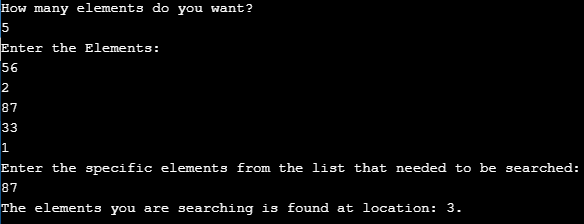
    The output of binary search in c language.

  • Magic Number in C

    In this tutorial, we will write a program for Magic Number in C. Before that you may go through the following topics in C.

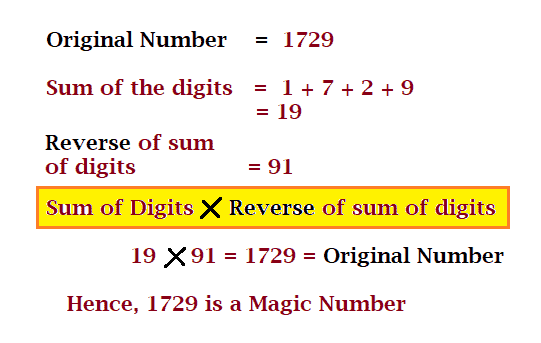
    A number is said to be a Magic Number if the sum of the digits of that number, when multiplied by the reverse number of the sum of its digits, is equal to the original number.

    Example: 1729 is a magic number.

    C Magic Number

    C Magic Number:
    In the following C Program to check for magic Numbers, first, take the user input for the number which needed to be checked. Then, we find the sum of the digits of that number and then find the reverse of that sum of the digits.

    Lastly, check if the multiplication of reverse and sum of the digits is equal to the original entered number or not. If it is equal then print “Magic Number” else print “Not a magic Number” using the if-else statement in c.


    C Program for Magic Number

    Question: C program to check whether a number is Magic Number or not

    #include <stdio.h>
    #include <stdlib.h>
    
    int main()
    {
      int n, temp;
      int revnum = 0, sumOfTheDigits = 0;
    
     //User Input
      printf("Enter a Number that you want to check:");
      scanf("%d", &n);
    
      temp = n;
    
     //sum of the digits of n number calculation
      while (temp > 0)
      {
        sumOfTheDigits += temp % 10;
        temp = temp / 10;
      }
    
     //reversing the Sum of the Digits of n
      temp = sumOfTheDigits;
      while (temp > 0)
      {
        revnum = revnum *10 + temp % 10;
        temp = temp / 10;
      }
    
     //check for Magic Number and Display
      if (revnum *sumOfTheDigits == n)
        printf("%d is a Magic Number.", n);
      else
        printf("%d is not a Magic Number.", n);
    
      return 0;
    
    }

    The Output of magic Number in C Programming.


  • Global Variable in C

    Global variables in C are declared outside any functions and usually at the top of the program as shown below. They can be used in the program inside any block of code.

    Properties of a Global Variable:

    • Global variables are defined outside a function, usually on top of the program.
    • The lifetime of a Global Variable is throughout the program and can be accessed to any function or block.

    Example: C Program for Local Variable

    #include <stdio.h>
    
    //Global Variable
    int a = 20;
    
    void funGlobal()
    {
      /*local variable with
        same name on different block*/
      int a = 50;
      printf("%d : Inside funGlobal Function\n", a);
    }
    
    int main()
    {
      printf("%d : Inside main\n", a);
    
     //caling the function
      funGlobal();
    }

    The Output of Global Variable in C.

    20 : Inside main
    50 : Inside funGlobal Function

  • Local Variable in C

    A variable that is declared within the body of the function or block is called a local variable. This variable is used only within that block or function where it was created, other classes cannot access it. And is destroyed after exiting the block.

    Properties of a Local Variable:

    • A local variable is allocated on the C stack.
    • Local variables are uninitialized by default and contain garbage values.
    • The lifetime of a local variable is only within the function or block. And is destroyed after exiting the block.
    • A local variable is accessed using block scope access.

    Example: C Program for Local Variable

    #include <stdio.h>
    
    void differentFunc()
    {
      /*local variable of this function */
      int a = 10;
      printf("%d : Variable from differentFunc function\n", a);
    }
    
    int main()
    {
      /*local variable of function main*/
      int a = 50;
      {
        /*local variable for this block*/
        int a = 30;
        printf("%d : Variable inside the block\n", a);
      }
    
      printf("%d : Variable of main\n", a);
    
     	//calling function 
      differentFunc();
    }

    The output of Local variable in C:

    30 : Variable inside the block
    50 : Variable of main
    10 : Variable of main

  • Kruskal’s Algorithm in C

    In this article, you will learn the implementation of Kruskal’s Algorithm in C programming and starting with Kruskal’s Algorithm.

    Kruskal’s Algorithm

    It is a greedy algorithm that is directly based on MST (Minimum Spanning Tree). Kruskal’s algorithm finds a minimum spanning tree for a connected weighted graph.

    It finds a subset of the edges that forms a tree that includes every vertex, where the total weight of all the edges in the tree is minimized.

    There are many fields where Kruskal’s Algorithm is practically used such as in the field of Traveling Salesman Problem, Creating Mazes and Computer Networks, etc.

    Minimum Spanning Tree

     A Minimum Spanning Tree (MST) or minimum weight spanning tree for a weighted, connected and undirected graph is a spanning tree whose sum of edge weights is as small as possible.

    Number of edges in a Minimum Spanning Tree (MST): (V-1)
    here, V is the number of vertices in the given graph.


    C Programming Implementation of Kruskal’s Algorithm

    Source Code:

    #include <stdio.h>
    #include <conio.h>
    #include <stdlib.h>
    
    int i, j, k, a, b, u, v, n, ne = 1;
    int min, mincost = 0, cost[9][9], parent[9];
    
    int find(int);
    int uni(int, int);
    
    void main()
    {
      printf("Kruskal's algorithm in C\n");
      printf("========================\n");
    
      printf("Enter the no. of vertices:\n");
      scanf("%d", &n);
    
      printf("\nEnter the cost adjacency matrix:\n");
      for (i = 1; i <= n; i++)
      {
        for (j = 1; j <= n; j++)
        {
          scanf("%d", &cost[i][j]);
          if (cost[i][j] == 0)
            cost[i][j] = 999;
        }
      }
    
      printf("The edges of Minimum Cost Spanning Tree are\n");
      while (ne < n)
      {
        for (i = 1, min = 999; i <= n; i++)
        {
          for (j = 1; j <= n; j++)
          {
            if (cost[i][j] < min)
            {
              min = cost[i][j];
              a = u = i;
              b = v = j;
            }
          }
        }
    
        u = find(u);
        v = find(v);
    
        if (uni(u, v))
        {
          printf("%d edge (%d,%d) =%d\n", ne++, a, b, min);
          mincost += min;
        }
    
        cost[a][b] = cost[b][a] = 999;
      }
    
      printf("\nMinimum cost = %d\n", mincost);
      getch();
    }
    
    int find(int i)
    {
      while (parent[i])
        i = parent[i];
      return i;
    }
    
    int uni(int i, int j)
    {
      if (i != j)
      {
        parent[j] = i;
        return 1;
      }
    
      return 0;
    }

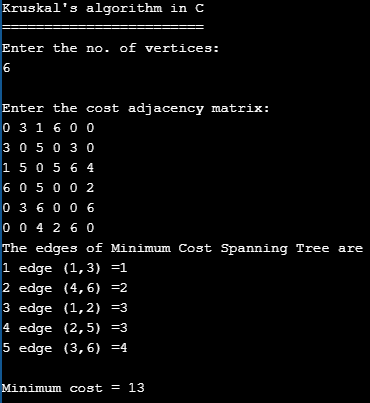
    The output of Kruskal’s Algorithm implementation in C.

    Kruskal’s Algorithm in C

    Time Complexity of Kruskal’s Algorithm.

    The time complexity of the algorithm= O (e log e) + O (e log n)
    where, e is the number of edges.
    n is the number of vertices.
    O (e log e) is sorting algorithm’s time complexity.
    O (e log n) is the merging of components’ time complexity.


  • Java Program to Sort String in an Alphabetical order

    In this another java tutorial lesson on Java alphabetical sort, we will learn how to sort strings in an order of alphabets.
    Let’s begin.

    Program explanation for arranging string in alphabetic order in java:

    First, we will take the user input for how many strings to enter? with the help scanner class. Then ask the user to input all the strings one by one and get them with help of for loop.

    Then to sort strings that are stored in a string array, we compare the first alphabet of each array to display them in alphabetic order in java with the help of the compareTo() function. If the first alphabet is the same it will compare the second alphabet and so on.


    Java Program to Sort String in an Alphabetical Order

    //java sort string
    
    import java.util.Scanner;
    
    public class JavaSortString
    {
      public static void main(String[] args)
      {
        int lenStr;
        String temp;
    
        Scanner scan = new Scanner(System.in);
    
        //number of strings
        System.out.print("How many Strings would you like to enter? ");
        lenStr = scan.nextInt();
    
        String str[] = new String[lenStr];
    
        Scanner scan2 = new Scanner(System.in);
    
        //getting all the strings
        System.out.println("Enter the " + lenStr + " Strings: ");
        for (int i = 0; i < lenStr; i++)
        {
          str[i] = scan2.nextLine();
        }
    
        scan.close();
        scan2.close();
    
        //Sorting strings with compareTo()
        for (int i = 0; i < lenStr; i++)
        {
          for (int j = i + 1; j < lenStr; j++)
          {
            if (str[i].compareTo(str[j]) > 0)
            {
              temp = str[i];
              str[i] = str[j];
              str[j] = temp;
            }
          }
        }
    
        //Print the sorted strings
        System.out.print("Strings sorted n alphabetical order: ");
        for (int i = 0; i <= lenStr - 1; i++)
        {
          System.out.print(str[i] + ", ");
        }
      }
    }

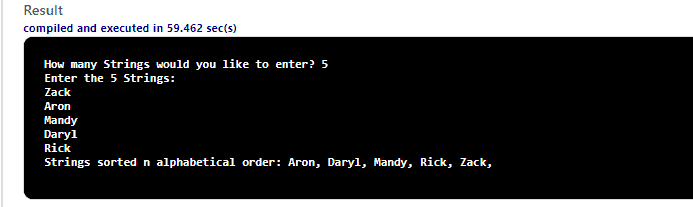
    Output: After executing the above program, the following output will be displayed.

    Sort String Alphabetically in java

  • Java Program to Write Char by Char into a File

    In this tutorial, you will learn how to Write Char by Char into a File in java. To understand it better, you may want to check the following first:


    Java Program to Write Char by Char into a File

    //write char by char into a file in java
    
     import java.io.*;
    
     public class FileByChar 
     {
     
      public static void main(String[] args) throws IOException 
      {
        File f=new File("javaCode.txt"); //Creation of File Descriptor for output file
        FileWriter fw=new FileWriter(f);  //Creation of File Writer object
        fw.write('S');  //Write character by Character
        fw.write('i');
        fw.write('m');
        fw.write('p');
        fw.write('l');
        fw.write('e');
        fw.write('2');
        fw.write('C');
        fw.write('o');
        fw.write('d');
        fw.write('e');
        fw.flush();
        fw.close();
          
      System.out.println("Check the javaCode.txt file");
      }
     
     }

    Output:

    Check the javaCode.txt file

    Open javaCode.txt file that will be created after execution of a program

    javaCode.txt

    Simple2Code


  • Java Program to Write in a File Line by Line

    In this tutorial, you will learn how to Write in a File Line by Line in java. To understand it better, you may want to check the following first:


    Java Program to Write in a File Line by Line

    //write in a file line by line 
    
     import java.io.*;  
    
     public class FileWrite
     {
     
      public static void main(String[] args) throws IOException 
      {
        File f = new File("javaCode.txt"); 
        
        FileWriter fw = new FileWriter(f);
        
        fw.write("Welcome to Simple2Code. \n"); 
        fw.write("Start the Tutorial");
        fw.flush();
        fw.close();
        System.out.println("Done..Check javaCode.txt");
      }
     
     }

    Output:

    Done..Check javaCode.txt

    javaCode.txt

    Welcome to Simple2Code.
    Start the Tutorial


  • Java Program to Read in a File Line by Line

    In this tutorial, you will learn how to Read in a File Line by Line in java. To understand it better, you may want to check the following first:


    Java Program to Read in a File Line by Line

    First, create a text file named javaCode.txt and write something on that text file. And then Save that text file within the same directory as the source code. For example, the following content is present in the javaCode.txt file.

    javaCode.txt

    Welcome to Simple2Code.
    Let Start
    first tutorial
    second Program

    Source Code:

    //read in a file line by line 
    
     import java.io.*; 
     
     public class FileRead
     {
      public static void main(String[] args) throws IOException 
      {
        File f = new File("javaCode.txt");     
        FileReader fr = new FileReader(f);  
    
        BufferedReader br = new BufferedReader(fr);  
        String s = null;
    
        while((s = br.readLine()) != null)
        {
          System.out.println(s);
              
        }
          fr.close();
      }
     
     }

    Output:

    Welcome to Simple2Code.
    Let Start


  • Java Program to Search a Particular Word in a File

    In this tutorial, you will learn how to Search for a Particular Word in a File in java. To understand it better, you may want to check the following first:


    Java Program to Search a Particular Word in a File

    First, save the content in a text file with the same name that you enter in a program. For this example, a text file saved with the name javaCode.txt

    javaCode.txt

    Welcome to Simple2Code.
    Let Start
    first tutorial
    second Program

    Source Code:

    //search the particular word in a file 
    
     import java.io.*;
    
     public class SearchWord
     {
      public static void main(String[] args) throws IOException 
      {
          File f = new File("javaCode.txt"); //file
          String[] words=null;  //Intialization
          
          FileReader fr = new FileReader(f);  //File Reader object
          BufferedReader br = new BufferedReader(fr); 
          
          String s;     
          String input="program";
          int count=0;   //Intializing count
          
          while((s = br.readLine())!=null) //Reading Content from the file
          {
            words=s.split(" ");  //Split the word using space
              for (String word : words) 
              {
                if (word.equals(input))  //Search for the given word
                {
                  count++;    //If Present increase the count by one
                }
              }
          }
          if(count!=0)  //Check for count not equal to zero
          {
            System.out.println("Number of times given word present: "+count);
          }
          else
          {
            System.out.println("The given word is not present.");
          }
          
            fr.close();
      }
     }

    Output:

    Number of times given word present: 3