Author: admin

  • C Program to Check Armstrong Number

    In this C programming example, we will write a program to check Armstrong Number in C. We will start with Armstrong Number.

    Before that, you should have knowledge of the following topics in C programming.


    What is an Armstrong Number?

    A number is said to be an Armstrong Number if even after the sum of its digits, where each digit is raised to the power of the number of digits is equal to the original number. For example 153, 371, 407, 9474, etc are Armstrong numbers.
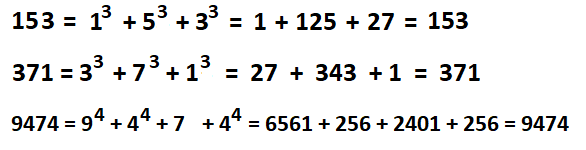
    Armstrong Number in Java

    C Program to Check for Armstrong Number

    This program checks Armstrong number for 3 digit numbers only, not more than 3 digits.

    #include<stdio.h>
    
    int main()
    {
       int num, temp, sum = 0, rem;
    
       //user input for number
       printf("Enter the number: ");
       scanf("%d",&num);
    
       /*storing it to another
       so that the original value could be used later*/
       temp = num;
    
       //cubes of every digit 
       while (num != 0)
       {
          rem = num % 10;
          sum = sum + (rem*rem*rem);
          num = num / 10;
       }
    
       //comaparing with original value
       if(temp == sum)
          printf("%d is an Armstrong Number", temp);
       else
          printf("%d is not an Armstrong Number", temp);
       return(0);
    }

    Output:

    Enter the number: 371
    371 is an Armstrong Number


    C Program Check Armstrong Number of n number of digits

    This number checks Armstrong Number for any number of digits. Armstrong Number finds the power of each digit to the number of digits present in that number such as:

    Number: 1634
    =1^4+6^4+3^4+4^4
    =1+1296+81+256
    =1634
    The original Number and sum of the number are the same. Therefore, it is an Armstrong Number.

    To make it simple, we have used one of the math functions, pow()provided by math.h library. The pow() takes two-digit, one the number whose power needs to be found and the other is the power itself.

    #include <math.h>
    #include <stdio.h>
    
    int main()
    {
      int num, temp, rem, n = 0, sum = 0;
    
      printf("Enter the Number: ");
      scanf("%d", &num);
    
      temp = num;
    
      //counting number of digits by increasing n
      for (temp = num; temp != 0; ++n)
      {
        temp /= 10;
      }
    
      temp = num;
      while (temp != 0)
      {
        rem = temp % 10;
    
        //adding and storing in sum variable
        sum += pow(rem, n);
        temp /= 10;
      }
    
      //comaparing with original value
      if (sum == num)
        printf("%d is an Armstrong number", num);
      else
        printf("%d is not an Armstrong number", num);
      return 0;
    }

    Output:

    Enter the number: 1634
    1634 is an Armstrong Number

    The programs first stored the number of digits present in the number by incrementing the n value so that it can be later used in calculating the power as shown in the program.

  • C Program to Generate Random numbers within a Range

    In this tutorial, you will learn to generate random numbers within a range in C programming. But before that, you may go through the topic below if you do not know about the rand() and srand() function used in random numbers generation.

    Here we will use srand() function provided in C to generate random numbers. The current time will be used to seed the srand() function.

    C Program to generate random numbers within the range

    Since the rand() will generate random numbers between 0 to max value, but instead of 0 we want to enter the lower range as well as the upper range so here is the trick we need to implement.

    (upRange - lrRange + 1)) then add the lower range at the end.

    #include <stdio.h>
    #include <stdlib.h>
    #include <time.h>
    
    int main()
    {
        int lrRange, upRange, n;
        
        //Number of random number you want
        printf("Enter how many random numbers you want: ");  
        scanf ("%d", &n);
        
        //initial number
        printf("Enter the lower range: ");  
        scanf ("%d", &lrRange);
        
        //the last number for random range
        printf("Enter the upper range: ");  
        scanf ("%d", &upRange);
    
        srand(time(0));
    
        printf("\n%d random numbers are: ", n);
        for (int i = 0; i < n; i++) 
        {
            int num = (rand() % (upRange - lrRange + 1)) + lrRange;
            printf("%d ", num);
        }
    
        return 0;
    }

    Output:

    Enter how many random numbers you want: 7
    Enter the lower range: 10
    Enter the upper range: 50

    7 random numbers are:
    22 29 24 33 18 41 11

    Again execute the program but this time entered for 10 random numbers, start from 1 and give upper range 7.

    Enter how many random numbers you want: 10
    Enter the lower range: 1
    Enter the upper range: 7

    7 random numbers are:
    1 3 7 7 5 2 1 5 1 2

    Notice that the program is repeating the number as you requested for 10 random numbers but the range is limited to 7 numbers. Hence the program repeats the number.


  • C Program to Generate Random Numbers

    In this C program section, we will learn how to generate random numbers in C programming. Let us start with random numbers.

    What is Randon Number?

    We can define Random as something that happens without any conscious decision. Similarly, a random number is a number that is chosen unpredictably or randomly from the set of numbers.

    During programming or creating a project, you may come through scenarios to generate numbers such as in dice games, lottery systems, etc. Although, there are in-built functions in C which makes it easy.

    • rand()
    • srand()

    rand() function

    rand() in c programming is a library function that generates random numbers within a range [0, RAND_MAX]. To use rand(), we need to provide a header file <stdlib.h>. The return type of rand() is a random integer type.

    Program: Generate the random numbers using the rand() function in C.

    #include <stdio.h>
    #include <stdlib.h>
    
    int main(void)
    {
        printf("Random number::  %d ", rand());
        printf("\nRandom number::  %d ", rand());
        printf("\nRandom number::  %d ", rand());
    
        return 0;
    }

    Output:

    Random number:: 1804289383
    Random number:: 846930886
    Random number:: 1681692777

    Program: Generate 4 random numbers using the rand() function in C.

    #include <stdio.h>  
    #include <stdlib.h>  
      
    int main()  
    {  
        int i;    
        
        printf("4 Random Numbers are: \n");   
        for (i=0; i<5; i++)  
        {  
            printf(" %d", rand());  
        }   
         return 0;  
    }  

    Output 1:

    4 Random Numbers are:
    1804289383 846930886 1681692777 1714636915 1957747793

    Output 2:

    4 Random Numbers are:
    1804289383 846930886 1681692777 1714636915 1957747793

    No matter how many times you execute this program, it will return the same sequence of random numbers on every execution of the programming.


    srand() function

    srand() is a library function that sets the starting value for producing a series of pseudo-random integers. A srand() function cannot be used without using a rand() function. The srand() function is used to set the seed of the rand function to a different starting point.

    It is used in the following manner in the programmer:

    int srand(unsigned int seed)

    Seed is an integer value for the new sequence in pseudo-random numbers.

    Program: Generate the random numbers using the srand() function in C.

    #include <stdio.h>  
    #include <stdlib.h>  
    #include <time.h> //for time
          
    int main()  
    {  
        int num, i;   
          
        printf("Enter how many numbers you want: ");  
        scanf ("%d", &num);  
          
    
        srand((unsigned) time (0)); // pass the srand() parameter  
      
        printf("%d Random Numbers are:\n", num);
        // print within 0 to 100  
        for (i = 0; i <num; i++)  
        {  
            printf( "%d ", rand() % 100);  
        }  
         return 0;  
    }  

    Output:

    Enter how many numbers you want: 5
    5 Random Numbers are:
    55 70 60 17 50

    Again after second execution:

    Enter how many numbers you want: 5
    5 Random Numbers are:
    36 70 91 3 2

    Now you can see that the program returns series of different random number after every execution.


  • Keith Number in Java

    In this java programming tutorial, you will learn about Keith Number and its implementation in java. It is frequently asked in Java coding.

    What is Keith Number?

    A positive n digit number x is called a Keith number or repfigit number (repetitive Fibonacci-like digit) if it is arranged in a special number sequence generated using its digits. This sequence has n terms as digit of x and the next term is determined by the sum of previous n terms and so on. And if the number x falls under this sequence then x is a Keith Number. Example: 19, 742, etc

    Explanation: Consider the number 742. Go through the following steps:

    First separate the digit, 7, 4, 2.

    To find the next term, add the digits, 7+4+2 = 13
    New Series: 7, 4, 2, 13.

    To find the next term, add the last three digits of the above sequence, 13+2+4=19
    New Series: 7, 4, 2, 13, 19.

    To find the next term, add the last three digits of the above sequence, 19+13+2=34
    New Series: 7, 4, 2, 13, 19, 34.

    To find the next term, add the last three digits of the above sequence, 34+19+13=66
    New Series: 7, 4, 2, 13, 19, 34, 66.

    To find the next term, add the last three digits of the above sequence, 66+34+19=119
    New Series: 7, 4, 2, 13, 19, 34, 66, 119.

    To find the next term, add the last three digits of the above sequence, 119+66+34=219
    New Series: 7, 4, 2, 13, 19, 34, 66, 119, 219.

    To find the next term, add the last three digits of the above sequence, 219+119+66=404
    New Series: 7, 4, 2, 13, 19, 34, 66, 119, 219, 404.

    To find the next term, add the last three digits of the above sequence, 404+219+119=742
    New Series: 7, 4, 2, 13, 19, 34, 66, 119, 219, 404, 742.

    Now we will stop as we got the number 742 as the term of the series. Hence 742 is a Keith Number.


    What are the Steps to Find Keith Number with programming

    1. Read a number (x).
    2. Separate each digit from the number (x).
    3. Add all the separated n-digits and that will give the next term of the series.
    4. Again, add the last n-terms of the series to find the next term.
    5. Repeat step 4 until the term which the same as the number(x).

    Java Program to check whether the Number is Keith Number or not

    import java.util.Scanner;
    
    public class KeithNumber
    {
      public static void main(String[] args)
      {
        int i, sum = 0, n, num;
        Scanner sc = new Scanner(System.in);
    
        System.out.print("Enter a number: ");
        num = sc.nextInt();
    
        n = num;
    
        //string to get the length
        String s = Integer.toString(num);
        int d = s.length();
        int arr[] = new int[num];
    
        //separating the digit and storing it in array
        for (i = d - 1; i >= 0; i--)
        {
          arr[i] = n % 10;
          n = n / 10;
    
        }
    
        i = d;
    
        /*once the sum value becomes equal or greater than
        that of the entered number, it stops */
        while (sum < num)
        {
          sum = 0;
          for (int j = 1; j <= d; j++)
          {
            sum = sum + arr[i - j];
          }
    
          arr[i] = sum;
          i++;
        }
    
        //compares the sum with the entered number 
        if (sum == num)
          System.out.println(num + " is a Keith Number.");
        else
          System.out.println(num + " is not a Keith Number.");
      }
    }

    Output:

    Enter a number: 742
    742 is a Keith Number.

    //Another output
    Enter a number: 456
    456 is not a Keith Number.


    Another way to do it, by creating a function that will pass Boolean value to the main function.

    import java.util.*;
    
    public class KeithNumber
    {
      //function that checks if the given number is Keith or not  
      static boolean isKeithNum(int num)
      {
        //array list to store the separated digit 
        ArrayList<Integer> terms = new ArrayList<Integer> ();
    
        int temp = num, n = 0;	//n = no. of digits  
    
        //condition to separate the digit 
        while (temp > 0)
        {
          terms.add(temp % 10);
          temp = temp / 10;
    
          n++;
        }
    
        //reverse the List  
        Collections.reverse(terms);
        int next = 0, i = n;
    
        //calculation of next terms
        while (next < num)
        {
          next = 0;
    
          //condition for adding the terms to get new term
          for (int j = 1; j <= n; j++)
            next = next + terms.get(i - j);
    
          terms.add(next);
          i++;
        }
    
        /*now the next is either equal or greater than entered number
        if equal then it is true else false*/
        return (next == num);
      }
    
      //main 
      public static void main(String[] args)
      {
        int number;
        Scanner sc = new Scanner(System.in);
    
        System.out.print("Enter a number: ");
        number = sc.nextInt();
    
        //passing the number as an argument to the function  
        if (isKeithNum(number))
          System.out.println(number + " is a Keith number.");
        else
          System.out.println(number + " is not a Keith number.");
    
      }
    }

    Output:

    Enter a number: 19
    19 is a Keith number.


  • Fascinating Number in Java

    In this java program tutorial, we will learn about Fascinating Number and its implementation through Java. We will check whether the number Fascinating Number or not and also another program to find the find Fascinating Number within a given range in java.

    What is Fascinating Number?

    A number is said to be a fascinating number if it is (having at least 3 digits) multiplied by 2 and 3, and then both these product’s results are concatenated with the original number, then the new number contains all the digits from 1 to 9 exactly once. There could be any number of zeros and are ignored.

    Example:
    Consider a Number = 192
    Then multiply it by two and 3
    192 × 2 = 384
    192 × 3 = 576
    Concatenating the above two numbers with the original number, we get:
    “192” + “384” + “576” = 192384576 = result.
    Now the final result contains all the digits from 1 to 9. Hence it is a Fascinating Number.


    Procedure for Fascinating Number

    1. First, check if the entered/given number has three digits or not. If not, print “cannot be a Fascinating Number”.
    2. Else, Multiply the given number with 2 and 3.
    3. Then convert the product result into a string and Concatenate those strings along with the original number.
    4. Iterate the string that we get after concatenation and also keep the frequency count of the digits.
    5. Print “Not a Fascinating Number” if any of the digits (1 to 9) is missing or repeated.
    6. Else, print “It is a Fascinating Number”.

    Java Program for Fascinating Number

    1. Write a Java program to check whether a number is fascinating or not.

    import java.util.*;
    
    public class FascinatingNumber
    {
      public static void main(String args[])
      {
        int num, product2, product3;
        Scanner sc = new Scanner(System.in);
    
        System.out.print("Enter 3 digit Number: ");
        num = sc.nextInt();
    
        //multiplying with 2 and 3
        product2 = num * 2;
        product3 = num * 3;
       
        //concatenating all three numbers 
        String concatstr = num + "" + product2 + product3;
        boolean isfound = true;
    
        //checking for all the digits 
        for (char c = '1'; c <= '9'; c++)
        {
          int count = 0;
    
          //counting the frequency
          for (int i = 0; i < concatstr.length(); i++)
          {
            char ch = concatstr.charAt(i);
           	//comparing 
            if (ch == c)
              count++;
          }
    
          //returns true if any of the condition returns true  
          if (count > 1 || count == 0)
          {
            isfound = false;
            break;
          }
        }
    
        if (isfound)
          System.out.println(num + " is a fascinating number.");
        else
          System.out.println(num + " is not a fascinating number.");
      }
    }

    Output:

    Enter 3 digit Number: 327
    327 is a fascinating number.

    //Another Output
    Enter 3 digit Number: 145
    145 is not a fascinating number.


    2. Java Program to find all the fascinating numbers between the given Range.

    import java.util.Scanner;
    
    public class FascinatingNumberForRange
    {
      //separate method to do the calculation
      public static boolean isFascinatingFunc(int number)
      {
        int digit = 0;
    
        //multiplying and concatinating the numbers
        String str = "" + number + number *2 + number * 3;
    
        // declare an array of size 10
        int arr[] = new int[10];
    
        // comparing array elements with the string Characters
        for (int i = 0; i < str.length(); i++)
        {
          digit = str.charAt(i) - '0';
    
          // ignoring the 0 character
          if (digit == 0 || arr[digit] == 0)
            arr[digit]++;
    
          else return false;
        }
    
        // check for the missing number, ignore 0
        for (int i = 1; i < arr.length; i++)
        {
          if (arr[i] == 0)
            return false;
        }
    
        return true;
      }
    
      public static void main(String[] args)
      {
        // declare variables
        int lrRange = 0, upRange = 0;
        Scanner scan = new Scanner(System.in);
    
        //user Input
        System.out.print("Enter the Lower range: ");
        lrRange = scan.nextInt();
        System.out.print("Enter the Upper range: ");
        upRange = scan.nextInt();
    
        System.out.println("The Fascinating number between " + lrRange + " to " + upRange + " are: ");
    
        // looping for the range
        for (int i = lrRange; i <= upRange; i++)
        {
         	// check number
          if (isFascinatingFunc(i))
            System.out.print(i + " ");
        }
      }
    }

    Output:

    Enter the Lower range: 1
    Enter the Upper Range: 1000
    The Fascinating number between 1 to 1000 are:
    192 219 273 327


  • C Program to Convert Number to Words

    In this tutorial, we will create a C program to Convert Numbers to Words.

    Consider a number 278 is taken as an input, now the program will convert this numeric value to words such as “Two Hundred Seventy Eight”. We have to create a program keeping the place values in minds such as ones, tens, hundreds, etc.

    Example:

    Input: 147
    Output: One Hundred Forty-Seven.


    C program to Print Number in Words

    The following program handles the integer between 0 to 9999.

    #include <stdio.h>
    #include <string.h>
    #include <stdlib.h>
    
    //Function
    void convertFunc(char *num)
    {
      int len = strlen(num);
    
      // checking cases for the length of the number
      if (len == 0)
      {
        fprintf(stderr, "empty string\n");
        return;
      }
    
      if (len > 4)
      {
        fprintf(stderr, "Length more than 4 is not supported\n");
        return;
      }
    
      //The first string is not used, it is to make array indexing simple
      char *single_digit[] = { "zero", "one", "two", "three", "four", "five", "six", "seven", "eight", "nine" };
    
      //The first two string are not used, they are to make array indexing simple
      char *tens_place[] = { "", "ten", "eleven", "twelve", "thirteen", "fourteen", "fifteen", "sixteen", "seventeen", "eighteen", "nineteen" };
    
      char *tens_multiple[] = { "", "", "twenty", "thirty", "forty", "fifty", "sixty", "seventy", "eighty", "ninety" };
      char *tens_power[] = { "hundred", "thousand" };
    
      // Used for debugging purpose only
      printf("\n%s: ", num);
    
      // used for single digit number
      if (len == 1)
      {
        printf("%s\n", single_digit[*num - '0']);
        return;
      }
    
      // Iteration
      while (*num != '\0')
      {
        //first 2 digits
        if (len >= 3)
        {
          if (*num - '0' != 0)
          {
            printf("%s ", single_digit[*num - '0']);
            printf("%s ", tens_power[len - 3]);
          }
    
          --len;
        }
    
        // last 2 digits
        else
        {
          // Need to explicitly handle 10-19. Sum of the two digits is
          //used as index of "tens_place" array of strings
          if (*num == '1')
          {
            int sum = *num - '0' + *(num + 1) - '0';
            printf("%s\n", tens_place[sum]);
            return;
          }
    
          //explicitely handle 20
          else if (*num == '2' && *(num + 1) == '0')
          {
            printf("twenty\n");
            return;
          }
    
          // Rest of the two digit numbers i.e., 21 to 99
          else
          {
            int i = *num - '0';
            printf("%s ", i ? tens_multiple[i] : "");
            ++num;
            if (*num != '0')
              printf("%s ", single_digit[*num - '0']);
          }
        }
    
        ++num;
      }
    }
    
    //main function
    int main()
    {
      //calling function with different inputs
      convertFunc("123");
      convertFunc("5648");
      convertFunc("336");
    
      return 0;
    }

    Output:

    123: one hundred twenty three
    5648: five thousand six hundred forty eight
    336: three hundred thirty six


  • Tech Number Program in Java

    In this tutorial, we will learn about Tech numbers and create a Java program to check for Tech numbers. We will see two java examples on Tech Numbers with Java Programming.

    What is Tech Number?

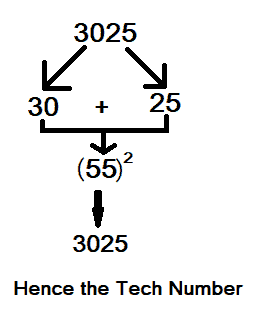
    A number is said to be Tech Number if the number is an even digit number and is equally divided into two halves. After that add the equally divided two halves and find the sum of that number. If we get the original number itself then it is a Tech Number.

    Example: 3025, 2025, etc.
    2025 => 20 + 25 => (55)2 => 3025, hence Tech Number.

    Tech Number

    Let us go through the program, we will write two different programs:

    1. Check for the Tech number in java.
    2. print all the tech numbers within a given range.

    Java program and check whether the Number is Tech or not

    import java.util.Scanner;
    
    public class TechNumber
    {
      public static void main(String[] args)
      {
        int n, num, leftNumber, rightNumber, digits = 0, sumSquare = 0;
        Scanner sc = new Scanner(System.in);
    
        System.out.print("Enter the number: ");
        n = sc.nextInt();
    
        num = n;
        while (num > 0)
        {
          digits++;
          num = num / 10;
        }
    
        //check for even or odd
        if (digits % 2 == 0)
        {
          num = n;
          leftNumber = num % (int) Math.pow(10, digits / 2);
          num = num / (int) Math.pow(10, digits / 2);
          rightNumber = num;
          sumSquare = (leftNumber + rightNumber) *(leftNumber + rightNumber);
    
          //cheks with original Number and print the result
          if (n == sumSquare)
          {
            System.out.println(n + " is a Tech Number");
          }
          else
          {
            System.out.println(n + " is not a Tech Number");
          }
        }
        else //by default Not Tech because the digits are odd
        {
          System.out.println(n + " Not Tech Number");
        }
      }
    }

    Output:

    Enter the number: 3025
    3025 is a Tech Number

    //Another Output
    Enter the number: 1045
    1045 is not a Tech Number


    Java Program to find all Tech Number in a given Range

    import java.util.Scanner;
    
    public class TechNumberEg
    {
      private static boolean isTechFunc(int number)
      {
        // declare variables
        int n = number, count = 0, firstHalf = 0;
        int lastHalf = 0, sum = 0;
    
        //counting number of digits
        while (n != 0)
        {
          n /= 10;
          count++;
        }
    
        // for the digit to be odd
        if (count % 2 != 0) return false;
    
        //dividing in two
        firstHalf = number / (int) Math.pow(10, count / 2);
        lastHalf = number % (int) Math.pow(10, count / 2);
    
        //sum of the two halves
        sum = firstHalf + lastHalf;
    
        // squaring the sum and check with original
        if (sum *sum == number)
          return true;
    
        return false;
      }
    
      public static void main(String[] args)
      {
        int n, num, lrRange, upRange, digits = 0, sumSquare = 0;
        Scanner sc = new Scanner(System.in);
    
        System.out.print("Enter the lower range: ");
        lrRange = sc.nextInt();
        System.out.print("Enter the uppper range: ");
        upRange = sc.nextInt();
    
        System.out.println("The Tech Numbers between " + lrRange + " and " + upRange + " are: ");
    
        for (int i = lrRange; i <= upRange; i++)
        {
          if (isTechFunc(i))
            System.out.print(i + " ");
        }
      }
    }

    Output:

    Enter the lower range:: 1
    Enter the uppper range:: 10000
    The Tech Numbers between 1 and 10000 are:
    81 2025 3025 9801


  • Sunny Number in JAVA

    In this tutorial, we will learn about Sunny numbers and create a Java program to check for sunny numbers. We will see two java examples on Sunny Number.

    What is Sunny Number?

    A number N is said to be a sunny number if the number next to the given number (N+1) is a perfect square.

    Example: Let us take a Number 8, then the next number is 8+1=9 and as 3 is a square root of 9, hence 8 is a sunny Number.

    Another example, let the number be 5, then 5+1=6, that has no square roots, hence 5 is not a sunny Number.


    Java Program to Check Whether the Number is Sunny Number or Not.

    The program uses Math.sqrt() function that is an inbuilt function in Java.

    import java.util.Scanner;
    
    public class SunnyNumber
    {
      // Method to check for Sunny
      public static boolean isSunnyFunc(int n)
      {
        if (Math.sqrt(n + 1) % 1 == 0)
          return true;
        else return false;
      }
    
      // main method
      public static void main(String[] args)
      {
        int num = 0;
        boolean result = false;
    
        Scanner scan = new Scanner(System.in);
    
        //taking input
        System.out.print("Enter the number: ");
        num = scan.nextInt();
    
        // calling calculation Function by passing number
        result = isSunnyFunc(num);
    
        //print the result
        if (result)
          System.out.println(num + " is a Sunny number");
        else
          System.out.println(num + " is not a Sunny number");
    
      }
    }

    Output:

    Enter the number: 80
    80 is a Sunny number

    //Another Execution
    Enter the number: 6
    6 is not a Sunny number


    Java Program to find all the Sunny Number between a given Range

    import java.util.Scanner;
    
    public class SunnyNumber
    {
      // Method to check for Sunny
      public static boolean isSunnyFunc(int n)
      {
        if (Math.sqrt(n + 1) % 1 == 0)
          return true;
        else return false;
      }
    
      // main method
      public static void main(String[] args)
      {
        int lrNum, upNum;
        boolean result = false;
    
        Scanner scan = new Scanner(System.in);
    
        // take input from end-user
        System.out.print("Enter the lower range: ");
        lrNum = scan.nextInt();
        System.out.print("Enter the upper range: ");
        upNum = scan.nextInt();
    
        System.out.println("The Sunny number between " + lrNum + " and " + upNum + " are: ");
    
        for (int i = lrNum; i <= upNum; i++)
        {
          if (isSunnyFunc(i))
            System.out.print(i + " ");
        }
      }
    }

    Output:

    Enter the lower range: 1
    Enter the upper range: 100
    The Sunny number between 1 and 100 are:
    3 8 15 24 35 48 63 80 99

    Hope this article on the java program for the sunny number was helpful.


  • Peterson Number in Java

    In this tutorial, we will learn about the Peterson number and check if the number is Peterson or not in java.

    What is Peterson Number?

    A number is said to be a Peterson number if the sum of factorials of each digit of the number is equal to the number itself.

    Example:

    Number = 145
    145 = !1 + !4 + !5
    = 1 + 4*3*2*1 + 5*4*3*2*1
    = 1+24+120
    = 145 =145

    Therefore, we can see that after the sum of the factorial of 145 is equal to the number 145 itself. Hence the Peterson Number.


    Java Program to check whether the number is Peterson Number or not

    import java.io.*;
    import java.util.*;
    
    public class GFG
    {
      // find factorial of digits
      static int[] fact = new int[]
      { 1, 1, 2, 6, 24, 120, 720, 5040, 40320, 362880 };
    
      //function
      static boolean peterson(int num)
      {
        int n = num;
        int sum = 0;
    
        while (num > 0)
        {
          int digit = num % 10;
          sum += fact[digit];
          num = num / 10;
        }
    
        return (sum == n);
      }
    
      // main Program
      static public void main(String[] args)
      {
        int num;
        Scanner sc = new Scanner(System.in);
    
        System.out.print("Enter a number: ");
        num = sc.nextInt();
    
        if (peterson(num))
          System.out.println(num + " is a Peterson number");
        else
          System.out.println(num + " is not a Peterson number");
      }
    }

    Output 1:

    Enter a number: 145
    145 is a Peterson number

    Output 2:

    Enter a number: 55
    55 is not a Peterson number


  • C Program to Find GCD of two Numbers

    This tutorial will teach you how to find the GCD (Greatest Common Divisor) or HCF of two numbers in C. To understand this example, you should have knowledge of the following C programming topics.

    The GCD(Greatest Common Divisor) of two integers is the largest integer that can exactly divide both numbers (without a remainder). Example: HCF of 12 and 18 is 6.


    1. C Program to Find GCD of two Numbers using while loop and if..else Statement

    #include <stdio.h>
    
    int main()
    {
      int num1, num2;
    
      printf("Enter 2 positive integers:\n");
      scanf("%d %d", &num1, &num2);
    
      while (num1 != num2)
      {
        if (num1 > num2)
          num1 -= num2;
        else
          num2 -= num1;
      }
    
      printf("GCD (Greatest Common Divisor): %d", num1);
    
      return 0;
    }

    Output:

    Enter 2 positive integers:
    12
    18
    GCD (Greatest Common Divisor): 6


    2. C Program to Find GCD of two Numbers using for loop and if Statement

    #include <stdio.h>
    int main()
    {
        int num1, num2, i, gcd;
    
        printf("Enter 2 integers:\n");
        scanf("%d %d", &num1, &num2);
    
        for(i = 1; i <= num1 && i <= num2; ++i)
        {
            // Checks if i is factor of both integers
            if(num1%i == 0 && num2%i == 0)
                gcd = i;
        }
    
        printf("GCD of %d and %d: %d", num1, num2, gcd);
    
        return 0;
    }

    Output:

    Enter 2 positive integers:
    12
    18
    GCD of 12 and 18: 6