Author: admin

  • C Program for deletion of an element from the specified location from Array

    In this tutorial, we will write a C program to delete elements from an array at a specified position. We will specifically learn two different programs:

    1. Delete an element by specifying the position.
    2. Delete an element by specifying the value.

    Example: By position.

    Input
    Input array elements: 11 22 30 42 50
    Specify the position to delete: 3

    Output
    Array elements: 11 22 42 50

    Example: By Value.

    Input
    Input array elements: 11 22 30 42 50
    Specify the value to delete: 22

    Output
    Array elements: 11 30 42 50

    Before that, you should have knowledge on the following C topics:


    C program to delete an element from an array at specified position

    Explanation: The position of an element to be removed is entered. Then using loop traverse to that position. Once you get to the specified position, shift all the elements from index + 1 by 1 position to the left.

    And if the position is not present that is the number of elements present in an array is 5 but the user entered the 6th position to delete, in that case, the program will display the message “Position Not Valid”.

    #include <stdio.h>
    
    int main()
    {
       int arr[50], pos, i, size;
    
       printf("Enter the size of an array: ");
       scanf("%d", &size);
    
       printf("Enter %d elements in an array:\n", size);
       for (i = 0; i < size; i++)
          scanf("%d", &arr[i]);
    
       printf("Array before deletion of element:\n");
       for (i = 0; i < size; i++)
          printf("%d  ", arr[i]);
    
       printf("\n\nEnter the location of the element to delete: ");
       scanf("%d", &pos);
    
       if (pos >= size + 1)
          printf("Entered Position Not Valid");
       else
          for (i = pos - 1; i < size - 1; i++)
             arr[i] = arr[i + 1]; //Location shifted
    
       printf("\nArray after deletion of element:\n");
       for (i = 0; i < size - 1; i++)
          printf("%d  ", arr[i]);
    
       return 0;
    }

    Output:

    Enter the size of an array: 5
    Enter 5 elements in an array:
    10
    20
    30
    40
    50
    Array before deletion of element:
    10  20  30  40  50  
    
    Enter the location of the element to delete: 2
    Array after deletion of element:
    
    10  30  40  50   

    C Program to delete Element in an Array by specifying the Value

    Explanation: Here instead of a position of an element, the value of the element is specified to delete. Similarly, the program traverse until the element is found and then shifts all the elements from index + 1 by 1 position to the left.

    And if the value is not that is the entered value does not match with any element present in an array, in that case, the program will display the message “Element Not Valid”.

    #include <stdio.h>
    
    int main()
    {
       int arr[50], element, i, size, pos;
       int element_found = 0;
    
       printf("Enter the size of an array: ");
       scanf("%d", &size);
    
       printf("Enter %d elements\n", size);
    
       for (i = 0; i < size; i++)
          scanf("%d", &arr[i]);
    
       printf("\nArray before Deletion:\n");
       for (i = 0; i < size; i++)
          printf("%d ", arr[i]);
    
       printf("\n\nEnter the element to be deleted: ");
       scanf("%d", &element);
    
       // check the element to be deleted is in array or not
       for (i = 0; i < size; i++)
       {
          if (arr[i] == element)
          {
             element_found = 1;
             pos = i;
             break;	// terminate the loop
          }
       }
    
       if (element_found == 1)  // for element exists
       {
          for (i = pos; i < size - 1; i++)
             arr[i] = arr[i + 1];
       }
       else	//for element does not exists
          printf("\nElement %d is not present in an Array. Try Again!", element);
    
       printf("\nArray after Deletion:\n");
       for (i = 0; i < size - 1; i++)
          printf("%d  ", arr[i]);
    
       return 0;
    }

    Output:

    Enter the size of an array: 5
    Enter 5 elements
    10
    20
    30
    40
    50
    
    Array before Deletion:
    10 20 30 40 50 
    
    Enter the element to be deleted: 30
    
    Array after Deletion:
    10 20 40 50
  • Program to Reverse the Array Elements in C

    In this tutorial, we will learn C Program to Reverse an Array element. Before continuing, you should have knowledge of the following topics in C programming.

    Revering an array element: The entered array of integers will be reversed and displayed. Example:

    Input:
    arr = {1, 2, 3, 4, 5, 6}

    Output:
    Reversed arr: {6, 5, 4, 3, 2, 1}

    Here, we will look at two different programs to Reverse an Array element in C.

    1. By standard method
    2. By creating a function and swapping.

    C Program to print the elements of an array in reverse order

    #include <stdio.h>
    
    int main()
    {
       //Initialize array     
       int arr[50], size, i;
    
       printf("Enter the size for an array: ");
          scanf("%d", &size);
    
       printf("Enter %d elements of an array:\n", size);
       for (i = 0; i < size; i++)
          scanf("%d", &arr[i]);
    
       printf("Original order of an Array:\n");
       for (i = 0; i < size; i++)
       {
          printf("%d ", arr[i]);
       }
    
       printf("\nReversed order of an array:\n");
       for (i = size - 1; i >= 0; i--)
       {
          printf("%d ", arr[i]);
       }
    
       return 0;
    }

    Output:

    Enter the size for an array: 5
    Enter 5 elements of an array:
    10
    20
    30
    40
    50
    Original order of an Array:
    10 20 30 40 50
    Reversed order of an array:
    50 40 30 20 10


    C Program to to Reverse the Array Elements using Function

    This program has a separate function(rev_Array()) to reverse the element in an array. The reversing of elements is done by swapping array elements.

    #include <stdio.h>
    
    void rev_Array(int arr[], int size)
    {
       int temp, i = 0;
    
       //swapping
       while (i < size)
       {
          temp = arr[i];
          arr[i] = arr[size];
          arr[size] = temp;
          i++;
          size--;
       }
    }
    
    int main()
    {
       //Variables     
       int arr[50], size, i;
    
       //user inputs
       printf("Enter the size for an array: ");
          scanf("%d", &size);
       printf("Enter %d elements of an array:\n", size);
       for (i = 0; i < size; i++)
          scanf("%d", &arr[i]);
    
       printf("Original order of an Array:\n");
       for (i = 0; i < size; i++)
          printf("%d ", arr[i]);
    
       //calling reverse function
       rev_Array(arr, size - 1);
    
       //printing the reversed order
       printf("\nReversed order of an Array:\n");
       for (i = 0; i < size; i++)
          printf("%d ", arr[i]);
    
       return 0;
    }

    Output:

    Enter the size for an array: 5
    Enter 5 elements of an array:
    20
    30
    40
    60
    80
    Original order of an Array:
    20 30 40 60 80
    Reversed order of an Array:
    80 60 40 30 20


  • C Program to find the Largest and Smallest element in Array

    In this tutorial, we will learn how to write a C Program to Find the Largest and Smallest Number in an Array. Before continuing, you should have knowledge of the following topics in C programming.


    Program to find Largest and Smallest Element in an Array in C

    The programs take user inputs for the size of an array and the values of the elements Then the variables to store the largest and smallest (large, small) element is initialized to the 0th position of an array.

    Then the program is run through the for loop and inside it, two if statements are present that are executed if the largest or the smallest element is encountered. The literation loops for the size of an array.

    Lastly, the small and large value is displayed along with their respective position (starts from 1).

    #include <stdio.h>
    
    int main()
    {
       int arr[50], size, i, large, small;
       int maxPos, minPos;
    
       printf("Enter the size for an array: ");
       scanf("%d", &size);
    
       printf("Enter %d elements of an array:\n", size);
       for (i = 0; i < size; i++)
          scanf("%d", &arr[i]);
    
       //initializing large and small element to 0th position
       large = small = arr[0];
    
       for (i = 1; i < size; i++)
       {
          //for large element
          if (large < arr[i])
          {
             large = arr[i];
             maxPos = i;
          }
    
          //for small element
          if (small > arr[i])
          {
             small = arr[i];
             minPos = i;
          }
       }
    
       //Display
       printf("The largest element is %d at %d position.", large, maxPos + 1);
       printf("\nThe smallest element is: %d at %d position.", small, minPos + 1);
    
       return 0;
    }

    Output:

    Enter the size for an array: 5
    Enter 5 elements of an array:
    66
    2
    77
    9
    15
    The largest element is 77 at 3 position.
    The smallest element is: 2 at 2 position.


  • Neon Number in Java

    In this tutorial, we will write two programs for the Neon number in Java.

    1. Program to check whether the nuber neon number or not in Java
    2. Display all the neon numbers within the specified range in java.

    Neon Numbers

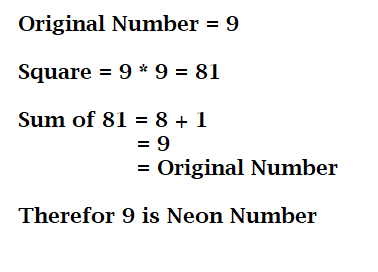
    A number is said to be a neon number if the sum of the digits of a square of the number is equal t the original number.
    Example: 9 is a Neon number (see explanation in the diagram).

    Procedure to Find Neon Number

    • Read an integer (n), user input.
    • Find the square of that number and store it in a variable.
    • After that, sum each of the digits of the squared number and again store it in some variable.
    • Lastly, compare the sum number with the original number (n). If both are equal then the given number is a neon number, else it is not a neon number.

    Java Program to Check given number is Neon number or not

    Based on the above procedure, let us apply it in a java program to check for neon numbers.

    import java.util.*;
    
    public class NeonNumberExample1
    {
       public static void main(String args[])
       {
          int sum = 0, num;
    
          Scanner sc = new Scanner(System.in);
    
          System.out.print("Enter the Number: ");
          num = sc.nextInt();
    
          //square of a number
          int square = num * num;
    
          while (square != 0)
          {
             int digit = square % 10;
             sum = sum + digit;
    
             square = square / 10;
          }
    
          //compare and display 
          if (num == sum)
             System.out.println(num + " is a Neon Number.");
          else
             System.out.println(num + " is not a Neon Number.");
       }
    }

    Output:

    Enter the Number: 9
    9 is a Neon Number.

    //Another Execution
    Enter the Number: 45
    45 is not a Neon Number.


    Java Program to find Neon numbers between a specified range

    The following java program finds all the neon numbers present in the specified range. The range will be specified by the user during runtime. Using loops the program will find all the Neon numbers within that range.

    import java.util.Scanner;
    
    public class NeonNumber 
    {
    
      public static boolean isNeon(int num) 
      {
         int sum = 0;
         int square = num * num;
    
         while(square != 0)
         {
            sum += square % 10;
            square /= 10;
         }
         return (sum == num);
      }
    
     
      public static void main(String[] args) 
      {
         int lrRange = 0, upRange = 0;
    
    
         Scanner scan = new Scanner(System.in);
    
         //user inputs for max and min value
         System.out.print("Enter lower range: ");
         lrRange = scan.nextInt();
         System.out.print("Enter the upper range: ");
         upRange = scan.nextInt();
    
         // check number 
         System.out.println("\nAll the Neon numbers between "+lrRange+" to "+ upRange+" are: ");
    
         for(int i=lrRange; i<=upRange; i++) 
         {
             //calling function by passing i
            if(isNeon(i))
                System.out.print(i+" ");
         }
         
         scan.close();
      }
    }

    Output:

    Enter lower range: 0
    Enter the upper range: 10000

    All the Neon numbers between 0 to 10000 are:
    0 1 9


  • C Program to find the sum of all elements in an Array

    In this section, we will write a C program to perform the addition of all elements in Array.

    Before we start, if you want to learn about the Arrays as this program uses an array, click the link below.

    Program:

    Take the user input for the elements of an array and then by iterating the loop, add each of the element present in an array at each iteration.

    Example:

    Input: arr[] = {1, 2, 3}
    loop: 1 + 2 + 3 = 6
    Output: 6

    We will write two different programs in C to sum the elements in an array.

    1. Standard method
    2. Using function (user-defined function)

    C Program to find the sum of all elements present in an Array

    This is a standard method where all of the calculation is done within the main function.

    #include <stdio.h>
    
    int main()
    {
       int arr[100], i, size, sum = 0;
    
       printf("Enter size of an array: ");
       scanf("%d", &size);
    
       printf("Enter %d elements in an array:\n", size);
       for (i = 0; i < size; i++)
       {
          scanf("%d", &arr[i]);
       }
    
       for (i = 0; i < size; i++)
       {
         	//adding each of the element
          sum += arr[i];
       }
    
       printf("Sum of the element of an array: %d", sum);
    
       return 0;
    }

    Output:

    Enter size of an array: 5
    Enter 5 elements in an array:
    5
    10
    6
    20
    3
    Sum of the element of an array: 44


    C Program to find the sum of all elements present in an Array using function

    A separate function (array_sum()) is created and the parameter array (arr), and the size of an array (size) is passed.

    The function calculates the sum of all elements and returns the total sum to the main function where it is displayed.

    #include <stdio.h>
    
    int array_sum(int arr[], int size)
    {
       int i, sum = 0;
    
       for (i = 0; i < size; i++)
       {
          sum += arr[i];
       }
    
       return sum;
    }
    
    int main()
    {
       int arr[100], i, size, result;
    
       printf("Enter size of an array: ");
       scanf("%d", &size);
    
       printf("Enter %d elements in an array:\n", size);
       for (i = 0; i < size; i++)
       {
          scanf("%d", &arr[i]);
       }
    
       result = array_sum(arr, size);
       printf("Sum of the element of an array: %d", result);
    
    }

    Output:

    Enter size of an array: 4
    Enter 5 elements in an array:
    5
    10
    3
    8
    Sum of the element of an array: 26


  • C Program to Search an Element in an Array

    In this tutorial, we will write a program to search an element in an array in C. There are various ways or algorithms to search an element in an array, we will use linear search.

    Before going further, you should have knowledge of the following topics in C programming.

    Explanation:

    We will create a program that will take an array element from the user. Then the user will enter an element that needed to be searched. Then the searching will be applied (shown in the program below).

    If the element is present in an array it will display found else display not found.


    C Program to Search an Element in an Array

    //C Program to Search an Element in an Array
    #include <stdio.h>
    
    int main()
    {
      int arr[30], arr_size, i, s_element, flag = 0;
    
      printf("Enter the size of an array: ");
      scanf("%d", &arr_size);
    
      printf("Enter %d elements in an array:\n", arr_size);
      for (i = 0; i < arr_size; i++)
      {
        scanf("%d", &arr[i]);
      }
    
      printf("\nEnter the element to be searched: ");
      scanf("%d", &s_element);
    
      for (i = 0; i < arr_size; i++)
      {
        if (arr[i] == s_element)
        {
          flag = 1;
          break;
        }
      }
    
      if (flag == 1)
      {
        printf("Element %d is found at the position %d.", s_element, i + 1);
      }
      else
      {
        printf("Element %d is not found.", s_element);
      }
    
      return 0;
    }

    Output:

    Enter the size of an array: 5
    Enter 5 elements in an array:
    12 55 89 2 67

    Enter the element to be searched: 89
    Element 89 is found at the position 3.


    C Program to search an element in an array using Pointers

    A separate function( search_function()) will be created where the array pointer will be declared and the searched element along with the size of an array will be passed. The function will return 1 if any element matches with the searched element otherwise it will return 0.

    #include <stdio.h>
    
    int search_function(int *a, int n, int s_element)
    {
      int i;
    
      for (i = 0; i < n; i++)
      {
        if (a[i] == s_element)
        {
          return 1;
        }
      }
    
      return 0;
    
    }
    
    int main()
    {
      int arr[30], i, size, s_element;
    
      printf("Enter the size of an array: ");
      scanf("%d", &size);
    
      printf("Enter %d elements of an array:\n", size);
      for (i = 0; i < size; i++)
      {
        scanf("%d", &arr[i]);
      }
    
      printf("\nEnter the element to be searched: ");
      scanf("%d", &s_element);
    
      if (search_function(arr, size, s_element))
        printf("Searched element %d is present.", s_element);
      else
        printf("Searched element %d is NOT present.", s_element);
    
    }

    Output:

    Enter the size of an array: 7
    Enter 7 elements of an array:
    5
    12
    55
    78
    1
    63
    29

    Enter the element to be searched: 78
    Searched element 78 is present.


  • C Program to Find the Size of int, float, double and char

    In this tutorial, we will write a program to display the size of every data type using sizeof operator in C. Before that, you may go through the following topics in c as it is used in the program.


    sizeof() operator in C

    The sizeof operator in C is commonly used to determine the size of an expression or data type. It returns the size of the memory allocated to that data type.

    C Program to find the size of data types

    #include<stdio.h>
    
    int main() 
    {
        int intVar;
        float floatVar;
        double doubleVar;
        char charVar;
    
        //size of each variables
        printf("Size of the Variables in bytes:\n");
        printf("int: %zu\n", sizeof(intVar));
        printf("float: %zu\n", sizeof(floatVar));
        printf("double: %zu\n", sizeof(doubleVar));
        printf("char: %zu\n", sizeof(charVar));
        
        return 0;
    }

    Output:

    Size of the Variables in bytes:
    int: 4
    float: 4
    double: 8
    char: 1


  • sizeof() operator in C

    The sizeof operator in C is commonly used to determine the size of an expression or data types. It is a compile-time unary operator that returns the size of the memory allocated to that data type.

    sizeof operator is not used with primitive data types but can also be used with the pointer data type, union, struct, etc.

    Note: Although, the output varies with the Machine that is 32-bit system and 64-bit system can show different values for same data types.


    Its use in program:

    The sizeof operator behaves differently depending on the operand type:

    1. When the operand is a Data Type
    2. When the operand is an expression

    1. When the operand is a Data Type

    When used with data types such as integer, float, etc. It simply returns the amount of memory allocated to that data type.

    Let us see an example in C to find the size of int, float, double and char variables.

    #include<stdio.h>
    
    int main() 
    {
        int intVar;
        float floatVar;
        double doubleVar;
        char charVar;
    
        //size of each variables
        printf("Size of the Variables in bytes:\n");
        printf("int: %zu\n", sizeof(intVar));
        printf("float: %zu\n", sizeof(floatVar));
        printf("double: %zu\n", sizeof(doubleVar));
        printf("char: %zu\n", sizeof(charVar));
        
        return 0;
    }

    Output:

    Size of the Variables in bytes:
    int: 4
    float: 4
    double: 8
    char: 1

    2. When the operand is an expression

    When used with expression in a program, it returns the size of an expression. Let us see an example in C to find the size of an expression.

    #include <stdio.h>
    int main()
    {
        int a = 0;
        double d = 10.21;
        
        printf("Size of an expression (a+d): %d\n",sizeof(a+d));
        
        int result = (int)(a+d);
        printf("Size of an explicitly converted expression: %d\n",sizeof(result));
        return 0;
    }

    Output:

    Size of an expression (a+d): 8
    Size of explicitly converted expression: 4

  • C Program to check whether a Date is Valid or not

    In this tutorial, we will write a C program to check date is valid or not. Given the date, month and year, the program finds whether it is valid or not. Although before jumping to the main program, you should have knowledge of the following topics in C programming.

    The valid Range for a date, month, and year is 1/1/1800 – 31/12/9999.

    Explanation- What does the following program check for:

    • For Date: The date cannot be less than 1 and more than 31.
    • For Month: Month cannot be less than 1 and more than 12
    • For year: The maximum and minimum year is taken before the main program that is less than 1800 and more than 9999.
    • Leap Year: Checks if the year is a leap year or not.
      • If it is a leap year, the February month will have 29 days.
      • If it is not a leap year, the February month will have 28 days.
    • For 30 days month: The months April, June, September, and November cannot have more than 30 days

    C Program Date is Valid or Not

    #include <stdio.h>
    
    //take constant value for min and max year
    #define max_yr 9999
    #define min_yr 1800
    
    /*function to check the leap year
    if yes returns 1 else 0*/
    int isleapYear(int y)
    {
      if ((y % 4 == 0) && (y % 100 != 0) && (y % 400 == 0))
        return 1;
      else
        return 0;
    }
    
    //separate function to valid date or not
    int isDateValid(int d, int m, int y)
    {
      if (y < min_yr || y > max_yr)
        return 0;
      if (m < 1 || m > 12)
        return 0;
      if (d < 1 || d > 31)
        return 0;
    
      /*for february month
      if leap year feb has 29 days else 28 days*/
      if (m == 2)
      {
        if (isleapYear(y))
        {
          if (d <= 29)
            return 1;
          else
            return 0;
        }
      }
    
      //for 30 days months (April, June, September and November)
      if (m == 4 || m == 6 || m == 9 || m == 11)
        if (d <= 30)
          return 1;
        else
          return 0;
      return 1;
    }
    
    //main function 
    int main(int argc, char
      const *argv[])
    {
      int d, m, y;
    
      printf("Enter date (DD/MM/YYYY format): ");
      scanf("%d/%d/%d", &d, &m, &y);
    
      if (isDateValid(d, m, y))
        printf("Date is valid.");
      else
        printf("Date is not valid.");
      return 0;
    }

    Output:

    Enter date (DD/MM/YYYY format): 13/06/1998
    Date is valid.


  • C Program to Check whether the entered character is capital, small letter, digit or special character

    In this tutorial, we will write a program to check whether the entered character is capital, small letter, digit or any special character using C programming.

    Here, we will write two different C program,

    1. user library function
    2. ASCII value of the character

    1. Using library function

    The following C program Check whether the entered character is capital, small letter, digit or special character by using the user library function provided by the ctype.h header file.

    Following are some of the library functions in C:

    • isupper(): It returns true if the character is in uppercase.
    • islower(): It returns true if the character is in lowercase.
    • isdigit(): It returns true if entered character is a digit.
    • isalpha(): This function checks whether the passed character is alphabetic.
    • isspace(): This function checks whether the passed character is white-space.
      etc.

    C Program:

    #include<stdio.h>
    #include<conio.h>
    #include<ctype.h>
    
    void main()
    {
        char ch;
        
        //user input for Character
        printf("Enter a Character: ");
        scanf("%c", &ch);
        
        //check for upper case
        if(isupper(ch))
            printf("%c is an Upper case character.", ch);
        
        //check for lower
        else if(islower(ch))
            printf("%c is a Lower case character", ch);
        
        //check fordigit
        else if(isdigit(ch))
            printf("%c is a Digit character.", ch);
        
        //else it is special character
        else
            printf("%c is a Special character.", ch);
            
        getch();
    }

    Output:

    //First Execution
    Enter a Character: A
    A is an Upper case character.

    //Second Execution
    Enter a Character: b
    b is a Lower case character.

    //Third Execution
    Enter a Character: 7
    7 is a Digit character.

    //Fourth Execution
    Enter a Character: @
    @ is a Special character.


    2. ASCII value of the character

    The following C Program To Check For Alphabet, Number, and Special Symbol using the ASCII value.

    The following table shows the range of ASCII values for various characters.

    CharactersASCII Values
    A – Z65 – 90
    a – z97 – 122
    0 – 948 – 57
    special symbols0 – 47, 58 – 64, 91 – 96, 123 – 127

    C Program:

    #include <stdio.h>
    
    int main()
    {
      char ch;
    
      printf("Enter a Character: ");
      scanf("%c", &ch);
    
      if (ch >= 65 && ch <= 90)
        ("%c is an Upper case Character.", ch);
    
      else if (ch >= 97 && ch <= 122)
        printf("%c is a lower case Character.", ch);
    
      else if (ch >= 48 && ch <= 57)
        printf("%c is a Digit Character.", ch);
    
      else if ((ch >= 0 && ch <= 47) ||
        (ch >= 58 && ch <= 64) ||
        (ch >= 91 && ch <= 96) ||
        (ch >= 123 && ch <= 127))
        printf("%c is a Special Character.", ch);
    
      return 0;
    }

    Output:

    //Run 1
    Enter a Character: 7
    7 is a Digit Character.

    //Run 2
    Enter a Character: A
    A is an Upper case Character.