Author: admin

  • C++ While Loop

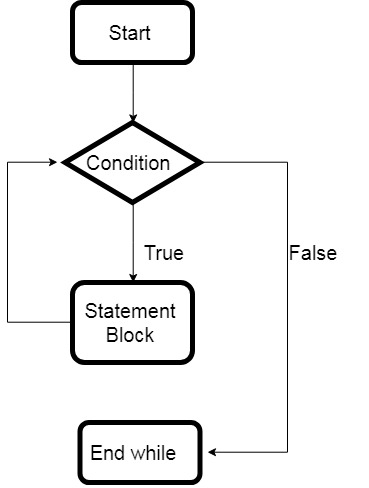
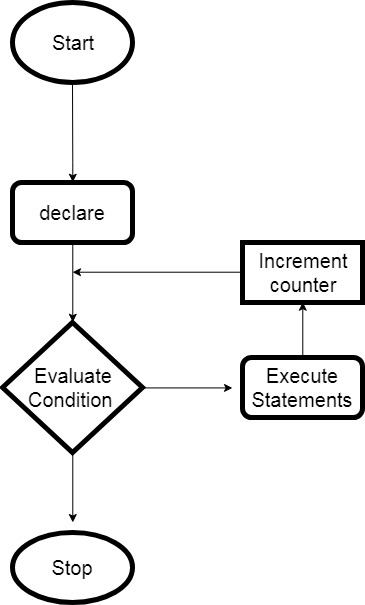
    A while loop is a straightforward loop and is also an entry-control loop. It evaluates the condition before executing the block of the loop. If the condition is found to be true, only then the body of the loop is executed. The loop continues until the condition stated found to be false.

    While loops are used when we do not know the exact number of times the iteration required beforehand. By default the while loop condition is true.

    while loop Flowchart:

    While Loop

    The syntax for while loop in C++:

     while(condition)
      {  
        //block of code to be executed  
      } 

    You should use a while loop, where the exact number of iterations is not known but the loop termination condition, is known.


    Example of C++ while loop

    #include <iostream>
    using namespace std;
    
    int main()
    {
       int i = 1;
    
       // while loop
       while (i <= 10)
       {
          cout << "value of i: " << i << endl;
          i++;
       }
    
       return 0;
    }

    Output:

    value of i: 1
    value of i: 2
    value of i: 3
    value of i: 4
    value of i: 5
    value of i: 6
    value of i: 7
    value of i: 8
    value of i: 9
    value of i: 10

  • C++ for Loop

    The for loop has a more efficient loop structure and is an entry-control loop. The loop allows the programmer to write the execution steps together in a single line and also the specific number of times the execution is to be iterated.

    for loop Flowchart:

    for loop

    It has three computing steps as shown in the syntax below.

    • initialization: The first step is the initialization of the variable and is executed only once. And need to end with a semicolon(;).
    • condition: Second is condition check, it checks for a boolean expression. If true then enter the block and if false exit the loop. And need to end with a semicolon(;).
    • Increment or Decrement: The third one is the increment or decrement of the variable for the next iteration. Here, we do not need to use the semicolon at the end.

    The syntax for for loop in C++:

     for(initialization; condition; Increment or Decrement) 
     {
      // Statements
     } 

    You should use for a loop when the number of iterations is known beforehand, i.e. when the number of times the loop body is needed to be executed is known.


    Example of C++ for loop

    #include <iostream>
    using namespace std;
     
    int main () 
    {
       // for loop execution
       for( int i = 1; i <= 10; i++ ) 
           cout << "value of i: " << i << endl;
       
     
       return 0;
    }

    Output:

    value of i: 1
    value of i: 2
    value of i: 3
    value of i: 4
    value of i: 5
    value of i: 6
    value of i: 7
    value of i: 8
    value of i: 9
    value of i: 10

  • C# Decision Making Statements

    During coding, you tackle most of the situations where your next move depends on your decisions. Now to make such a decision in programming, we use the decision-making statement provided by the programming language.

    Decision-Making statements are used when a user wants a certain block to be executed under certain conditions. The condition to be checked is determined by true or false value.

    C# programming language provides the following types of decision-making statements:

    • if statement 
    • if-else statement 
    • nested-if statement 
    • if-else-if ladder statement 
    • switch-case statement 

    The above decision making statements determines the direction of flow of the program execution.


    C# if statement

    An if statement consists of a Boolean expression followed by a block of codes. If the Boolean expression is true, the block of code inside the if statement will be executed else if statement will be skipped. This is the simplest one of all the decision-making statements.

    The syntax of the if statement in C#:

    if (condition) 
    {
       //block of statement
    }

    Note: If the curly brackets { } are not used with if statement or any other decision statements then the statement just next to it will only be executed and others will not be considered as a part of the decision statements.

    For example and flowchart of C# if statement, click here


    C# if…else statement

    This statement contains two-part and depends on the boolean value evaluated by the condition checked. If the condition is true then the code inside the if statement is executed or if it is false then the code inside else statement will be executed.

    The syntax of the if..else statement in C#:

     if (condition) 
     {
      //code executed if condition true 
     }
     else
     {
      //code executed if condition false 
     }

    For example and flowchart C# if…else statement, click here


    C# nested if statement

    In this type of statement the if block contains another if block within it. And the inner if statement is executed only if the outer if statement’s condition is true.

    The syntax of the nested if statement in C#:

    if(condition1)
    {    
       //block of code to be executed    
       if(condition2)
       {  
         //block of code to be executed    
       }    
    } 

    For example and flowchart C# nested if statement, click here


    C# if-else-if ladder statement

    This statement allows the user to have multiple options to check for different conditions. Here, if one of the if or else-if condition is true then that part of the code will be executed and the rest will be skipped. if none of the conditions are true then the final else statement present at the end will be executed.

    The syntax of the if-else-if ladder statement in C#:

     if(condition1)
     {  
       //code to be executed if condition1 is true  
     }
     else if(condition2)
     {  
       //code to be executed if condition2 is true  
     }  
     else if(condition3)
     {  
       //code to be executed if condition3 is true  
     }  
       ...  
     else
     {  
        //final else if all the above condition are false 
     }

    For example and flowchart C# if-else-if ladder statement, click here


    C# switch statement

    A switch statement allows a variable to be tested for equality against multiple values and each of those values is called a case. It can be used instead of nested if...else..if ladder.

    There must be at least one case or multiple cases with unique case values. In the end, it can have a default case which is optional that is executed if no cases are matched.

    Switch expression and case value must be of the same type. Each of these case is exited by break keyword which brings the execution out of the switch statement.

    The syntax of the switch statement statement in C#:

    switch (expression)
    {
        case value1:    
               //code to be executed;    
               break;  //optional  
        case value2:    
                //code to be executed;    
                break;  //optional  
        .
        .
        .
        .    
        case valueN:    
                //code to be executed;    
                break;  //optional 
            
        default:     
               code to be executed if all cases are not matched;    
    }

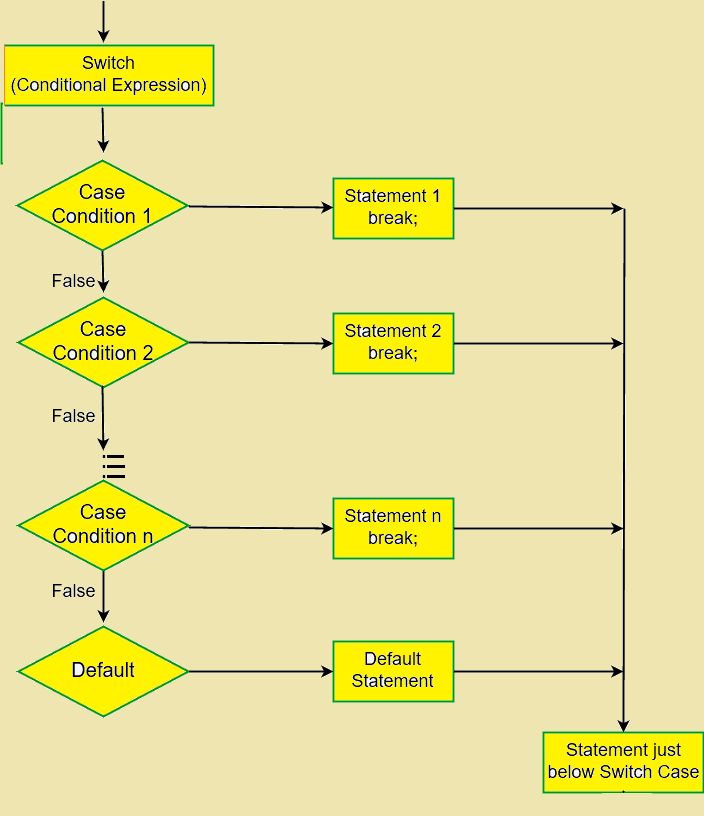
    The expression is evaluated once and compared with the values of each case label.

    • If the expression and case value are matched then the corresponding code present within that particular case will be executed and a break statement is used to come out of the switch statement by skipping all of the other cases.
    • If the values of expression and case do not match, the code within default: is executed.

    For example and flowchart C# switch statement statement, click here


    The ? : Operator

    ? : This operator is called a conditional operator or ternary operator. The execution of this operator depends on the result of the binary condition.

    Ternary Operator can also be used instead of if...else statement as it does follow the same algorithm and the only difference is ternary operator takes less space and it’s the short version of if...else statement.

    ? : Operator is also called Ternary Operator because it takes three operands to operate, as shown in the syntax below.

    Syntax of Ternary Operator:

    variable = Condition ? Expression1 : Expression1

    Here, the condition that is the binary condition is to be evaluated. And if the binary condition is true then Expression1 is executed and if it is false then Expression2 is executed. And both of them return the results.

    Click here to learn about ternary operator with an example.

  • C# switch statement

    A switch statement allows a variable to be tested for equality against multiple values and each of those values is called a case. It can be used instead of nested if...else..if ladder.

    There must be at least one case or multiple cases with unique case values. In the end, it can have a default case which is optional that is executed if no cases are matched.

    Switch expression and case value must be of the same type. Each of these case is exited by break keyword which brings the execution out of the switch statement.

    The syntax of the switch statement statement in C#:

    switch (expression)
    {
        case value1:    
               //code to be executed;    
               break;  //optional  
        case value2:    
                //code to be executed;    
                break;  //optional  
        .
        .
        .
        .    
        case valueN:    
                //code to be executed;    
                break;  //optional 
            
        default:     
               code to be executed if all cases are not matched;    
    }

    Switch statement Flowchart:

    switch statement

    Example of C# switch statement

    using System;
    
    namespace DecisionStatement
    {
       class SwitchStatement
       {
          static void Main(string[] args)
          {
             char grade_choice = 'D';
    
             switch (grade_choice)
             {
                case 'A':
                   Console.WriteLine("Excellent!");
                   break;
    
                case 'B':
                   Console.WriteLine("Very Good!");
                   break;
    
                case 'C':
                   Console.WriteLine("Well done");
                   break;
    
                case 'D':
                   Console.WriteLine("You passed");
                   break;
    
                case 'F':
                   Console.WriteLine("Failed! Better Luck Next time");
                   break;
    
                default:
                   Console.WriteLine("Invalid grade");
                   break;
             }
          }
       }
    }

    Output:

    You passed

  • C# if-else-if ladder statement

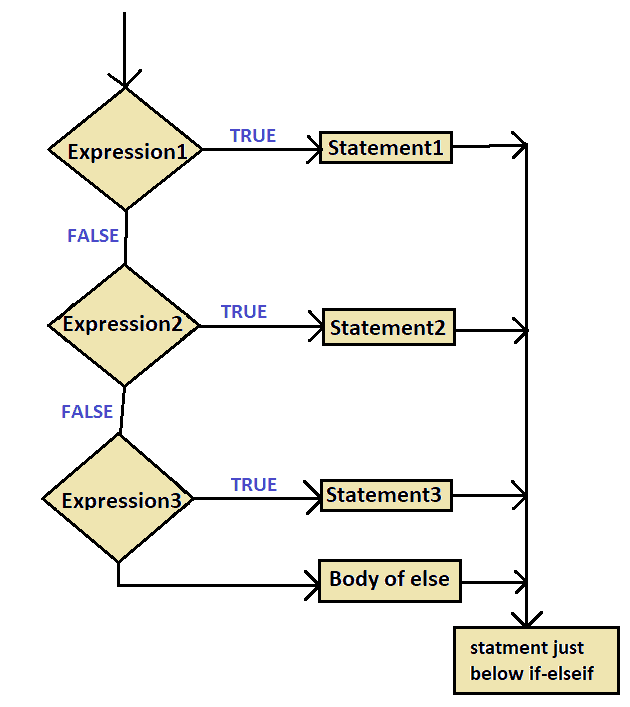
    This statement allows the user to have multiple options to check for different conditions. Here, if one of the if or else-if condition is true then that part of the code will be executed and the rest will be skipped. if none of the conditions are true then the final else statement present at the end will be executed.

    The syntax of the if-else-if ladder statement in C#:

     if(condition1)
     {  
       //code to be executed if condition1 is true  
     }
     else if(condition2)
     {  
       //code to be executed if condition2 is true  
     }  
     else if(condition3)
     {  
       //code to be executed if condition3 is true  
     }  
       ...  
     else
     {  
        //final else if all the above condition are false 
     }

    Flowchart diagram for if-else if statement:

    if elseif statement

    Example of C# if-elseif ladder statement

    using System;
    
    namespace DecisionStatement
    {
       class IfElseIfLadder
       {
          static void Main(string[] args)
          {
             int x = 50;
    
             if (x > 70)
                Console.WriteLine("True, x > 700");
             else if (x < 100)
                Console.WriteLine("True, x < 100");
             else if (x == 20)
                Console.WriteLine("True, x == 20");
             else
                Console.WriteLine("x is not present");
          }
       }
    }

    Output:

    True, x < 100

  • C# nested if statement

    In this type of statement the if block contains another if block within it. And the inner if statement is executed only if the outer if statement’s condition is true.

    The syntax of the nested if statement in C#:

    if(condition1)
    {    
       //block of code to be executed    
       if(condition2)
       {  
         //block of code to be executed    
       }    
    } 

    nested if statement Flowchart:

    nested if

    Example of nested if statement in C#

    using System;
    
    namespace DecisionStatement
    {
       class NestedIfStatement
       {
          static void Main(string[] args)
          {
             int a = 300;
             int b = 600;
    
             /*check the boolean condition */
             if (a > 100)
             {
                Console.WriteLine("This is outer if statement");
                if (b > 200)
                   Console.WriteLine("a is greater than 100 and b is  greater than 200");
             }
          }
       }
    }

    Output:

    This is outer if statement
    a is greater than 100 and b is  greater than 200

  • C# if…else statement

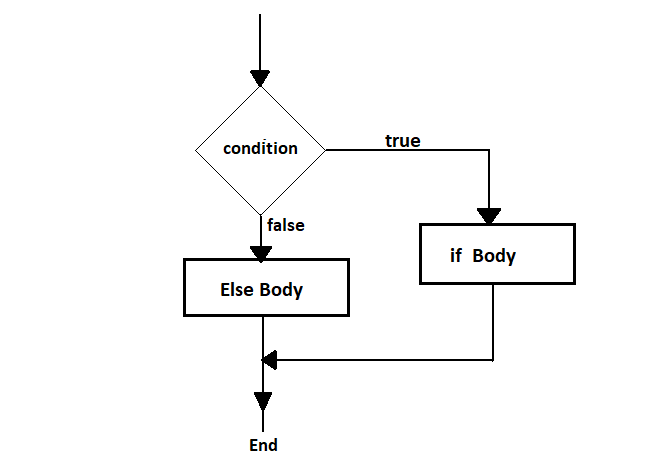
    This statement contains two-part and depends on the boolean value evaluated by the condition checked. If the condition is true then the code inside the if statement is executed or if it is false then the code inside else statement will be executed.

    The syntax of the if..else statement in C#:

     if (condition) 
     {
       //code executed if condition true 
     }
     else
     {
       //code executed if condition false 
     }

    if..else statement Flowchart:

    if…else

    Example of if…else statement in C#

    using System;
    
    namespace DecisionStatement
    {
       class IfElseStatement
       {
          static void Main(string[] args)
          {
             int x = 50;
    
             // check condition
             if (x < 30)
             {
                Console.WriteLine("True, x is less than 30");
             }
             else
             {
                Console.WriteLine("False, x is greater than 30");
             }
          }
       }
    }

    Output:

    False, x is greater than 30

  • C# if statement

    An if statement consists of a Boolean expression followed by a block of codes. If the Boolean expression is true, the block of code inside the if statement will be executed else if statement will be skipped. This is the simplest one of all the decision-making statements.

    The syntax of the if statement in C#:

    if (condition) 
    {
       //block of statement
    }

    Note: If the curly brackets { } are not used with the if statement then the statement just next to it will only be executed and others will not be considered as a part of the statement.


    if statement Flowchart:

    if statement

    Example of C# if statement:

    using System;
    
    namespace DecisionStatement
    {
       class IfStatement
       {
          static void Main(string[] args)
          {
             int x = 50;
    
             // check condition
             if (x < 100)
             {
                Console.WriteLine("True, x is less than 100");
             }
          }
       }
    }

    Output:

    True, x is less than 100

  • C++ Decision Making Statements

    During coding, you tackle most of the situations where your next move depends on your decisions. Now to make such a decision in programming, we use the decision-making statement provided by the programming language.

    Decision-Making statements are used when a user wants a certain block to be executed under certain conditions. The condition to be checked is determined by true or false value.

    C++ programming language provides the following types of decision-making statements:

    • if statement 
    • if-else statement 
    • nested-if statement 
    • if-else-if ladder statement 
    • switch-case statement 

    The above decision making statements determines the direction of flow of the program execution.


    C++ if statement

    An if statement consists of a Boolean expression followed by one or more statements. If the Boolean expression is true, the block of code inside the if statement will be executed else not. This is most simple of all the decision making statements.

    The syntax of the if statement in C++:

    if (condition) 
    {
       //block of statement
    }
    • If the condition is evaluated true, block of statement is executed.
    • If the condition is evaluated false, block of statement is skipped.

    For example and flowchart of C++ if statement, click here


    C++ if…else statement

    If the Boolean expression is true then the code inside the if statement block is executed or if it is false then the code inside else statement will be executed. Hence if..else statement.

    The syntax of the if..else statement in C++:

     if (condition) 
     {
      //code executed if condition true 
     }
     else
     {
      //code executed if condition false 
     }

    For example and flowchart C++ if…else statement, click here


    C++ nested if statement

    This statement allows the user to use if block inside the other if block. And the inner if statement is executed only if the outer if statement’s condition is true.

    The syntax of the nested if statement in C++:

    if(condition1)
    {    
       //block of code to be executed    
       if(condition2)
       {  
         //block of code to be executed    
       }    
    } 

    You can also nest the if..else statement in same manner as shown below.

    //Nested if....else statement
    
    if(condition1)
    {
        if(condition2)
        {
            //block of statement;
        }
        else 
        {
            //block of statement;
        }
    }
    else
    {
        //block of statement;
    }

    For example and flowchart C++ nested if statement, click here


    C++ if-else-if ladder statement

    This statement allows the user to have multiple options to check for different conditions. Here, if one of the if or else-if condition is true then that part of the code will be executed and the rest will be skipped. if none of the conditions are true then the final else statement present at the end will be executed.

    The syntax of the if-else-if ladder statement in C++:

     if(condition1)
     {  
       //code to be executed if condition1 is true  
     }
     else if(condition2){  
       //code to be executed if condition2 is true  
     }  
     else if(condition3){  
       //code to be executed if condition3 is true  
     }  
       ...  
     else{  
        //final else if all the above condition are false 
     }

    For example and flowchart C++ if-else-if ladder statement, click here


    C++ switch statement

    A switch statement allows a variable to be tested for equality against multiple values and each of those values is called a case. It can be used instead of nested if...else..if ladder.

    Switch expression and case value must be of the same type. There must be at least one case or multiple cases with unique case values. In the end, it can have a default case which is optional that is executed if no cases are matched.

    The syntax of the switch statement statement in C++:

    switch (expression)
    {
        case value1:    
               //code to be executed;    
               break;  //optional  
        case value2:    
                //code to be executed;    
                break;  //optional  
        .
        .
        .
        .    
        case valueN:    
                //code to be executed;    
                break;  //optional 
            
        default:     
               code to be executed if all cases are not matched;    
    }

    The expression is evaluated once and compared with the values of each case label.

    • If the expression and case value are matched then the corresponding code present within that particular case will be executed and a break statement is used to come out of the switch statement by skipping all of the other cases.
    • If the values of expression and case do not match, the code within default: is executed.

    For example and flowchart C++ switch statement statement, click here


    The ? : Operator

    ? : This operator is called a conditional operator or ternary operator. The execution of this operator depends on the result of the binary condition.

    Ternary Operator can also be used instead of if...else statement as it does follow the same algorithm and the only difference is ternary operator takes less space and it’s the short version of if...else statement.

    ? : Operator is also called Ternary Operator because it takes three operands to operate, as shown in the syntax below.

    Syntax of Ternary Operator:

    variable = Condition ? Expression1 : Expression1

    Here, the condition that is the binary condition is to be evaluated. And if the binary condition is true then Expression1 is executed and if it is false then Expression2 is executed. And both of them return the results.

    Click here to learn about ternary operator with an example.

  • C++ switch statement

    A switch statement allows a variable to be tested for equality against multiple values and each of those values is called a case. It can be used instead of nested if...else..if ladder.

    Switch expression and case value must be of the same type. There must be at least one case or multiple cases with unique case values. In the end, it can have a default case which is optional that is executed if no cases are matched.

    The syntax of the switch statement statement in C++:

    switch (expression)
    {
        case value1:    
               //code to be executed;    
               break;  //optional  
        case value2:    
                //code to be executed;    
                break;  //optional  
        .
        .
        .
        .    
        case valueN:    
                //code to be executed;    
                break;  //optional 
            
        default:     
               code to be executed if all cases are not matched;    
    }

    The expression is evaluated once and compared with the values of each case label.

    • If the expression and case value are matched then the corresponding code present within that particular case will be executed and a break statement is used to come out of the switch statement by skipping all of the other cases.
    • If the values of expression and case do not match, the code within default: is executed.

    Switch statement Flowchart:

    switch statement

    Example of C++ switch statement

    // C++ Program tocreate calculator
    
    #include <iostream>
    using namespace std;
    
    int main()
    {
       char choice;
       float num1, num2;
    
       cout << "Enter two numbers: " << endl;
       cin >> num1 >> num2;
    
       cout << "Enter one of the operator(+, -, *, /): ";
       cin >> choice;
    
       switch (choice)
       {
          case '+':
             cout << num1 << " + " << num2 << " = " << num1 + num2;
             break;
          case '-':
             cout << num1 << " - " << num2 << " = " << num1 - num2;
             break;
          case '*':
             cout << num1 << " *" << num2 << " = " << num1 * num2;
             break;
          case '/':
             cout << num1 << " / " << num2 << " = " << num1 / num2;
             break;
          default:
            	//when entered operator does not match with any cases
             cout << "Entered operator is not correct";
             break;
       }
    
       return 0;
    }

    Output:

    Enter two numbers: 
    2 3
    Enter one of the operator(+, -, *, /): +
    2 + 3 = 5

    C++ nested switch Statement

    The use of switch statement inside another switch statement is called nested switch statement.

    Syntax of nested switch statement in C++:

    switch(ch1) 
    {
       case 'A': 
          printf("This A is part of outer switch" );
          
          //use of another switch statement
          switch(ch2) {
             case 'A':
                printf("This A is part of inner switch" );
                break;
             case 'B': /* case code */
          }
          break;
    
       case 'B': /* case code */
    }

    Example of C++ nested switch statement

    #include <iostream>
    using namespace std;
    
    int main()
    {
       int a = 50;
       int b = 100;
    
       switch (a)
       {
          case 50:
             cout << "This is a outer switch" << endl;
    
            	//another switch
             switch (b)
             {
                case 100:
                   cout << "This is a inner switch" << endl;
             }
       }
    
       return 0;
    }

    Output:

    This is a outer switch
    This is a inner switch