If you want to change the execution from the normal sequence or if you want the program to exit loops, for these purposes you need to use loop control statements.
Loop control statements are also known as Jump statements. It allows you to jump from the loops or if you wish to repeat the loops after some condition is satisfied, jump statements helps you to achieve that.
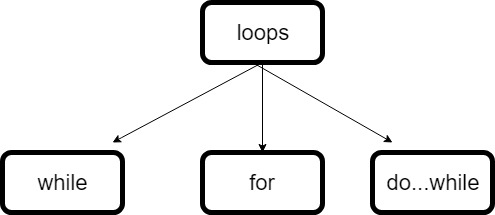
C++ supports the following control statements.
break statement
continue statement
goto
break statement in C++
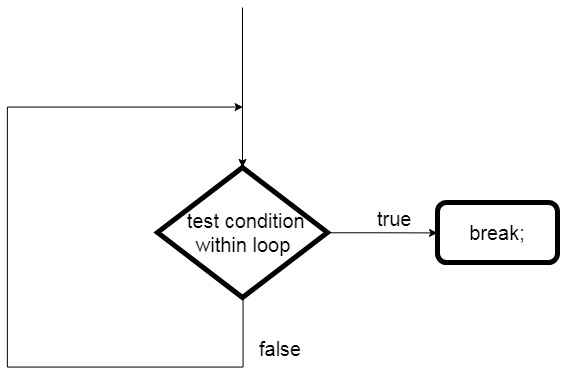
break statement terminates the loop and transfers the execution process immediately to a statement following the loop.
break statement is mostly used in a switch statement to terminate the cases present in a switch statement.
The use of break statements in nested loops terminates the inner loop and the control is transferred to the outer loop.
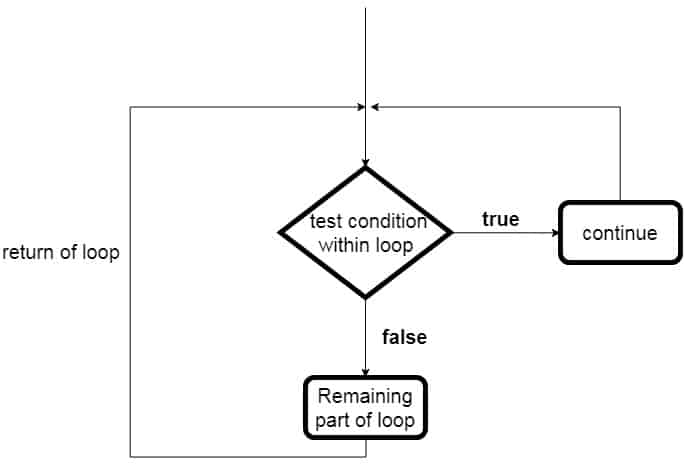
The continue statement works like a break statement, instead of terminating the loop the continue statement skips the code in between and passes the execution to the next iteration in the loop.
In case of for loop, the continue statement causes the program to jump and pass the execution to the condition and update expression by skipping further statement. Whereas in the case of while and do…while loops, the continue statement passes the control to the conditional checking expression.
continue statement Flowchart:
continue statement
Syntax of continue statement in C++:
continue;
Click here for example of continuestatement in C++.
goto statement in C++
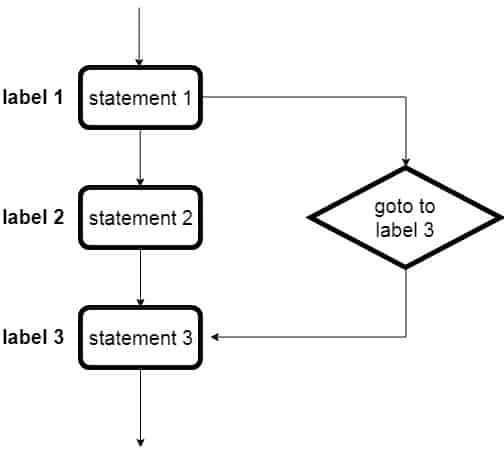
The goto statement is a jump statement that allows the user in the program to jump the execution control to the other part of the program. It jumps to the position where the labeled statement present in the program. The label (tag) is used to spot the jump statement.
NOTE: Remember the use of goto is avoided in programming language because it makes it difficult to trace the control flow of a program, making the program hard to understand and hard to modify.
The goto statement is a jump statement that allows the user in the program to jump the execution control to the other part of the program. It jumps to the position where the labeled statement present in the program. The label (tag) is used to spot the jump statement.
NOTE: Remember the use of goto is avoided in programming language because it makes it difficult to trace the control flow of a program, making the program hard to understand and hard to modify.
The simple example of goto statement in C++ programming.
#include <iostream>
using namespace std;

int main()
{
   //this is the label
   ineligible_label:

   int age;
   cout << "Enter your age: ";
   cin >> age;

   if (age < 18)
   {
      cout << "You are below 18 and not eligible to vote.\n";
      goto ineligible_label;
   }
   else
   {
      cout << "You are above 18 and eligible to vote.";
   }
}
Output:
Enter your age: 16
You are below 18 and not eligible to vote.
Enter your age: 21
You are above 18 and eligible to vote.
Avoid the use of goto: However, the use of goto is considered a harmful construct and a bad programming practice in a C++ programming. It makes the program complex and tangled, instead you can achieve the task of goto by using thebreak and continue statement.
The continue statement works like a break statement, instead of terminating the loop the continue statement skips the code in between and passes the execution to the next iteration in the loop.
In case of for loop, the continue statement causes the program to jump and pass the execution to the condition and update expression by skipping further statement. Whereas in the case of while and do…while loops, the continue statement passes the control to the conditional checking expression.
continue statement Flowchart:
continue statement
Syntax of continue statement in C++:
continue;
Example of C++ continue statement
Example: Use of continue in for loop in C++ programming.
//C++ program for continue statement

#include <iostream>
using namespace std;

int main()
{
    for (int i = 1; i <= 10; i++)
    {
        //continue condition
        if (i == 6)
        {
            //Number 6 is skipped
            continue;
        }

        cout << "Value of i: " << i << endl;
    }

    return 0;
}
Output:
Value of i: 1
Value of i: 2
Value of i: 3
Value of i: 4
Value of i: 5
Value of i: 7
Value of i: 8
Value of i: 9
Value of i: 10
As you can see in the above output the 6th iteration is skipped. When the value of i becomes 6, if statement is executed and hence the continue statement. Then the control is passed to the update expression of the for loop and i becomes 7.
Example: Use of continue in do-while loop loop in C++ programming
#include <iostream>
using namespace std;

int main()
{
   int a = 1;

   // do-while loop
   do {
      if (a == 5)
      {
         //a incremented and iteration skipped.
         a += 1;
         continue;
      }

      cout << "value of a: " << a << endl;
      a += 1;
   }

   while (a <= 10);	//condition check

   return 0;
}
Output:
value of a: 1
value of a: 2
value of a: 3
value of a: 4
value of a: 6
value of a: 7
value of a: 8
value of a: 9
value of a: 10
break statement terminates the loop and transfers the execution process immediately to a statement following the loop.
break statement is mostly used in a switch statement to terminate the cases present in a switch statement.
The use of break statements in nested loops terminates the inner loop and the control is transferred to the outer loop.
break statement Flowchart:
break statement
Syntax of break statement in C++:
break;
Example on C++ break Statement
Example: C++ program to demonstrate the use of break statement in single loop.
#include <iostream>
using namespace std;

int main()
{
   for (int i = 1; i <= 10; i++)
   {
      if (i == 7)
      {
         //when i becomes 7 then it will come out of for loop
         break;
      }

      cout << "i is: " << i << endl;
   }
}
Output:
i is: 1
i is: 2
i is: 3
i is: 4
i is: 5
i is: 6
Example: C++ program for break statement used in nested loop.
//using break statement inside nested loop

#include <iostream>
using namespace std;

int main()
{
   // outer loop
   for (int i = 1; i <= 5; i++)
   {
     	//inner loop
      for (int j = 1; j <= 2; j++)
      {
         if (i == 4)
         {
            //if i becomes 4, it will come out of inner loop
            break;
         }

         cout << "i = " << i << ", j = " << j << endl;
      }
   }

   return 0;
}
Output:
i = 1, j = 1
i = 1, j = 2
i = 2, j = 1
i = 2, j = 2
i = 3, j = 1
i = 3, j = 2
i = 5, j = 1
i = 5, j = 2
In the above program, for the value i = 4 is skipped because when we reached i value as four, break statement is applied the execution came out of the inner loop, skipping the inner loop for 4.
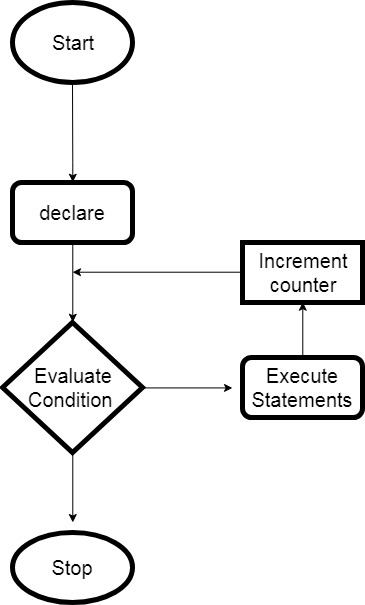
A situation may arise during coding where you need to repeat the block of code for some number of times then the loops present in C# will come into play.
Loops allow us to execute a block of code or statement or group of statements as many times according to the user’s need. The condition is checked every time the loop is repeated. It is done by evaluating a given condition for true and false.
If true, the loop statement are repeated, if false then the loop is skipped.
Loops in Programming
Two Types of Loops in C Programming.
1. Entry controlled loop:
In entry control loops, the conditional is checked first and then the block of code is executed. It is also called a pre-checking loop.
A while loop is an entry-control loop that evaluates the condition before executing the block of the loop. If the condition is true then the body of the loop is executed else the loop will be skipped. The loop continues until the condition stated found to be false.
The syntax for while loop in C#:
while(condition)
{
   //block of code to be executed
}
You should use a while loop, where the exact number of iterations is not known but the loop termination condition, is known.
For example and flowchart of while loop, click here
C#do…while loop
As we know from the above loop that if the condition is found false then the loop will not be executed but what if we want the loop to execute once (like the menu drive program) even if the condition is found to be false. So in this kind of situation do-while loop comes into play.
It is the same as the while loop where the loop is terminated on the basis of the test condition. The main difference is that the do-while loop checks the condition at the end of the loop which allows the do-while to execute the loop at least once.
The syntax for do-while loop in C#:
do{
    //statements..
 }while (condition);
You should use do while loop if the code needs to be executed at least once.
For example and flowchart of do-while loop, click here
C#for Loop
The for loop is an entry-control loop as the condition is initially checked. It has the most efficient structure than the other two loops. The loop allows the programmer to write the execution steps together in a single line and also the specific number of times the execution is to be iterated.
It has three computing steps as shown in the syntax below.
initialization: The first step is the initialization of the variable and is executed only once. And need to end with a semicolon(;).
condition: Second is condition check, it checks for a boolean expression. If true then enter the block and if false exit the loop. And need to end with a semicolon(;).
Increment or Decrement: The third one is the increment or decrement of the variable for the next iteration. Here, we do not need to use the semicolon at the end.
You should use for a loop when the number of iterations is known beforehand, i.e. when the number of times the loop body is needed to be executed is known.
The syntax for a nested do-while loop statement in C#:
do {
   //outer statement
   do {
      //inner statement
   }
   while(condition1);
}
while(condition2);
You can use loops inside another for any number of times as required. You can also use any type of loop inside any other type of loops. For example, you can use while loop inside for loop or vice versa.
Example of C# nested loop
We will see an example of use of nested for loop in C# to print a star pattern.
using System;

namespace Loops
{
   class NestedLoopProgram
   {
      public static void Main(string[] args)
      {
         for (int i = 1; i <= 5; i++)
         {
            for (int j = 1; j <= i; j++)
            {
               Console.Write("* ");
            }

            Console.WriteLine();
         }
      }
   }
}
Output:
*
* *
* * *
* * * *
* * * * *
The Infinite Loop
As the name suggests, the infinite loop is a forever executing loop. The infinite loop repeats indefinitely and the condition never becomes false. It is also known as an indefinite loop or an endless loop.
We can use one of the Loops in C# to turn it into infinite loop.
infinite ‘for’ loop
for(; ;)
{
  //body of the loop
}
Example: of infinite for loop in C#
using System;

namespace Loops
{
   class InfiniteLoop
   {
      static void Main(string[] args)
      {
         for (; ; )
         {
            Console.WriteLine("Executed Forever.");
         }
      }
   }
}
The above program will run forever. The compiler assumes the condition to be true if the condition is absent in the loop.
The for loop is an entry-control loop as the condition is initially checked. It has the most efficient structure than the other two loops. The loop allows the programmer to write the execution steps together in a single line and also the specific number of times the execution is to be iterated.
for loop Flowchart:
for loop
It has three computing steps as shown in the syntax below.
initialization: The first step is the initialization of the variable and is executed only once. And need to end with a semicolon(;).
condition: Second is condition check, it checks for a boolean expression. If true then enter the block and if false exit the loop. And need to end with a semicolon(;).
Increment or Decrement: The third one is the increment or decrement of the variable for the next iteration. Here, we do not need to use the semicolon at the end.
You should use for a loop when the number of iterations is known beforehand, i.e. when the number of times the loop body is needed to be executed is known.
Example of C# for Loop
using System;

namespace Loops
{
   class ForProgram
   {
      static void Main(string[] args)
      {
         //f or loop execution
         for (int i = 1; i <= 10; i++)
         {
            Console.WriteLine("Value of i: {0}", i);
         }
      }
   }
}
Output:
Value of i: 1
Value of i: 2
Value of i: 3
Value of i: 4
Value of i: 5
Value of i: 6
Value of i: 7
Value of i: 8
Value of i: 9
Value of i: 10
As we know from the above loop that if the condition is found false then the loop will not be executed but what if we want the loop to execute once (like the menu drive program) even if the condition is found to be false. So in this kind of situation do-while loop comes into play.
It is the same as the while loop where the loop is terminated on the basis of the test condition. The main difference is that the do-while loop checks the condition at the end of the loop which allows the do-while to execute the loop at least once.
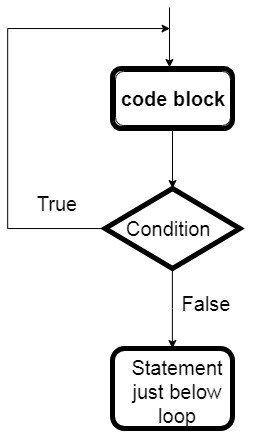
do-while Flowchart:
do-while loop
The syntax for do-while loop in C#:
do{
    //statements..
 }while (condition);
You should use do while loop if the code needs to be executed at least once.
Example of C# do-while loop
using System;

namespace Loops
{
   class DoWhileProgram
   {
      static void Main(string[] args)
      {
         int i = 1;

         //do loop execution
         do {
            Console.WriteLine("value of i: {0}", i);
            i += 1;
         }

         while (i <= 10);
      }
   }
}
Output:
value of i: 1
value of i: 2
value of i: 3
value of i: 4
value of i: 5
value of i: 6
value of i: 7
value of i: 8
value of i: 9
value of i: 10
A while loop is an entry-control loop that evaluates the condition before executing the block of the loop. If the condition is true then the body of the loop is executed else the loop will be skipped. The loop continues until the condition stated found to be false.
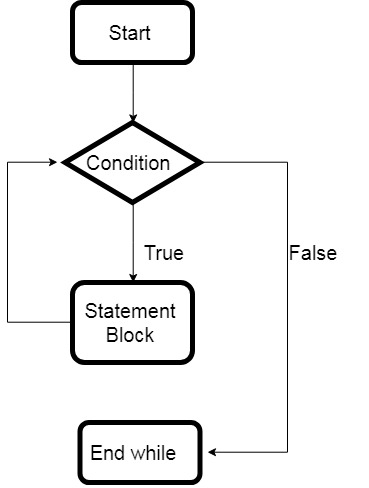
while loop Flowchart:
While Loop
The syntax for while loop in C#:
while(condition)
{
   //block of code to be executed
}
You should use a while loop, where the exact number of iterations is not known but the loop termination condition, is known.
Example of C# While Loop
using System;

namespace Loops
{
   class WhileProgram
   {
      static void Main(string[] args)
      {
         int i = 1;

         //while loop execution
         while (i <= 10)
         {
            Console.WriteLine("value of i: {0}", i);
            i++;
         }
      }
   }
}
Output:
value of i: 1
value of i: 2
value of i: 3
value of i: 4
value of i: 5
value of i: 6
value of i: 7
value of i: 8
value of i: 9
value of i: 10
A situation may arise during coding where you need to repeat the block of code for some number of times then the loops present in C++ will come in play.
Loops allow us to execute a block of code or statement or group of statements as many times according to the user’s need. The condition is checked every time the loop is repeated. It is done by evaluating a given condition for true and false.
If true, the loop statement are repeated, if false then the loop is skipped.
Loops in Programming
Two Types of Loops in C Programming.
1. Entry controlled loop:
In entry control loops, the conditional is checked first and then the block of code is executed. It is also called a pre-checking loop.
A while loop is a straightforward loop and is also an entry-control loop. It evaluates the condition before executing the block of the loop. If the condition is found to be true, only then the body of the loop is executed. The loop continues until the condition stated found to be false.
While loops are used when we do not know the exact number of times the iteration required beforehand. By default the while loop condition is true.
The syntax for while loop in C++:
 while(condition)
  {
    //block of code to be executed
  }
You should use a while loop, where the exact number of iterations is not known but the loop termination condition, is known.
For example and flowchart of while loop, click here
do…while loop in C++
Sometimes it is necessary that the block or statement must be executed at least once but if the condition is initially at a false state then the block will not be executed. So for the situation where a block of code must be executed at least once a do-while loop comes into play.
It is the same as the while loop where the loop is terminated on the basis of the test condition. The main difference is that the do-while loop checks the condition at the end of the loop which allows the do-while to execute the loop at least once.
The syntax for do-while loop in C++:
do
 {
    //statements..
 }while (condition);
You should use do while loop if the code needs to be executed at least once.
For example and flowchart of do-while loop, click here
for Loop in C++
The for loop has a more efficient loop structure and is an entry-control loop. The loop allows the programmer to write the execution steps together in a single line and also the specific number of times the execution is to be iterated.
It has three computing steps as shown in the syntax below.
initialization: The first step is the initialization of the variable and is executed only once. And need to end with a semicolon(;).
condition: Second is condition check, it checks for a boolean expression. If true then enter the block and if false exit the loop. And need to end with a semicolon(;).
Increment or Decrement: The third one is the increment or decrement of the variable for the next iteration. Here, we do not need to use the semicolon at the end.
The syntax for for loop in C++:
 for(initialization; condition; Increment or Decrement)
 {
  // Statements
 }
You should use for a loop when the number of iterations is known beforehand, i.e. when the number of times the loop body is needed to be executed is known.
C# break Statement: break statement in programming is used to come out of the loop or switch statements. It is a jump statement that breaks the control flow of the program and transfers the execution control after the loop. Click here to learn in detail
C# continue Statement: It is a loop control statement. It is used to continue the loop in the program. The use of continue inside a loop skips the remaining code and transfer the current flow of the execution to the beginning o the loop. Click here to learn in detail
C# goto Statement: The goto statement is a jump statement that allows the user in the program to jump the execution control to the other part of the program. Click here to learn in detail.
The Infinite Loop
As the name suggests, the infinite loop is a forever executing loop. The infinite loop repeats indefinitely and the condition never becomes false. It is also known as an indefinite loop or an endless loop.
We can use one of the Loops in C++ to turn it into infinite loop.
infinite ‘for’ loop
for(; ;)
{
  //body of the loop
}
infinite while loop
while(1)
{
   //body of the loop
}
infinite do-while loop
do
{
  //body of the loop
}while(1);
Example: of infinite for loop in C++
#include <iostream>
using namespace std;

int main ()
{
   int i;

    //infinite for loop

    for ( ; ; )
    {
      cout << "This loop will run forever.\n";
    }


    /*//infinite while loop

    while (true)
    {

      cout << "This loop will run forever.\n";
    }
*/


   return 0;
}
The compiler assume the condition to be true if the condition is absent in the loop.
Sometimes it is necessary that the block or statement must be executed at least once but if the condition is initially at a false state then the block will not be executed. So for the situation where a block of code must be executed at least once a do-while loop comes into play.
It is the same as the while loop where the loop is terminated on the basis of the test condition. The main difference is that the do-while loop checks the condition at the end of the loop which allows the do-while to execute the loop at least once.
do-while Flowchart:
do-while loop
The syntax for do-while loop in C++:
do
 {
    //statements..
 }while (condition);
You should use do while loop if the code needs to be executed at least once.
Example of C++ do-while loop
#include <iostream>
using namespace std;

int main ()
{
   int i = 1;

   // do loop
   do {
      cout << "value of i: " << i << endl;
      i += 1;
   } while( i <= 10 ); //condition check

   return 0;
}
Output:
value of i: 1
value of i: 2
value of i: 3
value of i: 4
value of i: 5
value of i: 6
value of i: 7
value of i: 8
value of i: 9
value of i: 10