Author: admin

  • C++ Storage Classes

    What is Storage Class in C?

    Storage class is used to define the scope and lifetime of a variable. It tells the compiler where to allocate memory for a variable.

    Every variable in C++ has a type and the storage class. The type defines its data types such as int, float, etc. While storage defines two features such as scope and lifetime of a variable.

    A lifetime of a variable refers to the period of its activeness and visibility refers to the accessibility of a variable in a program.

    C++ program uses the following storage class:

    • Automatic
    • Register
    • Static
    • External
    • Mutable

    Automatic(auto) Storage class:

    A variable defined within a function or block with an auto specifier belongs to the automatic storage class. Auto variables can only be accessed within the block/function where they have been declared and not outside them which defines their scope.

    These are also referred to as local variables. By default, the variable declared in a program is auto storage variables and if they are not assigned then they hold a garbage value.

    auto keyword is used to defined an auto storage class in a program.
    Example:

    auto int number;
    //Example
    
    {
       auto int num;  
       float num = 3.45;  
    }

    The above defines a auto variable that are only accessible within those curly braces.

    C++ Program for auto storage class

    #include <iostream>
    using namespace std;
    
    //user-defined funciton
    void autoStorage()
    {
       // auto variables
       auto x = 20;
       auto y = 50;
    
       //displaying
       cout << "x: " << x << " \n";
       cout << "y: " << y << " \n";
    }
    
    int main()
    {
       //calling a function
       autoStorage();
    
       return 0;
    }

    Output:

    x: 20 
    y: 50 

    Now if you try to access the x or y variables through the main function, you will get an error indicating the scope of x and y is within the autoStorage() function only.


    Register Storage class:

    Register storage class is only for those variables that are being used very often in a program. The reason is, there are very few CPU registers at our disposal and many of them might be busy processing or something else. A typical application of the register storage class is loop counters, which get used a number of times in a program.

    Just like auto storage, it has the scope to a limited block where it is used. The difference is that the variables declared with a register keyword are stored in the register memory instead of RAM memory for quick access.

    It also means that the variable size is equal to the register size, usually one word.

    Note: We cannot get the memory location when dealing with the CPU register. If you use pointers to access the memory location, the program will through an error.

    Registers are declared as:

    register int variable_name;

    Static Storage Class:

    The keyword static is used to declare this type of variables in a c++ program. The name static is given to variables that can hold their values between calls of a function. They are allocated only once and their values are preserved between any number of function calls.

    Space is allocated for static variables in the program code itself and hence no new memory is allocated to it as they are not re-declared in the program.

    Their scope is local to the function where they are defined. Also, a global static variable can be accessed anywhere throughout the program.

    The static variable has the default value 0 which is provided by compiler.

    NOTE: Every global variable, defined outside functions has the type static automatically. The opposite of static is auto.

    C++ program of static storage class

    #include <iostream>
    using namespace std;
    
    //global variable
    static int count = 5;
    
    // Function
    void staticFunc(void)
    {
       // local static variable
       static int temp = 1;
       temp++;
       cout << "temp is: " << temp << ",  count is: " << count << endl;
    }
    
    
    int main()
    {
       while (count--)
       {
          staticFunc();
       }
    
       return 0;
    }

    Output:

    temp is: 2,  count is: 4
    temp is: 3,  count is: 3
    temp is: 4,  count is: 2
    temp is: 5,  count is: 1
    temp is: 6,  count is: 0

    External(extern) Storage Class:

    Extern stands for external storage class. The principal use of extern is to specify that a variable is declared with external linkage elsewhere in the program. In general, it is used to declare a variable to be used in a module that is not the one in which the corresponding variable is defined.

    extern keyword is used to define the global variable whose scope is within the whole program, which means these variables are accessible throughout the program.

    The main purpose of using extern is that they can be accessed between two different files which are located apart in a large program providing the reference of the variable. Check the program below to understand clearly.

    extern int variable_name;

    C++ program for extern storage class

    We will create two C++ file and access the variable/function of one file to another with static keyword.

    First file: main.cpp

    #include <iostream>
    
    int temp;
    
    //accessed using extern
    extern void extern_example();
     
    main() 
    {
       temp = 10;
       write_extern();
    }

    Second file: test.cpp

    #include <iostream>
    using namespace std;
    
    //this count variable is declared in main.cpp
    //here it accessed by using extern
    extern int temp;
    
    //some user-defined function
    void extern_example(void) 
    {
       cout << "Count is " << temp << endl;
    }

    Output:

    10

    As you can see, the variable of main.cpp file is accessed in test.cpp file using extern keyword and extern_example() function of test.cpp file is accessed in main.cpp file.


    mutable Storage Class

    mutable keyword is used for some specific task such as to modify one or more data members of class/struct through const function. This specifier is applied to only class objects.

    If we summarize all of the in a table, we will get,

    Storage ClassLifetimeVisibilityDefault Value
    Automatic (auto)Function BlockLocalGarbage
    Register (register)Function BlockLocalGarbage
    External (extern)different program
    files
    GlobalZero
    Static (static)Whole ProgramLocalZero
    Mutable (mutable)ClassLocalGarbage

  • C# Out Parameter

    This method is Passing Parameters by Output. Unlike other methods that return only a single value from the method, the Out Parameter can return multiple values from a function.

    They are similar to reference type, except the data are transferred out rather than into it. C# provide out keyword for the out parameter type.


    Example: C# Out Parameter

    using System;
    
    namespace Programs
    {
       class Swapping
       {
          // function (user-defined)
          public void valueFunc(out int val)
          {
             int temp = 20;
             val = temp;
          }
    
          //main method
          static void Main(string[] args)
          {
             Swapping swapObj = new Swapping();
    
             int a = 10;
    
             Console.WriteLine("Before calling a method, a: {0}", a);
    
             //calling funciton with out keyword
             swapObj.valueFunc(out a);
    
             Console.WriteLine("After method called, a: {0}", a);
    
          }
       }
    }

    Output:

    Before calling a method, a: 10
    After method called, a: 20

  • C# Call by Reference

    Here reference refers t the addresses but not the actual value. In this method, we pass the reference of the argument to the formal parameter. To pass the parameters in C#, we have a keyword called ref.

    It passes a reference to a memory location rather the actual value, so the changes made to this passed parameters are reflected o the main program that is their value can be modified permanently.


    Example: C# call by reference

    using System;
    
    namespace Programs
    {
       class Swapping
       {
          //swapping function (user-defined)
          public void swapFunc(ref int x, ref int y)
          {
             int temp;
    
             temp = x;
             x = y;
             y = temp;
          }
    
          //main method
          static void Main(string[] args)
          {
             Swapping swapObj = new Swapping();
    
             int a = 10, b = 20;
    
             Console.WriteLine("Before swapping, a: {0}", a);
             Console.WriteLine("Before swapping, b: {0}", b);
    
             //calling swap funciton with ref keyword
             swapObj.swapFunc(ref a, ref b);
    
             Console.WriteLine("\nAfter swapping, a: {0}", a);
             Console.WriteLine("After swapping, b: {0}", b);
    
          }
       }
    }

    Output:

    Before swapping, a: 10
    Before swapping, b: 20
    
    After swapping, a: 20
    After swapping, b: 10

    Unlike call by value (from the previous tutorial), the swapped value of a and b can be seen in the output above.


  • C# Call By Value

    This is passing parameters by Value. These value-type parameters in C# copy the actual parameters to the function (known as formal parameters) rather than referencing it.

    Whenever a method is called by passing value, a new storage location is created for each value parameter. The copies of these values are stored, hence the changes made in the formal parameter have no effect on the actual argument.


    Example: C# call by value

    using System;
    
    namespace Programs
    {
       class Swapping
       {
         	//swapping function (user-defined)
          public void swapFunc(int x, int y)
          {
             int temp;
    
             temp = x;
             x = y;
             y = temp;
          }
    
         	//main method
          static void Main(string[] args)
          {
             Swapping swapObj = new Swapping();
    
             int a = 10, b = 20;
    
             Console.WriteLine("Before swapping, a: {0}", a);
             Console.WriteLine("Before swapping, b: {0}", b);
    
            	//calling swap funciton by passing a and b
             swapObj.swapFunc(a, b);
    
             Console.WriteLine("\nAfter swapping, a: {0}", a);
             Console.WriteLine("After swapping, b: {0}", b);
    
          }
       }
    }

    Output:

    Before swapping, a: 10
    Before swapping, b: 20
    
    After swapping, a: 10
    After swapping, b: 20

    As you can see the value of a and b is not changed, even though the two value are swapped inside a function.


  • C# Methods

    A method refers to a block of code (or a group of statements) that performs a specific task. It takes some inputs, does some computation based on that input and returns the output. They are also known as functions.

    The use of function in a program helps in many ways such as reuse of code, Optimization of Code. The function is declared within the curly braces {}.

    Every C# program has at least one function which is always executed and that is the main function from where the execution of the program begins.

    In order to use a method in a program, you need to:

    • define a method
    • call a method

    Defining Methods in C#

    Defining a method means to write its structure with all of its components. Generally, the function is defined in following way in C#:

    <Access Specifier> <Return Type> <Method Name>(Parameter List) 
    {
       //Method Body
    }

    Followings are the list of component present in a method.

    • Access Specifier: It defines its visibility to the other class, which means it specifies the variables and methods accessibility in the program.
    • Return type: A function may return a value unless it is a void function, which does not return any type of value. return_type is a data type of the function. It could return arithmetic values (int, float, etc.), pointers, structures, etc.
    • Function name: Function name refers to identifiers through which function can be identified uniquely. It is a function’s name that is stated to function by following some naming rules.
    • Parameter list: Parameter is also referred to as Argument. We can pass the values through the parameter when the function is invoked. The parameter list refers to the type, order, and number of the parameters of a function
    • Function Body: The function body is enclosed within the curly braces’{}’. It defines the task of a method within the curly braces.

    Remember that you can also leave the parameter list empty if you are not passing any value to the function.


    Calling Methods in C#

    To call a method means to execute the method and to do that we need to write a function name by passing the values as parameters (if any) within the two parentheses () and semicolon.

    Following is the syntax t call a function.

    function_name( parameter_list );

    Example: C# example of method

    let us see an example in C# where we create an addition function and pass the value to add and return the result to the main function. We will see the use of defining and calling a method in C#.

    using System;  
    
    namespace MethodExam  
    {  
        class Program  
        {  
            //defining a method  
            public int addFunc(int x, int y) 
            {  
                return x+y;
            }  
            
            //main Function 
            static void Main(string[] args)  
            {  
                int result;
                
                // Creating Object 
                Program program = new Program();  
                
                // Calling Function 
                result = program.addFunc(5, 10);  
                Console.WriteLine("The result of addition: {0}", result);
            }  
        }  
    }
    //Output:
    
    The result of addition: 15

    Example:

    Let us see the use of Access Specifier in the C# program. The program below will have two classes and the method of one class can be accessed by another class by using the instance of the class. We need to use the public Access Specifier.

    using System;
    
    namespace MethodExample
    {
       //class1
       class Class1
       {
          // User defined function without return type  
          public int largestFunc(int num1, int num2) 
          {
             if (num1 > num2)
                return num1;
             else
                return num2;
          }
       }
    
       //class2
       class Class2
       {
          static void Main(string[] args)
          {
             int largest;
    
             // Creating Object 
             Class1 class1 = new Class1();
    
             // Calling Function 
             largest = class1.largestFunc(100, 80);
             Console.WriteLine("The largest of two number is: {0}", largest);
          }
       }
    }

    Output:

    The largest of two number is: 100

    How to pass Parameter in Methods?

    We need to pass the values to a method in order to calculate just like an example shown above, we can do that in three different ways in C#.

    • call by value
    • call by reference
    • out parameter

    We will got through each of them in next tutorial.


  • Call by Value and Call by Reference in C++

    There are two ways in which the argument can be passed through a function in C++ Programming.

    1. Call by Value
    2. Call by Reference

    Let’s go through call by value and call by reference in C++ language one by one.


    C++ call by value

    The method of call by value copies the actual argument to the formal parameter of the function. In this case, the changes made to the formal parameters within the function will not be affect the actual argument that is original value is not modified.

    By default, C++ programming uses call by value to pass arguments.

    Let us understand the call by value with an example in C++

    Example: Swap the values of two variables in C++ Programming:

    #include <iostream>
    using namespace std;
    
    // function declaration and definition together
    void swapFunc(int x, int y)
    {
       int temp;
    
       temp = x;
       x = y;
       y = temp;
    
       return;
    }
    
    //main function
    int main()
    {
       int a = 10;
       int b = 20;
    
       cout << "Before swap, a: " << a << endl;
       cout << "Before swap, b: " << b << endl;
    
       //calling function by passing a and b
       swapFunc(a, b);
    
       cout << "\nAfter swap, a: " << a << endl;
       cout << "After swap, b: " << b << endl;
    
       return 0;
    }

    Output:

    Before swap, a: 10
    Before swap, b: 20
    
    After swap, a: 10
    After swap, b: 20

    C++ Call by Reference

    Here reference refers t the addresses but not the actual value. In this method, we pass the reference of the argument to the formal parameter.

    Since the actual and formal parameters share the same address, the changes made inside the function will be reflected outside the function too. Hence, the original value is modified.

    we know that the reference that is the is dealt through the pointers in a program. to understand the call by reference type, you need to have basic knowledge of pointers.

    Let us understand the call by reference with an example in C++

    Example: Swap the values of two variables in C++ Programming:

    #include <iostream>
    using namespace std;
    
    //user-defined function
    void swap(int *x, int *y)
    {
       int swap;
    
       swap = *x;
       *x = *y;
       *y = swap;
    }
    
    //main function
    int main()
    {
       int a = 100, b = 200;
    
       cout << "Before swap, a: " << a << endl;
       cout << "Before swap, b: " << b << endl;
    
       //calling a value by passing reference  
       swap(&a, &b);
    
       cout << "\nAfter swap, a: " << a << endl;
       cout << "After swap, b: " << b << endl;
       return 0;
    }

    Output:

    Before swap, a: 100
    Before swap, b: 200
    
    After swap, a: 200
    After swap, b: 100

  • C++ Functions

    A function refers to a block of code (or a group of statements) that performs a specific task. A function takes some inputs, does some computation based on that input and returns the output. The function can be called many times by passing different values each time.

    For example, let us say that you need to compute a complex multiplication for different values on a different part of a program. One thing you can do is repeat the block of code for computation again and again, which is not a good practice as a programmer and makes the program complex and time-consuming. Better you can create a function and call that function every time you need by passing the different values.

    Every C++ program has at least one function which is always executed and that is the main function from where the execution of the program begins. The function is declared within the curly braces {}.


    Advantages of functions in C++

    There are many advantages of using function in C++.

    Reusability of code: As mention above in the example, we can reuse the function by calling it again and again as required in the program.

    Optimization of Code: Use of functions makes the program short and simple to understand. You only need to write the logic of the calculation once and use it several times.


    C++ function is defined into two categories:

    1. Standard Library Functions
    2. User-defined functions


    1. C++ Standard Library Functions

    These are the pre-defined function in a C++ program, like a main function. These built-in functions are already defined and written in C++, to use them you just need to invoke or call them directly.

    Some common library functions in C++ are sqrt()abs()isdigit(), etc.

    To use these library functions an appropriate header file needs to be included in the program. Example: to use math functions such as sqrt(), you need to include cmath header file.

    Example of C++ Standard Library Functions:

    #include <iostream>
    #include <cmath>  //math header file to use maths library function
    using namespace std;
    
    int main()
    {
       double number, square_result;
    
       cout << "Enter the number: ";
       cin >> number;
    
       //here sqrt() is a library function that calculates the square root
       square_result = sqrt(number);
    
       cout << "The square root of " << number << " is: " << square_result;
       return 0;
    }
    //Output:
    
    Enter the number: 625
    The square root of 625 is: 25

    2. C++ User-defined functions

    These are the functions created by the programmer in order to use it as many times as required. The user or programmer writes a block of code inside a body of a function to do some specific task.

    These functions can also be called or invoke from any part of the program and code inside the body of that function will be executed.

    We will see the examples of both Library Functions and User-defined functions below in this article.

    Example of C++ User-defined Functions:

    #include <iostream>
    using namespace std;
    
    //user-defined function
    int sum(int a, int b = 5)
    {
       int result;
       result = a + b;
    
       return result;
    }
    
    //Main function
    int main()
    {
       int a = 10, b = 20, result;
    
       // calling a function by passing a and b
       result = sum(a, b);
       cout << "Sum result: " << result << endl;
    
       // calling a function again by passing only a
       //In this case b will be added through the function defined above
       result = sum(a);
       cout << "Sum result: " << result << endl;
    
       return 0;
    }
    //Output:
    
    Sum result: 30
    Sum result: 15

    Function Declaration or Prototype:

    Declaring a function means telling the compiler about the function name and its return type and parameters (if any). it is like stating the prototype of the function.

    In C++, the function declaration declares a function without a body. It is important to declare the function when you are using one of the source file function to another file. We declare the function at the top of the program.

    The syntax for function declaration:

    return_type function_name( parameter list );

    Example:

    int max(int, int);
    
    //function that takes a ponter and integer
    int *swap(int*,int);

    Note: Also note that, if you defined the function before the main function then the separate function declaration is not required in a program else you need to mention the declaration. Example: In the syntax below, a declaration is not required

    #include <iostream>
    using namespace std;
    
    //user-defined function
    int sum(int a, int b = 5)
    {
    
       ...........
       ...........
    
     
       return result;
    }
    
    //Main function
    int main()
    {
       .............
       .............
    
       // calling a function
       result = sum(a, b);
       ............
       .............
    
       return 0;
    }

    Function Definition

    Generally, the function is defined in following way in C++:

    return_type function_name( parameter_list ) {
       body of the function;
    }

    Each part of a function:

    • Return type: A function may return a value unless it is a void function, which does not return any type of value. return_type is a data type of the function. It could return arithmetic values (int, float, etc.), pointers, structures, etc.
    • Function name: Function name refers to identifiers through which function can be identified uniquely. It is a function’s name that is stated to function by following some naming rules.
    • Parameter list: Parameter is also referred to as Argument. We can pass the values through the parameter when the function is invoked. The parameter list refers to the type, order, and number of the parameters of a function
    • Function Body: The function body is enclosed within the curly braces’{}’. It defines the task of a method within the curly braces.

    Note: The function declaration and definition is for the user-defined type function only because the library function is already declared and defined. We just need to call the library function in order to use it.


    Function Call

    We need to call the function in order to use it. To call a function we simply write the function name by passing the values as parameters (if any).

    When the function is called, the execution control passes to the function and does some specific task. When the return statement of the function is executed or when it executes the end braces, it means the program control is returned to the main function.

    Following is the syntax t call a function.

    function_name( parameter_list );

    Example: How to declare and define a function and call the function in C++

    #include <iostream>
    using namespace std;
    
    //declaring a function
    int sumFunc(int, int);
    
    //Main FUnction
    int main()
    {
       int x, y, sum;
    
       cout << "Enter two numbers to add: ";
       cin >> x >> y;
    
       //calling a function by passing x and y
       sum = sumFunc(x, y);
    
       cout << "The addition of " << x << " and " << y << " is: " << sum;
       return 0;
    }
    
    //function definition
    int sumFunc(int num1, int num2)
    {
       int result = num1 + num2;
       return result;  //returning the result to main funciton
    }

    Output:

    Enter two numbers to add: 10 20
    The addition of 10 and 20 is: 30

    Function Arguments

    The function is called by passing some values, and the function must declare variables in order to accept those values of the argument. These variables are called a formal parameters of the function and created during the entry of the function.

    The actual arguments refers to the values passed while calling the function.

    There are two ways in which the argument can be passed through a function:

    • Call by Value.
    • Call by Reference.

    Click here to learn about them in detail.


  • C# goto Statement

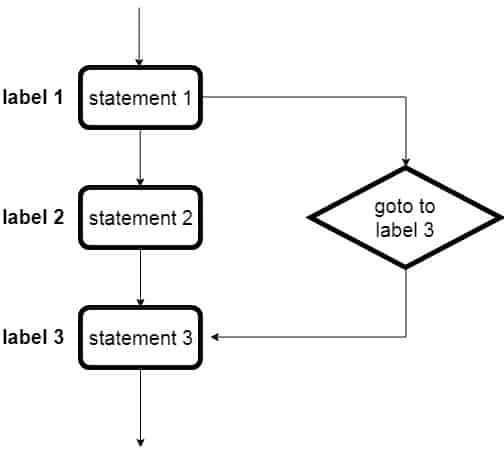
    The goto statement is a jump statement that allows the user in the program to jump the execution control to the other part of the program. When encountered in a program, it transfers the execution flow to the labeled statement. The label (tag) is used to spot the jump statement.

    NOTE: Although the use of goto is avoided in programming language because it makes it difficult to trace the control flow of a program, making the program hard to understand and hard to modify.

    goto statement Flowchart:

    goto statement in C
    goto statement

    Syntax of goto statement in C#:

    goto label;
    ....
    ....
    label: statement; //label to jump
    ....
    ....
    statements

    Example of C# goto Statement

    // use of goto statement
    using System;
    
    public class GotoStatement
    {
       static public void Main()
       {
          int selected = 3;
          switch (selected)
          {
             case 1:
                //this is the label
                first_case:
                   Console.WriteLine("case: 1");
                break;
    
             case 2:
                Console.WriteLine("case: 2");
                break;
    
             case 3:
                Console.WriteLine("case: 3");
    
                // transfer the flow to case 1
                goto first_case;
    
             default:
                Console.WriteLine("No match found");
                break;
          }
       }
    }

    Output:

    case: 3
    case: 1

  • C# continue Statement

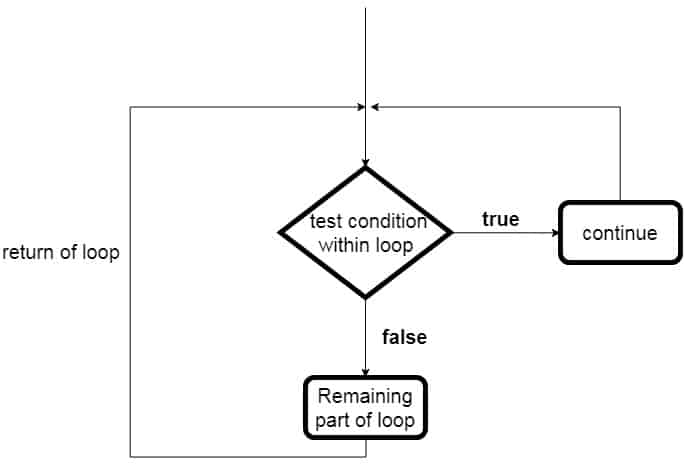
    It is a loop control statement. It is used to continue the loop in the program. The use of continue inside a loop skips the remaining code and transfer the current flow of the execution to the beginning o the loop.

    In case of for loop, the continue statement causes the program to jump and pass the execution to the condition and update expression by skipping further statement. Whereas in the case of while and do…while loops, the continue statement passes the control to the conditional checking expression.

    continue statement Flowchart:

    Continue statement in java
    continue statement

    Syntax of continue statement in C#:

    //continue syntax
    continue;

    Example of C# continue Statement

    using System;
    
    public class ContinueStatement
    {
       public static void Main(string[] args)
       {
          for (int i = 1; i <= 10; i++)
          {
             if (i == 7)
             {
                // 7 is skipped and control passed to for loop
                continue;
             }
    
             Console.WriteLine("Value of i: {0}", i);
          }
       }
    }

    Output:

    Value of i: 1
    Value of i: 2
    Value of i: 3
    Value of i: 4
    Value of i: 5
    Value of i: 6
    Value of i: 8
    Value of i: 9
    Value of i: 10

    Example: C# continue program in nested loops

    using System;
    
    public class ContinueNested
    {
       public static void Main(string[] args)
       {
          //outer loop
          for (int i = 1; i <= 2; i++)
          {
             //inner loop
             for (int j = 1; j <= 2; j++)
             {
                if (i == 1 && j == 2)
                {
                    //skips when i=2 and j=2 and control goes to the outer loop
                   continue;
                }
    
                Console.WriteLine("i: {0}, j: {1}", i, j);
             }
          }
       }
    }

    Output:

    i: 1, j: 1
    i: 2, j: 1
    i: 2, j: 2

    In the above output, i: 1, j: 2 is skipped as the continue statement stopped the further execution after that and transferred the execution control to the beginning of the outer loop.


  • C# break Statement

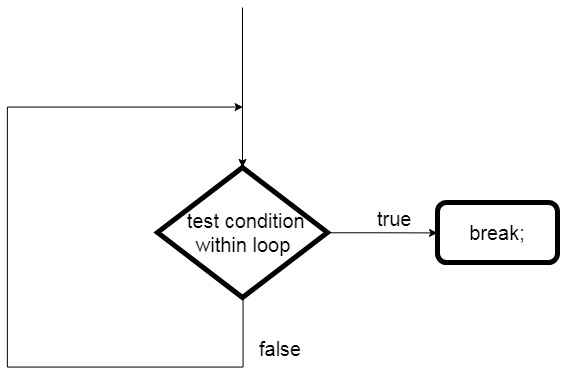
    break statement in programming is used to come out of the loop or switch statements. It is a jump statement that breaks the control flow of the program and transfers the execution control after the loop.

    The use of break statements in nested loops terminates the inner loop and the control is transferred to the outer loop.

    break statement Flowchart:

    break statement

    Syntax of break statement in C#:

    //break syntax
    break;

    Example C# break Statement

    Use of break statement in a single loop in C#.

    using System;
    
    public class BreakStatement
    {
       public static void Main(string[] args)
       {
          for (int i = 1; i <= 10; i++)
          {
             if (i == 6)
             {
                //stops loop at 6th iteration
                break;
             }
    
             Console.WriteLine("Value of i: {0}", i);
          }
       }
    }

    Output:

    Value of i: 1
    Value of i: 2
    Value of i: 3
    Value of i: 4
    Value of i: 5

    Example: C# break statement with the nested loop.

    using System;
    
    public class BreakNested
    {
       public static void Main(string[] args)
       {
          for (int i = 1; i <= 2; i++)
          {
             for (int j = 1; j <= 2; j++)
             {
                // for i = 1 and j = 2 is skipped in the output
                if (i == 1 && j == 2)
                   break;
    
                Console.WriteLine("i: {0}, j: {1}", i, j);
             }
          }
       }
    }

    Output:

    i: 1, j: 1
    i: 2, j: 1
    i: 2, j: 2

    As you can see in the output that i = 1 and j = 2 is skipped. This is because the break statement breaks the inner loop for i = 1 and j = 2 and transfer the control to the outer loop and the rest iteration continues until the loop condition is satisfied.