Author: admin

  • Currency Conversion Program in Java

    In this section of the java program tutorial, we will learn how to write a Java Currency Converter Program and see how it works. Before we begin, let me tell you that this is a beginner’s tutorial for the currency converter program in java.

    Although there are many ways in which you can create a currency converter using java. You can create separate methods or you can use if..else-if statement, here we are going to use a switch case statement for the currency converter.


    Java Currency Converter program using Switch case

    import java.util.*;
    import java.text.DecimalFormat;
    
    public class CurrencyConverter
    {
       public static void main(String[] args)
       {
          double amount;
          double rupee, dollar, pound, euro, yen, ringgit;
          int choice;
    
          DecimalFormat f = new DecimalFormat("##.##");
    
          Scanner sc = new Scanner(System.in);
    
          System.out.println("Following are the Choices:");
          System.out.println("Enter 1: Ruppe");
          System.out.println("Enter 2: Dollar");
          System.out.println("Enter 3: Pound");
          System.out.println("Enter 4: Euro");
          System.out.println("Enter 5: Yen");
          System.out.println("Enter 5: Ringgit");
    
          System.out.print("\nChoose from above options: ");
          choice = sc.nextInt();
    
          System.out.println("Enter the amount you want to convert?");
          amount = sc.nextFloat();
    
          switch (choice)
          {
             case 1:  // Ruppe Conversion
                dollar = amount / 70;
                System.out.println(amount + " Rupee = " + f.format(dollar) + " Dollar");
    
                pound = amount / 88;
                System.out.println(amount + " Rupee = " + f.format(pound) + " Pound");
    
                euro = amount / 80;
                System.out.println(amount + " Rupee = " + f.format(euro) + " Euro");
    
                yen = amount / 0.63;
                System.out.println(amount + " Rupee = " + f.format(yen) + " Yen");
    
                ringgit = amount / 16;
                System.out.println(amount + " Rupee = " + f.format(ringgit) + " ringgit");
                break;
    
             case 2:  // Dollar Conversion
                rupee = amount * 70;
                System.out.println(amount + " Dollar = " + f.format(rupee) + " Ruppes");
    
                pound = amount *0.78;
                System.out.println(amount + " Dollar = " + f.format(pound) + " Pound");
    
                euro = amount *0.87;
                System.out.println(amount + " Dollar = " + f.format(euro) + " Euro");
    
                yen = amount *111.087;
                System.out.println(amount + " Dollar = " + f.format(yen) + " Yen");
    
                ringgit = amount *4.17;
                System.out.println(amount + " Dollar = " + f.format(ringgit) + " ringgit");
                break;
    
             case 3:  // Pound Conversion
                rupee = amount * 88;
                System.out.println(amount + " pound = " + f.format(rupee) + " Ruppes");
    
                dollar = amount *1.26;
                System.out.println(amount + " pound = " + f.format(dollar) + " Dollar");
    
                euro = amount *1.10;
                System.out.println(amount + " pound = " + f.format(euro) + " Euro");
    
                yen = amount *140.93;
                System.out.println(amount + " pound = " + f.format(yen) + " Yen");
    
                ringgit = amount *5.29;
                System.out.println(amount + " pound = " + f.format(ringgit) + " ringgit");
                break;
    
             case 4:  // Euro Conversion
                rupee = amount * 80;
                System.out.println(amount + " euro = " + f.format(rupee) + " Ruppes");
    
                dollar = amount *1.14;
                System.out.println(amount + " euro = " + f.format(dollar) + " Dollar");
    
                pound = amount *0.90;
                System.out.println(amount + " euro = " + f.format(pound) + " Pound");
    
                yen = amount *127.32;
                System.out.println(amount + " euro = " + f.format(yen) + " Yen");
    
                ringgit = amount *4.78;
                System.out.println(amount + " euro = " + f.format(ringgit) + " ringgit");
                break;
    
             case 5:  // Yen Conversion
                rupee = amount *0.63;
                System.out.println(amount + " yen = " + f.format(rupee) + " Ruppes");
    
                dollar = amount *0.008;
                System.out.println(amount + " yen = " + f.format(dollar) + " Dollar");
    
                pound = amount *0.007;
                System.out.println(amount + " yen = " + f.format(pound) + " Pound");
    
                euro = amount *0.007;
                System.out.println(amount + " yen = " + f.format(euro) + " Euro");
    
                ringgit = amount *0.037;
                System.out.println(amount + " yen = " + f.format(ringgit) + " ringgit");
                break;
    
             case 6:  // Ringgit Conversion
                rupee = amount *16.8;
                System.out.println(amount + " ringgit = " + f.format(rupee) + " Ruppes");
    
                dollar = amount *0.239;
                System.out.println(amount + " ringgit = " + f.format(dollar) + " dollar");
    
                pound = amount *0.188;
                System.out.println(amount + " ringgit =: " + f.format(pound) + " pound");
    
                euro = amount *0.209;
                System.out.println(amount + " ringgit = " + f.format(euro) + " euro");
    
                yen = amount *26.63;
                System.out.println(amount + " ringgit = " + f.format(yen) + " yen");
                break;
    
              //Default case
             default:
                System.out.println("Invalid Input");
          }
       }
    }

    Output:

    Following are the Choices:
    Enter 1: Ruppe
    Enter 2: Dollar
    Enter 3: Pound
    Enter 4: Euro
    Enter 5: Yen
    Enter 5: Ringgit
    
    Choose from above options: 3
    Enter the amount you want to convert?
    200
    200.0 pound = 17600 Ruppes
    200.0 pound = 252 Dollar
    200.0 pound = 220 Euro
    200.0 pound = 28186 Yen
    200.0 pound = 1058 ringgit

    The above java program is the simple one as you can see that the conversion is done using the basic switch statement. And as told earlier, you can do the same by using the if..else-if ladder statement, or either you can create a separate function for each currency conversion. This is how you can create a basic currency converter in java program.

  • Evil Number in Java

    In this section, we will learn about the evil number and the java program on evil numbers. We will write java code to check the given number for evil number.

    What is Evil Number?

    A number is said to be an evil number if it is a positive whole number that has an even number of 1’s in its binary expansion. Binary expansion refers to the binary representation of a number that is with 0(zero) and 1(one).

    Odious numbers are opposite to evil numbers.

    Example of evil number:

    Input = 3
    The binary value of 3 = 11. Since the 1’s are even, therefore 3 is an evil number.

    Input = 23
    The binary value of 23 = 10111. Since the 1’s are even, therefore 23 is an evil number.

    Input = 4
    The binary value of 4 = 100. Since the 1’s are odd, therefore 23 is not an evil number. But it is an odious number.

    Now we know what is Evil number is, let us see Evil Number Program in Java with source code.


    Java program to check whether the given number is an evil number or not.

    We will take a number and find its binary equivalent and store the binary value in a variable. Then we will check the number of 1’s present in that binary variable. If the number of 1’s is even then it is an evil number else the given number is not an evil number.

    import java.util.Scanner;
    
    public class EvilNumberProgram
    {
       // user-defined method to check evil number
       public static boolean isEvil(int number)
       {
          // calling binaryConversion function by passing the number
          long binValue = binConversion(number);
          int count = 0;
    
          // iteration to increase the count value on every 1's
          while (binValue != 0)
          {
             if (binValue % 10 == 1)
                count++;
    
             binValue /= 10;
          }
    
         	// check for count for even value
          if (count % 2 == 0)
             return true;
    
          // if odd value than return false
          return false;
       }
    
       private static long binConversion(int num)
       {
          long binValue = 0;
          int remainder = 0;
          int i = 1;
    
          //iteration to convert the number into binary
          while (num != 0)
          {
             remainder = num % 2;
             binValue += remainder * i;
    
             num /= 2;
             i *= 10;
          }
    
          return binValue;
       }
    
       public static void main(String[] args)
       {
          // declaration of variables
          int num = 0;
    
          Scanner scan = new Scanner(System.in);
          System.out.print("Enter the positive number: ");
          num = scan.nextInt();
    
          // check the condition of returned value for evil number
          if (isEvil(num))
             System.out.println(num + " is an evil number");
          else
             System.out.println(num + " is not an evil number");
    
       }
    }

    Output: Evil Number Java.

    //Run 1
    Enter the positive number: 23
    23 is an evil number

    //Run 2
    Enter the positive number: 4
    4 is not an evil number

    In the above java evil program, we created two user-defined functions, one for the conversion of an integer to binary and another one that checks the number of 1’s present in the binary number and returns the true-false value to the main function accordingly.


  • Duck Number Program in Java

    In this tutorial, we will learn about the Duck number with examples and write a java program for duck numbers. Before that, you may go through the following topics in java.

    What is a Duck Number?

    A number is said to be a duck number if it is a positive integer number with zeroes in it. The digit zero (0) must not be present at the beginning of the number but can be present anywhere except the initial digit.

    Example of duck number:

    • 3210 is a duck number.
    • 0183 is not a duck number because there is a zero present at the beginning of the number.
    • 00132 is also not a dick number.

    Now you have understood the Duck number, let us do a program to check duck numbers in java.


    Java program to check whether a number is duck number or not

    //Java Duck Number
    
    import java.util.Scanner;
    
    public class DuckNumberProgram
    {
       public static void main(String[] args)
       {
          // variables
          int num, temp;
          boolean flag = false;
    
          Scanner sc = new Scanner(System.in);
    
          //user input
          System.out.print("Enter a positive integer: ");
          num = sc.nextInt();
    
          temp = num;
    
          //checking condition
          while (temp > 0)
          {
             if (temp % 10 == 0)
                 flag = true;
    
             temp = temp / 10;
          }
    
          //checking for flag 
          if (flag)
    
             System.out.println(num + " is a Duck Number");
    
          else      
             System.out.println(num + " is not a Duck Number");
    
       }
    }

    Output:

    //Run: 1
    Enter a positive integer: 2015
    2015 is a Duck Number

    //Run: 2
    Enter a positive integer: 00124
    124 is not a Duck Number

    //Run: 3
    Enter a positive integer: 11245
    11245 is not a Duck Number

    You can create a separate Boolean function that will return true or false like the flag that is working in this program. Hope this article was helpful on Duck Number Program in Java


  • Algorithm in C Language

    In this tutorial, we will learn about the algorithms in C language with examples and practices. Let us start by understanding algorithms.

    What is Algorithm?

    An algorithm is a set of well-defined instructions to solve a particular problem. It is a step-by-step procedure to execute some instructions in a certain order to get the required output. Software Engineer commonly uses an algorithm for planning and solving problems.

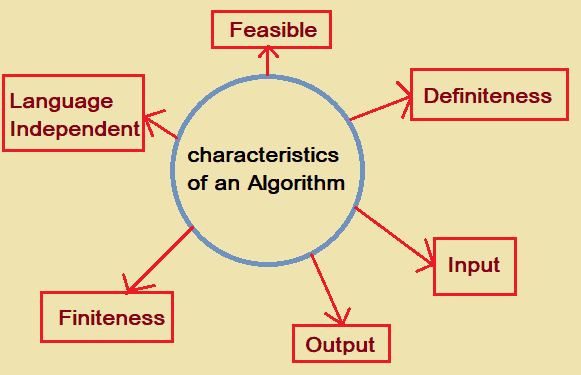
    Following are the characteristics of an Algorithm:

    algorithm in C
    • Definiteness: Each instruction must be clear and unambiguous.
    • Input: An algorithm may have 0(zero) inputs or may have well-defined inputs.
    • Output: Each algorithm is expected to produce one or more than one desired output.
    • Finiteness: once the algorithm is executed, the algorithm must terminate after a finite number of steps.
    • Language Independent: The direction of steps in an algorithm should be independent of any programming language.
    • Feasible: The algorithm should be simple and generic so that it is feasible with any available resources.

    How to write algorithm in C or for any other languages.

    As told earlier, algorithm is independent of any programming language, so there is no well-defined method to write an algorithm. It depends on your problem and resources.

    However, you may need to have a basic understanding on writing algorithms. Follow the steps below.

    1. Define your algorithm’s input.
    2. Define the variables.
    3. Outline the algorithm’s operations.
    4. Output the results of your algorithm’s operations.

    There are some common types of control structures that are used while writing an algorithm such as Branching (if-else statements), loops (do-while, for, while), or in a sequence structure that is execution taking place starting from up to down.


    Advantages of Algorithm

    • It is easy to understand because of its step-wise representation.
    • As it is independent of programming language so the person with no programming language can understand it.
    • The procedural step helps the problem to break down into smaller problems, making it easier for the programmer to understand and code.

    Example of algorithms

    Problem 1: write an algorithm to add two numbers and display the result.

    Step 1: START
    Step 2: Declare integer variables num1, num2, and result.
    Step 3: Read values num1 and num2.
    Step 4: add the value and store it to the result variable. result←num1+num2
    Step 5: print result
    Step 6: STOP

    Problem 2: write an algorithm to calculate the factorial of a number and print the result.

    Step 1: START
    Step 2: Declare num, fact, and i.
    Step 3: Initialize fact=1 and i=1
    Step 4: Read n
    Step 5: if i <= num go to step 6 else go to step 8
    Step 6: Calculate fact = fact * i
    Step 7: i++ and go to step 5
    Step 8: Print fact
    Step 9: STOP


    Analysis of Algorithm

    There are two ways to analyze an algorithm that is before implementation and after implementation. They are:

    1. Priori Analysis: The meaning of Priori is before, hence indicating that this analysis is done before the implementation of an algorithm. It is a theoretical analysis step. This Efficiency of an algorithm is measured by assuming that all other factors, for example, processor speed, are constant and have no effect on the implementation. The algorithm designer is responsible for this analysis.

    2. Posterior Analysis: Here Posterior means after, hence indicating that this analysis is done after the implementation of an algorithm. Here the checking of an algorithm is done by implementing it in any programming language. The programmer checks the statistics like running time, correctness, space required, etc.


    Complexity of an algorithm

    The time and space are the two main factors that decides the complexity of the algorithm.

    Time factor: This time factor of an algorithm is calculated by counting the number of key operations such as comparisons in the sorting algorithm.

    Space Factor: This space factor of an algorithm is calculated by counting the maximum memory space required by the algorithm.

    Space Complexity

    Space complexity refers to the amount of memory that an algorithm uses in its life cycle to get the result. The calculation of space complexity is done on the basis of the following two components.

    • Fixed Part: This space is required by the algorithm to store input variables, output variables, program size, etc. those size are independent of the problem
    • Variable Part: This is the space required to store variables that are dependent on the size of the problem. For example, temporary variables, dynamic memory allocation, recursion stack space, etc.

    Time Complexity

    Time complexity refers to the amount of time that an algorithm required in its life cycle for the completion of the task. This can be for the operations, conditional if-else statements, etc. The calculation of space complexity is done on the basis of the following two components.

    • Constant time part: Instruction that is executed only once such as input, output, if-else, switch, etc.
    • Variable Time Part: Instruction that is executed more than once such as loops, recursion, etc.

  • C Program for Predictive Parser

    The following is the C Program for Implementation of functionalities of Predictive Parser.

    #include <stdio.h>
    #include <string.h>
    
    char prol[7][10] = { "S", "A", "A", "B", "B", "C", "C" };
    char pror[7][10] = { "A", "Bb", "Cd", "aB", "@", "Cc", "@" };
    char prod[7][10] = { "S->A", "A->Bb", "A->Cd", "B->aB", "B->@", "C->Cc", "C->@" };
    char first[7][10] = { "abcd", "ab", "cd", "a@", "@", "c@", "@" };
    char follow[7][10] = { "$", "$", "$", "a$", "b$", "c$", "d$" };
    char table[5][6][10];
    
    int numr(char c)
    {
       switch (c)
       {
          case 'S':
             return 0;
    
          case 'A':
             return 1;
    
          case 'B':
             return 2;
    
          case 'C':
             return 3;
    
          case 'a':
             return 0;
    
          case 'b':
             return 1;
    
          case 'c':
             return 2;
    
          case 'd':
             return 3;
    
          case '$':
             return 4;
       }
    
       return (2);
    }
    
    int main()
    {
       int i, j, k;
    
       for (i = 0; i < 5; i++)
          for (j = 0; j < 6; j++)
             strcpy(table[i][j], " ");
    
       printf("The following grammar is used for Parsing Table:\n");
    
       for (i = 0; i < 7; i++)
          printf("%s\n", prod[i]);
    
       printf("\nPredictive parsing table:\n");
    
       fflush(stdin);
    
       for (i = 0; i < 7; i++)
       {
          k = strlen(first[i]);
          for (j = 0; j < 10; j++)
             if (first[i][j] != '@')
                strcpy(table[numr(prol[i][0]) + 1][numr(first[i][j]) + 1], prod[i]);
       }
    
       for (i = 0; i < 7; i++)
       {
          if (strlen(pror[i]) == 1)
          {
             if (pror[i][0] == '@')
             {
                k = strlen(follow[i]);
                for (j = 0; j < k; j++)
                   strcpy(table[numr(prol[i][0]) + 1][numr(follow[i][j]) + 1], prod[i]);
             }
          }
       }
    
       strcpy(table[0][0], " ");
    
       strcpy(table[0][1], "a");
    
       strcpy(table[0][2], "b");
    
       strcpy(table[0][3], "c");
    
       strcpy(table[0][4], "d");
    
       strcpy(table[0][5], "$");
    
       strcpy(table[1][0], "S");
    
       strcpy(table[2][0], "A");
    
       strcpy(table[3][0], "B");
    
       strcpy(table[4][0], "C");
    
       printf("\n--------------------------------------------------------\n");
    
       for (i = 0; i < 5; i++)
          for (j = 0; j < 6; j++)
          {
             printf("%-10s", table[i][j]);
             if (j == 5)
                printf("\n--------------------------------------------------------\n");
          }
    }

    Output: Predictive parser in C

    The following grammar is used for Parsing Table:
    S->A
    A->Bb
    A->Cd
    B->aB
    B->@
    C->Cc
    C->@
    
    Predictive parsing table:
    
    --------------------------------------------------------
              a         b         c         d         $         
    --------------------------------------------------------
    S         S->A      S->A      S->A      S->A                
    --------------------------------------------------------
    A         A->Bb     A->Bb     A->Cd     A->Cd               
    --------------------------------------------------------
    B         B->aB     B->@      B->@                B->@      
    --------------------------------------------------------
    C                             C->@      C->@      C->@      
    --------------------------------------------------------

  • Menu Driven Program in Java

    In this tutorial, we will write a program on menu driven in java using switch statement along with source code. The switch case is mostly used when it is necessary to give options to the users. If you do not know the working process of the switch case statement then click the link below.

    Java Menu-driven Program using switch case:

    This is a menu program in java that displays a menu and takes the input from the user. The choice made by the user is among the option displayed in the menu. And accordingly, the output is displayed on the screen. It is a user-friendly program in java.


    Menu Driven Program in Java.

    The below menu-driven Java program calculates the area of different geometrical figures.

    //area of different geometric figures using switch case in java
    
     import java.util.Scanner;
    
     public class MenuDriven
     {
        public static void main(String args[])
        {
           Scanner sc = new Scanner(System.in);
    
           System.out.println("To find the areas of following press:");
           System.out.println("1 for the Area of a Circle");
           System.out.println("2 for the Area of a Square");
           System.out.println("3 for the Area of a Right Angled Triangle");
           System.out.println("4 for the Area of a Rectangle");
           System.out.println("5: Area of Rhombus");
           System.out.print("\nEnter your Choice: ");
           int ch = sc.nextInt();
    
           switch (ch)
           {
              case 1:
                 System.out.println("Enter radius for the circle:");
                 float r = sc.nextFloat();
                 float area = 3.14f *r * r;
                 System.out.println("Area:" + area);
                 break;
    
              case 2:
                 System.out.println("Enter side for square:");
                 int s = sc.nextInt();
                 int ae = s * s;
                 System.out.println("Area:" + ae);
                 break;
    
              case 3:
                 System.out.println("Enter height and base for traingle:");
                 float h = sc.nextFloat();
                 float bs = sc.nextFloat();
                 float ar = 0.5f *h * bs;
                 System.out.println("Area:" + ar);
                 break;
    
              case 4:
                 System.out.println("Enter length and breadth for rectangle:");
                 int l = sc.nextInt();
                 int b = sc.nextInt();
                 int aa = l * b;
                 System.out.println("Area:" + aa);
                 break;
    
              case 5:
                 System.out.print("Enter the first diagonal of a Rhombus: ");
                 float diagonal1 = sc.nextInt();
                 System.out.print("Enter the second diagonal of the Rhombus: ");
                 float diagonal2 = sc.nextInt();
                 float aRhombus = (diagonal1 *diagonal2) / 2;
                 System.out.println("Area of the Rhombus is: " + aRhombus);
                 break;
    
              default:
                 System.out.println("Invalid Input");
                 break;
           }
        }
     }

    Output 1:

    To find the areas of following press:
    1 for the Area of a Circle
    2 for the Area of a Square
    3 for the Area of a Right Angled Triangle
    4 for the Area of a Rectangle
    5: Area of Rhombus
    
    Enter your Choice: 2
    Enter side for square:
    4
    Area:16

    Output 2:

    To find the areas of following press:
    1 for the Area of a Circle
    2 for the Area of a Square
    3 for the Area of a Right Angled Triangle
    4 for the Area of a Rectangle
    5: Area of Rhombus
    
    Enter your Choice: 3
    Enter height and base for traingle:
    3
    2
    Area:3.0

    Output 3:

    To find the areas of following press:
    1 for the Area of a Circle
    2 for the Area of a Square
    3 for the Area of a Right Angled Triangle
    4 for the Area of a Rectangle
    5: Area of Rhombus
    
    Enter your Choice: 5
    Enter the first diagonal of a Rhombus: 4
    Enter the second diagonal of the Rhombus: 3
    Area of the Rhombus is: 6.0

    Using this logic you can create various other menu programs in java.


  • Magic Number Program in Java

    In this section, we are going to learn about the magic number in Java and also how to find magic numbers in java.

    What is Magic Number?

    A number is said to be a magic number if the sum of its digits is calculated till a single digit is obtained by recursively adding the sum of its digits. And the single-digit which is obtained at the end must be 1, then the number is a magic number, otherwise, it is not a magic number.

    Example: 1729 is a magic number.

    Explanation:
    1+7+2+9 = 19, the sum of the digit is 19, again
    1+9 = 10
    1+0 = 1, Therefore after the addition of digits, the last number we got is 1. Hence 1729 is a Magic Number.


    Magic Number in Java

    Let us see an example in java to check whether the number is a magic number or not. We will use a nested while loop in Java.

    import java.util.Scanner;
    
    public class MagicNumberProgram
    {
       public static void main(String[] args)
       {
          int num, rem = 1, temp, sum = 0;
          Scanner sc = new Scanner(System.in);
          System.out.print("Enter number: ");
          num = sc.nextInt();
          temp = num;
    
          //checking the condition with nested while loop
          while (temp > 9)
          {
             while (temp > 0)
             {
                rem = temp % 10;
                sum = sum + rem;
                temp = temp / 10;
             }
    
             temp = sum;
             sum = 0;
          }
    
          if (temp == 1)
          {
             System.out.println(num + " is a Magic Number");
          }
          else
          {
             System.out.println(num + " is not Magic Number");
          }
       }
    }

    Output:

    //Run: 1
    Enter number: 1729
    1729 is a Magic Number

    //Run: 2 Enter number: 123
    123 is not Magic Number

    You can also create a separate Boolean function and return true or false to the main function after checking the number for magic in Java.


  • Buzz Number Program in Java

    In this tutorial, we will start with what is Buzz Number and Write a Java Program to check whether the number is Buzz Number or not.

    Buzz Number

    A Buzz number is one of the special numbers that end with 7 or is divisible by 7.

    For example: 7, 17, 27, 37, etc are buzz numbers because they end with 7, and the numbers 7, 14, 21, 28, etc are also buzzed numbers because they are divisible by 7.


    Program Approach to check the Buzz Number.

    1. First take a number that needs to be checked for Buzz.

    2. We then apply a condition to check the two conditions needed to check for the Buzz number.

    • We check if the last digit is 7 or not with % operator (number % 10 == 7), which gives us the remainder.
    • Then, we check the divisibility of a number by 7 with / operator (num / 7 == 0).

    3. Both of these conditions are checked together in with || operator, in which if either one is true then || (or) operator returns a true value. Indicating the number is Buzz number.

    4. Else the number is not a Buzz number.


    Java Program to check whether the number is Buzz Number or not

    import java.util.Scanner;
    
    public class BuzzNumber
    {
       public static void main(String args[])
       {
          Scanner sc = new Scanner(System.in);
    
          System.out.print("Enter a number to check for Buzz: ");
          int num = sc.nextInt();
    
          //Condition for Buzz number
          if (num % 10 == 7 || num % 7 == 0)
             System.out.println(num + " is a Buzz number.");
          else
             System.out.println(num + " is a not Buzz number.");
       }
    }

    Output:

    //Run: 1
    Enter a number to check for Buzz: 17
    17 is a Buzz number.

    //Run: 2
    Enter a number to check for Buzz: 32
    32 is a not Buzz number.


    Java program to display all the Buzz number in a given Range

    This is another example where we will print all the Buzz numbers in a given range in Java.

    import java.util.Scanner;
    
    public class BuzzNumber
    {
       public static void main(String args[])
       {
          int lRange, uRange;
    
          Scanner sc = new Scanner(System.in);
    
          System.out.print("Enter the lower range: ");
          lRange = sc.nextInt();
    
          System.out.print("Enter the Upper range: ");
          uRange = sc.nextInt();
    
          System.out.print("List of all the buzz number between " + lRange + " and " + uRange);
          for (int i = lRange; i <= uRange; i++)
          {
             //Condition for Buzz number
             if (i % 10 == 7 || i % 7 == 0)
                System.out.println(i);
          }
       }
    }

    Output:

    Enter the lower range: 0
    Enter the Upper range: 50
    List of all the buzz number between 0 and 50
    7
    14
    17
    21
    27
    28
    35
    37
    42
    47
    49

    You may create a separate boolean function to check for the Buzz number and return the number to the main function. Call the boolean function inside the for loop in the main function.


  • C++ Pointers

    Pointer is an important part of the programming as it deals with the memory address of the variables. There are various tasks that can be achieved easily with the use of pointers in C++ such as dynamic memory allocation that needs pointers for its operation. It also minimizes the execution time and saves memory space. Arrays, function and structure also use pointers to manipulate the variables and parameters.

    Let us understand the memory address first.

    Memory Address:

    As we already know at this point that every variable declared in a program is stored in computer storage possessing some memory address. And these addresses can be accessed by using the ampersand (&) operator. If you have the variable name var then &var is used to access the address of that variable in a program.

    Let us see ampersand (&) in action.

    C++ program to print the address of variables using pointers.

    #include <iostream>
    using namespace std;
    
    int main()
    {
        //variables declaration and initialization
        int var1 = 8;
        int var2 = 50;
    
        // printing the address with &
        cout << "Address of var1: "<< &var1 << endl;
        cout << "Address of var2: " << &var2 << endl;
    }

    Output:

    Address of var1: 0x7ffec209b710
    Address of var2: 0x7ffec209b714

    The address on displayed on your computer may be different. It address is in hexadecimal representation.


    C++ Pointer

    In programming, pointers refer to the symbolic representation of an address. Pointers are the variables that store the address of another variable (the variable the pointer is pointing to) rather than the value itself.

    Syntax of Pointer:

    Declaration of pointer in C++: Pointer variables are declared in the following way using asterisk * symbol ( asterisk * = same asterisk used for multiplication).

    //pointer declaration
    data_type *pointer_name;

    Example: You can declare the pointer with different C++ data-types too, some are:

    int    *intp; //pointer to an integer
    float  *fltp; //pointer to a float
    char   *chp   //pointer to a character

    Initialization of pointers

    After declaring the pointer, we need to initialize the pointers. To get the actual address we use the ampersand (&) operator and it is used before the variable name that pointer needed to be the point.

    pointer = &variable_name;

    Example:

    int *ptr;
    
    int x =10;
    x = 10;
    ptr= &x;

    • Reference operator (&): It returns the variable’s address.
    • Dereference operator (*): It gets the value that has been stored in a memory address.

    How to use a Pointer?

    • First, we define a pointer.
    • Then, assigning an address of a variable to a pointer using a Reference operator (&).
    • Lastly, with the use of Dereference operator (*), we access the value present at the address pointed by the pointer variable.

    Pointer Example

    Let us see a C++ program to print the address and the value with Pointers.

    #include <iostream>
    using namespace std;
    
    int main()
    {
        //variables declaration and initialization
        int num = 10;
        int *ptr; //pointer variable 
        
        //ptr stores the address of num variable   
        ptr = &num; 
    
        // printing the address with &
        cout << "Address of num: "<< ptr << endl;
        cout << "Value of *ptr variable: " << *ptr << endl;
    }

    Output:

    Address of num: 0x7ffedcadffec
    Value of *ptr variable: 10

  • C# Array Class

    There are various operations that can be done with an array such as creating, manipulating, sorting, searching, etc. This is done by the array class that provides various methods to perform mentioned operation in C#.

    Note: In C#, Array is not part of the collection but considered as a collection because it is based on the IList interface.


    Properties of the Array Class – C#

    The following table represents some of the properties of the Array class that are mostly used.

    PropertyDescription
    IsFixedSizeThis property is used to get a value indicating whether the Array has a fixed size or not.
    IsReadOnlyThis is used to check whether the Array is read-only or not.
    LengthThis property gets (32-bit integer) that represents the total number of elements in all the dimensions of the Array.
    LongLengthThis property gets (a 64-bit integer) that represents the total number of elements in all the dimensions of the Array.
    RankThis property gets the rank (number of dimensions) of the Array.
    SyncRootIt gets an object that can be used to synchronize access to the Array.
    IsSynchronizedIt checks whether the access to the Array is synchronized.

    Methods of the Array Class – C#

    The following table represents some of the methods of the Array class that are mostly used.

    MethodDescription
    BinarySearch()This method is used to search an entire one-dimensional sorted array for a specific value. It uses binary search algorithm
    Clear()It is used to set a range of elements to zero, to null, or to false, depending on the type of element.
    Empty()Simply returns an empty array.
    Copy()This method copies elements of an array into another array by specifying the initial index and performs type casting as required.
    CopyTo()Copies all the elements of the current one-dimensional array to the specified one-dimensional array.
    Clone()This method creates a shallow copy of the Array.
    CreateInstance()Using this method new instance of the Array class is initialized.
    Initialize()This method initializes every element of the value-type Array by calling the default constructor of the value type.
    IndexOf()This method searches for the specified object and returns the index of the first occurrence in a one-dimensional array.
    Find()It is used to search for an element that matches the conditions defined by the specified predicate and returns the first occurrence within the entire Array.
    Reverse()This method reverses the sequence of the elements in the entire one-dimensional Array.
    ToString()It returns a string that represents the current object.
    GetUpperBound()It is used to get the upper bound of the specified dimension in the Array.
    GetLowerBound()It is used to get the lower bound of the specified dimension in the Array.
    Sort()It is used to sort the elements in an entire one-dimensional Array by using the IComparable implementation of each element of the Array..
    AsReadOnly()This method returns a read-only wrapper for the specified array.

    C# program for Array Class

    No let us see an example to demonstrate some of the methods of Array Class in C# programming.

    using System;
    
    namespace ArrayClass
    {
       class Program
       {
          //We will call this printing function if we want to print in the main program
          // User defined method 
          static void DisplayFunc(int[] arr)
          {
             foreach(Object elem in arr)
             {
                Console.Write(elem + " ");
             }
          }
    
          static void Main(string[] args)
          {
             // Creating an array and initializing it 
             int[] arr = new int[5]
             { 10, 2, 3, 8, 77 };
    
             // Print length of array  
             Console.WriteLine("Length of an Array: " + arr.Length);
    
             // Finding index of an array element using IndexOf()
             Console.WriteLine("Index of 3 in an array: " + Array.IndexOf(arr, 3));
    
             // Creating an empty array to copy  
             int[] copied_arr = new int[6];
             Array.Copy(arr, copied_arr, arr.Length);
             Console.Write("Copied Array (copied_arr): ");
             DisplayFunc(copied_arr);
    
             // Sorting an array   
             Array.Sort(arr);
             Console.Write("\nSorted array (arr): ");
             DisplayFunc(arr);
    
             //Reverse an array
             Array.Reverse(arr);
             Console.Write("\nFirst Array elements in reverse order: ");
             DisplayFunc(arr);
          }
       }
    }

    Output:

    Length of an Array: 5
    Index of 3 in an array: 2
    Copied Array (copied_arr): 10 2 3 8 77 0 
    Sorted array (arr): 2 3 8 10 77 
    First Array elements in reverse order: 77 10 8 3 2