Author: admin

  • Algorithm and Flowchart to find Factorial of a number

    This is the tutorial we will write an algorithm to find the factorial of a number, we will also learn to draw a flowchart to find Factorial of a number. You may go through the topic below to learn more about algorithms.

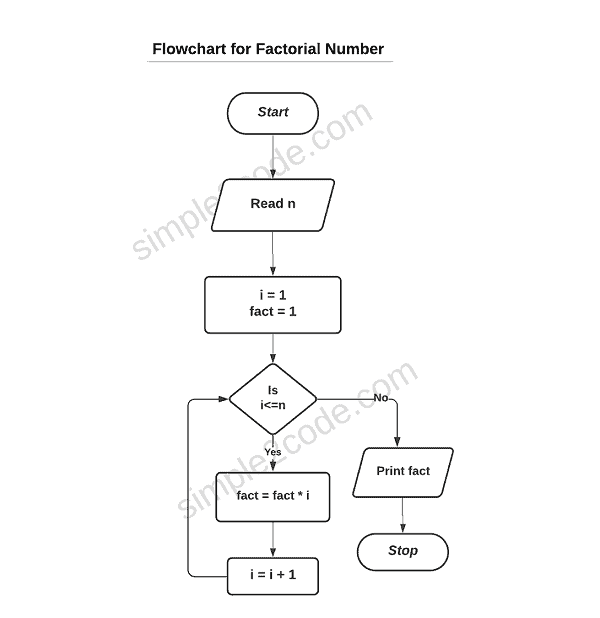
    Let us start with a flowchart for factorial numbers.

    Flowchart to calculate the factorial of a number

    flowchart for factorial of a number

    The above flowchart diagram is to find the factorial number.


    Algorithm of factorial of a number

    Step 1: Start
    Step 2: Read a number n
    Step 2: Initialize variables:
    i = 1, fact = 1
    Step 3:  if i <= n go to step 4 otherwise go to step 7
    Step 4: Calculate
    fact = fact * i
    Step 5: Increment the i by 1 (i=i+1) and go to step 3
    Step 6: Print fact
    Step 7: Stop

    If you want to understand through code, you may follow the below link:


  • C++ Classes and Objects

    C++ is an Object-Oriented Programming Language and classes and objects are the fundamental components of OOP’s. Everything in C++ is linked with classes and objects. The main purpose of C++ is to introduce the OOPs concept in the C programming language which itself is a powerful language.

    Objects are real-life entity and classes are the blueprint for creating an object. For example: consider a class for a car, it has color, some weight, size, etc, these are its attributes and drive, gear, brake, etc are its behaviour.

    These attributes and behaviour in a program are variables and functions in a class, also called the class members.

    C++ Class

    A class is a user-defined blueprint or prototype for creating Objects. It is a logical entity. We can say that classes are categories, and objects are items within each of those categories.

    It contains fields, methods, constructors, etc. These members of a class can be accessed and used by creating an instance of that class.

    Defining Class:

    The definition of the class starts with the keyword class followed by a class name. The body of the class is enclosed within the curly braces and ends with a semicolon. All the members of the class are declared within the body of the class as shown below.

    Syntax for class:

    class Rectangle
    {
       public:            //access specifiers
          float length;   // Length of a rectangle
          float breadth;  // Breadth of a rectangle
    
    };

    Explanation:
    The class keyword is used to create a class followed by a class name ‘Rectangle‘. the public is one of the access specifiers that are used with the class members to determine their scope that is their visibility outside of the class. There are two public variables length and breadth (attributes). And at the end of braces, a semicolon is provided to end the class.


    C++ Objects

    Objects are real-world entities that have states and behavior. Example. bike, Lamp, pen, table, etc. An object is an instance of a class. It can be physical and logical.

    All the class members are accessed by creating an object of that class. Objects are created at runtime so is called runtime entity.

    • State: It is represented by attributes of an object that is the data value.
    • Behaviour: It represents the functionality that is the behaviour of an object. Example withdraw, deposit, etc.
    //creating an object of class Rectangle
    Rectangle rect;

    Here the type is of Rectangle type rect is a reference variable that refers to the instance of a Rectangle class.

    Let us understand class and objects in C++ through an example.

    Example of C++ Class and Object

    #include <iostream>
    using namespace std;
    
    class StudentDetail   //class
    {
       public:    // Access specifier
          int stID;
          string stName;
    };
    
    int main()
    {
       // Create an instance (object) of StudentDetail
       StudentDetail stObj;
    
       // Accessing members with dot operator
       stObj.stID = 32;
       stObj.stName = "Steve Rogers";
    
       // Displaying
       cout << stObj.stID << endl;
       cout << stObj.stName;
    
       return 0;
    }

    Output:

    32
    Steve Rogers


    Example: C++ multiple objects with methods

    #include <iostream>
    using namespace std;
    
    //Car class
    class Car
    {
       public:
           string brand;
           int year;
    
       void carInfo(string br, int y)
       {
          brand = br;
          year = y;
       }
    
       void display()
       {
          cout << brand << "  " << year << endl;
       }
    };
    
    int main()
    {
       // Create two objects of Car class
       Car obj1;
       Car obj2;
    
       obj1.carInfo("BMW", 1999);
       obj1.display();
    
       obj2.carInfo("Ford", 1969);
       obj2.display();
    
       return 0;
    }

    Output:

    BMW 1999
    Ford 1969

    We created two objects (obj1, obj2) and call the methods present in the Car class with two separate objects by passing different values.


  • C++ Object Oriented Programming (OOP) Concepts

    The main purpose of C++ is to introduce the OOPs concept in C programming language which is a powerful language.

    OOP is a concept of using objects in programming. It is a paradigm that uses objects and classes that aim to implement real-world entities. The entities such as inheritance, abstraction, polymorphism, etc that are used in programming.

    There are few main principles that form the foundation of Object-Oriented programming or you can say that they are the Characteristics of an Object-Oriented Programming language. They are:

    • Class
    • Object
    • Inheritance. 
    • Encapsulation. 
    • Abstraction. 
    • Polymorphism

    Object

    Objects are real-world entities that have state and behavior. Example. bike, Lamp, pen, table, etc. An object is an instance of a class. It can be physical and logical.

    Class

    A class is a user-defined blueprint or prototype for creating Objects. It is a logical entity. We can say that classes are categories, and objects are items within each of those categories. It holds the data members and member functions and these members of a class can be accessed and used by creating an instance of that class.

    Inheritance

    Inheritance is also one of the main concepts of OOP. Inheritance is one of the processes or mechanisms in OOP in which one class(sub-class) acquires the properties(data members) and functionalities(methods) of another class(parent-class).

    This feature in C++ help to optimize the size of the code.

    Super Class: The class whose properties and functionalities are inherited by the Subclass is known as the superclass(a parent class or a base class).

    Sub Class: The class that inherits the property and behavior of the other class(Superclass) is known as a subclass( a derived class, extended class, or child class).

    Abstraction

    Data abstraction refers to the process of hiding the details but only displaying the relevant information to the world, which is hiding the implementation details and displaying only its functionalities.

    Abstraction can be achieved in two ways.

    • Abstraction class.
    • Interfaces.

    Encapsulation

    Encapsulation in C++ is defined as the wrapping up of data(variable) under a single unit. The use of Encapsulation is to make sure that implementation detail or we can say sensitive data is hidden from the users. Encapsulation is also known as data hiding

    Polymorphism

    Polymorphism means having many forms, which means it is the way of performing some task in many ways. That means a single function or an operator functioning in many ways.

    Function overloading and Function overriding are used in order to achieve Polymorphism. There is a Compile-time Polymorphism and Runtime Polymorphism.

    We will learn about each of the above concept of OOP separately in details in the further tutorial.


  • Java Program to check Krishnamurthy Number

    In this tutorial, we will learn about Krishnamurthy numbers and write a Krishnamurthy Number program in Java. We will write two programs for Krishnamurthy number in java.

    Krishnamurthy Number

    A number is said to be a Krishnamurthy Number if the sum of the factorial of all digits of a number is equal to the original number itself. Krishnamurthy Number is also known as Strong number and is frequently asked questions in interviews.

    Example:

    Input: 145
    Output: Krishnamurthy Number
    = 1! + 4! + 5!
    = 1 + 24 + 120
    = 145
    = Original Number


    Java Program to check Krishnamurthy Number

    import java.util.Scanner;
    
    public class KrishnamurthyProgram
    {
       // boolean function to check Krishnamurthy Number
       public static boolean isKrishnamurthy(int number)
       {
          int sum = 0, lastDigit = 0;
          int temp = number;
    
          // iterating through all the digits
          while (temp != 0)
          {
             lastDigit = temp % 10;
             sum += factFunc(lastDigit); //calling factFunc func for every digit
             temp /= 10;
          }
    
          // returns true if number and sum are equal
          if (sum == number)
             return true;
          return false;
       }
    
       //user defined function to calculate the factorial
       public static long factFunc(int n)
       {
          long fact = 1;
          for (int i = 1; i <= n; i++)
             fact *= i;
    
          return fact;
       }
    
       // main function
       public static void main(String[] args)
       {
          int num = 0;
          boolean checkResult = false;
    
    
          Scanner scan = new Scanner(System.in);
    
          // user input
          System.out.print("Enter an integer: ");
          num = scan.nextInt();
    
          // calling function by passing the entered number
          checkResult = isKrishnamurthy(num);
    
          //Check and display the result
          if (checkResult)
             System.out.println(num + " is a Krishnamurthy number");
          else
             System.out.println(num + " is not a Krishnamurthy number");
    
       }
    }

    Output:

    //Run: 1
    Enter an integer: 145
    145 is a Krishnamurthy number

    //Run: 2
    Enter an integer: 123
    123 is not a Krishnamurthy number

    We have created two different user-defined functions, one to calculate the factorial of a number and another to check the number for Krishnamurthy which is a boolean function.


    Java Program to check Krishnamurthy number within the given Range

    import java.util.Scanner;
    
    public class KrishnamurthyProgram
    {
       // main function
       public static void main(String[] args)
       {
          int lrRange, upRange;
    
          //create Scanner class object to take input
          Scanner scan = new Scanner(System.in);
    
          // take input from end-user
          System.out.print("Enter lower Range value: ");
          lrRange = scan.nextInt();
          System.out.print("Enter Upper Range value: ");
          upRange = scan.nextInt();
    
          System.out.println("The Krishnamurthy number between " + lrRange + " and " + upRange + " are: ");
    
          for (int i = lrRange; i <= upRange; i++)
          {
             if (isKrishnamurthy(i))
                System.out.print(i + " ");
          }
       }
    
       // boolean function to check Krishnamurthy Number
       public static boolean isKrishnamurthy(int num)
       {
          int sum = 0, lastDigit = 0;
          int temp = num;
    
          // iterating through all the digits
          while (temp != 0)
          {
             lastDigit = temp % 10;
             sum += factFunc(lastDigit);	//calling factFunc func for every digit
             temp /= 10;
          }
    
          // compare sum and number
          if (sum == num)
             return true;
          return false;
       }
    
       //user defined function to calculate the factorial
       public static long factFunc(int n)
       {
          long fact = 1;
          for (int i = 1; i <= n; i++)
             fact *= i;
    
          return fact;
       }
    }

    Output:

    Enter lower Range value: 1
    Enter Upper Range value: 1000
    The Krishnamurthy number between 1 and 1000 are: 
    1 2 145

    As you can see, we did the same way by creating separate functions but here we took the user input for both the lower and upper range and called the function within those ranges to find all the possible Krishnamurthy number java.


  • Java Program for ISBN Number

    In this tutorial, we will learn about the ISBN (International Standard Book Number) and write a program to check for the ISBN Number in Java

    ISBN number program in java.

    ISBN is a 10-digit unique number that is is carried by almost each and every book. It is used to identify the book uniquely. With the help of ISBN, we can easily find a book. The ISBN is legal if 1*digit1 + 2*digit2 + 3*digit3 + 4*digit4 + 5*digit5 + 6*digit6 + 7*digit7 + 8*digit8 + 9*digit9 + 10*digit10 is divisible by 11.

    The first nine digits of the ISBN number are used to represent the Title, Publisher, and Group of the book, and the last digit is used for checking whether ISBN is correct or not.

    Example:

    Let us consider a number: 1259060977
    Check:
    Sum = 1*10 + 2*9 + 5*8 + 9*7 + 0*6 + 6*5 + 0*4 + 9*3 + 7*2 + 7*1 = 209
    Now divide the sum by 11 and see if the remainder obtained is zero or not.
    rem = 209%11 = 0
    Since, rem = 0, therefore 1259060977 is a legal ISBN number.


    Steps to write Program for ISBN number Java

    • First, take a 10-digit number input from the user.
    • The second step is to check if the entered number is 10-digits or not because a number cannot be ISBN if it is not a 10-digit number. If it is not a 10-digit number then we will display an invalid message otherwise follow the steps below.
    • For the sum, we need to multiply each digit by 1 to 10 from left to right.
    • Lastly, divide the sum and check if the remainder is zero or not, if it is zero then the entered number is an ISBN number else it is not.

    Now let us implement the above logic to check whether the number is an ISBN or not in java.


    Java Program to check for ISBN Number

    //Program to check the ISBN number in java
    
    import java.io.*;
    
    public class ISBNumberProgram
    {
       public static void main(String[] args) throws IOException
       {
          long num;
          int sum = 0, i, t, d, dNumber;
          String numString;
         
          // User input
          InputStreamReader in = new InputStreamReader(System.in);
          BufferedReader br = new BufferedReader(in);
          
          System.out.print("Enter 10-digit ISBN number: ");
          num = Long.parseLong(br.readLine());
    
          //check if the entered digits are total 10 digits or not
          numString = "" + num;
          if (numString.length() != 10)
          {
             System.out.println("Invalid Number");
             return; //the program will terminate
          }
    
          // computing sum by iterating each digits
          for (i = 0; i < numString.length(); i++)
          {
             d = Integer.parseInt(numString.substring(i, i + 1));
             dNumber = i + 1;
             t = dNumber * d;
             sum += t;
          }
    
          //lastly check and display the result
          if ((sum % 11) != 0)
          {
             System.out.println(num+ " is an Illegal ISBN Number");
          }
          else
          {
             System.out.println(num+ " is a Legal ISBN Number");
          }
       }
    }

    Output: After execution following result will be displayed.

    //Run: 1
    Enter 10-digit ISBN number: 1259060977
    1259060977 is a Legal ISBN Number

    //Run: 2
    Enter 10-digit ISBN number: 8417652579
    8417562579 is an Illegal ISBN Number

    You may create a separate user define function where you can pass the entered number and do the necessary calculation and at the end return the result to the main function. This is how you calculate the ISBN number java.


  • C++ Memory Management

    Memory management refers to the process of managing the computer memory while assigning the space to the program’s variable to improve the overall performance.

    Requirement of Memory Management.

    We know that data in arrays are stored in a homogeneous way. And we allocate the memory during the array declaration. But in some situations, we may not know how much memory to allocate or how much space the data may require until runtime, so to overcome this situation we declare an array with a maximum size but here the memory is unused and wasted. So to increase the array size, we can manually allocate the memory during run-time and this allocating and freeing of memory refers to dynamic memory allocation in C++ programming.

    Now, we know that in C programming, we use malloc() or calloc() functions to dynamically allocate the memory to a variable and free() function is used to free the memory. The same task is obtained in C++ with the use of new and delete Operators. Let us understand them individually.


    C++ new Operator.

    Just like malloc() or calloc(), the new operator is used to allocate the memory to a variable and arrays. The following is the way of using the new operator.

    // declare an int pointer
    int* pointerVar;
    
    //using the new keyword for dynamic allocation 
    pointerVar = new int;
    
    //value assigned to new allocate memory
    *pointerVar = 45;

    We use malloc() function in C, but it still exists in C++ but we avoid the use of malloc() in C++. The new operator has its own advantages, the main advantage is that it creates a new object in C++ which is the main concept of C++ as it involves OOP.

    It is also a Good practice to check if the free store has been used or not. You can check in the following manner.

    int* pointerVar = NULL;
    
    if(!(pointerVar = new double )) 
    {
       cout << "Error Message" <<endl;
       exit(1);
    }

    C++ delete Operator

    We use delete to free up dynamically allocated space that is to delete the dynamic memory once we no longer required it. It means deallocating the memory. The syntax for the delete operator is:

    delete pointerVar;
    
    //For arrays
    delete [] pointerVar; 

    Let us go through a simple C++ example to understand better.

    #include <iostream>
    using namespace std;
    
    int main() {
        // Initailizing pointer with Null
        int* pointerVar = NULL;
    
        // allocating memory dnamically
        pointerVar = new int;
    
        // assigning value to the memory
        *pointerVar = 458;
        
    
        cout << "Its Value: " << *pointerVar << endl;
    
        // deallocating the memory
        delete pointerVar;
    
        return 0;
    }

    Output:

    Its Value: 458

    You can also see we deallocated the memory at the end after its use.


    new and delete Operators for Arrays

    Now let us see the use of new and delete operators in arrays. Dynamic allocation increases the efficiency of memory management, especially in arrays.

    The syntax or way to allocate memory and deallocate memory is done in the following way in c++.

    //Allocating memory
    pointerVar = new data-type[size]; 
    
    //Deallocating memory
    delete [] pointerVar;  

    The syntax is for one dimensional array. You can also allocate memory to multi dimensional array in the following way:

    //Allocating memory to multi dimensional array
    pointerVar= new double [row][col];
    
    //Deallocating multi dimensional array
    delete [] pionterVar;

    As you can see deallocation is same for both one and multi dimensional arrays.

    Now let us see an C++ example for dynamic memory allocation in array.

    #include <iostream>
    using namespace std;
    
    int main() 
    {
        int number;
        float* ptr;
        
        cout << "How many students are present in your class: ";
        cin >> number;
        
        //allocating memory
        ptr = new float[number];
    
        cout << "Enter their Maths marks: " << endl;
        for (int i = 0; i < number; ++i) 
        {
            cout << "Roll " << i + 1 << ": ";
            cin >> *(ptr + i);
        }
    
        cout << "\nEntered Marks for each student." << endl;
        for (int i = 0; i < number; ++i)
            cout << "Roll " << i + 1 << ": " << *(ptr + i) << endl;
    
        // releasing the ptr memory
        delete[] ptr;
    
        return 0;
    }

    Output:

    How many students are present in your class: 5
    Enter their Maths marks: 
    Roll 1: 68
    Roll 2: 90
    Roll 3: 84
    Roll 4: 77
    Roll 5: 96
    
    Entered Marks for each student.
    Roll 1: 68
    Roll 2: 90
    Roll 3: 84
    Roll 4: 77
    Roll 5: 96

    new and delete Operators for Objects

    As said earlier, a new operator is also used to create new objects in C++. Let us understand through an example.

    #include <iostream>
    using namespace std;
    
    class Employee 
    {
       int salary;
    
       public:
    
        // constructor
        Employee() : salary(25000) {}
    
        void empSalary() 
        {
            cout << "Salary: " << salary << endl;
        }
    };
    
    int main() 
    {
        // Employee Objects Dynamically
        Employee* ptr = new Employee();
    
        //calling empSalary funciton from Employee class
        ptr->empSalary();
    
        // releasing pointer
        delete ptr;
    
        return 0;
    }

    Output:

    Salary: 25000

    In the above program, we created a Employee class where salary variable is initialized using the constructor. An in the main function, we created an object of the Employee class using a new operator and used a pointer to point to the address.

    As soon as we create the object the salary is initialized by the constructor and we use the following code to call the function empSalary() from the Employee class
  • C++ Pointer to Pointer

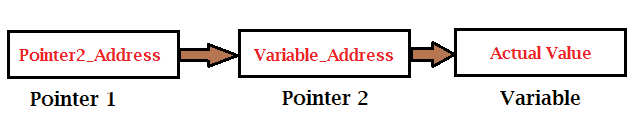
    As we know by now that a pointer stores the address of the pointed variable. But it is not the only use, pointer also stores the address of another pointer forming a chain like structure.

    When we defined the pointer to a pointer, it means the first pointer contains the address of the second pointer and the second pointer contains the address of an actual variable.

    Pointer to Pointer

    We can declare the pointer to pointer variable by simply adding an additional asterisk * before the pointer name. example:

    int **pointer_name;

    C++ Program for Pointer to Pointer

    #include <iostream>
    using namespace std;
     
    int main () 
    {
       int num = 100;
        
       //Pointer declaration
       int  var;
       int  *ptr1;
       int  **ptr2;
    
       //assigning address to pointer
       ptr1 = &num;
       ptr2 = &ptr1;
    
       // value present in each varibles
       cout << "Value stored by var :" << num << endl;
       cout << "Value stored byt *ptr1 :" << *ptr1 << endl;
       cout << "Value stored by **ptr2 :" << **ptr2 << endl;
    
       return 0;
    }

    Output: After execution, the following output will be displayed.

    Value stored by var :100
    Value stored byt *ptr1 :100
    Value stored by **ptr2 :100

  • C++ Passing Pointers to Functions

    A function is a user-defined block of codes that executes some specific task assigned to it invoked by its name. If there is an argument to be passed while calling a function then it is called actual arguments. There are two ways to call a function:

    • call by value
    • call by reference

    In a first way, we pass the actual values as an actual argument and those values are copied to the function and the function does some task with them. And the second way to call a function can be processed in two ways:

    • by passing the references
    • by passing the pointers

    In C++ programming, just like we pass values of the variable as parameters in the function, we can also pass addresses as an argument in functions.

    When we pass pointers in the function that means we pass the address of the variable instead of the value.

    Let us understand it through a syntax.

    // & before the parameter is used for address
    void func(int &num) 
    {
        // code
    }
    
    int main() 
    {
        int number = 10;
    
        // pass by reference
        func(number);
    
        return 0;
    }

    As you can see that the func() function takes a reference of the number variable that is the address of the number. And & is used to access the address.


    Example: Passing Pointer to Function by reference

    #include <iostream>
    using namespace std;
    
    // swap function
    void swapFunc(int *num1, int *num2) 
    {
        int temp;
        
        temp = *num1;
        *num1= *num2;
        *num2= temp;
    }
    
    int main()
    {
    
        int a = 4, b = 5;
    
        cout << "Values of a and b, before swapping" << endl;
        cout << "a: " << a << endl;
        cout << "b: " << b << endl;
    
        // calling swap function by passing a reference
        swapFunc(&a, &b);
    
        cout << "\nValues of a and b, after swapping" << endl;
        cout << "a: " << a << endl;
        cout << "b: " << b << endl;
        
        return 0;
    }


    Output: After execution of the above code, you will get the following result.

    Values of a and b, before swapping
    a: 4
    b: 5
    
    Values of a and b, after swapping
    a: 5
    b: 4

    In the above program, we use * in the swapFunc() function with passing reference to swap the number because we are dealing with the address so it is necessary to put * while using those variables.


    Return Pointer from Functions

    As we know, in C++ that array can be returned from the function, similarly, a pointer can also be returned from a function. For this, we need to declare the returning function as the pointer in the following way.

    //return int type
    int * functionName() 
    {
       //statements
    }

    Also, note that it is considered bad practice to return the address of a local variable from a function, so define the local variable as a static variable.

    Now let us see an example

    #include <iostream>
    using namespace std;
    
    //user defined funtion
    int *getArray()
    {
       static int r[5] = { 0, 10, 20, 30, 40 };
    
       for (int i = 0; i < 5; ++i)
       {
          r[i] += 5;
          cout << r[i] << endl;
       }
    
       return r;
    }
    
    //main function
    int main()
    {
       int *ptr;
    
       ptr = getArray();
    
       for (int i = 0; i < 5; i++)
       {
          cout << "*(p + " << i << ") : ";
          cout << *(ptr + i) << endl;
       }
    
       return 0;
    }

    Output:

    5
    15
    25
    35
    45
    *(p + 0) : 5
    *(p + 1) : 15
    *(p + 2) : 25
    *(p + 3) : 35
    *(p + 4) : 45

  • C++ Null Pointer

    We use a null pointer when we do not have the exact address to assign to a pointer. It is considered a good practice and null is assigned at the time of declaration. Therefore the pointer with a null value is called a null pointer.

    Check the C++ example for the null pointer.

    #include <iostream>
    
    using namespace std;
    
    int main () 
    {
       int  *ptr = NULL;
       cout << "Value of NULL pointer: " << ptr ;
     
       return 0;
    }

    Output:

    Value of NULL pointer: 0

    The value of null pointer is 0 as provided in many of the standard library.


    We can also check the pointer for null before accessing it. By doing so we can perform error handling. We can do it in a following way.

    
    if (!ptr)
    { //if will be executed if pointer is not null
        ..........
    }
    else {
    
       .......
    }

  • C++ Pointers and Arrays

    In this section, you will learn how pointers and arrays are related to each other. Before that, you should have knowledge on the following topics in C.

    Pointers and arrays are strongly related to each other. In general, the name of the array is a pointer itself, it points to the address of the first element in an array. For example, if an array of name score[] is created then the name (score) contains the address of a first element. Through this, we can access other elements.

    Consider the following:

    double *ptr;		
    double arr[10];
    
    ptr = arr;

    In the above example, the variable arr will provide the base address, which is a constant pointer pointing to the first element of the array that is to arr[0]. And hence the arr will contain the address of arr[0]. Thus, the above program fragment assigns ptr with the address of the arr.

    Once the address of the first element is stored in the pointer ‘p’, we can access other elements of array elements using *p, *(p+1), *(p+2), and so on.

    Let us see it in a C++ program.

    #include <iostream>
    using namespace std;
    
    int main()
    {
       int *ptr;
       int arr[] = { 10, 20, 30, 40, 50 };
    
       //assigning the address of first element to pointer
       ptr = arr;
    
       for (int i = 0; i < 5; i++)
       {
          cout << "Address: " << ptr << endl;
          cout << "Value: " << *ptr << endl;
          ptr++;
       }
    
       return 0;
    }

    Output:

    Address: 0x7ffea05a98f0
    Value: 10
    Address: 0x7ffea05a98f4
    Value: 20
    Address: 0x7ffea05a98f8
    Value: 30
    Address: 0x7ffea05a98fc
    Value: 40
    Address: 0x7ffea05a9900
    Value: 50

    C++ Array of Pointers

    An array of pointers refers to the array whose elements are pointer type that stores a pointer to an integer or char or any other data types in C++. These variables of pointers point to some other element.

    The declaration of array of pointers is done in the following way:

    int *ptr[10];

    In the above declaration, an array of pointer named ptr is created that that allocates 10 integer pointers in memory.

    We can also access or assign the variable through array of pointers such as:

    int x; // variable declaration.  
    ptr[3] = &x;  //assigning the address of x to 4th element  
    
    *ptr[2];  accessing the 3rd element

    Let us see it in a C++ program.

    #include <iostream>
    using namespace std;
    
    int main()
    {
       int number[5] = { 10, 20, 30, 40, 50 };
       int *ptr[5];
    
       // assign the address of number element tp ptr.
       for (int i = 0; i < 5; i++)
       {
          ptr[i] = &number[i];
       }
    
       //Displaying the value in ptr
       for (int i = 0; i < 5; i++)
       {
          cout << "number[" << i << "] = ";
          cout << *ptr[i] << endl;
       }
    
       return 0;
    }

    Output:

    number[0] = 10
    number[1] = 20
    number[2] = 30
    number[3] = 40
    number[4] = 50

    Array of Pointers to character

    We can use array of pointers to store a list of string in C++. Example:

    #include <iostream>
    using namespace std;
    
    int main()
    {
       const char *names[5] = { "Leanord Drest", "Zelda", "Tony Star", "Peter", "Steve" };
    
       for (int i = 0; i < 5; i++)
       {
          cout << "names[" << i << "] : " << names[i] << endl;
       }
    
       return 0;
    }

    Output: After execution, you will get the following result.

    names[0] : Leanord Drest
    names[1] : Zelda
    names[2] : Tony Star
    names[3] : Peter
    names[4] : Steve