
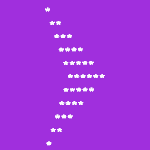
In this tutorial, we will write a java program to print right arrow star pattern. Before that, you may go through the following topic in java.
Right Arrow Star Pattern in Java
This is a program on the arrowhead pattern in java. The program takes a user input for the number of rows in a pattern and using for loop, it displays the pattern.
import java.util.Scanner;

public class Main
{
  public static void main(String args[])
  {
    int rows, i, j, k;
    Scanner sc = new Scanner(System.in);

    System.out.print("Enter the number of rows: ");
    rows = sc.nextInt();

    System.out.print("Output:\n");

    //upper part of the arrow head
    for (i = 1; i < rows; i++)
    {
      for (j = 0; j < i; j++)
        System.out.print(" ");

      for (k = 0; k < i; k++)
        System.out.print("*");

      System.out.println();
    }

    //lower part of the arrow head
    for (i = 0; i < rows; i++)
    {
      for (j = 0; j < rows - i; j++)
        System.out.print(" ");

      for (k = 0; k < rows - i; k++)
        System.out.print("*");

      System.out.println();
    }
  }
}
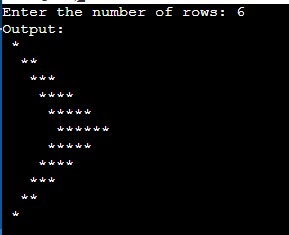
Output:
User Input for Character
import java.util.Scanner;

public class Main
{
  public static void main(String args[])
  {
    int rows, i, j, k;
    char symbol;
    Scanner sc = new Scanner(System.in);

    System.out.print("Enter the number of rows: ");
    rows = sc.nextInt();
    System.out.print("Enter the symbol for the pattern: ");
    symbol = sc.next().charAt(0);

    System.out.print("Output:\n");

    //upper part of the arrow head
    for (i = 1; i < rows; i++)
    {
      for (j = 0; j < i; j++)
        System.out.print(" ");

      for (k = 0; k < i; k++)
        System.out.print(symbol);

      System.out.println();
    }

    //lower part of the arrow head
    for (i = 0; i < rows; i++)
    {
      for (j = 0; j < rows - i; j++)
        System.out.print(" ");

      for (k = 0; k < rows - i; k++)
        System.out.print(symbol);

      System.out.println();
    }
  }
}
Output:
